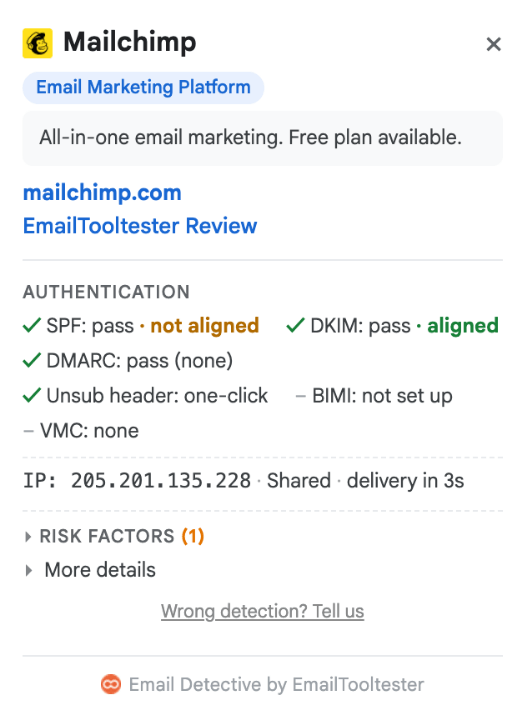
Our email header analyzer names the email platform behind the message, explains SPF, DKIM and DMARC in plain English, shows how long the email took to arrive, and checks it against Gmail’s and Yahoo’s sender rules.
How to get the headers
You need the full headers, not just the From and Subject lines. Better still, paste the whole email, content included: you'll get extra checks, and it never leaves your browser.
Gmail
- Open the email in Gmail on your computer.
- Next to Reply, click More (the three dots), then Show original.
- Click Copy to clipboard and paste it into the box above.
Outlook (new Outlook for Windows, Outlook on the web and Outlook.com)
- Open the email.
- Click More actions (the three dots) at the top of the message.
- Select View > View message details.
- Copy everything in the window and paste it above.
Classic Outlook for Windows
- Double-click the email to open it in its own window.
- Click File > Properties.
- Click into the Internet headers box, press Ctrl+A to select everything, then Ctrl+C to copy.
Outlook for Mac
Right-click the email and choose View Source. Copy everything and paste it above.
Apple Mail on Mac
- Open the email.
- Choose View > Message > Raw Source.
- Press Cmd+A, then Cmd+C, and paste it above.
Yahoo Mail
- Open the email.
- Click the More options icon (the three dots), then View Raw Message.
- Copy everything and paste it above.
iCloud Mail
At icloud.com/mail, open the email, click the More button, then Show All Headers.
On your phone? The Gmail, Outlook, Apple Mail and Yahoo apps don't show full headers. Open the email on a computer instead.
What the results mean
The full explanation for each:
Sent with
The email platform that sent the message, like Mailchimp, Klaviyo or HubSpot. Underneath, one line tells you what that's based on: the receiving server's own checks, or only the platform's traces in the headers. The "Why we say" section at the bottom shows the evidence from the headers. If you paste the whole email and only its links point to a platform, it says "Probably sent with" instead, so you know it's a guess.
Is it really from the sender?
This is the question SPF, DKIM and DMARC answer. Here's what each one does:
- DMARC is the final verdict. It passes when SPF or DKIM passes for the same domain as the From address. The sender's DMARC policy also tells inboxes what to do with fakes: nothing, spam folder, or reject.
- DKIM is a digital signature. If it passes, the email wasn't changed on the way and really comes from the domain that signed it. We also show the size of the key that signed it, and that key as it is published today. Anything under 2048 bits counts as weak. If the key has since been removed or revoked, you'll see that too.
- SPF checks that the server that delivered the email is allowed to send for the sender's domain.
- ARC matters for forwarded emails. The forwarding server records the original results and signs them, so the inbox at the end can still trust them.
We show the results the receiving server actually recorded when the email arrived. Where we look up the sender's DNS records today (for example their DMARC record), we mark it "checked today", because records can change after an email was sent.
Forwarded emails
If an email was forwarded, SPF usually fails at the end. That's normal: SPF checks the last server that handed the email over, and that's the forwarding server, not the original sender. DKIM normally survives a forward, which is why DMARC can still pass. The analyzer spots forwards and tells you when a failed check is expected.
How it travelled
Every server the email passed through, in order, with the time it spent at each stop, drawn to scale. If an email arrived late, this shows you where it was held up.
Gmail and Yahoo sender rules
Since February 2024, Gmail and Yahoo require bulk senders to meet a set of rules. We check everything the headers can show: SPF or DKIM passes, the From address lines up with a passing check, the domain has a DMARC record, there's one-click unsubscribe, and the email was sent over an encrypted connection.
One rule can't be checked from headers: a spam complaint rate below 0.3%. Senders can see theirs in Google Postmaster Tools.
What the sender publishes
Checked today, straight from the sender's DNS:
- DMARC: their policy (including a parent domain's policy for subdomains), where their reports go and, for the report services we know, which company receives them, plus the raw record.
- SPF: how their record ends, like -all (refuse email from servers it doesn't list) or ~all (treat it as suspicious), and how many of the 10 DNS lookups SPF allows it uses. Go over 10 and SPF can fail. If this email's SPF check was for a different domain, its bounce address, we point that out.
- BIMI: their logo record.
- MTA-STS and TLS reporting: these are about email sent to the sender's domain, not from it. MTA-STS asks other servers to use encryption they can verify when delivering to the domain, and TLS reporting says where reports about failed encrypted deliveries go.
Also in this email
If you paste the whole email, not just the headers, you also see what's inside it: the template builder it was made with, tracking tools, traces of AI tools or editors like ChatGPT and Google Docs, AMP, dark mode support, and warnings like an unsubscribe link that doesn't work.
Microsoft's spam filter
For emails received in Outlook or Microsoft 365, we decode Microsoft's own filter headers: the spam score (Microsoft says it no longer decides the verdict), the bulk complaint level, and Microsoft's combined sender check. If the sender also uses Microsoft 365, their own filter's notes are kept apart from the receiver's, so you know whose verdict you're reading.
Email header analyzer FAQ
Is it safe to paste my email headers here?
Yes. The analyzer runs entirely in your browser. Nothing you paste is sent to us, stored or counted.
The only outside lookups are the sender's public DNS records, like their DMARC record. Your browser asks a public DNS service for these, and only the sender's domain names go with the request, never your email. Full details are in our privacy policy.
Why did SPF fail when the email is real?
Most often because the email was forwarded. SPF checks the last server that delivered the email, and after a forward that's the forwarding server, which isn't on the original sender's list. If DKIM passed and DMARC passed, the email is fine.
What DKIM key size should I use?
2048 bits. Gmail still accepts 1024-bit keys, but Google itself recommends 2048. Many senders set up DKIM years ago, got a 1024-bit key by default and never looked again. If the analyzer flags a weak key on your own emails, create a new 2048-bit key in your email platform and update your DNS. If your platform manages DKIM for you, ask their support.
What are Gmail's and Yahoo's sender rules?
Since February 2024, Gmail and Yahoo require bulk senders (Gmail counts anyone sending around 5,000 or more emails a day to personal Gmail accounts) to:
- Set up SPF and DKIM
- Publish a DMARC record
- Make sure the From address matches a domain that passed SPF or DKIM
- Offer one-click unsubscribe in marketing emails
- Keep spam complaints below 0.3%
Paste one of your own emails into the analyzer to see where you stand.
How can you tell which platform sent an email?
We've been testing email marketing tools for over 15 years, so we know where each one leaves its fingerprints. Our free Email Detective extension recognises more than 200 email platforms, and the analyzer uses the same detection.
Every platform leaves traces in the headers: the servers it sends from, its own tracking headers, the domain behind its DKIM signature. We show you the one that decided it, so you can check our answer.
What if it can't name the platform?
Then it says so. If only the email's links point to a platform, it tells you that's a guess, not proof. Some companies send from their own servers, and new platforms appear all the time.
Is this the same as Microsoft's Message Header Analyzer?
No. Microsoft's tool is built for Outlook and Microsoft 365. Ours works with headers from any email client, including Outlook, and adds what Microsoft's leaves out: the sending platform, plain-English results, forwarding and the Gmail and Yahoo rules. It still reads Microsoft's own spam filter headers, so Outlook users get Microsoft's scores too.
Get this for every email, right in Gmail
Copying headers gets old fast. Our free Email Detective extension shows the sending platform and these checks next to every email you open in Gmail. No copying, no pasting.
Add Email Detective to Chrome (free)