

You likely already know that you need to set up a DMARC record.
DMARC protects your domain against spam and phishing emails, safeguarding your sender reputation.
But are you reading the DMARC reports you receive?
Let’s be honest: most of us don’t read ‘raw’ DMARC reports. Even though we know that the reports are packed with helpful information, they are super technical. Many people simply ignore them.
To get the full benefits of DMARC protection, you need an easy way to understand your DMARC reports. You need to know if there are changes to the emails that are being sent from your domain, and you need that information before your sender reputation is damaged.
What Is a DMARC Monitoring Tool? (And Why You Need One!)
All domain owners should use a free DMARC monitoring tool to convert raw DMARC reports into actionable insights.
A DMARC monitoring tool will:
- Reformat the raw data in an email digest or an online dashboard that you can understand
- Allow you to create alerts about suspicious changes, such as a new IP address sending email from your domain
- Make proactive monitoring easy and quick so that it’s less of a hassle.
I tested 8 DMARC monitoring tools. 6 of them still let you monitor your DMARC reports for free.
Here’s how they stack up.
6 Free DMARC Monitoring Tools: Tried and Tested
Here’s the full list of free DMARC monitoring tools:
- Postmark Free DMARC Monitor
- Valimail
- PowerDMARC
- DMARC Advisor
- Dmarcian
- Cloudflare Free DMARC Management Tool
Two more tools didn’t make the free list: EasyDMARC dropped its free plan, and the newcomer DMARKOFF is paid only. You’ll find both further down.
DMARC is an important factor in email authentication, so having the right monitoring service is important. Testing monitoring services can take a while, so to save you some time, I tested all of these tools myself.
During testing, I wanted to find out:
- How easy it was to set up the new DMARC record for the monitoring tool
- What features were included for free
- How many emails I could monitor in a month
- Whether the limits were adequate for a typical small business website.
While some tools offer advanced features like API access, we’ll skip over that and stick to the basics.
Let’s start with the quickest and simplest tool on the list:
Postmark Free DMARC Monitor
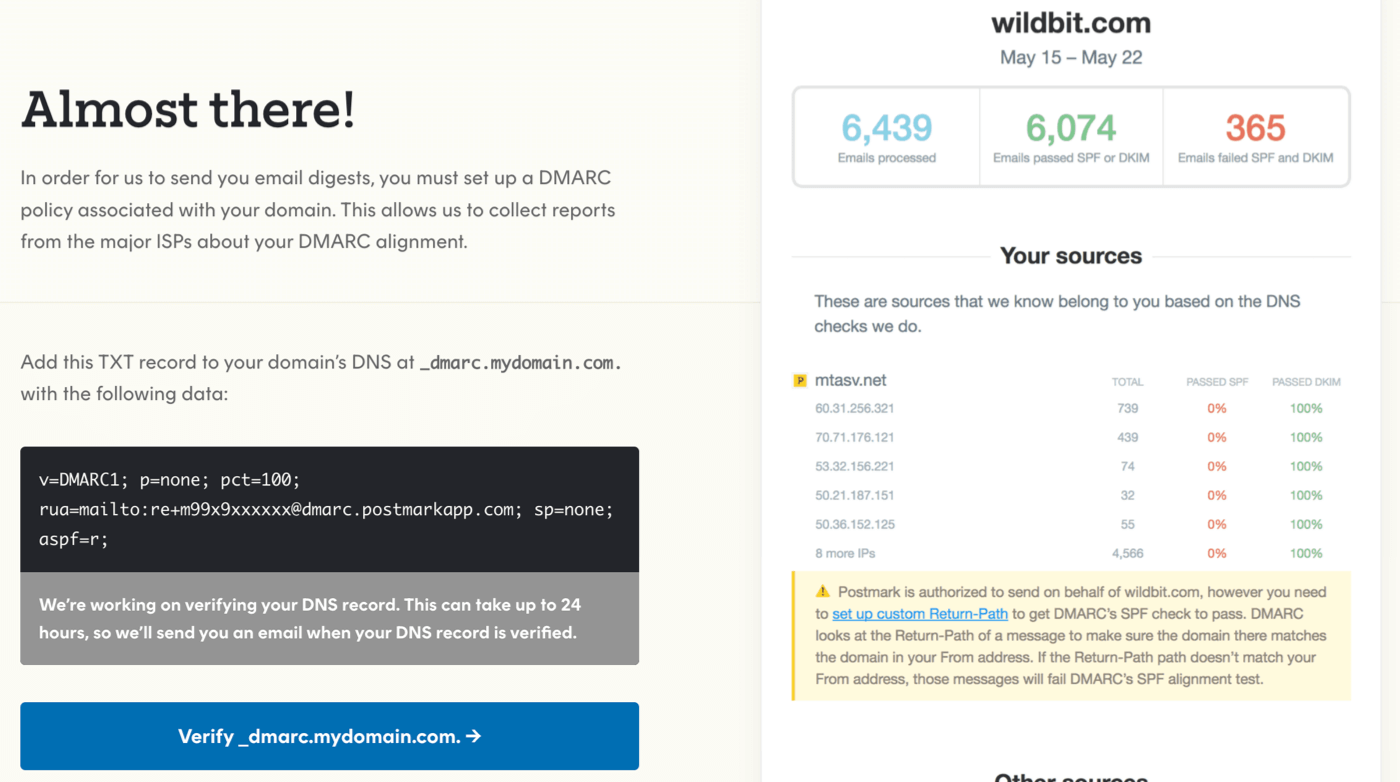
Postmark’s DMARC monitoring service converts your technical DMARC reports into attractive email digests.
You don’t have to be a Postmark customer to use it for free. The DMARC monitoring tool is completely separate from Postmark’s email API and SMTP services.
I signed up for the free DMARC monitor using one of my own domains. It was the fastest and easiest to sign up for.
Just specify your domain, add the DMARC record, and you’re done.
There are a couple of downsides, though:
- There is no dashboard. The reports are email-only. That means you only get a snapshot of your DMARC issues once a week, but no visibility between reports. For small domains without much email traffic, that’s probably fine. But you should be aware of the fact that there’s no way to log in and see what’s happening in ‘real time’.
- The weekly digest covers the last 7 days and your top 10 sending sources (with up to 5 IP addresses each). Again, that’s plenty for a small domain, but not for a business with lots of sending services.
- Setup was a little risky because Postmark prompted me to add a new DMARC record to my DNS without checking whether I already had one. And while Postmark validated my new DMARC record by scanning my domain’s DNS records, it didn’t pick up on the fact that I had two DMARC records then either. Having two DMARC records will invalidate both of them.
You can check our DMARC record example if you run into this problem. Ideally, you’d merge the existing record with the new one, but it depends on the reporting rules you’ve set up already.
This isn’t a deal-breaker. It’s just something to be aware of if you have a DMARC record already.
Despite the hiccup, Postmark’s free DMARC monitor is still a good choice for small businesses. The reports are nicely laid out and easy to read, and they’re definitely an improvement on the default report format.
Pros
- Free
- Reports are attractive and easy to understand
- Instant setup: just add the DMARC record provided.
Cons
- No web interface and no alerts
- Only 7 days of data and your top 10 sources
- Care needed during setup if you have a DMARC record already.
Pricing: Free. Paid plans start at $14 per month per domain for their premium product, DMARC Digests, which adds a dashboard and 60 days of history.
Try Postmark’s free DMARC Monitor
Valimail
Valimail offers a free tool called Monitor that provides basic DMARC monitoring. You may have learned about it from Mailchimp. Since Google and Yahoo tightened up their requirements for DMARC, Mailchimp started to recommend Valimail to monitor email deliverability.
There are no limits on the number of emails you can receive and analyze in Valimail. That is a huge bonus for high-volume senders like email marketers and busy online stores. Valimail itself says the free plan is free “and always will be”.
Setup is also very easy. Valimail completed a scan of my DNS when I signed up. Then it provided a new DMARC record that included everything I already had, but added Valimail to the rua section. That meant I could update the rule quickly without disrupting the other DMARC monitoring services I’d set up.
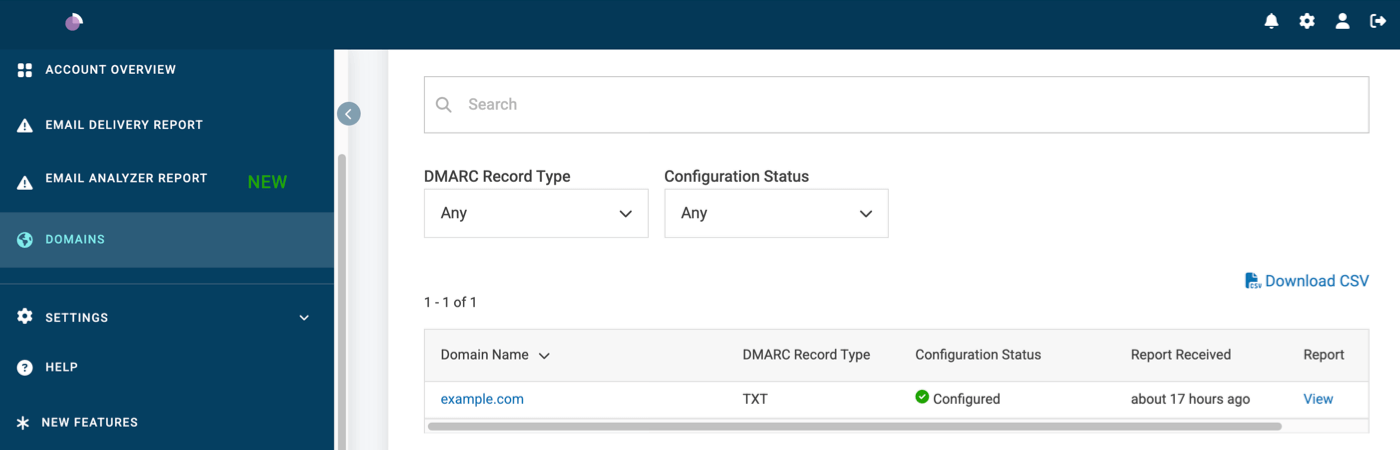
Once your domain is verified, you can send test emails from your domain to Valimail. This will analyze the email to ensure it passes email authentication checks. In other words, the dashboard clearly shows the status of SPF, DKIM, and DMARC.
On the free plan, you get a notification center in the dashboard and a detailed DMARC report by email every week. Alerts you can configure yourself are only included in the paid plans, though.
The downside is the reporting in the dashboard which I found a little confusing. For example, there was a delay of about 24 hours between the DMARC report being ‘available’ and the data being visible in the charts. The documentation is also on the technical side and didn’t answer all my questions, so I would be a little concerned about seeing an issue that I wasn’t able to solve on my own.
Pros
- Easy setup
- Unlimited emails
- Weekly DMARC report by email
Cons
- Dashboard can be unintuitive
- No custom alerts on the free plan
- No pricing advertised on the site
Pricing: Free. No pricing available for paid plans. Contact the sales team for more information.
Try Valimail’s free DMARC monitoring service.
PowerDMARC
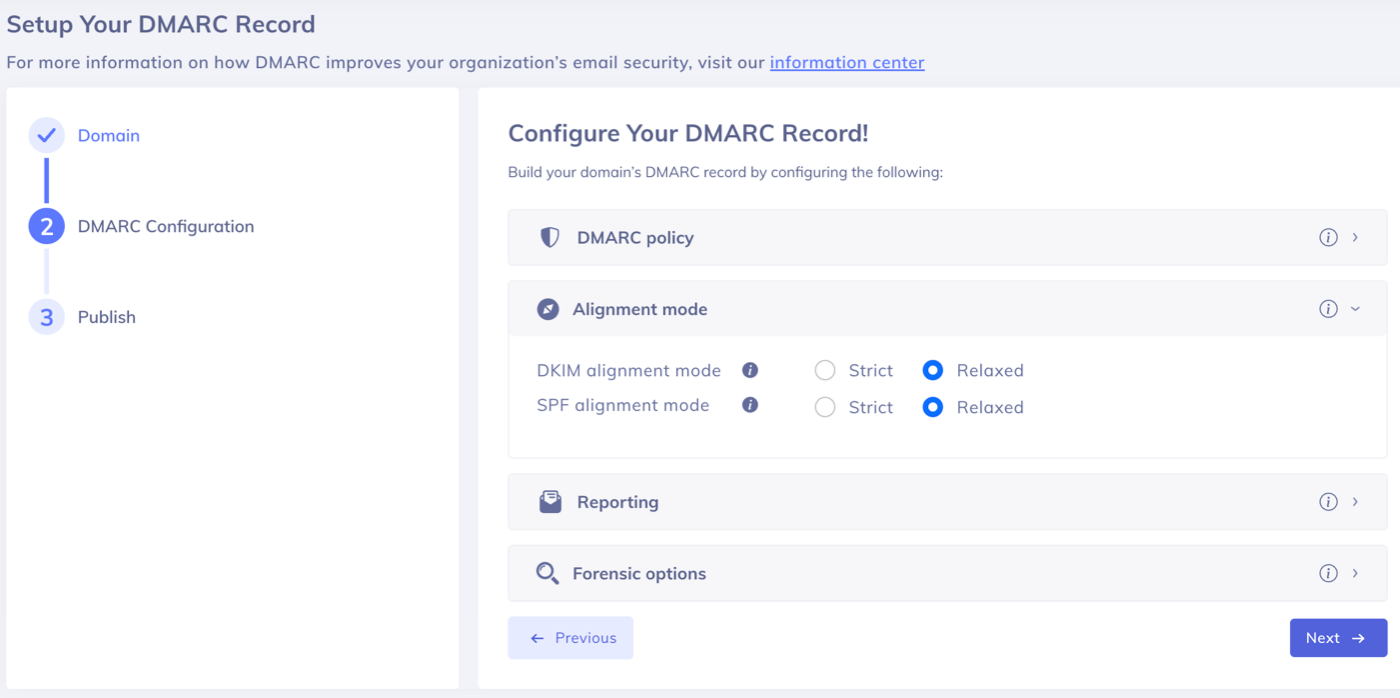
PowerDMARC’s free plan is for personal domains only. So it’s suitable for something like a portfolio website or a family project, but it isn’t going to work for a business.
You can monitor 1 active domain (plus unlimited inactive ones), and there’s capacity for up to 10,000 DMARC-compliant emails per month.
If you have a busy community or a forum that you set up just for fun, PowerDMARC might be a really good fit for your site.
I found the Setup Wizard to be a bit awkward compared to the others. Instead of giving you a DMARC record immediately just to get you started, you have to generate your own.
That means you need to know what the various components of a DMARC record do in order to select the right options. Many people will probably struggle here, and I feel like the tooltips could be improved to guide you along.
In general, I think PowerDMARC could do more to make setup easier for beginners. Providing a default record would be a better approach.
Once you’re set up, the dashboard is fine. It’s a little less intuitive than some of the other tools I tested, but it does the job. Logs are only retained for 10 days, so you’ll have to review them quite quickly to keep an eye on your sending reputation.
One thing PowerDMARC does better than the other free plans: it processes failure (forensic) reports, too. So you can dig into individual messages that failed DMARC.
For personal sites, a few compromises will be worth it just to get the high 10,000 email limit for DMARC monitoring. On the plus side, the paid plans are cheap if you want to use PowerDMARC for your business site instead.
Pros
- Generous limit: up to 10,000 emails
- Failure (forensic) reports included
- Unlimited subdomains included
Cons
- Setup could be easier
- Personal domains only, and just 1 active domain
- Only 10 days’ history
Pricing: Free for personal domains. Paid plans start at $8 per month for up to 50,000 emails ($6.42 per month billed yearly). The $12 you see first on their pricing page is for 100,000 emails, billed yearly.
Try PowerDMARC’s free DMARC monitor
DMARC Advisor
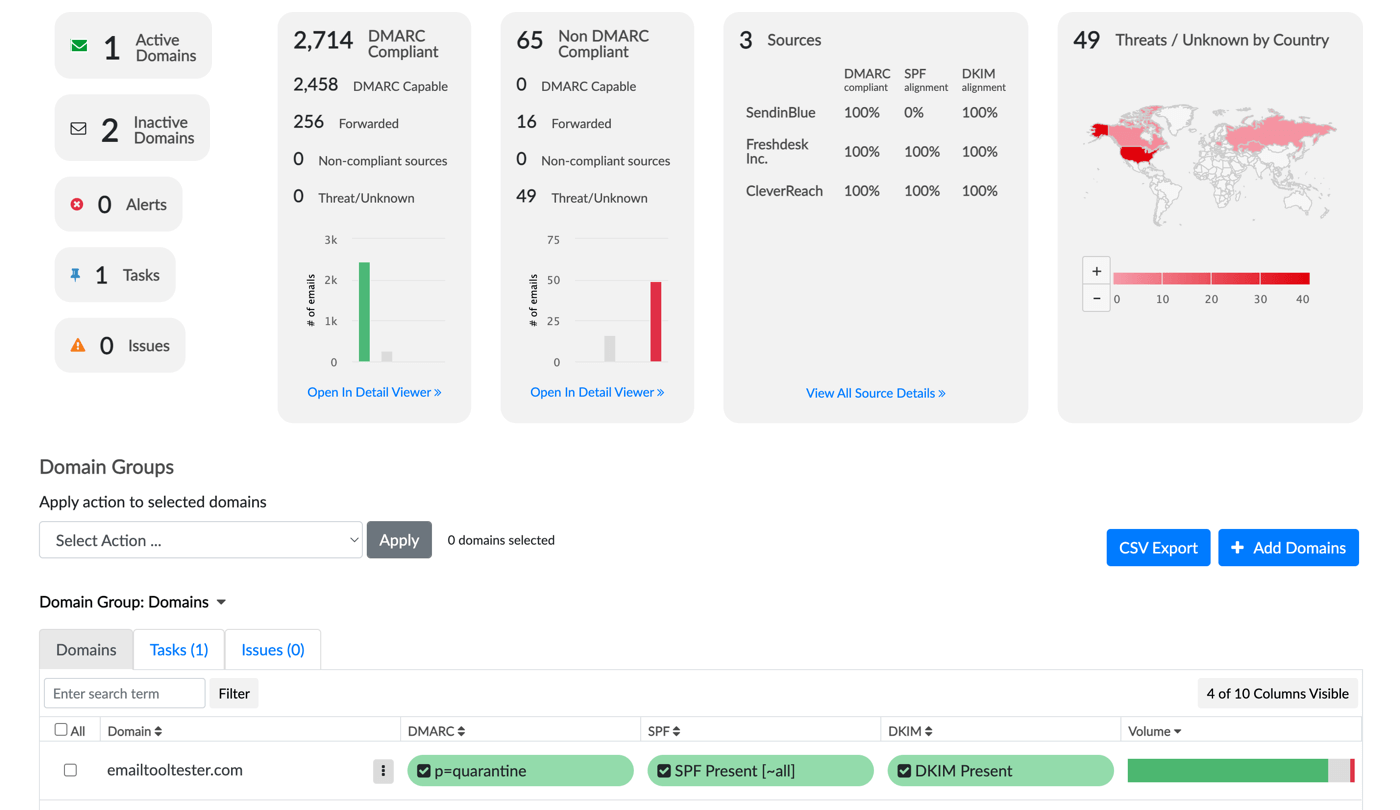
DMARC Advisor offers a free plan for personal use. It’s only available to users located in Europe and Africa.
The free plan allows you to add 2 domains. You can also park unlimited ‘inactive’ domains, which means you can register domains that aren’t used to send emails, just to keep an eye on the sending activity.
The free plan has been cut back since we first tested it, though. It now covers 1,000 emails per month (down from 10,000), and data is only kept for 1 week (down from 1 month).
I found that verifying my domain took a few hours with DMARC Advisor. There didn’t seem to be a way to force the service to re-check my DNS records. Once it caught up, the service worked well. (Update: I was told that there is indeed a way to force a refresh using the three dots in front of the domain).
With 1,000 emails a month, DMARC Advisor is now in the same league as Dmarcian (see below). But Dmarcian keeps your data for a month instead of a week.
Pros
- Monitor 2 domains for free
- Add unlimited inactive (parked) domains
- Exports and management reports included
Cons
- Only 1,000 emails per month and 1 week of history
- Personal use only
- Not available outside Europe and Africa
Pricing: Free for personal use. Paid plans start at €19 per month, billed annually, for up to 100,000 emails and 3 months of history.
Try free DMARC monitoring at DMARC Advisor
Dmarcian
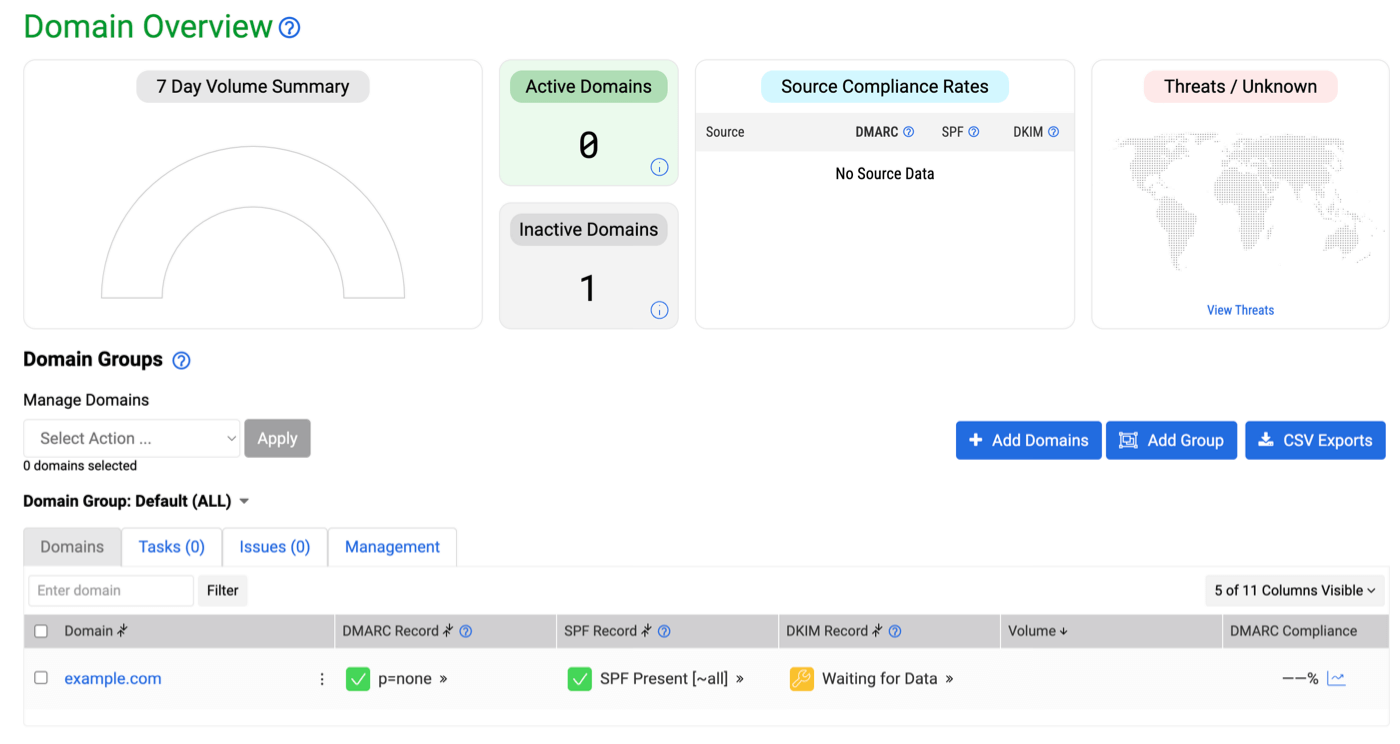
Dmarcian’s DMARC reporting was the most mature of all the free services I tested.
Its free Personal plan is meant for non-business use. It allows you to monitor 2 domains in the same account and retains data for a month. That’s longer than most of the other free plans here.
The onboarding and setup is super smooth and it’s very easy to understand what you need to do. Every step in the setup process was explained in plain language with actionable advice.
The dashboard view is clean, spacious, and easy to navigate too. I snapped the screenshot right after I completed setup, and it was easy to see the status of DMARC, SPF, and DKIM at a glance.
Dmarcian’s alerting is extremely comprehensive, but it’s only included in the paid plans. If you need help with anything, the documentation is easy to follow and written with beginners in mind.
Dmarcian won’t provide forensic reports on the free plan. It’s limited to a maximum of 1,250 emails per month, which is on the low side.
However, for a hobby site or a personal project, this is the best tool I tried.
Pros
- Monitor 2 domains for free
- Clear, simple dashboard
- 1 month of data history
Cons
- Non-commercial use only
- No forensic reports or alerts on the free plan
- Limited to 1,250 emails per month
Pricing: Free for personal use. Paid plans start at $19.99 per month billed yearly, or $24 billed monthly.
Try Dmarcian’s free DMARC monitoring plan
Cloudflare Free DMARC Management Tool
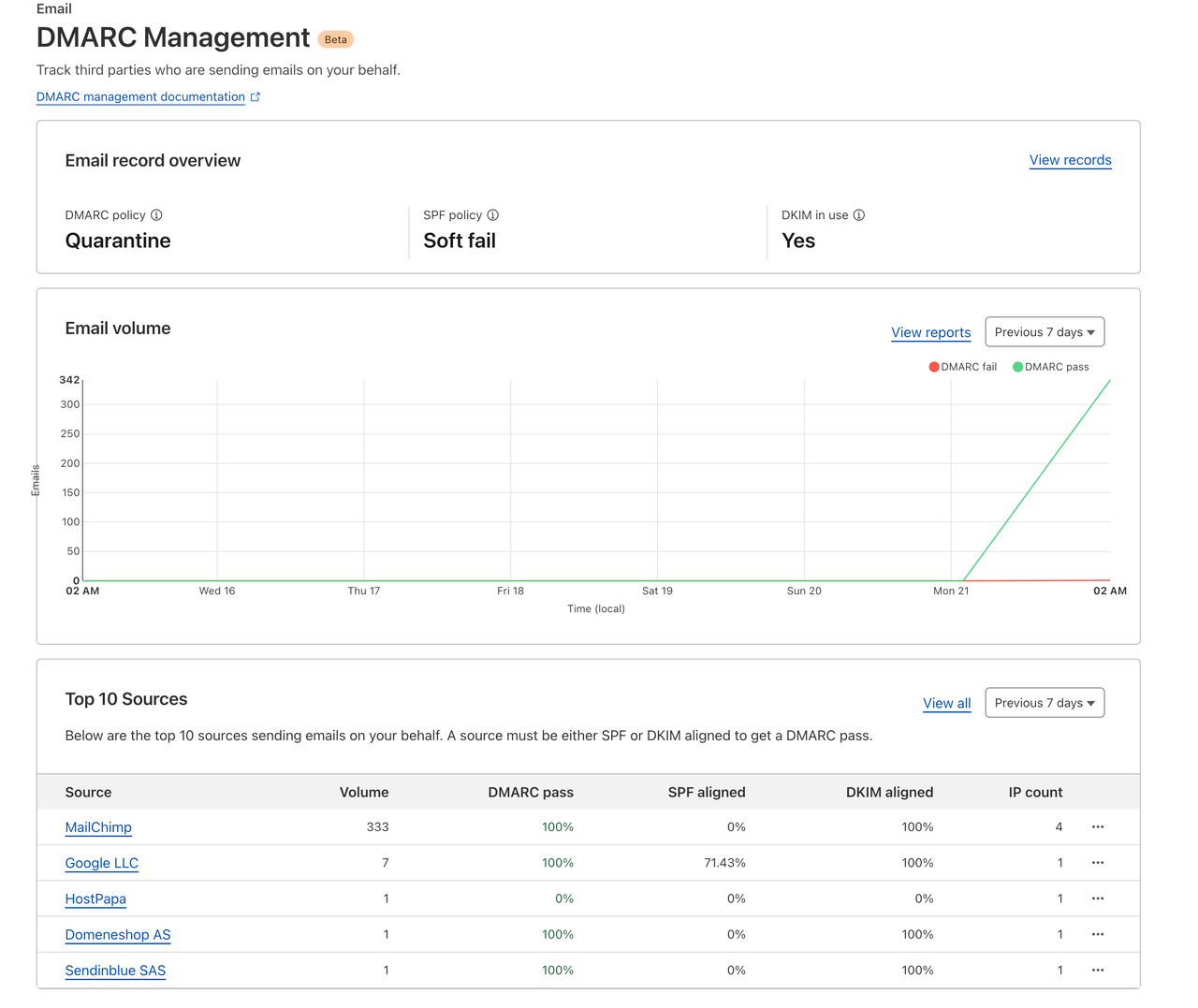
If you’re already using Cloudflare to handle your DNS, Cloudflare’s free DMARC management tool is one to consider.
DMARC management is available for free to every Cloudflare customer.
Having DMARC monitoring in the same place as your DNS makes perfect sense. And getting set up couldn’t be easier. Cloudflare generates the DNS record for you and you can add it to your DNS with one click.
If you already have a DMARC record, it will detect it for you. It’ll then generate a new record with a new rua section appended to it. This is ideal because it preserves your existing settings.
Cloudflare doesn’t limit the number of emails it analyzes. That’s good news for busy sites. And since the tool left beta in June 2026, the reporting has become a lot more useful: you can see every sending source with its IP address and its DMARC, SPF and DKIM results. Cloudflare also checks your DMARC, SPF, DKIM and BIMI records, and counts your SPF lookups.
The downsides: subdomains still aren’t supported, and there are no forensic reports.
If you’re not already with Cloudflare, moving your DNS is easy. It requires a couple of changes to your domain name settings. And Cloudflare’s free plan offers a ton of other benefits, like DDoS protection.
Pros
- Free for all your domains on Cloudflare
- Instant setup: just add the DMARC record provided
- No sending limits.
Cons
- No subdomain support
- No forensic reports
- You’ll need to move your DNS management to Cloudflare.
Pricing: Free.
Try Cloudflare’s free DMARC Management Tool
DMARC Monitoring Tools Without a Free Plan
These two tools are worth knowing about, but after a free trial, you’ll have to pay for them.
DMARKOFF
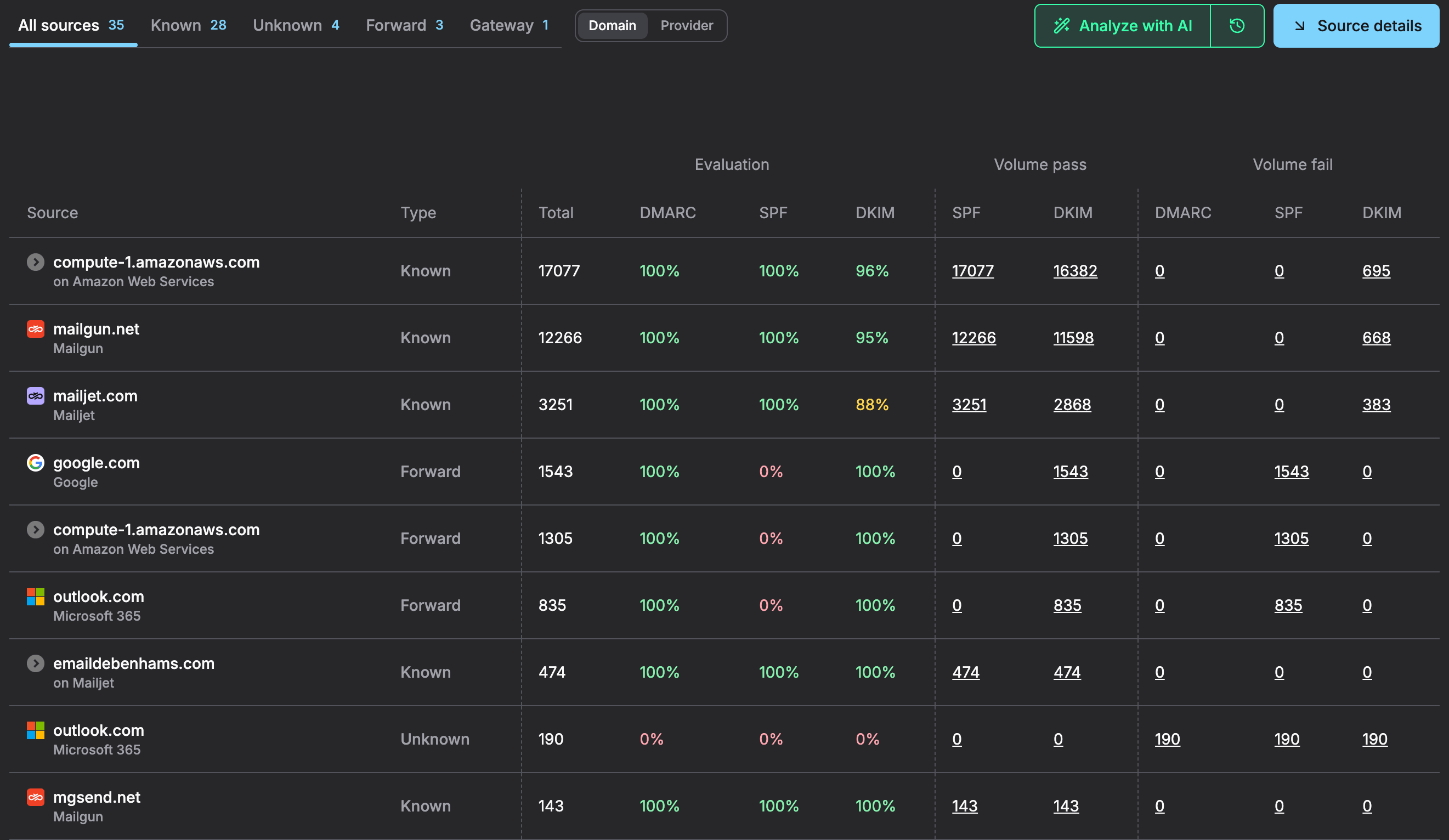
DMARKOFF is the newest tool on this list. It’s built by the team behind GlockApps, the inbox placement testing tool, so they know a thing or two about email authentication.
There’s no free plan, unless you’re a verified non-profit. You can try it for 14 days with one domain (no credit card needed).
I added emailtooltester.com, and setup was the smartest of all the tools I tested. DMARKOFF read my existing DMARC record, noticed that my DNS is on Cloudflare, and generated a new record that kept my existing Postmark reporting address and simply added its own. No duplicate records, no lost settings.
Reports take 1 to 2 days to come in, so the screenshot above is from DMARKOFF’s demo account. And this is where DMARKOFF shines:
- Every sending source is sorted into known senders, unknown senders, forwarders and gateways, with DMARC, SPF and DKIM pass rates for each
- DKIM results per selector and SPF results per return-path domain, including how many of your 10 SPF lookups you’ve used
- Health warnings when your volume or failure rates change
- AI reports (30 per month per domain) that explain problems in plain English and tell you how to fix them
There are no caps on emails or users, and your data is kept for a full year. Parked domains are monitored for free. And if you work with AI tools, there’s an MCP server, so Claude or ChatGPT can read your DMARC data.
Pros
- 1 year of data history
- Smart setup process
- Detailed source view with AI explanations
- Tracks unlimited emails in all plans
Cons
- No free plan (except for non-profits)
- Costs add up if you have many domains
- No one-click DNS setup
Pricing: $10 per month per domain, or $100 per year. Free for verified non-profits. Agencies with more than 10 domains get custom pricing.
EasyDMARC
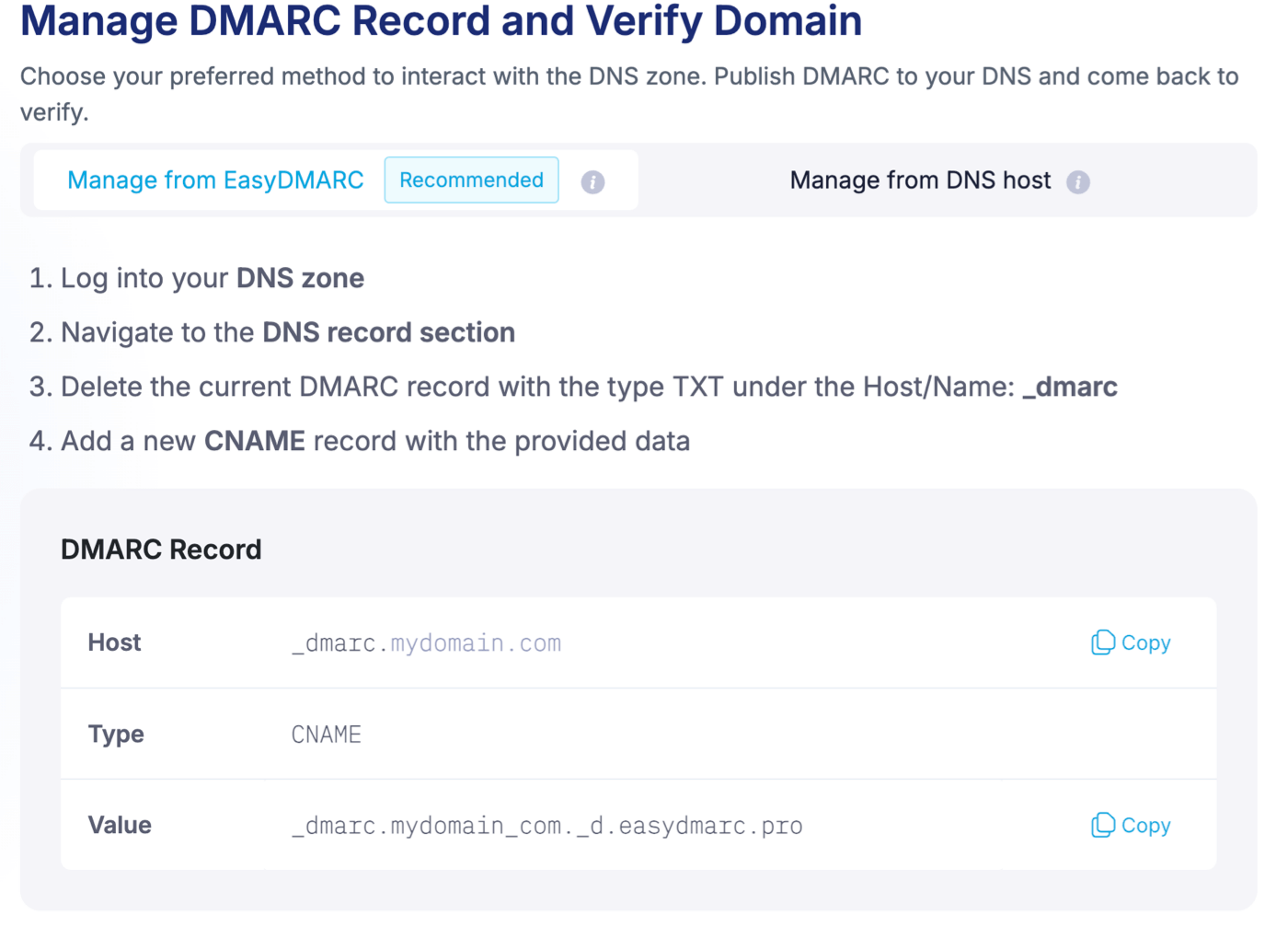
EasyDMARC offers a range of email deliverability tools. When we first tested it, it came with a free DMARC monitor. That’s no longer the case: the pricing page only offers a free trial (no credit card needed).
EasyDMARC’s help center says accounts drop to a limited free version once the trial ends: 1 domain, 1,000 emails per month, 14 days of history and no failure reports. But you can’t choose it when you sign up, so we no longer count EasyDMARC as a free tool.
Setting up my domain was really easy. EasyDMARC scanned my DNS and found my existing DMARC record. It prompted me to remove the record before adding a new one, which was a great sign.
There’s a bonus for Cloudflare users, too. If your domain’s DNS is managed in Cloudflare, you don’t even need to add a record. EasyDMARC has an integration that lets you set up the record in a single click.
EasyDMARC has an attractive dashboard and a suite of helpful tools to monitor email deliverability. It instantly showed me that my DMARC and SPF records are compliant, and it also shows the SPF and DMARC pass rates.
The cheapest plan, DMARC Plus, covers 2 domains and 100,000 emails per month, keeps 3 months of history, and includes failure reports. Alerts and email support are only included from the Premium plan up.
Pros
- Good setup wizard
- Automatic DMARC setup via Cloudflare
- Attractive dashboard
Cons
- No free plan you can sign up for (trial only)
- Alerts and support only on the pricier Premium plan
Pricing: Free trial. Paid plans start at $35.99 per month, billed annually.
Next Step: Authenticate Your Domain Today
If someone starts to send spam or phishing emails from your domain, it can destroy your sender reputation overnight. Recovery is challenging, and sometimes impossible.
That’s why you need to pay close attention to DMARC, DKIM, and SPF records. These three records work together to secure your domain against malicious activity that can harm your business and your customers.
For complete peace of mind, our email authentication setup service makes it easy to get your DNS records set up and verified. Our technical team will handle the entire process for you, and we’ll ensure that all 3 records are working correctly.
Don’t leave your domain open to attack. Leave a comment below if you have any questions!
The authors
Learn more about us

We keep our content up to date
27 Oct 2026: Free plans and pricing updated, EasyDMARC moved to paid tools, DMARKOFF added.
23 Jan 2026 – Updated limits and pricing
29 Oct 2024 – Cloudflare added
Our Methodology
This article has been written and researched following our EmailTooltester methodology.
Our Methodology