

EmailTooltester is supported by readers like you. When you purchase through our links, we may earn a commission that helps keep our reviews independent and free.
AI is a total cheat code for writing marketing emails faster, building effective email automations, and getting more sales.
What’s more, you don’t need a computer science degree or spend tons of $$$ and time training AI models to use this amazing technology. Many email platforms have done the hard work of souping up their features with AI. You just need to pick the best one for your small business, keeping your budget in mind.
At EmailTooltester, we’ve been keeping a close eye on how all the big-name platforms have been integrating new AI capabilities (it is our job, after all 😉). We’ve even incorporated many of them into our own campaigns.
So, let me show you through the AI options available in tools like ActiveCampaign, Klaviyo, Mailchimp, and more – and whether or not they’ll really make your email marketing more efficient.
What Is AI Email Marketing?
AI email marketing is the use of artificial intelligence (AI) in email marketing tasks. For example, AI can predict the best time to send an email and which products to recommend to customers in your emails. It can also write emails and build automated workflows.
As a result, you can spend less time on email marketing activities while getting better results — including higher open rates and increased revenue — from them. You can also use MCP for email marketing to connect your email marketing platform to LLMs like Claude to create AI workflows.
How Can AI Help With Email Marketing?
Email marketing tasks that can be done quicker and more easily with AI include:
- Email content creation: AI can generate text — be it subject lines, headings, call-to-action copy, or entire newsletters — in an instant. It can also create images to accompany your text. Many email platforms, including Brevo and GetResponse, offer AI email writing functionality. (Check out our dedicated article on AI newsletter generators to learn more.)
- Backend setup: Instead of manually building your contact segments and automated email funnels, tell AI the outcome you want to achieve. It can build the segment or automation for you. ActiveCampaign and Klaviyo are especially advanced in this area.
- Email asset designing: Let AI — like Mailchimp’s Intuit Assistant feature — analyze your brand’s colors, fonts, and logos to design on-brand email templates and other assets.
- Send time optimization: Use AI to decide the best time to send your emails so that they get opened, read, and acted upon. This is a common feature found in nearly all platforms like MailerLite, Brevo and ActiveCampaign.
- Product recommendations: Increase sales by having AI personalize your emails’ products to match your subscribers’ interests. Ecommerce-focused email platforms, like Klaviyo and Omnisend — tend to offer this option.
- Win probability: If you’re using customer relationship management software (CRM) with email marketing features, it may have an AI feature that can predict how likely you are to win an open deal. HubSpot is especially good at this.
- AI-powered automation and personalization: More advanced tools now let you embed AI directly into your workflows. This means emails can be personalized in real time, triggered by behavior, or even adjusted based on sentiment and engagement.
- Campaign planning and optimization: AI can suggest campaign ideas, generate audience segments, and provide recommendations to improve performance before you send.
- Conversational AI and customer interaction: Some platforms now offer AI agents that can interact directly with customers via chat, email, or SMS, answering questions, recommending products, and even supporting sales or customer service. Klaviyo is starting to move in this direction.
- AI integrations and assistants (MCP): A few ESPs are opening up to external AI tools through protocols like MCP, allowing you to connect tools like Claude or Gemini and manage campaigns, contacts, and reports using natural language.
(This list doesn’t cover all the AI features we’ll mention in this guide. To find out what the others are, you’ll have to keep reading!)
What Are the Best AI Email Marketing Tools?
The best AI email marketing tools include ActiveCampaign, Klaviyo, and GetResponse. These platforms offer powerful AI functionality writing emails, building automations, displaying personalized product recommendations, and so much more. Some of these are also free to use.
The Top 9 Email Platforms With AI Features
Here are our favorite AI-powered email marketing tools and the AI features they have to offer:
1. ActiveCampaign
Email marketing powerhouse ActiveCampaign is lightyears ahead of many competitors when it comes to AI.
The platform lets you use AI prompts to generate text for email campaigns. To be honest, that’s pretty common stuff. But ActiveCampaign also goes beyond that, letting you also generate images for your emails (though we have some reservations about the quality of such images, as we discussed in our newsletter).
AI brand kits are another standout feature. Provide ActiveCampaign with your site’s fonts and colors, and it’ll design email templates that match your branding. Spending ages picking the perfect colors will be a thing of the past!
You’ll find ActiveCampaign’s win probability feature handy if you use its CRM to manage your sales pipeline. The feature uses data on your past won and lost deals to predict how likely you are to win open ones. This way, you can spend more effort closing those you have a strong chance of winning.
And of course, I can’t leave out marketing automations, which are ActiveCampaign’s forte.
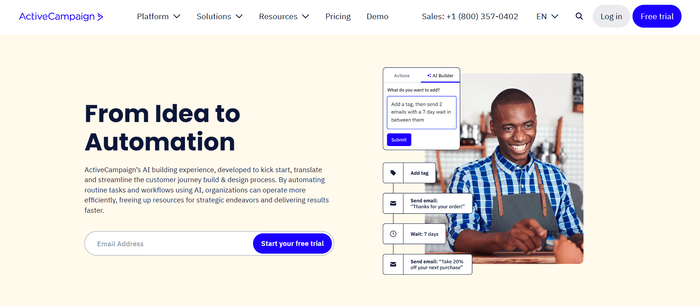
If you’re having trouble figuring out which triggers and events to add to your automation, just tell the platform’s AI automation builder the process you want to automate. It’ll build the automation for you. 🤯
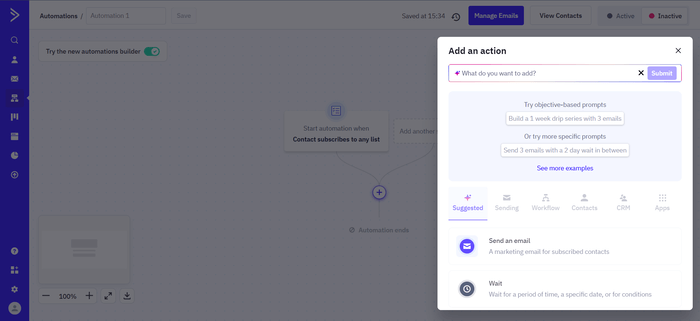
In recent updates, ActiveCampaign has significantly expanded its AI capabilities under what it now calls “Active Intelligence”. Beyond helping you write emails, it can now suggest audience segments, and optimize campaigns based on contact behavior.
There’s also Predictive Sending, which uses machine learning to deliver emails at the time each contact is most likely to engage. Newer tools such as AI Actions allow you to embed AI directly into your workflows, for example to personalize messages in real time or trigger steps based on sentiment.
ActiveCampaign has also started introducing MCP-style integrations with tools like Claude and ChatGPT, opening the door to more flexible, AI-driven workflows across external tools.
Overall, this makes it one of the more advanced options for automation-heavy users, although many of these features are limited to higher-tier plans.
ActiveCampaign pricing
ActiveCampaign doesn’t have a free plan, but you can get a 14-day trial of its paid plans and AI features.
AI features included in its lowest-tier Starter plan include its AI automation builder and one AI brand kit. This plan starts at $19/mo for 1,000 contacts.
You’ll need a higher plan to unlock AI content generation, predictive sending, and other premium AI features.
CRM-related AI features like win probability are available with ActiveCampaign’s CRM add-ons. Pricing for the Sales Engagement CRM add-on starts at $85 per user.
Learn more about ActiveCampaign pricing here.
> Try ActiveCampaign’s AI features in a free trial
> Read our full ActiveCampaign review
Or watch our video review:

2. Klaviyo
Online store users will love Klaviyo’s suite of AI features for improving your ecommerce email campaign content, automating campaigns, monitoring customer sentiment, and so much more.
Use Klaviyo’s subject line assistant to generate a punchy email subject line:
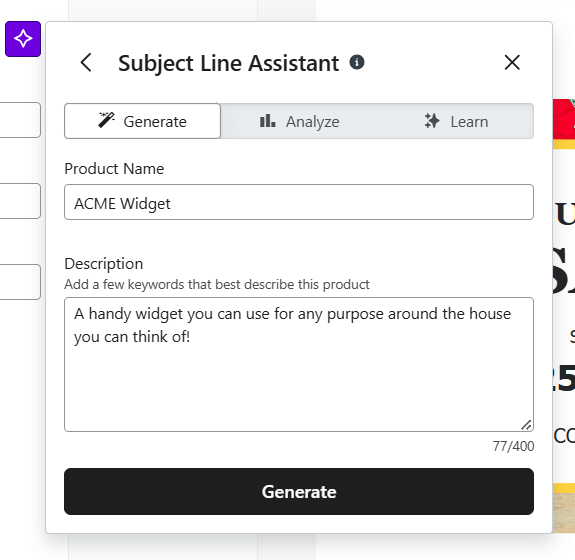
Then, tap into the Email AI tool to whip up compelling copy and images. And give your sales a boost by setting up AI product recommendations in your emails! (Its generative AI features extend to SMS content, too.)
Klaviyo also uses your customers’ activity to display predictive analytics. These are smart predictions on things like when a customer might make a repeat purchase. With this data, you can segment your customers and send them targeted email campaigns to keep their interest in your products high.
And if you don’t know how to set up segments or automations, Klaviyo’s got you covered. Its unique Segments AI and Flows AI features can help build automations (called “flows”) and segments according to your instructions. I haven’t seen many email service providers with similar features.
Klaviyo’s review sentiment feature is also helpful. If you’ve used the platform to collect product reviews, it can identify their common themes and whether they’ve had a good or poor experience shopping with you. Use this intel to learn what customers like the most (or least) about your store so you can keep them happy.
On top of that, features like Smart Send Time use machine learning to deliver emails when each subscriber is most likely to engage, while predictive analytics can estimate things like future purchases or churn risk.
More recently, Klaviyo has introduced its K:AI Marketing Agent, which acts like a built-in assistant across campaigns, customer data, and even support interactions. It uses real-time purchase and behavior data to personalize messages across multiple channels, helping brands deliver more relevant experiences at scale.
Klaviyo also offers a separate AI-powered Customer Agent, designed to handle support and sales conversations automatically. It can respond to customer questions, recommend products, and assist with tasks such as order tracking, all using real-time data from your store.
Klaviyo pricing
While you can use Klaviyo’s subject line assistant on its free plan, various other AI features like Email AI, Segments AI, and Flows AI are paid ones.
Unlike Klaviyo’s core AI features, the Customer Agent comes at an additional cost, with pricing based on how many AI conversations you expect each month.
Klaviyo’s paid plans start at $20/mo for up to 500 active profiles (more commonly known as “contacts”) and 5,000 monthly emails.
Learn more about Klaviyo pricing here.
> Try Klaviyo’s AI subject line assistant for free
> Read our full Klaviyo review
3. GetResponse
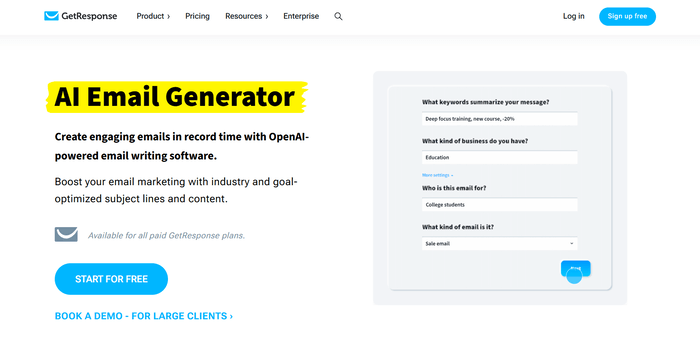
GetResponse is one of our top all-in-one marketing solutions due to its wide range of features for sending marketing emails and SMSes, building a website, hosting webinars, and creating conversion funnels. Many of these features have been upgraded with AI, too.
The email creator is one of them, where you can use the AI Assistant to write newsletters and automated emails. You don’t even have to write prompts from scratch because a prompt template is provided. The AI Assistant can also rephrase, proofread, or translate text.
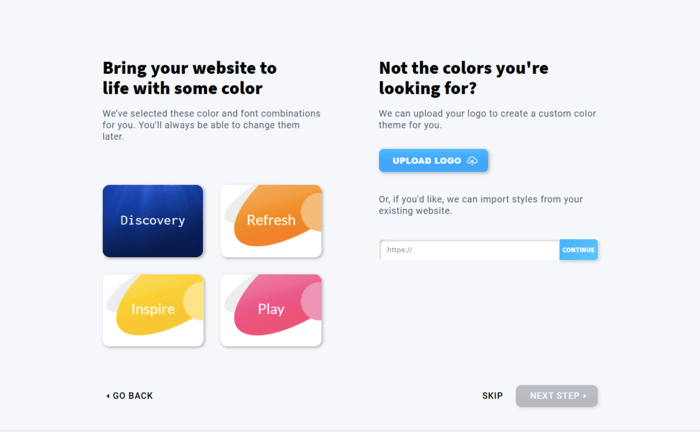
AI also makes building a website in GetResponse easy. Instead of getting bogged down with code, answer simple questions about your business and the features you’d like your website to have. The platform’s AI wizard will generate your website in a flash!
If you’ve integrated GetResponse with your ecommerce store, you can set up your emails with AI product recommendations. Behind the scenes, an AI model will learn your customers’ preferences to recommend products they’ll love and want to buy. And if they do, you’ll get more sales.
Finally, if you’re building a course in GetResponse, AI can help generate a first draft of text-based course content. You can then edit the text to add the insights only you can provide.
GetResponse pricing
GetResponse’s AI features are available on all trial and paid plans. Paid plans start at $19/mo for 1,000 contacts.
AI product recommendations are an exception — you’ll need the GetResponse MAX enterprise plan, which starts at $1,099/mo.
Learn more about GetResponse pricing here.
> Try GetResponse’s AI features in a free trial
> Read our full GetResponse review
Or watch our video review:
4. Brevo
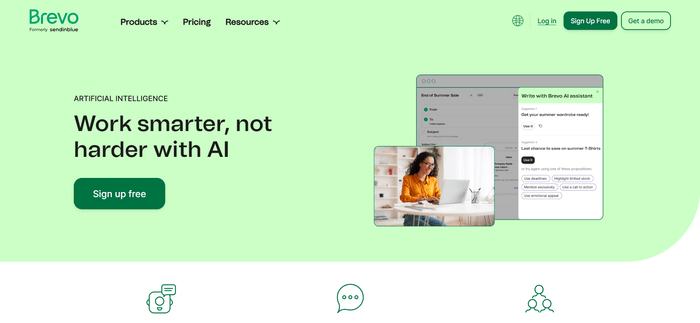
Brevo is known as a budget-friendly email platform, and it lives up to its name by offering its AI email builder right from its free plan.
This email builder’s AI assistant (called Aura) can generate any email copy — from headings to paragraphs and calls to action for button text.
It can also refine your copy. To do this, use the built-in options like “Rephrase text,” “Change style,” and “Translate.” Alternatively, click “Try again” to update your original prompt.
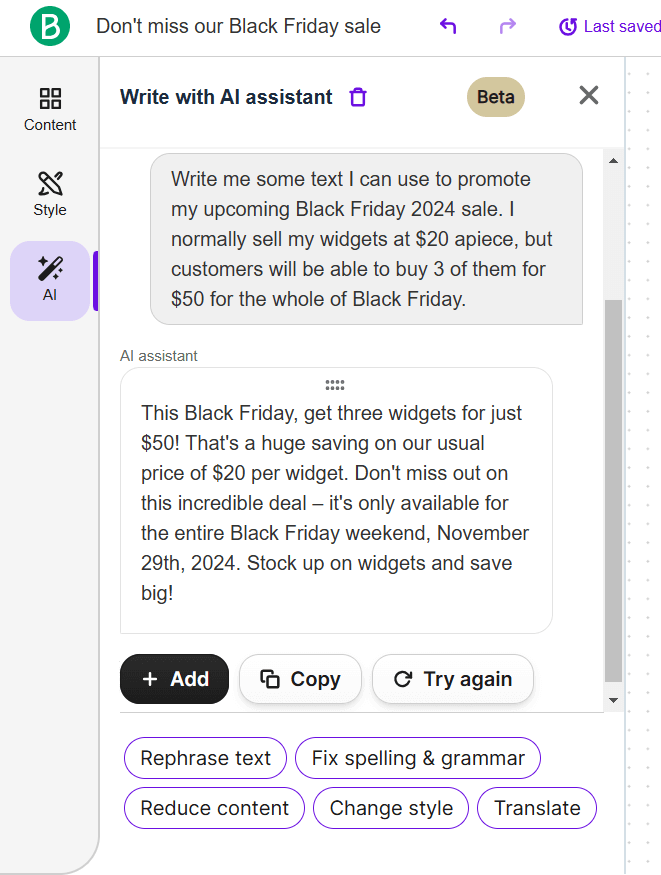
Once you’ve written your email, get Brevo to send it at the best time based on your past campaigns’ engagement rates. (If you haven’t sent many campaigns yet, Brevo will make its best guess using data collected from other users.) Now that’s what we call smart sending!
It’s no secret that we use Brevo at EmailTooltester and ever since we’ve moved into their Business plan, we’ve only ever used the smart sending feature.
Separately, if you’re using Brevo’s Conversations customer service solution, you’ll like how you can also use AI to summarize customer conversations and craft replies in your preferred tone of voice.
More recently, Brevo has expanded its AI offering to suggest segments, power product recommendations, and even offer an AI Sales Assistant. This can automate contact and deal creation, enrich contact records, generate sales emails, and even support call transcripts, making it useful for teams that want to reduce manual CRM work.
It has also launched an MCP Server, which lets AI assistants connect directly to your Brevo account using natural language. This means you can ask an AI tool to do things like create campaigns, manage contacts, or pull reports without navigating the platform manually. When we tested it out, we found it helpful in smoothing out our newsletter workflow.
Altogether, Brevo’s AI is becoming much more broad and practical, although it still feels more focused on speeding up day-to-day work than on the deeper predictive analysis you get from some higher-end platforms.
Brevo pricing
Brevo’s free plan gives you access to the platform’s AI email builder. However, you’ll need to upgrade to the following plans to access more AI features:
- Starter (from $9/month) – includes the AI content generator
- Standard (from $18/month) – includes AI send time optimization
- Professional (from $499/month) – includes AI segmentation and AI Data Analyst
You’ll need the Conversations Platform Pro plan to use an AI assistant for customer service conversations. Its pricing is $15/mo per user.
Learn more about Brevo pricing here.
> Try Brevo’s AI email builder for free
> Check out our complete Brevo tutorial
Or watch our video review:
5. Omnisend
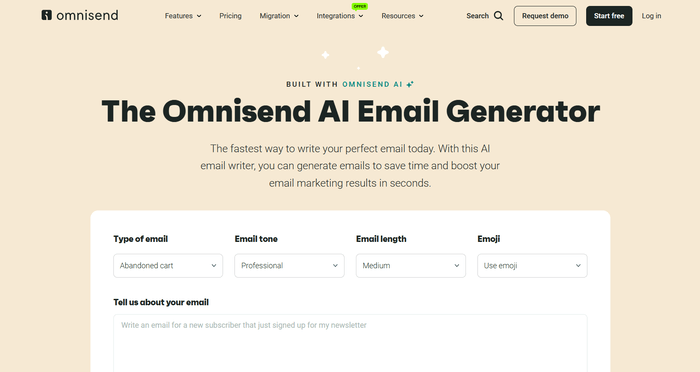
Ecommerce-focused email platform Omnisend has come a long way with its AI features, which are now much more integrated across the entire campaign workflow.
Instead of just assisting with small edits, its AI can now generate complete emails, including subject lines and preheaders, based on a simple prompt. This makes it especially useful for quickly creating common ecommerce campaigns like promotions, product launches, or abandoned cart emails.
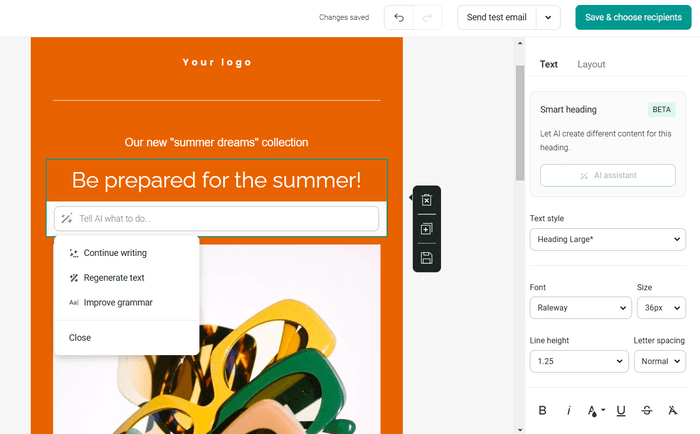
Omnisend’s AI also provides real-time suggestions to improve clarity, tone, and overall quality, rather than just continuing text or fixing grammar. Its subject line generator has also become more flexible, offering multiple variations and helping you refine messaging more easily.
On the ecommerce side, Omnisend continues to stand out with its use of behavioral data. It can automatically recommend products based on what customers have viewed or purchased, helping you deliver more relevant content without manual setup.
Beyond emails, AI is now also used in areas like send-time optimization and segmentation, helping improve campaign performance behind the scenes. For example, you can ask Omnisend’s AI to build a segment based on contacts who haven’t engaged in 3 months, or who are most likely to purchase from you.
More recently, Omnisend has introduced tools like its AI Forms Assistant, which can generate signup forms based on a short prompt, using your brand and campaign context. It has also launched its own MCP server, allowing AI assistants like ChatGPT to connect directly with your Omnisend account. In practice, this means you can ask your AI assistant to help create campaigns, check performance, or answer questions about your email marketing setup using natural language prompts.
Overall, its AI feels much more practical and embedded than before, with a clear focus on helping ecommerce businesses move faster and automate repetitive tasks, even if it doesn’t go as deep into predictive analytics as some more advanced platforms.
Omnisend pricing
Omnisend’s AI features are available in all plans — including its free plan. Its paid plans start at $16/mo for sending up to 6,000 emails per month to 500 contacts.
Learn more about Omnisend pricing here.
> Try Omnisend’s AI features for free
> Read our full Omnisend review
Or watch our video review:
6. Mailchimp
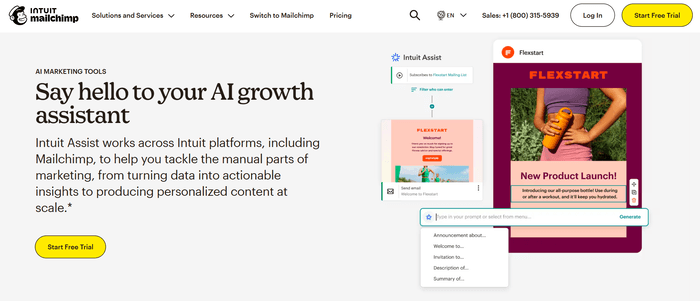
Mailchimp offers generative AI features under the Intuit Assist brand name (a nod to its parent company, Intuit).
If you’re writing emails, for example, prompt Intuit Assist to generate text for it. Options to summarize the generated text, lengthen it, or change its writing tone are available. The tool can also check for spelling and grammar mistakes.
Uniquely, Intuit Assist can use your brand’s colors, fonts, and logos to design your emails that match your branding.
Outside of Intuit Assist, AI helps power various other Mailchimp features. These include a content optimizer that evaluates your email’s skimmability and appeal, and send time optimization to help your emails reach your contacts’ inboxes at the time they’re most likely to open them.
Mailchimp has also started using AI to support campaign planning and audience targeting. For example, it can suggest pre-built customer segments and campaign ideas based on your existing data, helping you identify opportunities you might not have spotted yourself.
In addition, its AI can generate basic customer journey templates, giving you a starting point for automations without needing to build everything from scratch. These features aren’t as advanced as full workflow generators in some competing tools, but they do make it easier for beginners to get campaigns up and running quickly.
However, Mailchimp’s send time calculator isn’t the smartest, instead of sending based on the individual contact's “best time” it calculates an average for the entire list. Meaning that some of your most precious contacts could be receiving your email in the middle of the night. Not so optimal in my opinion.
Mailchimp pricing
You’ll need at least the Standard plan to access Mailchimp’s AI features (including Intuit Assist). This plan starts at $20/mo for 500 contacts. Learn more about Mailchimp pricing.
> Better options than Mailchimp
> Read our full Mailchimp review
Or watch our video review:
7. HubSpot
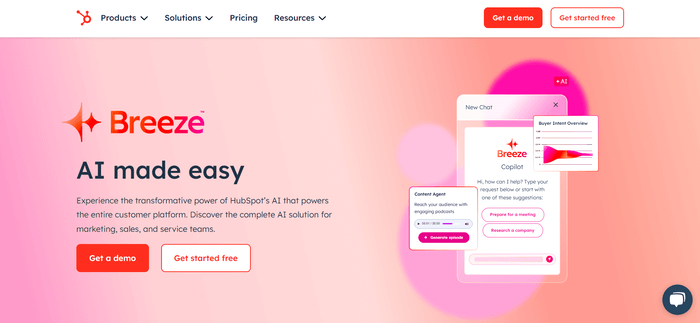
HubSpot’s AI features are built around its Breeze system, and they’ll help make your email marketing and sales efforts…a breeze! (Couldn’t resist the obvious pun, sorry!)
Breeze works in a chatbot-style interface, where you can chat with it to get what you’re looking for. If you need help writing your email, for example, ask Breeze to suggest headings and paragraphs.
It can also refine text to your liking. Just ask it to add new information, make the copy more concise, change the writing tone, and so on.
HubSpot CRM has also integrated Breeze, which is helpful if you’re using the platform to manage deals. In fact, you can instruct it to carry out various tasks!
These tasks include creating contacts and deals and adding notes to contacts. You’ll marvel at how you don’t need to click through menus and settings to do these yourself.
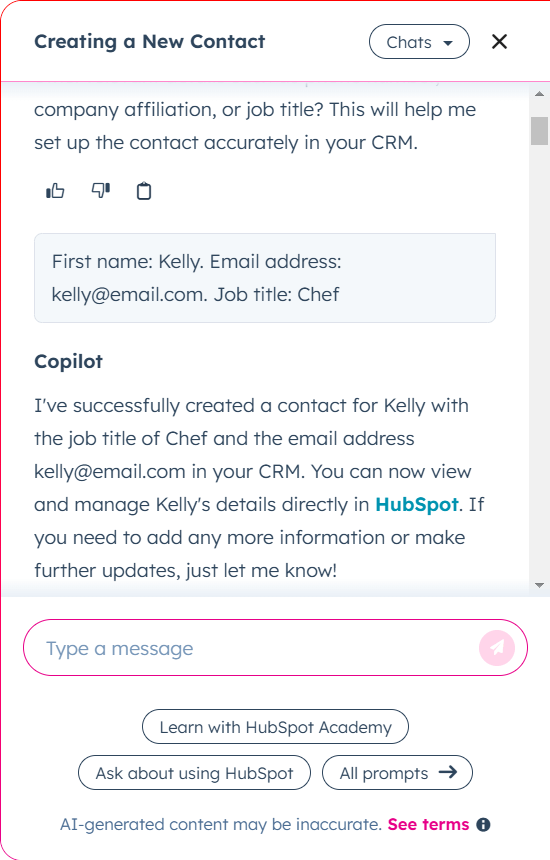
HubSpot also has some non-Breeze Copilot AI features that are worth a look. Future sales projection is one of them: based on your last three months’ worth of won deals, HubSpot will estimate the amount of sales you’re likely to make over the next few weeks.
Recently, HubSpot expanded its AI offering with what it calls Breeze Agents, which are designed to automate specific tasks across marketing, sales, and support. These include tools that can generate entire marketing campaigns, qualify and follow up with leads, and even handle customer support queries.
HubSpot has also improved its AI-assisted reporting, allowing you to generate reports and insights using simple prompts, rather than building them manually.
Last but not least, HubSpot’s Breeze Intelligence can enhance your CRM data with information from public sources and third-party vendors. Use it to get the most complete insights into your contacts before pitching them.
HubSpot pricing
Breeze Copilot is available on all HubSpot plans (even the free one!).
You can access AI sales projections on the Sales Hub Professional plan. This plan starts at $100/mo per seat, not including a mandatory $1,500 professional onboarding fee.
If you’re interested in Breeze Intelligence, you can get 100 Breeze Intelligence credits and the Starter Customer Platform plan for $50/mo. Otherwise, credits are sold in multiples of 100, 1,000, or 10,000.
Learn more about HubSpot pricing here.
> Try HubSpot’s Breeze Copilot for free
> Read our full HubSpot review
Or watch our video review:
8. Hostinger Reach
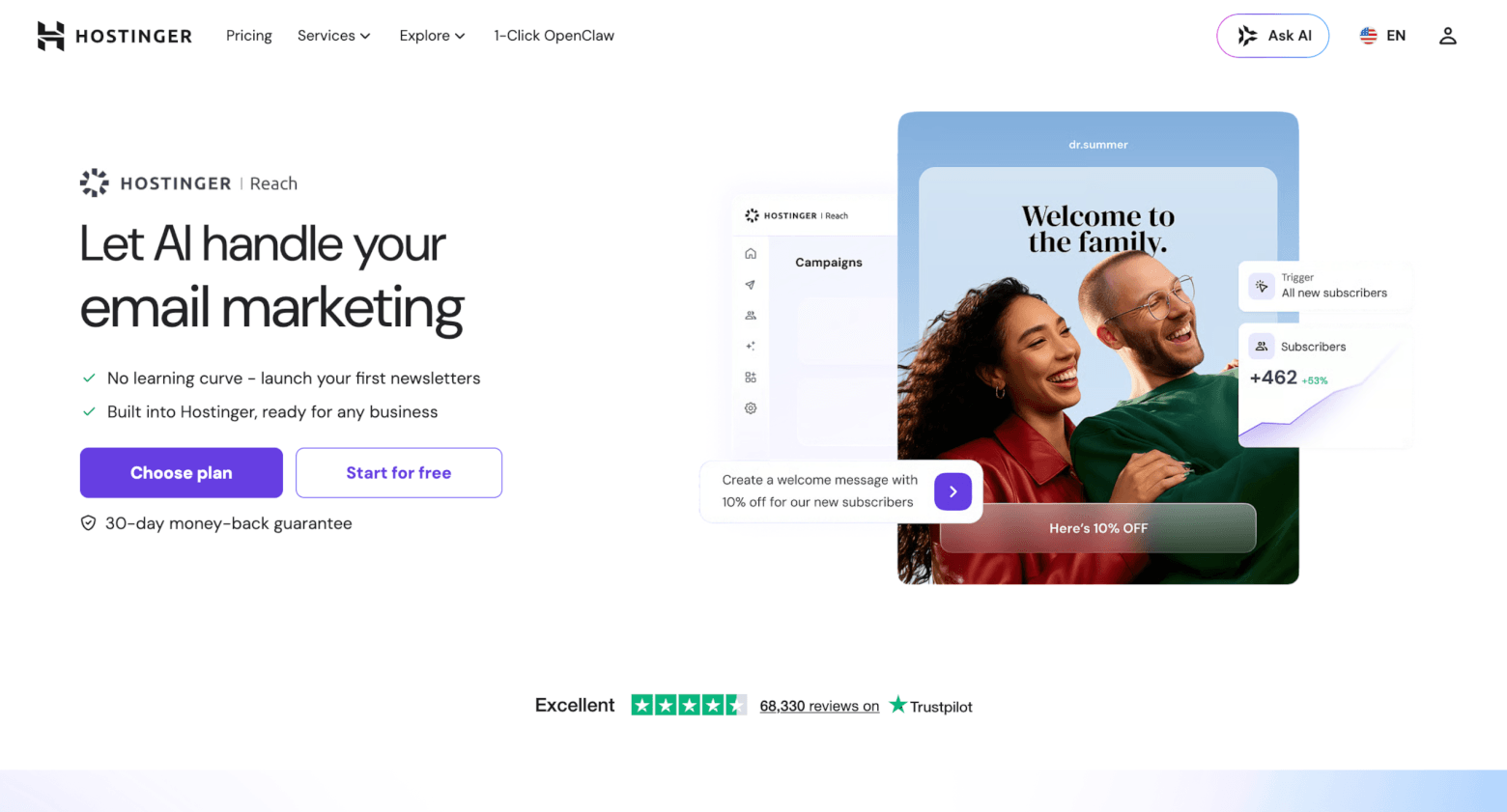
Hostinger may be best known for web hosting and its AI website builder, but it’s now moving into email marketing too with Hostinger Reach, an AI-powered email marketing platform aimed at creators, solo entrepreneurs, and small businesses.
And to be honest, Reach is one of the more interesting AI email marketing tools for beginners. While many platforms only use AI to help you rewrite a paragraph or suggest a subject line, Hostinger Reach can generate a complete email from a prompt, including the copy, layout, and design.
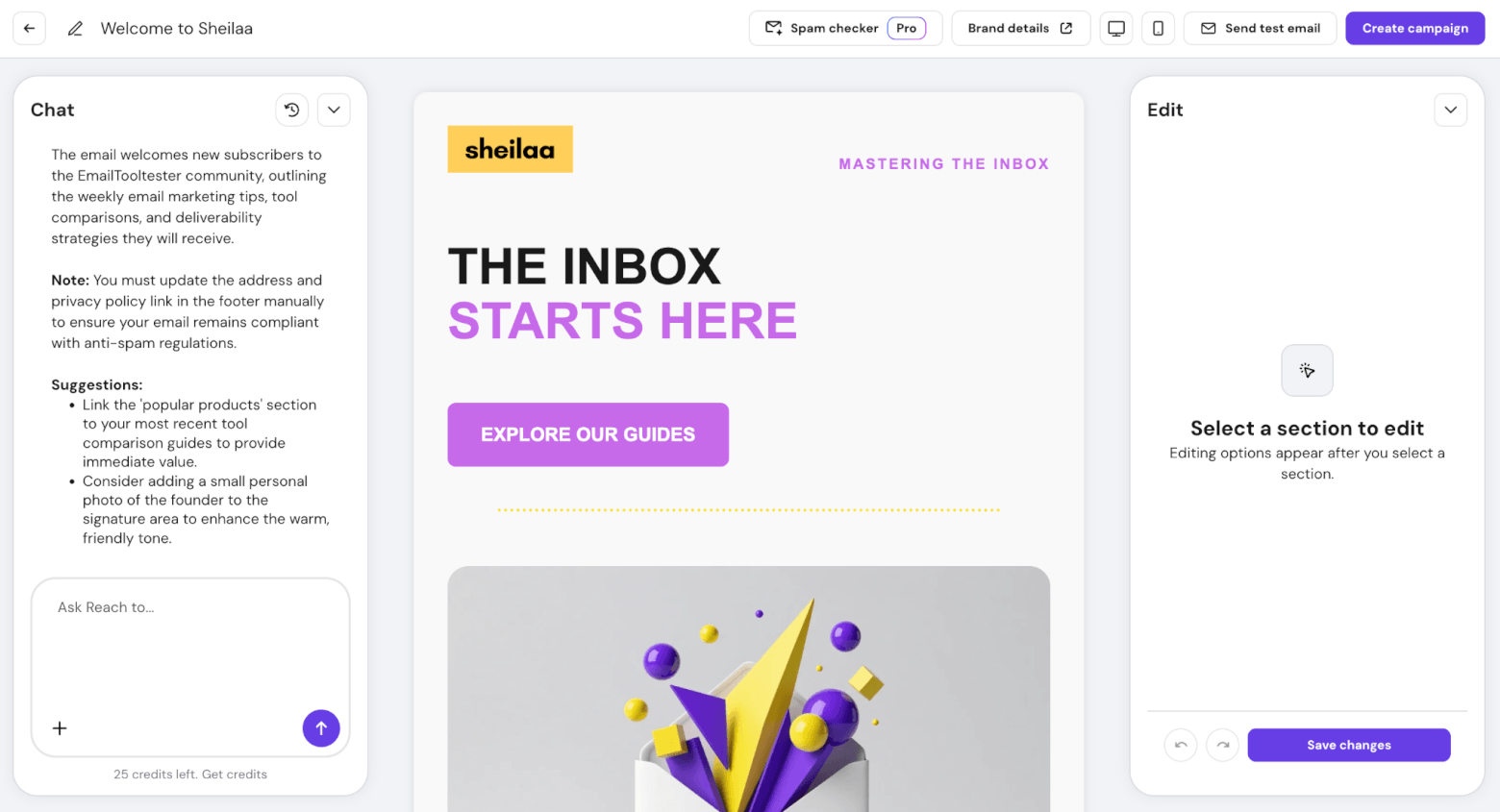
One of its most useful features is the brand setup. Enter your website, and Reach scans it to pull in brand details like your logo, colors, keywords, selling points, and other information. It then uses these details to generate on-brand emails that you can start using straight away.
The editor is beginner-friendly too. You can manually edit sections yourself, or use the AI chat assistant to make changes, add new sections, adjust the structure, or improve the content. There’s also an AI subject line writer and spam checker to help optimize campaigns before sending.
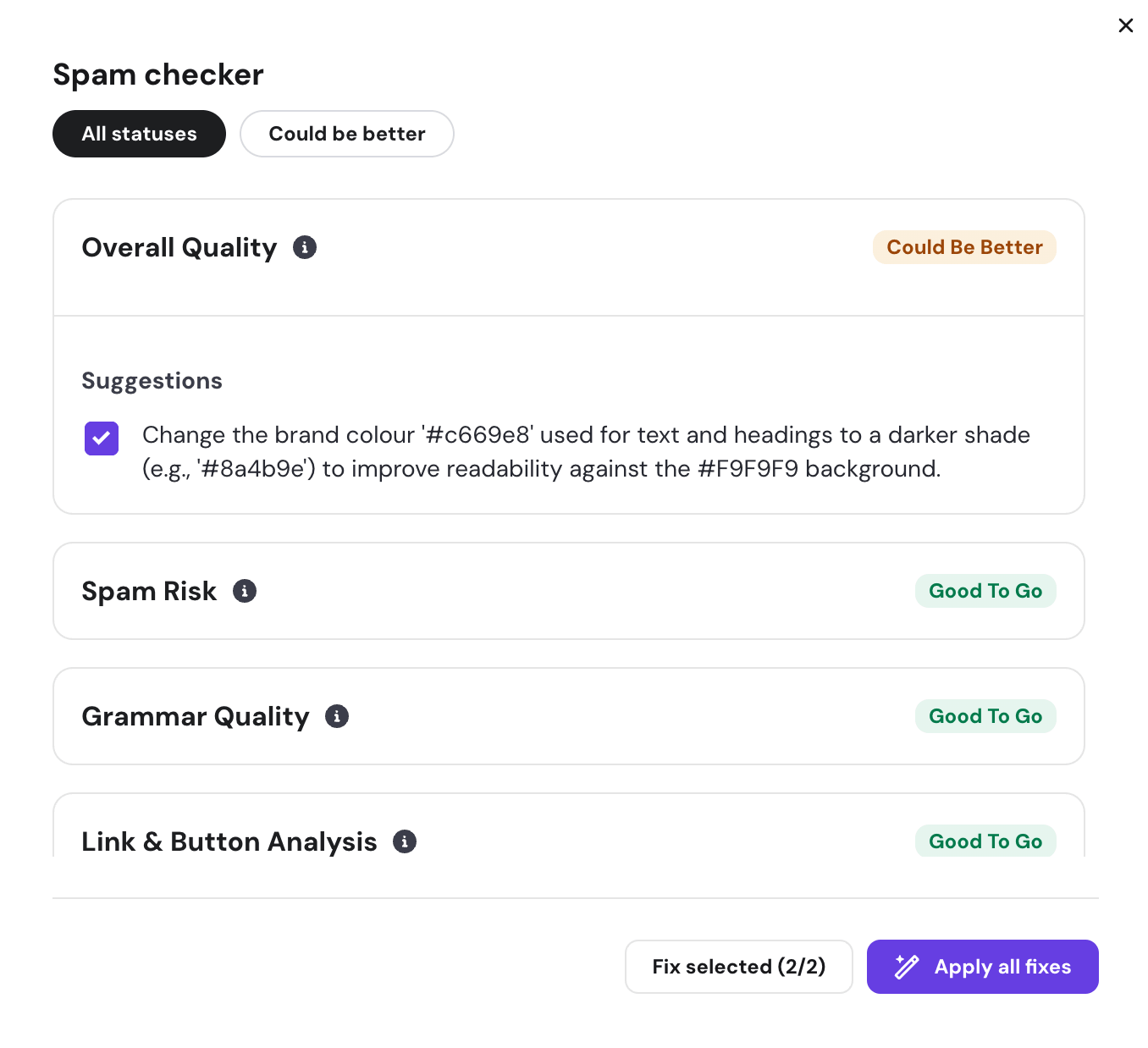
Another clever feature is image attachments as design references. If you have a newsletter, screenshot, or template design you like, you can upload it into the AI chat. Reach then uses the image as visual inspiration for the layout, spacing, and overall style of your new email template.
Hostinger has also added AI beyond the email editor, with:
- An AI-powered form builder: this lets you generate signup form layouts based on your chosen incentive, such as a discount, ebook, or exclusive content. You can then customize the form manually or ask the AI to change the layout, style, or images.
- AI-created segments: instead of manually building segment rules, you can describe the audience you want in plain English, for example “contacts who opened my last campaign but didn’t click.” Reach then creates the segment using contact data, engagement data, campaign behavior, tags, and subscription status.
That said, Hostinger Reach still feels more beginner-focused than tools like ActiveCampaign, Klaviyo, or HubSpot. You won’t get the same depth of predictive analytics, automation, or ecommerce intelligence. But for small businesses that want to create branded emails, signup forms, and basic segments without learning a complex platform, it’s a surprisingly practical option.
Hostinger Reach pricing
Hostinger Reach has a free plan, although some features and limits depend on the plan you choose. Its paid plan starts at $2.49/month for up to 500 contacts on a yearly subscription.
Paid plans also include unlimited audience segments and the option to remove Hostinger Reach branding. Note that some AI features require the use of credits – these are reset every month, and your monthly credits are based on your plan tier.
9. MailerLite
MailerLite is one of the easiest email platforms to use. Its AI features are still relatively simple compared to more advanced platforms, but they’ve been expanding in useful ways.
Click any text in the email editor to access MailerLite’s AI writing assistant. Choose the kind of text you need — like a long paragraph or a call to action, for example — and your preferred writing tone. Then, type your prompt to instantly get content for your email.
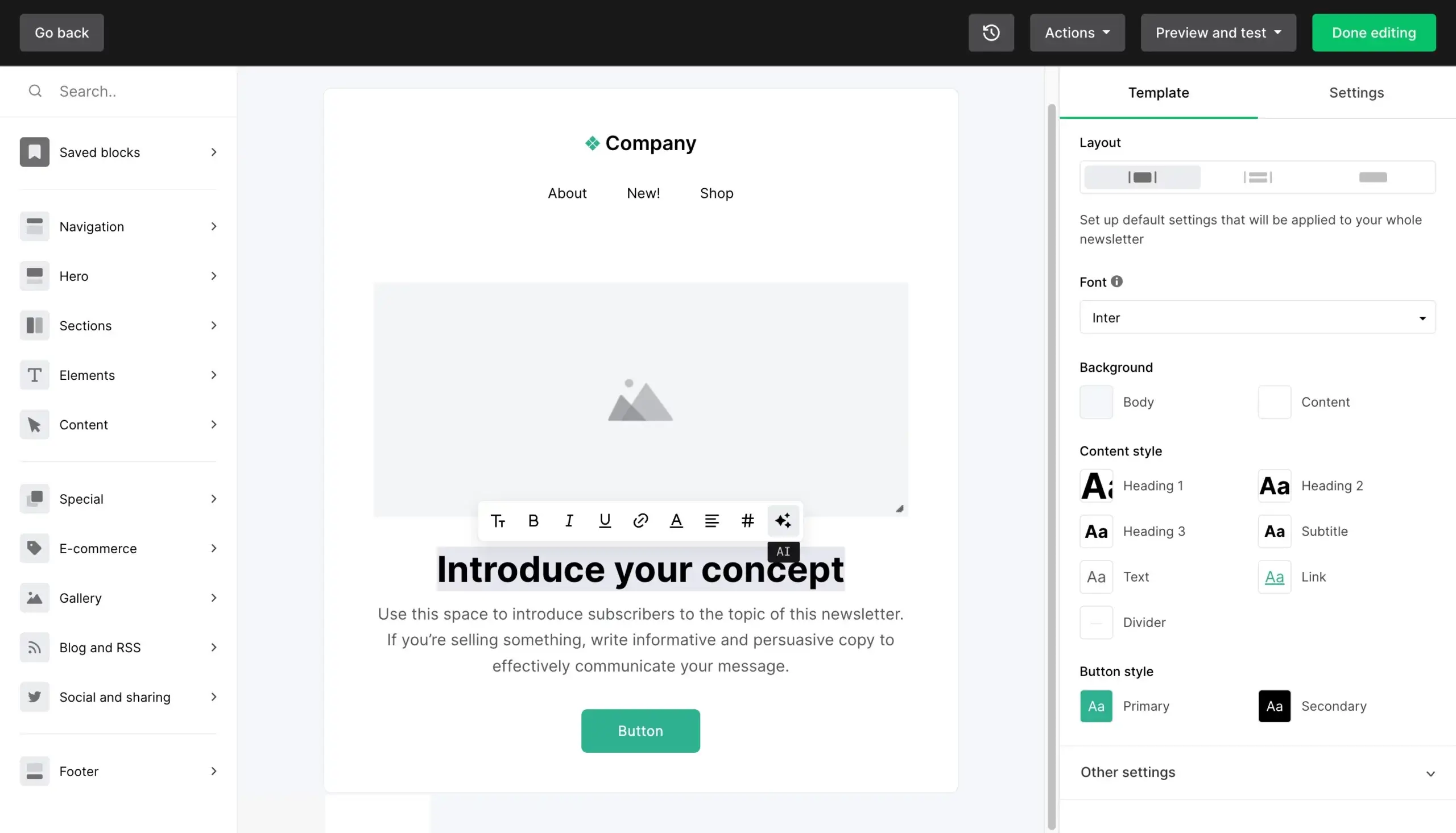
The AI writing assistant generates text in English by default, but you can get it to generate text in over 30 other languages. This is excelente — I haven’t seen many email platforms that can do this.
MailerLite has also started improving its design capabilities with AI. Through its Canva integration, you can bring AI-generated images directly into your emails and combine them with the drag-and-drop editor to create more polished campaigns, without needing external design tools.
On the campaign side, MailerLite now supports more advanced workflows through its Model Context Protocol (MCP) server. This allows you to connect external AI tools like Claude or Gemini and use them as a kind of personal assistant to write drafts, repurpose content, analyze automations, or generate reports on your email performance using natural language prompts.
MailerLite also offers an AI-powered smart sending feature for optimizing your emails’ send times. To do this, it’ll factor in when your subscribers previously clicked your email links or opened your emails. If they haven’t received any emails yet, the AI will check the time they subscribed to your email list.
Unlike Brevo, though, MailerLite doesn’t use aggregate data from other users to predict send times if you haven’t sent any emails. Instead, it’ll send your emails at 9am by default until your account collects data it can make predictions from.
Overall, its AI still focuses mainly on helping you create content faster, rather than offering deeper features like predictive segmentation, automation building, or advanced personalization. This makes it a good fit for beginners, but more advanced users may find it limiting over time.
MailerLite pricing
MailerLite’s AI writing assistant and smart sending features are available on its Advanced plan, whose pricing starts at $20/mo for up to 500 subscribers.
But regardless of your plan, you’ll get free credits to play around with the AI writing assistant.
Learn more about MailerLite pricing here.
> Try MailerLite’s AI writing assistant for free
> Read our full MailerLite review
Or watch our video review:
Things to Consider When Using AI in Email Marketing
Excited by how AI could help you level up your email marketing? Just be aware of these potential pitfalls before you go all in on it:
Pricing
While email marketing services may offer some AI features for free — like Brevo and its AI email writer, for instance — most make them paid features on premium plans. This is especially so for more sophisticated features like AI-powered automation builders.
Depending on the email platform you want to use, you may have to shell out quite a bit for its AI capabilities. (GetResponse’s AI product recommendations feature, which is available on the $1,099+/mo MAX plan, is a good example of this 💸)
Accuracy
If you’re using AI to write your emails, double-check that its content is accurate and makes sense.
That’s because generative AI tools are known to “hallucinate.” In other words, they may make up convincing-sounding statements without any evidence to back them up.
This might be less of an issue if your email contains promotional statements like:
“Buy two for the price of one!”
Instead of factual claims like:
“76% of people who buy XYZ product have reported shedding 10 pounds in two weeks.”
Still, go over your generated email content with a fine-toothed comb to ensure you don’t send subscribers any inaccurate or misleading information.
Otherwise, your business could be seriously harmed by losses in reputation and sales.
Data sharing
AI works by taking in lots of data to identify trends and patterns that can help with making predictions — like the best email send times or the next word in an AI-generated sentence. This data has to come from somewhere, and its sources could very well include you.
When you visit the help articles for HubSpot’s AI features, for instance, you’ll see prominent disclosures like:
“To improve the product, HubSpot logs and stores your prompts, generated language, and usage metrics when you use AI features.”
Depending on the email platform’s data-sharing policies and the data its AI features need to work, it may be possible to trace certain data back to you.
For example, HubSpot says your AI prompts will be linked to you. In contrast, Brevo’s send time optimization feature uses aggregate data, which has been anonymized and cannot be traced to any user.
Whichever the case, avoid including confidential business information in your AI prompts. This is so it doesn’t get leaked, whether through a security mishap or a rogue employee.
This becomes even more important if you’re using newer integrations like MCP (Model Context Protocol), which allow external AI tools to directly interact with your email marketing account.
While powerful, these integrations can potentially access sensitive data or perform actions on your behalf, such as editing contacts or triggering campaigns.
To stay on the safe side, avoid giving MCP tools more access than necessary. Email lists are incredibly valuable assets, and you don’t want to risk an AI accidentally deleting contacts or sending emails you’re not ready to send – so consider backing up this data.
It’s also good practice to regularly rotate your API keys and disconnect MCP integrations when you’re not actively using them. Having MCP enabled means each time you talk to your AI Assistant, you will be loading unnecessary data – and using extra AI tokens you don't really need to.
As a workaround, you could modify your input to contain only sample data before providing it to the AI.
Enhance Your Email Marketing With AI 🤖
We live in exciting times, where anyone can tap into AI to improve their email marketing. As we’ve seen, most ESPs offer AI capabilities to some extent, with email writing assistants and send time optimization being the most common.
Special mention to ActiveCampaign, Klaviyo, and GetResponse for being ahead of the curve, though: they’ve built a whole range of powerful AI features that many competitors don’t offer.
Use the handy links below to try these email providers’ AI features for free!
- Try ActiveCampaign’s AI features in a free trial
- Try Klaviyo’s AI subject line assistant for free
- Try GetResponse’s AI features in a free trial
In the future, I’d love to see AI-powered alerts. It’d be great to get automatic notifications when AI detects major changes in email activity, like:
- A spike in unsubscribes, bounces or spam complaints.
- If your open rates have plunged for certain mailbox providers — which could indicate deliverability issues.
- An email campaign performs considerably worse because you didn’t take into account a public holiday in the UK. AI could suggest to pause the UK segment and try again the next day.
- One email in an automation series is starting to receive fewer and few opens as it hasn’t been updated in two years.
This way, you can take quick action to diagnose and fix the issue before your email campaigns’ performance becomes too badly affected. You see, the possibilities for smart AI assistants in email marketing are endless!
Need help picking an AI email marketing tool? Leave your question in the comments below and we’ll get back to you.
The authors
Learn more about us

We keep our content up to date
01 Jun 2026 - added Hostinger Reach
24 Apr 2026 - general updates
10 Mar 2025 - added AI email marketing video
20 Nov 2024 - added Klaviyo review video
Our Methodology
This article has been written and researched following our EmailTooltester methodology.
Our Methodology