
Your Instagram followers are NOT your audience.
You can spend years building an Instagram following, attract thousands or even millions of followers, and generate consistent engagement. But there's one problem: those followers don’t actually belong to you.
Every follower you have exists on Instagram’s platform, not your own. The algorithm decides who sees your content, when they see it, and how often. A simple change to the platform can dramatically reduce your reach overnight.
And if your account is suspended, hacked, shadowbanned, or Instagram simply changes the rules, you have very little control. The audience you’ve worked so hard to build is gone. You walk away with nothing.
That's why smart creators don’t rely solely on social media. They use platforms like Instagram to attract attention, but they move their audience onto channels they own, such as their email list. Email is different. It’s a direct line to your audience that no algorithm touches and no platform can take from you. There’s a less likely risk that you’ll lose all your subscribers.
Since you’re reading this, you probably already know you should be building your email list. But, how do you turn your Instagram followers into email subscribers?
That’s what we cover in this guide. You’ll learn 9 strategies to turn your Instagram followers into email subscribers, and the landing page tools you need to set it up.
Let’s get into it.
First, why turn your Instagram followers into email subscribers
Instagram is a great place to be discovered. But you can’t build a direct relationship with your audience that you can control. Here are some reasons to start growing your email list with Instagram.
Lack of ownership
Every follower you get on Instagram belongs to Instagram. You can’t export them or contact them outside the platform. If Instagram decides your content violates a policy (even incorrectly), your account can be restricted or removed, and there’s no appeals process you can count on.
Algorithm limitation
You don’t control who sees your content or when they see it. One week you’re reaching thousands of people, the next week your posts are barely seen by your followers. You can’t afford to depend on this entirely for your business growth.
Organic reach on Instagram has been declining for years. According to Social Insider’s 2024 Instagram Organic Benchmark, the average post reached roughly 3 – 4% of followers.
Which means if you’ve worked hard to build 10,000 followers, most of your content is being seen by 300–400 people at best. And with a 0.48% average engagement rate, only about 192 people will like, comment, or share your post.
The platform risk is real, not theoretical
In October 2021, Facebook’s entire suite of platforms (including Instagram) went down for six hours. Businesses that relied on Instagram as their primary audience channel had no way to reach their customers.
More recently, the TikTok ban scare in January drove the point home. A survey by Later found that 88% of creators expected a decrease in income if TikTok were banned. Many of them wished they had built an email list.
Higher conversion potential with email
Email reaches almost 100% of your list every time you send. No algorithm or reach limits. And with measures in place to protect your email list, you’re less likely to lose your email subscribers.
A follower on Instagram might never see your post. But a subscriber will always get your email. Which means you have a better opportunity to engage and convert them into customers.
The goal isn’t to abandon Instagram. It’s to stop treating it as the destination and start using it for what it’s actually good at — getting people into a channel you own to convert them into customers more easily.
9 Strategies to Grow Your Email List with Instagram
Most Instagram-to-email advice sounds like this: “Add your subscription link in your bio.”
But that’s not enough. Converting followers into subscribers takes a deliberate strategy at every touchpoint. Here’s how to build it.
Create a lead magnet worth leaving Instagram for
You can have a perfectly optimized bio, a well-placed link sticker in your Stories, and consistent Reels driving traffic to your signup page.
But if the freebie you’re offering in exchange for email addresses isn’t worth it, none of that matters. Followers won’t hand over their email for something they don’t think is valuable or useful to them.
Most people offer weak lead magnets — generic PDFs nobody reads, discount codes that feel transactional, checklists so basic the reader already knows everything on them.
What works is specificity and immediate value.
Think in terms of outcomes, such as a quick win, a clear result, or a problem they’re desperate to solve.
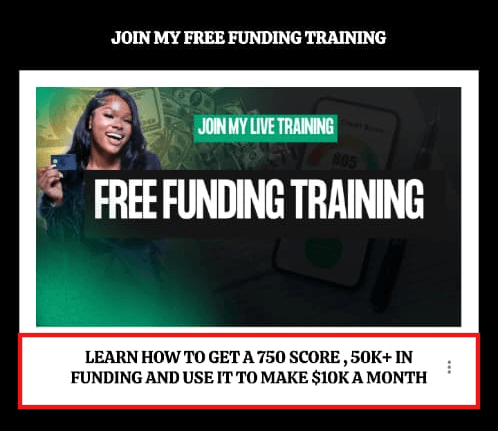
Image source: @kendracathey_
A discount works well for ecommerce, but only if it’s meaningful. Templates work well for creators and SaaS audiences because they’re usable “today.” And mini-courses work because they promise a transformation, not just information.
To test if you have a strong lead magnet, ask, “Would someone pay for this?” If the answer is yes, it’ll convert your Instagram followers into email subscribers.
Pro Tip: Name your lead magnet like a product, not a freebie. “My Morning Routine Guide” is forgettable.
“The 20-Minute Morning Routine for People Who Hate Mornings” tells someone exactly what they'll get and makes submitting their email address worth it.
Optimize your bio like a landing page, not a directory
Most Instagram bios try to do too much. Job title, location, three emojis, a branded hashtag, and a Linktree link buried at the bottom. The reader has no idea what to do.
Your bio has one job: get the click.
That means one clear statement of who you help and how, and one direct CTA pointing to your lead magnet.
Instead of: “Content creator | Email marketer | Helping brands grow 🚀 | New post every Tuesday | 📩 [email protected] | 🔗 linktr.ee/example”
Try: “I help small business owners turn Instagram followers into email subscribers. Grab the free 5-day list-building guide 👇”
Here's what that looks like in real life.
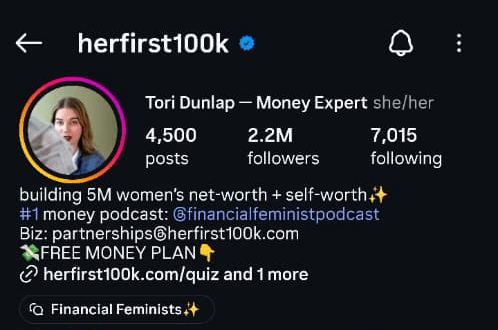
Image source: @herfirst100k
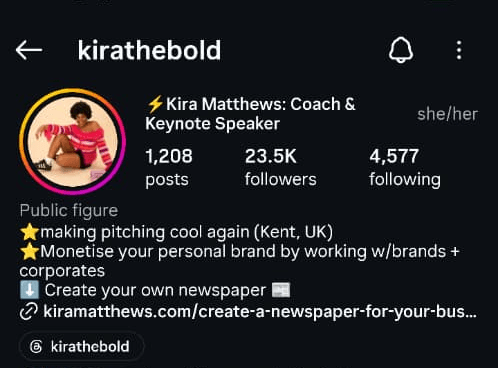
Image source: @kirathebold
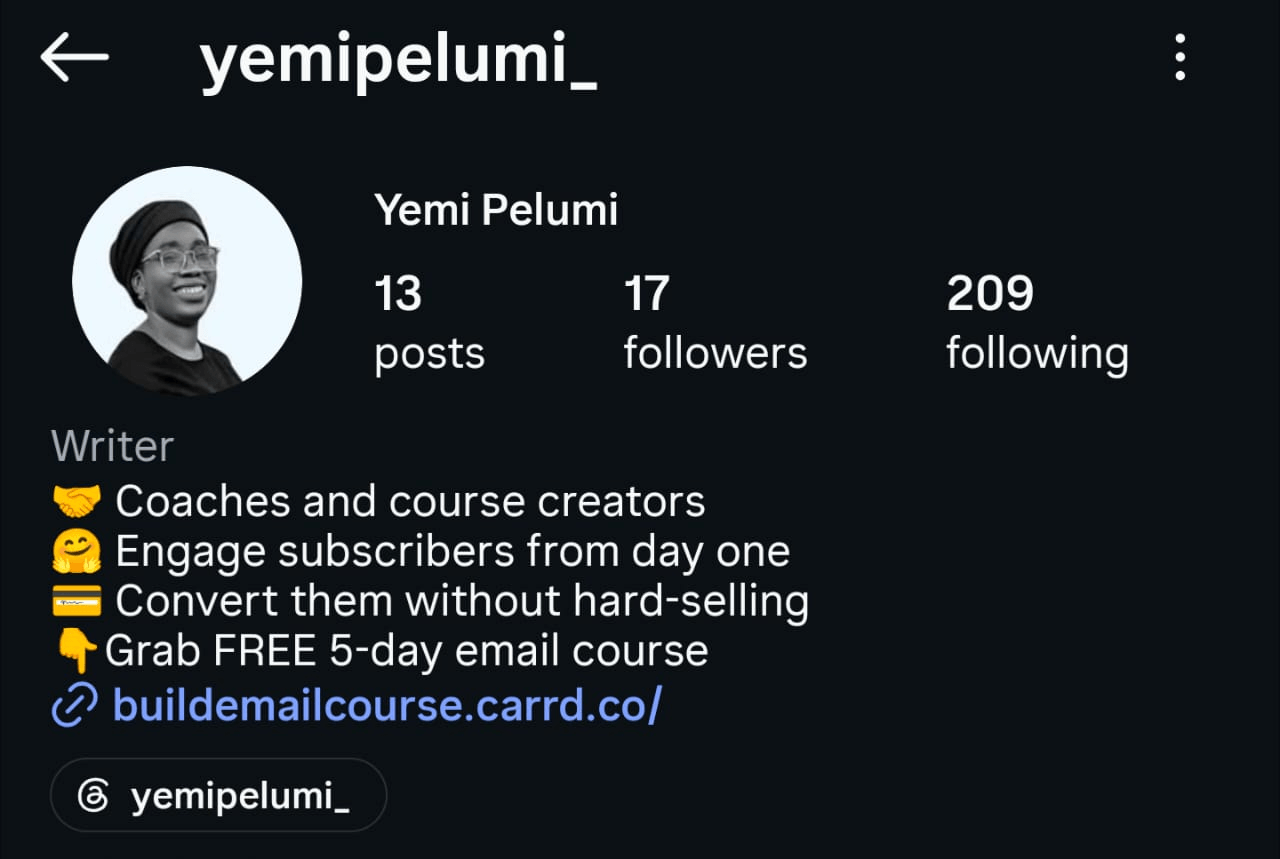
Image source: @yemipelumi_
In the examples above, you can see the bio is specific, the CTA is clear, and there's no confusion about what to click or why. That’s the standard to aim for.
ESP Tip: Use MailerLite, Kit, or HubSpot to create a dedicated landing page for your lead magnet, instead of linking to a generic signup form. Each of these tools has mobile-optimised landing page templates you can set up in under an hour.
Use link-in-bio tools to direct followers to your signup page
If you have multiple freebies and offers, a link-in-bio tool like Linktree or Stan Store lets you organise them without overwhelming visitors.
Also, Instagram now allows you to add multiple links directly to your bio. It’s less polished than external link-in-bio tools. But it reduces the steps your followers have to take.
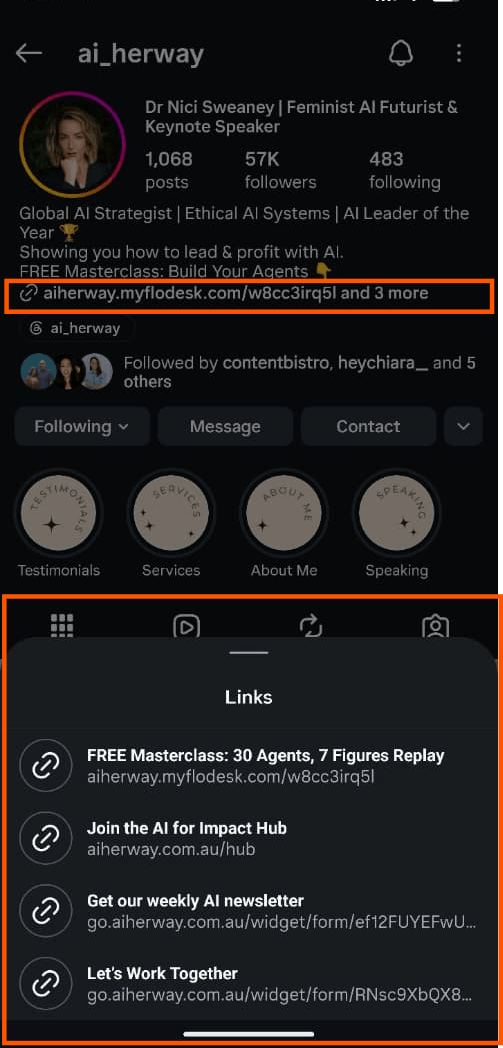
Image source: @ai_herway
Whether it’s the link-in-bio tools or Instagram’s native feature, many people use these tools like a digital directory with hundreds of links and no clear next step. That’s a missed opportunity.
Your email signup should be the first link, every time. Not buried third or fourth behind your latest YouTube video or podcast episode.
The first thing a visitor sees when they click your bio link should be a clear, compelling reason to join your list with your lead magnet front and centre.
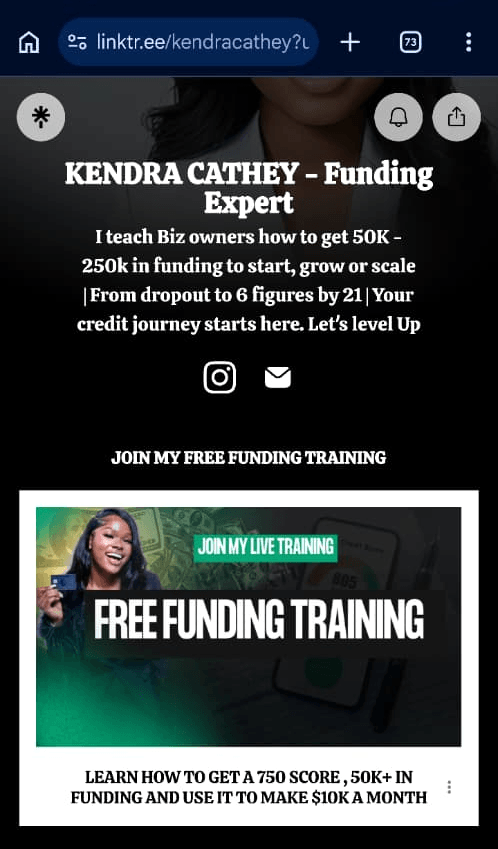
Image source: @kendracathey_
If your link-in-bio page has more than four options, trim it. Treat your link-in-bio like a funnel, not a directory.
- One primary action (your email signup)
- Supporting links only if necessary
- Clear labels that match your content.
Turn your Instagram Stories into a signup funnel
Stories are underused as a list-building tool. Most creators use them for behind-the-scenes content, polls, and reposts, which is fine for engagement but doesn’t move followers into your email list.
A Stories signup funnel works in three moves.
- First, use polls to pre-qualify
A poll like “Do you struggle with [specific problem]?” identifies who among your followers has the problem you solve. Then, it primes them for the next Story, which will speak directly to them.
- Second, create curiosity
Tease something your email subscribers are getting, such as a resource, an exclusive tip, or a BTS breakdown. “I just sent my email list something I've never shared publicly before. Here's a preview…” piques curiosity.
- Third, add the link sticker
Once the curiosity is there, the link sticker feels like the natural next step, not an interruption. “Join the list to get the full version” drives action because your followers want what’s behind it.
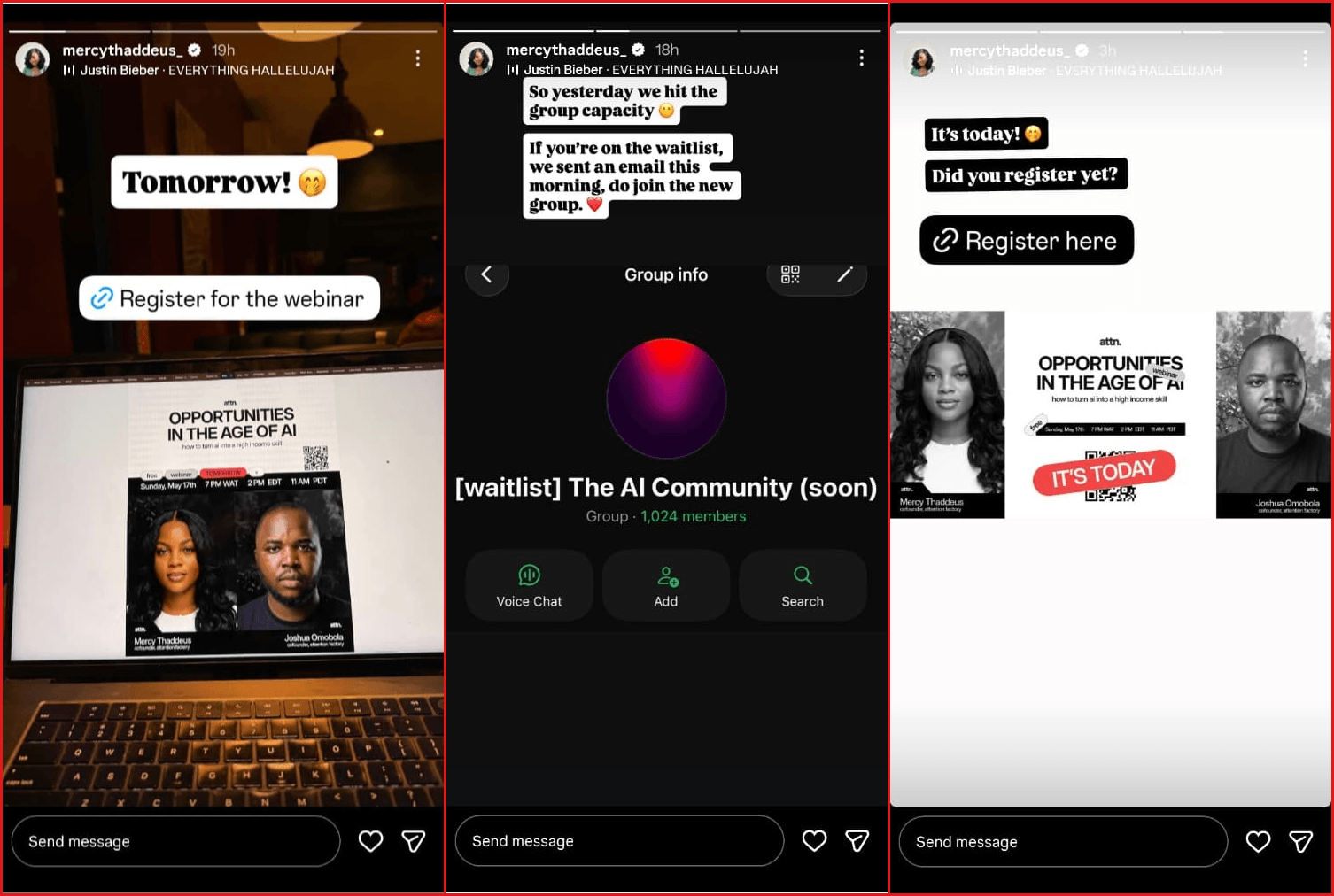
Image source: @mercythaddeus_
Pro Tip: Create a dedicated Story Highlight for your freebies. Every time you promote a lead magnet in your stories, save the link slide to your profile highlight. This allows new profile visitors to see and grab all your previous freebies that fit their needs.
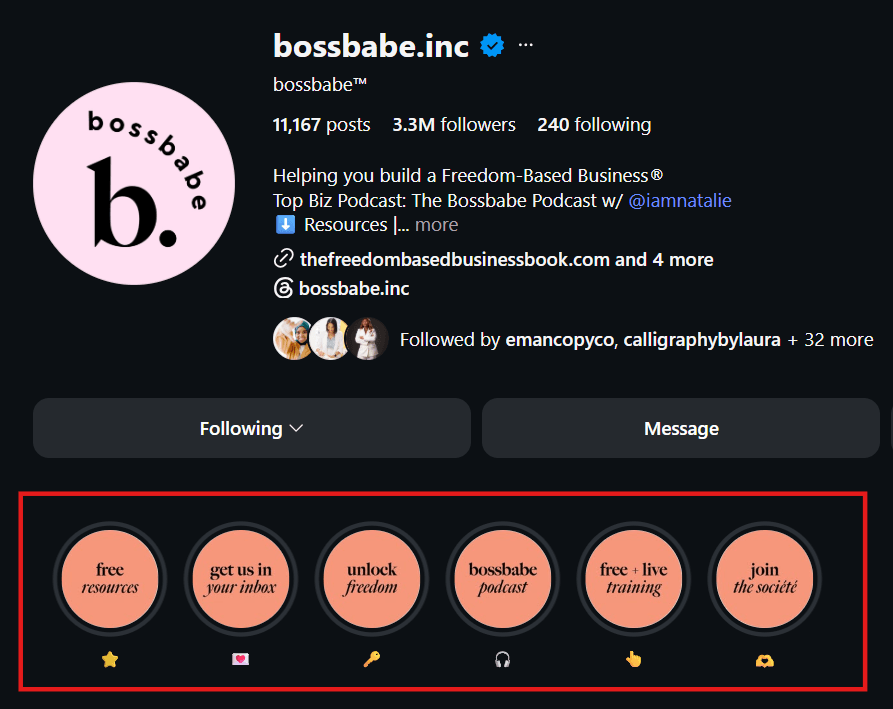
Image source: @bossbabe.inc
Use Reels to drive cold traffic to your signup page
Unlike Stories, Instagram Reels can reach people who have never heard of you. The mistake most creators make with Reels is treating them as brand awareness content with no conversion goal.
To grow your email list with Instagram Reels, the content has to do the heavy lifting, and the CTA must be specific.
The content should educate, entertain, or solve a specific problem well enough that the viewer thinks “this person knows what they’re talking about.” Once the content earns the click, the CTA becomes the next obvious step.
Make sure the CTA is actionable and gives people a reason to act. For example, “I made a free [specific resource] for anyone who wants [specific outcome]. The link is in my bio.”
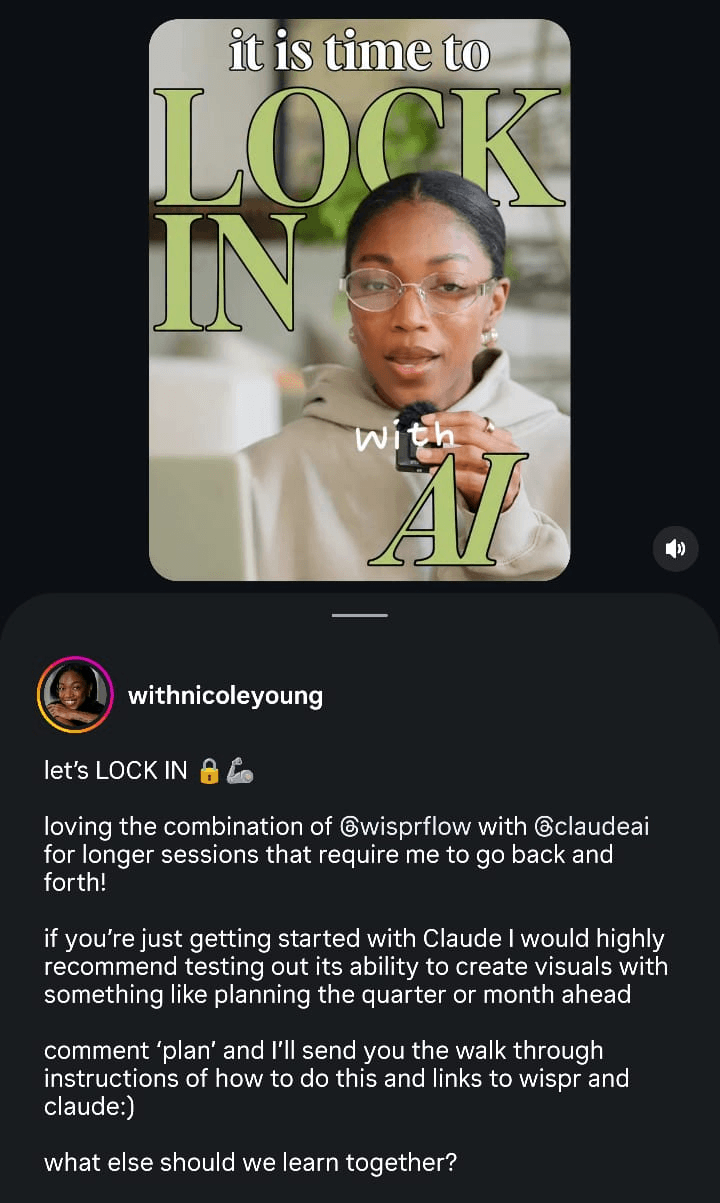
Image source @withnicoleyoung
A Reel that gets 50,000 views and drives 300 people to subscribers to your email list is better than one that gets 500 people to follow you with zero subscribers.
Use the comment-to-DM strategy
You’ve probably seen this strategy on your feed: a creator posts a Reel or carousel, asks viewers to comment a specific word (e.g., GUIDE, FREE, YES), and they’ll send the resource link straight to the commenter’s DMs
It’s called the automated DM strategy. And it works because the link lands in the person’s inbox within seconds of them commenting. No “link in bio” friction.
Beyond the conversion benefit, it also gets viewers to publicly raise their hands for your offer. And this signals interest to the algorithm and drives more engagement to the post and your profile.
The post can be a feed post, a Reel, or even a Story asking for replies. The structure is the same: tease the value, name the trigger word, and deliver the link.
The best thing is, you don’t have to send the DMs manually. Tools like ManyChat, CreatorFlow, and LinkDM connect to Instagram’s API and handle it automatically. This is Meta-approved, so there’s no risk to your account.
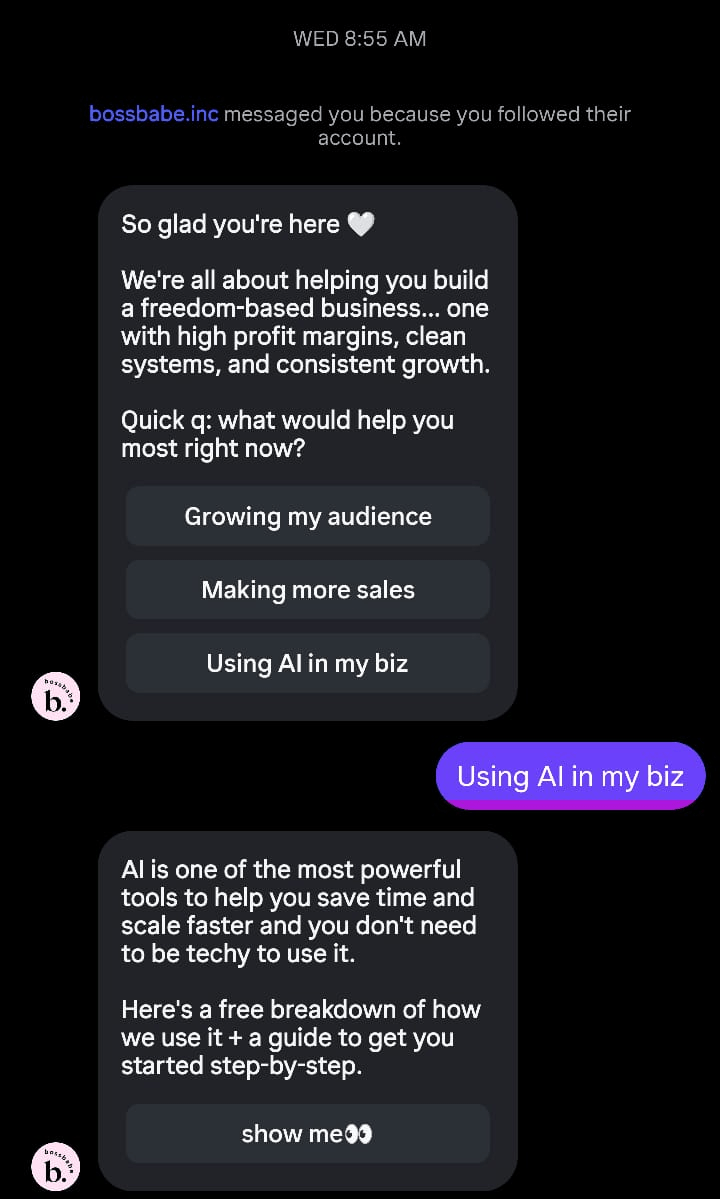
Image source: @bossbabe.inc
Pro Tip: Some of these tools let you collect email addresses inside the DM conversation and deliver the lead magnet automatically. This means that you can build your list directly from Instagram without the follower ever visiting your landing page.
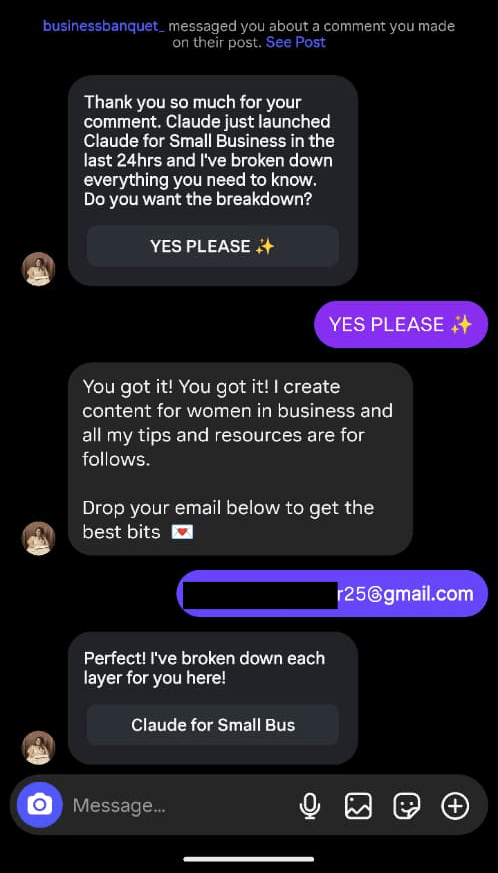
Image source: @businessbanquet_
Create FOMO around your email content
Your followers don’t know what they’re missing by not being on your list. So they feel no urgency to join. You need to make your email content visible on Instagram.
Take a screenshot of a valuable email you've sent (e.g., a tip, resource, or case study). Then, share it to your Stories or feed with a CTA to click the link in bio or comment a trigger word.
Use a caption like “This went out to my email list yesterday. If you're not subscribed yet, here's what you missed.”
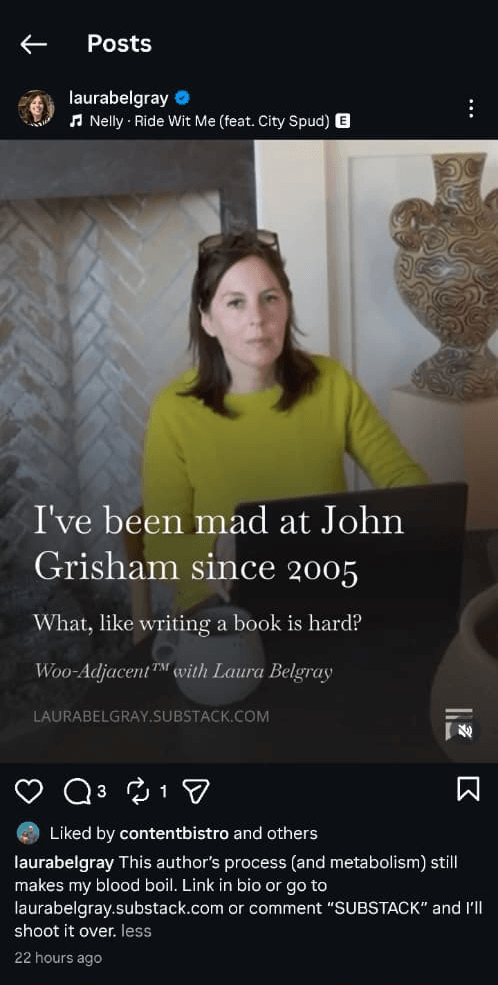
Image source: @laurabelgray
If you do this consistently, it’ll reframe your email list as an exclusive benefit rather than just another newsletter. Followers start to feel the gap between what they're getting on Instagram and what subscribers are getting in their inbox.
Pro Tip: Take this further by sharing subscriber replies and reactions. If someone emails back to say a tip helped them do or achieve something, screenshot it (with permission) and post it.
Social proof from existing subscribers is one of the most convincing things a hesitant follower can see to convince them to join your list.
Run a giveaway or challenge with email entry
Giveaways can build an email list fast. They can also fill it with people who want the prize and have zero interest in what you actually do. The difference comes down to how you structure it.
The prize has to be relevant to your audience, not just valuable in general.
An iPad giveaway will get you thousands of entries from everyone who wants an iPad (who doesn’t?). While a giveaway for a one-hour strategy session, a course, or a product you sell will attract people who actually want what you offer.
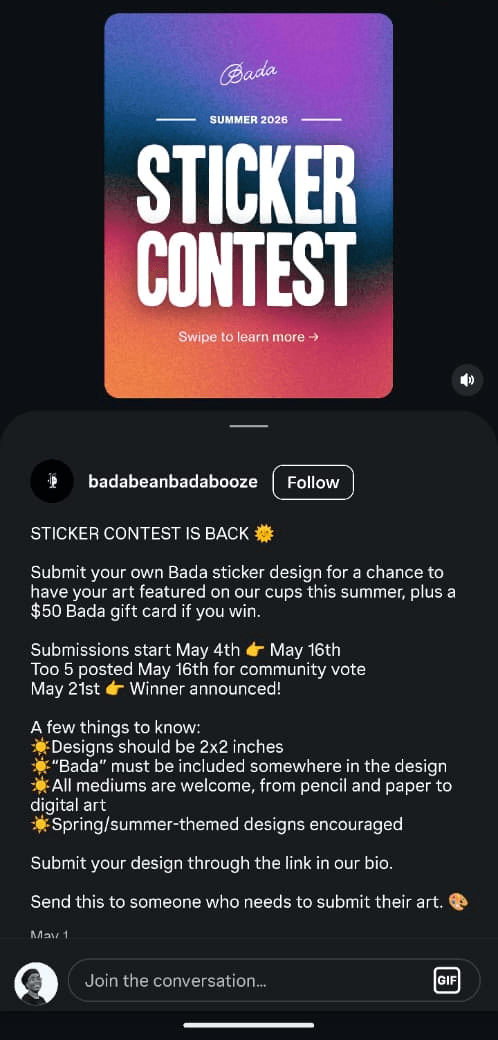
Image source: @badbeanbadabooze
Challenges work on the same principle – relevance first. A five-day challenge, such as “Walk 10,000 steps every day this week” or “Audit your finances in 5 days,” delivers daily value and builds trust.
Pro Tip: Have a follow-up sequence ready before you launch. The worst thing to do is run a giveaway or challenge, collect 457 email addresses, and then send nothing for two weeks. That’s how you lose the list before it’s even warm.
Collaborate with other creators to cross-pollinate audiences
Your followers trust you. Another creator’s followers trust them. A collaboration with them puts you in front of a warm, pre-qualified audience who’s already receptive to the kind of thing you offer.
The selection criteria matter. Choose collaborators whose audience has similar problems you solve, not just similar follower counts.
A creator with 5,000 highly engaged followers in your niche will send you better subscribers than one with 50,000 loosely related ones.
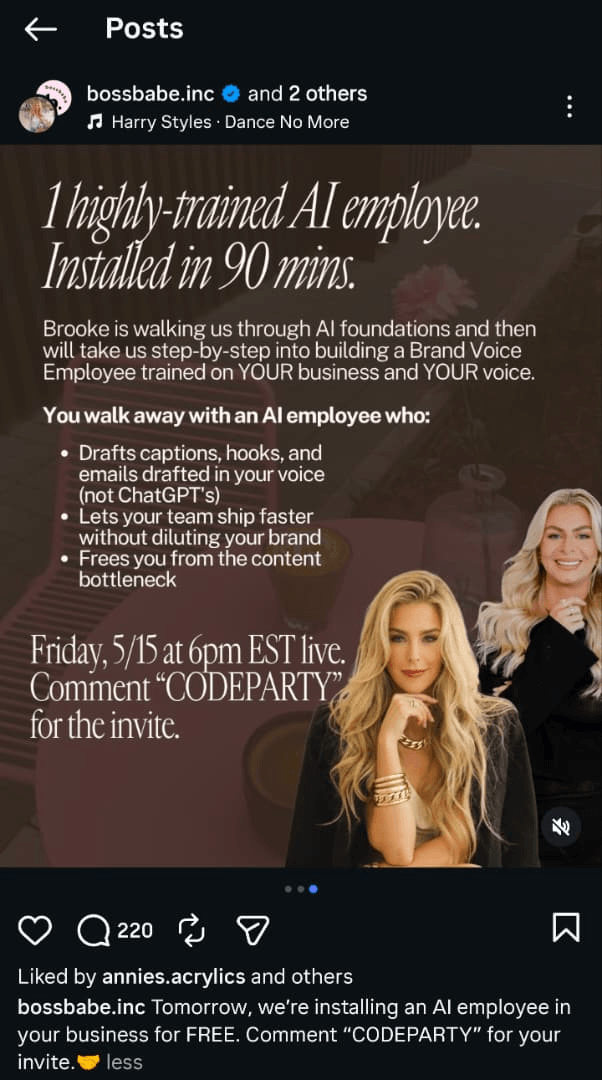
Image source: @bossbabe.inc
After selecting a collaborator, use any of these strategies:
- Instagram Lives with a joint lead magnet: Both of you promote it, both lists grow.
- Co-created resources: A guide, challenge, or webinar hosted together and offered to both audiences.
- Instagram Story cross-promotion: You mention their lead magnet on your Story and vice versa
- Joint Reels: You both appear in a Reel together, each promoting the shared lead magnet to your respective followers.
- Instagram Collab posts: Use the native Collab feature, so the post appears on both of your profiles simultaneously and reaches both audiences.
Pro Tip: Agree upfront on what each person is promoting and where the signup link lives. Confusion about which landing page to send followers to will cost you conversions on both sides.
Landing pages and tools: Where the conversion actually happens
Your Instagram strategy gets followers to the link. The landing page is where they either subscribe or leave.
A high-converting landing page for email signup needs just four things:
- A clear headline that states exactly what the subscriber gets
- Two or three bullet points on what makes it worth signing up for
- a simple form that asks for name and email, nothing more
- a CTA button that says something more specific than “Subscribe”
Also, mobile optimisation is non-negotiable.
Most of your Instagram traffic is coming from mobile phones. If your landing page is slow to load, hard to read on a small screen, or has a form that’s awkward to fill in with a thumb, you’ll lose subscribers.
For landing page tools, using an email service (ESP) provider with landing page capabilities is the smarter move. You can capture subscribers and nurture them in the same place, without stitching together separate tools.
Here are four landing page tools worth considering:
- Mailerlite is one of our favorites at Email Tooltester
It’s a strong starting point if you’re a small business building your first signup flow. The Free plan allows you to build up to 10 landing pages, collect up to 500 subscribers, and send 500 emails per month.
There are no landing page templates on the Free Mailerlite plan, but the drag-and-drop editor makes building one straightforward. Paid plans unlock a wide template library and an AI landing page generator feature.
1. Kit (formerly ConvertKit) is built primarily for creators
It offers the most generous Free plans with unlimited landing pages and forms, up to 10,000 subscribers, and the ability to connect a custom domain.
You can choose from 50 landing page templates on Kit. Plus, the post-submission experience is fully customizable, including hiding the form from people who have already signed up.
2. GetResponse is worth considering if you’re an ecommerce business
Its landing page builder doubles as an online store, so you can capture subscribers and process payments in the same place.
GetResponse offers 90 professionally designed templates, an intuitive drag-and-drop editor, and an AI builder for generating designs quickly. However, the Free plan limits you to one published landing page with 1,000 monthly visits.
3. HubSpot suits SaaS teams or businesses with longer sales cycles
The free plan includes 20 landing pages and a form builder. HubSpot also has a built-in CRM so every subscriber you capture is automatically stored in one place where you can manage them.
The landing page templates are conversion-optimized out of the box. And the CRM integration makes it easier to track leads from Instagram all the way through until they buy.
Common mistakes that kill your Instagram-to-email conversions
You can do everything right on Instagram and still struggle to grow your list. Usually, it comes down to one of these.
- Asking people to leave Instagram for no real reason
Asking someone to “join your email list” is not a reason to subscribe. What do they get? By when? How will it help them? If you can't answer those questions in one sentence, your lead magnet needs work before anything else does.
- Linking to your homepage.
Your homepage is designed to tell people everything about your business. Sending Instagram traffic to your homepage and hoping they find their way to an email form is hoping for too much. Always link to a dedicated landing page designed to do one thing: get the sign-up.
- Overcomplicated signup forms
Every field you add to a signup form reduces your conversion rate. Name and email is enough to start. Once someone is on your list, you can learn more about them through their behavior. Don’t make them fill out a form before they’ve decided they trust you.
- No follow-up emails
This is where most lists die. Someone subscribes, gets the lead magnet, and then hears nothing for weeks. By the time you send the next email, they’ve forgotten who you are and why they signed up in the first place.
Have a welcome series ready before you start driving traffic. At minimum, a three-email sequence that delivers the lead magnet, introduces you, and tells them what to expect next.
- Never testing or optimising
Most people set up a bio link and a landing page once and assume it’s working. It might not be. Check your analytics. Which Instagram placements are actually driving clicks — bio, Stories link stickers, Reels, Feed Posts?
Also, A/B test your landing page headline and CTA copy. Small improvements in conversion rate compound significantly over time. And you won’t find what works if you’re not testing and tracking.
How to turn subscribers into customers
A lot of people treat list growth like the finish line. But getting the subscriber is only the first step. What you do in the first week determines whether they become a customer or quietly disengage.
Here’s what to do after your Instagram followers join your email list:
1. Set the tone with your welcome email
Your welcome email is the first email your subscribers receive immediately after signup. And if it just says “here’s your freebie,” you’re wasting the moment.
Use your welcome email to reinforce why they signed up, tell them what they’ll get from you and set expectations for how often you’ll email them. This leaves a great first impression that will make them open your next email.
2. Nurture them to build trust
People don’t buy just because they joined your list. They buy because they trust you. And trust isn’t built with one welcome email. It comes from delivering value consistently.
Send a three-to-five email sequence after your welcome email to keep the momentum going. Or, create an email-based course.
You can use this sequence to teach something useful, share relatable insight, or tell your story. The goal isn’t to send more emails. It’s to make each one feel valuable and worth opening.
3. Segment from the start
Even if all your subscribers come from Instagram, they don’t all want the same thing. Some are curious (and may not even be your ideal customer). While others are ready to act. So, if you send the same email to everyone, you lose them.
The best ESPs have email segmentation capabilities that lets you tag subscribers based on which lead magnet they signed up for.
This tells you what problem they're trying to solve, so you can send personalized emails that are relevant to each subscriber. Relevance is what makes subscribers engage and convert.
Conclusion: Instagram got you the followers. Now get them into your email list
Instagram is designed to keep your audience on it. Every feature, from Reels to Explore exists to hold attention inside the app, not send it elsewhere.
Which means getting your followers to leave and subscribe to your email list will never happen by accident. It requires intention at every step. The right offer, the right placement, and the right follow-up.
When those pieces work together, Instagram becomes one of the most powerful list building tools available. When they don’t, you’re just feeding the algorithm.
But don’t try to do it all at once. Pick two or three strategies from this list that match where your audience already shows up. Set up a simple landing page on a free ESP so you can also start sending emails too.
The followers you’ve worked to build deserve more than a double-tap. Give them a reason to leave the app and a reason to open your emails.
If you need help picking an email platform that would work for you, try our ESP tool smart quiz.
And if you’ve tried turning your Instagram followers into email subscribers, let us know what worked in the comments and what you’ll be trying next.
The authors
Learn more about us

Our Methodology
This article has been written and researched following our EmailTooltester methodology.
Our Methodology