


Our first email marketing tool at EmailTooltester was Mailchimp. Back then, it was the tool most startups like ours were using, and it was enough to cover our basic newsletter needs and relatively small list. (The monkey credits were also a big factor – it meant we could send the majority of our campaigns for free!)
But here’s what we wish we would have known: choosing an email marketing tool for a startup means planning not only for the business you’re running today, but also the one you’re trying to build. And if we could go back, we would have chosen differently. Monkey credits or no monkey credits.
If you’re choosing an email marketing tool for your growing startup, you’re probably weighing up the same two things: what’s enough to get you started now, and what will still work as your needs develop.
You may not need every advanced feature on day one, but it helps to know what a platform will and won’t be able to do as your business grows. And details like pricing, automation capabilities, and integrations definitely deserve a closer look before you commit.
In this guide, we’ll help you weigh those trade-offs, drawing on our own experience testing and using these tools.
Best email marketing tools for growing startups at a glance
The right email marketing tool depends on what you’re building. If you’re an ecommerce business, you need emails that respond to purchases and abandoned carts. If you’re a software startup, your emails need to help users get started and keep them engaged. And if you run a creator-led business, you might rely on a newsletter to turn subscribers into customers.
So with those different needs in mind, here are our top platforms for a growing startup:
| Tool | Our pick for | Why it makes the shortlist | Main trade-off |
|---|---|---|---|
| Brevo | An all-round starting point | Combines email campaigns, automation and additional messaging channels, giving startups several ways to communicate with customers. | Check the contact, sending and automation limits of your chosen plan as your needs grow. |
| MailerLite | Small teams getting started | Brings newsletters, landing pages and email automation together in a manageable setup. | Startups with complex customer journeys may eventually need more advanced capabilities. |
| Kit | Creator-led startups | Suits businesses built around an audience, such as newsletters, educational content and digital products. | Its creator focus makes it less suited to businesses needing extensive sales or product lifecycle tools. |
| Omnisend | E-commerce startups | Combines approachable store-focused automation, product emails and helpful support, making it easier for a small team to get started. | Main competitor Klaviyo offers more depth for advanced segmentation and analytics. |
| ActiveCampaign | SaaS startups with advanced automation needs | Flexible workflows for lead nurturing, onboarding and customer follow-ups, with AI tools to help build campaigns and automations. | Steeper learning curve; complex workflows require higher plans, and CRM features cost extra. |
If you’re still figuring out your email strategy, start by comparing Brevo and MailerLite. Both belong on a general startup shortlist, with a wide range of features available to support growing businesses. But there are a few differences, and your expected sending volume, contact count, and automation needs will help narrow the choice.
If your business already has a clear model, start with one of the specialist options: Kit for an audience-led business, Omnisend for an online store, or ActiveCampaign for a software product.
You don’t have to choose the most advanced platform. Choose one that handles the emails you need now, then check what it will take (and cost) to support your next stage.
1. Brevo: Best all-round starting point for startups
We signed up with Brevo in 2021 when we hit a limitation with our previous provider. Our plan allowed just one automated workflow, which we were already using to deliver our email marketing ebook. Adding more workflows meant upgrading – and as a small business, we wanted to put that money elsewhere.
Brevo gave us a more affordable way to build the automations we needed, and we’ve been using it ever since.
Why we recommend it for startups
The biggest benefit for us has been the ability to grow our email marketing beyond a single signup form and welcome email. We now offer more than a dozen downloadable resources, including ebooks, courses, and cheat sheets. Brevo delivers these automatically, along with the follow-up emails. Its automation builder supports different entry points, so a workflow can start when someone submits a form, joins a list, or has a contact detail updated.
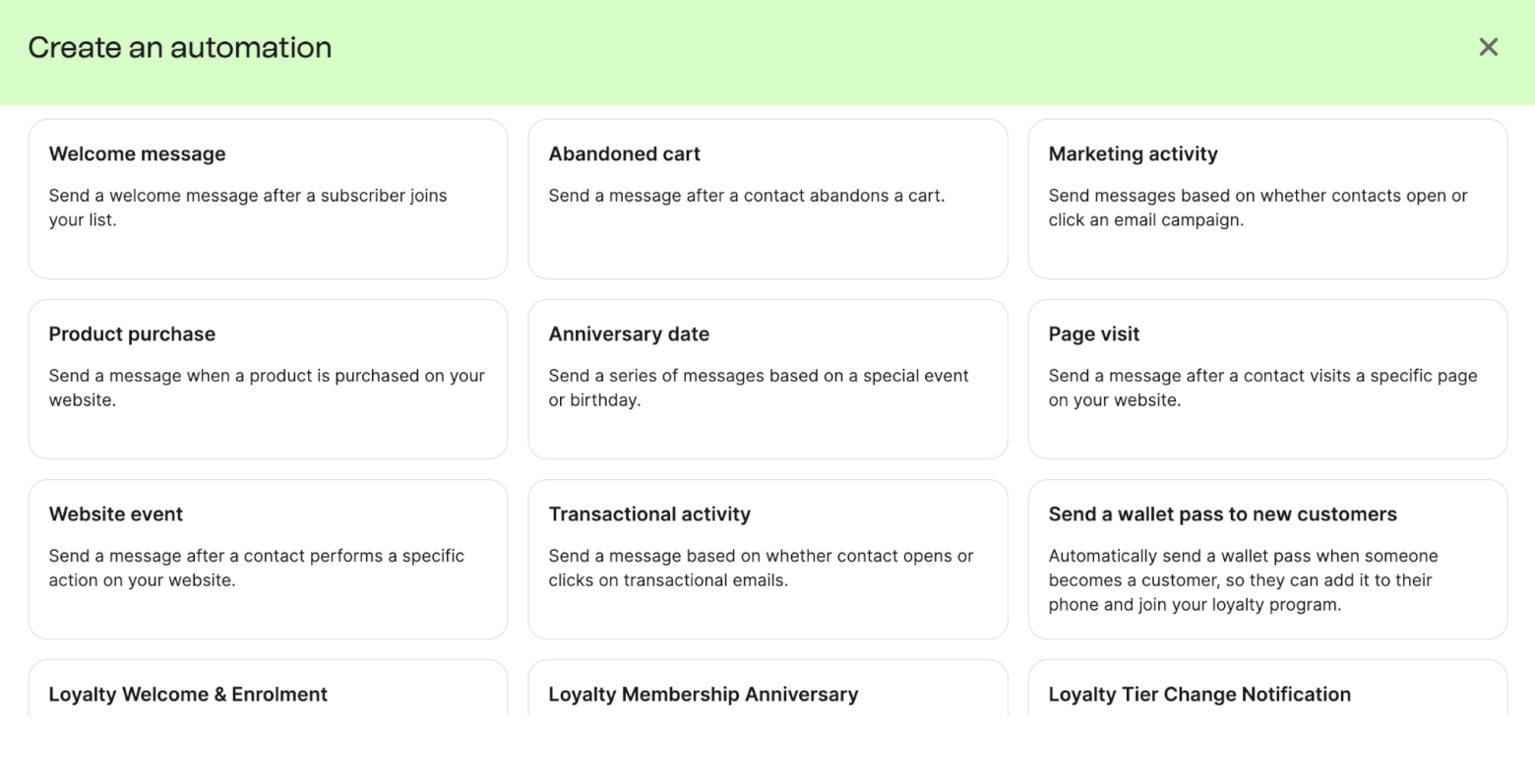
That flexibility is useful as your startup develops more ways to attract customers. You could deliver a resource to a new lead, send a relevant follow-up, then tailor subsequent emails to their interests.
We also use dynamic content to personalize messages. For example, when someone completes a quiz on our website, we can include their particular result in the email without creating a separate campaign for every possible outcome.
More than newsletters
Brevo’s website chat tool has also become part of our setup. Every month, it generates an average of around 40 conversations, helping us turn website visitors into customers and subscribers.
For startups building an app, Brevo can handle transactional messages alongside marketing emails. We use it for Email Detective’s account confirmation emails and our newsletter, with a separate opt-in for the latter. You can also connect product activity to automations through its Events API, for example, starting an onboarding sequence when someone begins a trial.
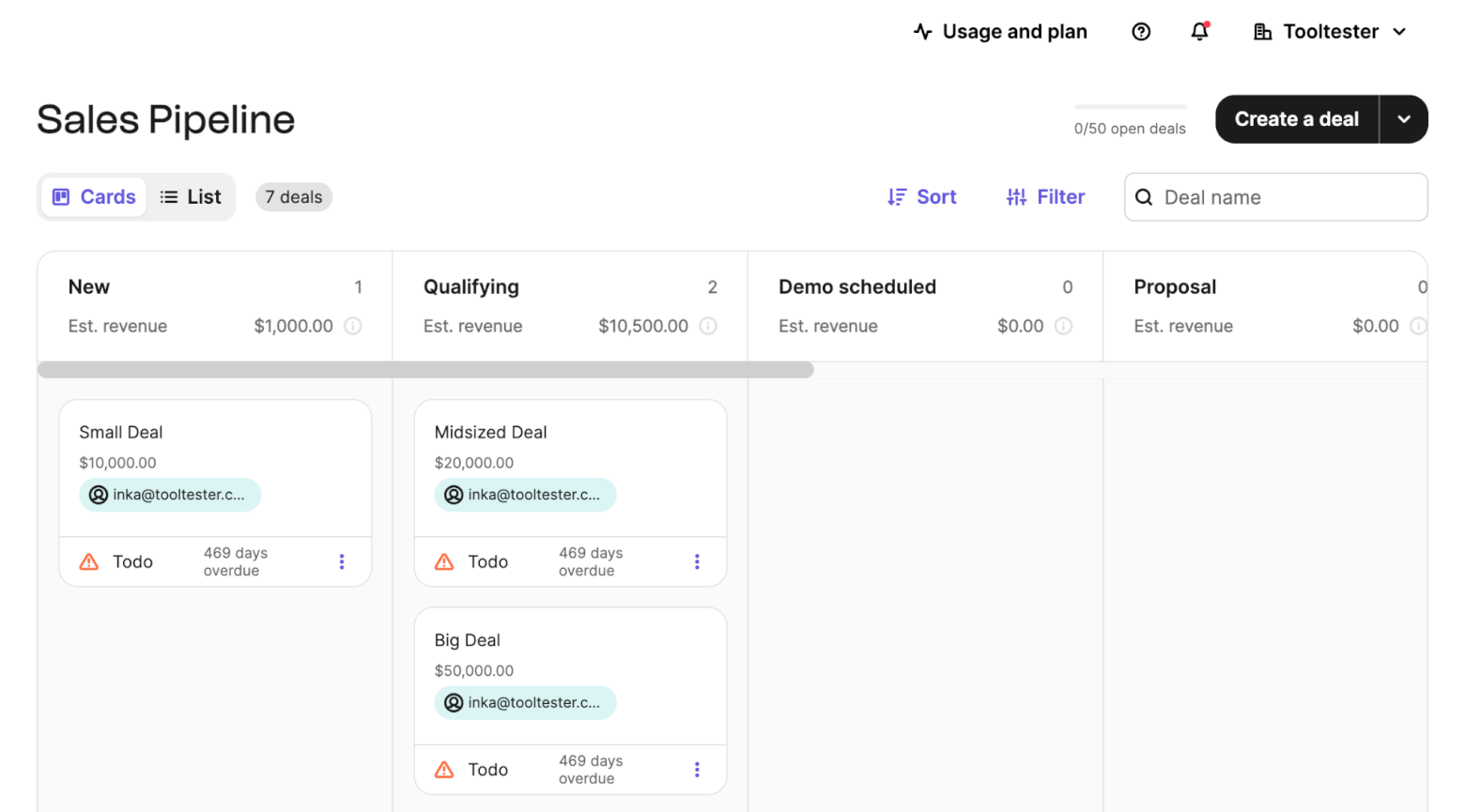
Brevo also has a built-in CRM for tracking deals, assigning follow-up tasks and managing your sales pipeline. For a startup selling through demos or consultations, that can help connect email marketing with the conversations that lead to a sale.
Its AI features could also save a small team some time. Alongside help with email copy and subject lines, Brevo offers an MCP connection. Once connected, you can ask your AI assistant to create a campaign, check performance or show deals at a particular stage.
What does it cost as you grow?
Brevo has worked well for our sending habits: we generally send no more than two emails per month to the same recipient. Its pricing is based mainly on email volume, although some lower tiers also have contact limits.
When we ran the numbers, our Brevo spending totalled $3,509 a year, versus an estimated $5,400 for the Mailchimp setup we would have needed – a difference of $1,891!
Brevo currently offers a free plan capped at 300 emails per day, with paid plans starting at $9 per month. Check the contact allowance and feature limits as well as the sending volume when comparing plans.
Where Brevo falls short
There are a few limitations we’ve encountered ourselves:
- Reporting prompted us to upgrade. We wanted more detail about which links people clicked, which wasn’t available on our lower-tier plan.
- Removing branding costs extra on Starter. Paying for a plan doesn’t automatically remove the Brevo logo from your emails.
- Support has been inconsistent. Some issues involved lengthy back-and-forth, and we’ve occasionally waited more than 24 hours for a reply.
- The landing page builder disappointed us. Creating an event signup page took longer than expected, and we weren’t happy with the result. We’d use another tool for that job.
For more complex requirements, its CRM and automation also have limits compared with specialist platforms. Our B2B automation comparison explores those differences.
Our verdict: Brevo is a strong option for startups that want to build useful automations without committing to a large marketing budget. It has supported our own expanding email setup, but we’d budget for reporting upgrades and use a separate landing page builder.
2. MailerLite: Best for small teams getting started
If you’re handling email marketing alongside product development, customer support and everything else, ease of use is probably important to you. MailerLite is one of the tools we most consistently recommend for that reason, winning our Ease of Use award every year from 2023 to 2026.
We like that the email editor is straightforward, and you don’t need to become an automation expert before building your first welcome sequence. But there’s also enough beyond newsletters to support a business as it develops.
Why we recommend it for startups
MailerLite makes it easy to connect the steps between attracting a subscriber and turning them into a customer.
For example, you could build a landing page offering a free guide, collect subscribers through a form, then send a welcome sequence introducing your product. Its visual automation builder lets you follow up based on subscriber actions and group membership, rather than sending everyone the same messages.

Useful for launching (and selling)
MailerLite’s website and landing page builders are particularly relevant if you’re still getting your startup off the ground. You can create a waitlist or launch page without building another part of your website from scratch.
It also offers tools for selling digital products, paid newsletter subscriptions and appointments. You could therefore collect leads, send educational emails and offer a paid appointment through the same platform.

There’s useful AI assistance, too. In our testing, its strengths were helping with subject lines, calls to action and rewriting individual sections. There are also MCP connections so that you can use MailerLite directly with a Claude or ChatGPT AI assistant.
What does it cost as you grow?
MailerLite’s free plan currently allows 250 active subscribers and 2,500 emails per month. It includes up to three automations, one website and one landing page, so you can test a basic signup and welcome sequence before paying. However, a growing startup could reach that subscriber limit quickly.
The Comfort plan starts at $12 per month for 500 subscribers. At 2,500 subscribers, it costs $33 per month; at 5,000, $49. Unlike Brevo’s mainly volume-based approach, your active subscriber count is a central part of the calculation.
Comfort also has limits on monthly sends, automations, forms, and landing pages. The higher Power tier expands those allowances and adds multiple automation triggers, so check the features you’ll need as well as your expected list size.
Where MailerLite falls short
Its simplicity has some limits:
- It isn’t a complete sales platform. There’s no built-in CRM or lead scoring for managing a more involved sales process.
- Advanced reporting is limited. Teams needing detailed automation analysis may want more depth.
- App emails require another service. For password resets, verification codes and similar transactional messages, MailerLite points users towards its sister service, MailerSend.
- Allow time for approval. Its account approval process can delay getting started, so don’t leave setup until launch day.
These limitations matter more if you’re building a complex software product or managing a longer B2B sales cycle.
Our verdict: MailerLite is a strong choice for a small team that wants to launch pages, grow an audience and build useful email sequences without spending weeks learning the software. We’d shortlist it particularly for content, digital product and service businesses. Just budget for a paid plan fairly early.
3. Kit: Best for creator-led startups

We use Kit for our Tooltester.com newsletter, which focuses on helping readers find useful online tools. If your startup sells expertise, educational content, or digital products, Kit’s appeal is easy to understand: it’s built around growing an audience, and turning that audience into a business.
Why we recommend it for startups
One thing we like is how straightforward it is to put together an email. The designs lean towards simple, content-focused emails, and the block-based editor lets you add text, images and products without too much fuss.
Kit also makes it easy to capture subscribers through embedded forms and landing pages. You can create pages for newsletter signups, waitlists or downloadable resources, and connect your own domain even on the free plan – useful when you’re testing an idea and don’t yet need a full website.

Built to help you grow (and earn from) your audience
Kit’s selling tools are a major reason to choose it over a basic newsletter service. You can sell digital products and paid subscriptions even on the free plan, giving you a way to test whether subscribers will pay for your content before committing to a monthly software bill.
For a founder building an audience around a particular skill or subject, that could mean selling a guide, a collection of templates or a premium newsletter. You can start with free content, learn what readers value and develop a paid offer around it.
Kit also gives you ways to grow beyond your own website and social channels. Its Creator Network lets newsletters recommend one another to their subscribers. Through Kit, we’ve used SparkLoop’s paid referral network to grow the Tooltester newsletter, gaining a few thousand subscribers through the channel, and helping us to eventually monetize the newsletter through ads and sponsorships.
What does it cost as you grow?
Kit’s free plan supports up to 10,000 subscribers, with unlimited email broadcasts, forms and landing pages (although you won’t get access to any automations).
The important catch is the upgrade cost. The Creator plan starts at $39 per month for 1,000 subscribers. The paid price scales with your list, so just be mindful that if you’re on the free plan and have over 1,000 subscribers, this is the lowest price you’ll be paying if you upgrade – in many cases, you might be paying even more.
Creator adds unlimited visual automations and sequences, integrations and branding removal. It also includes Kit’s MCP connection, which lets compatible AI assistants work with your account.
Where Kit falls short
There are a few reasons we wouldn’t recommend it for every startup:
- Design flexibility is limited. We like its straightforward editing experience, but businesses wanting highly visual campaigns may find the templates restrictive.
- Complex automation needs deserve closer scrutiny. Kit works well for content delivery and sales sequences, but isn’t our first choice for intricate product onboarding or a longer B2B sales process.
- More detailed analytics cost extra. Kit reserves features such as engagement scoring, deliverability reporting, and its Insights dashboard for Pro.
- The jump from free to paid can be substantial. The free plan doesn’t include automations, so budget for the subscriber count you’ll actually have when you need more features, because you might need to upgrade sooner rather than later.
Our verdict: Kit is a strong fit for startups where content and an engaged audience drive the business, and is especially handy for newsletters, educational businesses and digital products.
4. Omnisend: Best for e-commerce startups
If your startup sells physical products, you’ll want to follow up with shoppers who leave checkout, help customers get more from their purchases and encourage them to buy again.
That’s why we’ve shortlisted Omnisend for an e-commerce startup. It offers a good balance of usability, automation and value, earning our Best Email Marketing Tool for Ecommerce award for 2026. Read our Omnisend review.
Why we recommend it for startups
Omnisend’s pre-built workflows give ecommerce startups a practical starting point. You can welcome new subscribers, follow up with shoppers who abandon their carts, and keep in touch after a purchase.
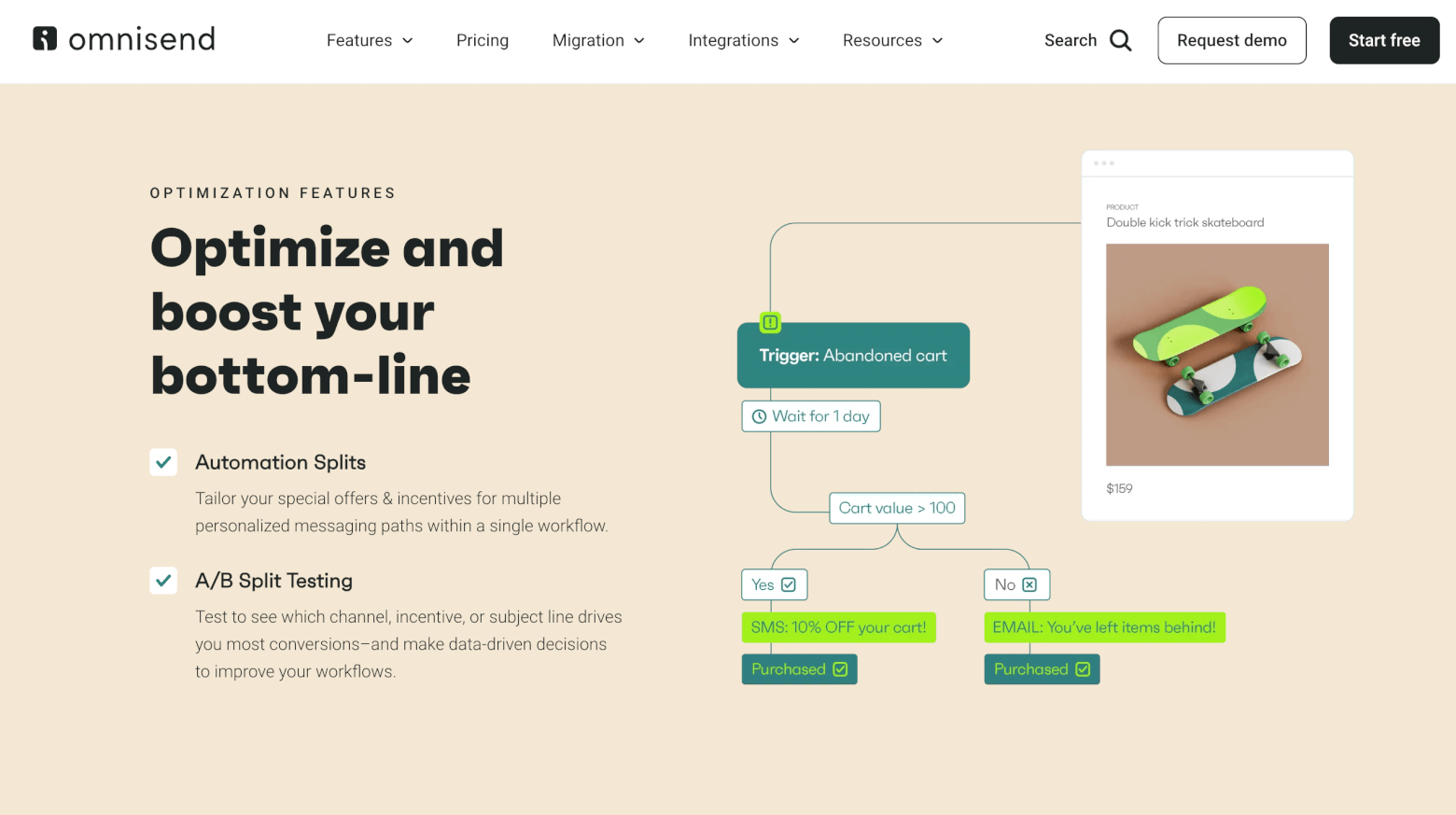
For example, a new clothing brand could start with a welcome offer and an abandoned-cart reminder, then add a post-purchase sequence with care instructions or complementary products.
As you grow, you can introduce different paths within a workflow and use shopping activity to make messages more relevant. Omnisend also supports email, SMS and web push.
We like that its email editor includes a product picker, so you can insert products from your connected store easily. And there are forms and landing pages to help you collect subscribers.
Omnisend also offers 24/7 live chat and email support, including on the free plan.
What does it cost as you grow?
The free plan lets you reach up to 250 contacts, with 500 emails and 500 web push notifications per month. It includes core features such as pre-built e-commerce workflows, segmentation, forms and landing pages.
The Standard plan starts at $16 per month for up to 500 contacts and 6,000 emails. Your costs increase with your billable contact count and sending needs.
Where Omnisend falls short
There are a few things we’d check before committing:
- Your integrations. Omnisend covers the main e-commerce platforms, but check any specialist apps your business relies on.
- Your team’s language needs. In our review, the platform’s English-only interface was a limitation.
- Your likely upgrade path. The free plan is useful for getting started, but its small sending allowance won’t support an active store for long. Omnisend review, plan limits.
As Omnisend’s better-known competitor, Klaviyo may make more sense if your brand already has substantial customer data, and a clear need for deeper segmentation, predictive tools and analytics.
Our verdict: Omnisend is a strong choice for an e-commerce startup that wants useful automation without a steep learning curve.
5. ActiveCampaign: Best for advanced automation

There comes a point when a welcome sequence and a monthly newsletter aren’t enough. You might need different follow-ups for people who download a guide, request a demo or start using your product, plus a way to keep track of who’s ready for a sales conversation.
That’s where we’d consider ActiveCampaign. We use it for email marketing on our sister site, HostingExperto.es, and its automation capabilities have consistently impressed us (in fact, we awarded it our Best Email Automation Tool for 2026). It takes more learning than tools like Brevo and MailerLite, but gives you considerably more control over what happens after someone joins your list.
Why we recommend it for startups
ActiveCampaign’s strength is the range of triggers, conditions and actions you can combine, letting you adapt a subscriber’s journey to their interests and behaviour.
For example, a B2B startup could send an industry-specific case study after someone downloads a guide. If that person later visits the pricing page, you could adjust their lead score and notify sales once they reach a chosen threshold.
These can be set up through ActiveCampaign’s AI automation builder, which takes a description of your goal and turns it into a complete workflow. For a startup, that could provide a starting point for a welcome sequence or lead-nurturing campaign.
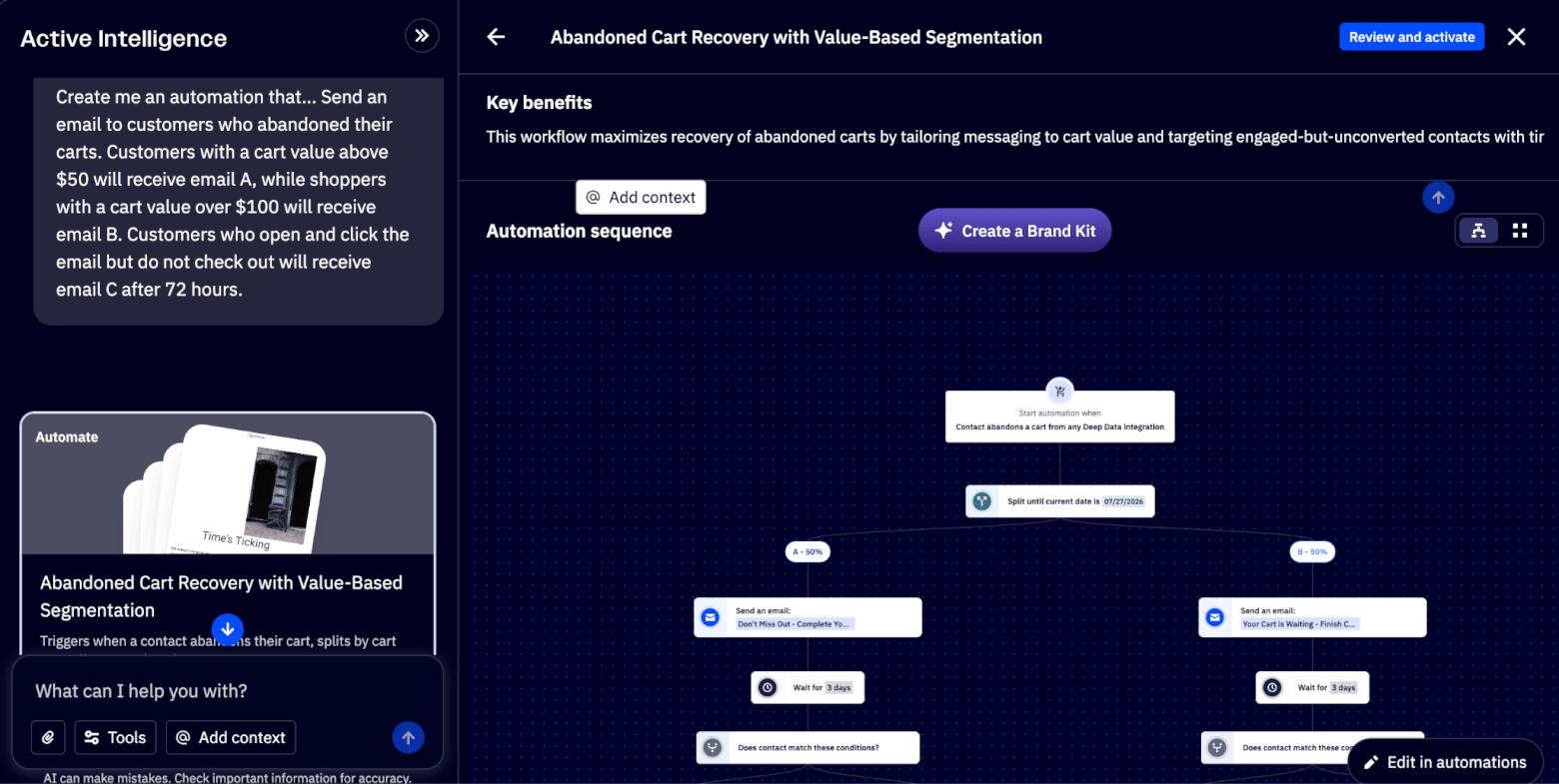
Software startups can also use custom events, such as a login or an action inside their app, to trigger automations. There’s also an MCP connection for working with your account through an AI assistant, which is useful if AI is already part of your team’s workflow.
Connecting marketing with sales
If your startup sells through demos, consultations or a longer decision-making process, ActiveCampaign’s CRM add-ons deserve a look. You can connect email engagement with deals, pipelines and follow-up tasks, rather than manage those activities separately.
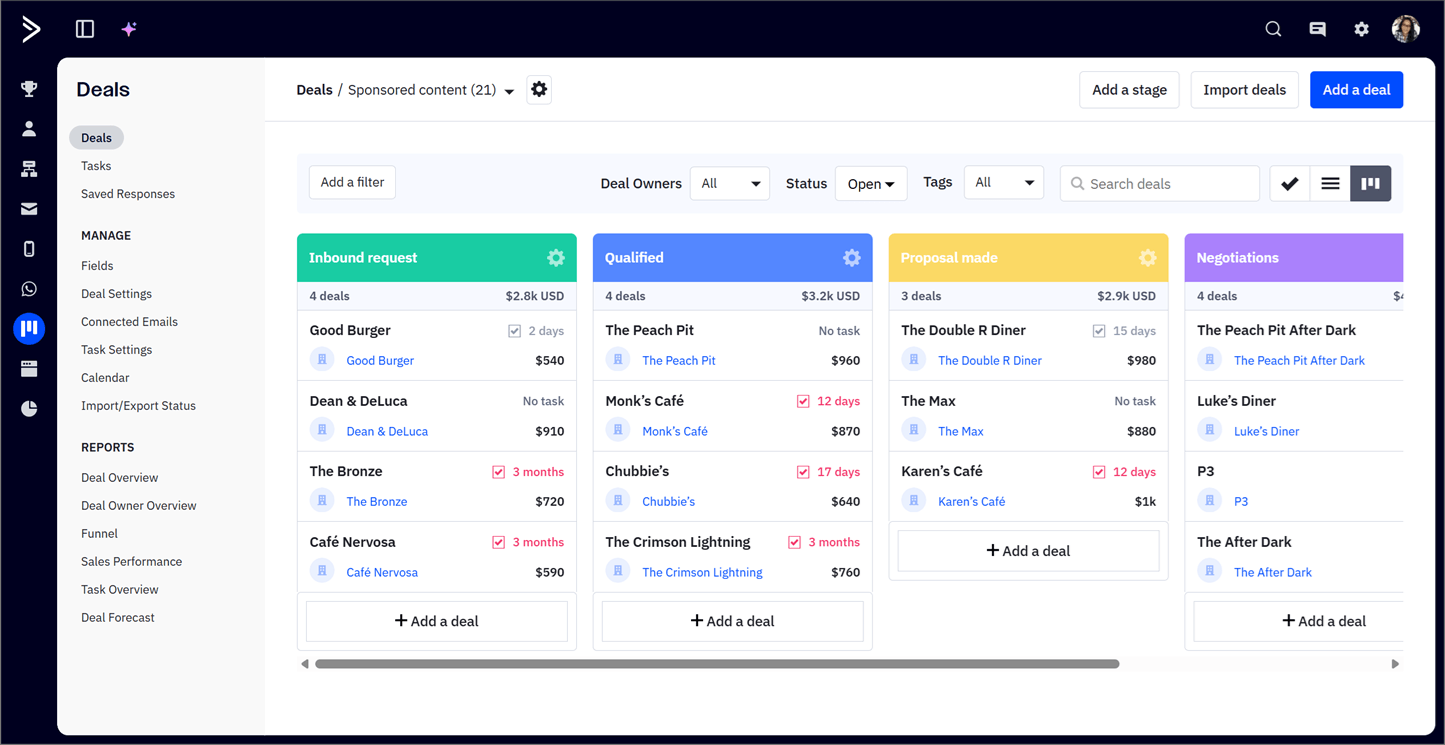
Our favourite aspect is how closely the sales tools connect with automation: a form submission can create a deal, while a change in deal stage can start the next follow-up.
What does it cost as you grow?
The Starter plan begins at $19 per month for 1,000 contacts, but there’s an important caveat: it limits each automation to five actions.
The Plus plan starts at $49 per month, adding features such as generative AI and landing pages. The Pro plan starts at $79 per month and includes predictive sending, conditional content, and more. CRM functionality is also an additional cost.
Is there a startup discount?
ActiveCampaign offers 90% off an annual plan for the first year through its incubator programme. There are a few conditions you must meet to qualify (you must be a new customer, have a business less than two years old, have secured no more than $1 million in funding, and currently participate in an incubator or have graduated within the previous 12 months). Approval is discretionary, and accounts move to full pricing after the first year.
Where ActiveCampaign falls short
Its flexibility comes with some trade-offs:
- There’s more to learn. We wouldn’t choose it just to send occasional newsletters.
- The entry plan is restrictive for complex workflows. The capabilities that attracted you are likely to require an upgrade, and ActiveCampaign’s pricing is at the premium end of the small-to-medium market.
- Sales features add to the bill. Include CRM and other channel costs in your comparison.
- Some design tools are less polished. In our testing, forms and landing pages were less convincing than the automation builder.
Our verdict: ActiveCampaign is a strong choice for a startup with a clear need for more sophisticated lead nurturing or customer journeys. We’d choose it when automation can replace meaningful manual work, and someone on the team has time to build and maintain it. For simpler requirements, Brevo or MailerLite may be easier to justify.
> Try ActiveCampaign for free for 14 days
Which email platforms are most popular with new brands?
Alongside our testing, we wanted to see which email tools new businesses (including startups) are actually using. Our Email Detective tool offers a useful snapshot: it identifies email platforms used by brands with recently registered or newly observed website domains.
Among 1,265 brands in its email marketing category, the ten most commonly detected email marketing platforms among these new brands were:
| Platform | Brands observed | Share of this group |
|---|---|---|
| Klaviyo | 171 | 13.5% |
| Brevo | 155 | 12.3% |
| Beehiiv | 108 | 8.5% |
| Kit | 103 | 8.1% |
| Iterable | 96 | 7.6% |
| MailerLite | 68 | 5.4% |
| HighLevel | 51 | 4.0% |
| Salesforce Marketing Cloud | 44 | 3.5% |
| HubSpot | 44 | 3.5% |
| Mailchimp | 43 | 3.4% |
Snapshot taken on November 11, 2026, covering domains dated within the previous 24 months. The dataset includes 1,265 new brands using email marketing platforms. Shows the first ESP Email Detective observed, which may not be the first one the business ever used.
The clearest takeaway is that new brands aren’t all starting with the same kind of tool. The mix includes e-commerce platforms, broader marketing tools and newsletter-focused services.
Looking at individual examples helps explain that variety. Klaviyo’s list includes fashion, beauty and specialty food brands. And Brevo’s includes software products and service businesses. So again, different niches are likely to have different email marketing needs.
Klaviyo leads this group, accounting for roughly one in six brands. So why do we recommend Omnisend over Klaviyo if more brands use Klaviyo?
Popularity is useful to know, but it doesn’t tell us which platform offers the best fit for a startup. For a startup getting its email marketing off the ground, setup, support and cost matter more than popularity. We found Omnisend easier to set up, and its support team were helpful when we had questions. Those advantages, alongside generally lower pricing, make it a strong choice for small ecommerce teams.
In short: treat the data as context, but not as a definitive ranking that should form the basis of your decision.
Which email marketing tool should your startup choose?
Although it ultimately wasn’t right for us, we have to admit Mailchimp was helpful in getting us started. But once we needed more ways to capture subscribers, deliver resources, and automate follow-ups, the value of a platform became about much more than sending emails for free.
Today, we use Brevo for much of EmailTooltester’s email marketing, Kit for Tooltester.com, and ActiveCampaign for HostingExperto.es. Having different tools across our sites has reinforced something we see in our testing: the right choice depends on what you’re trying to do.
For many startups, Brevo or MailerLite will be a sensible starting point. We’d look at Kit for an audience-led business, Omnisend for an online store, and ActiveCampaign when more advanced automation will save your team meaningful work.
Our advice would be to start with the tool that best matches your business model, then use its free plan or trial to build one real campaign and a welcome sequence. Before committing, check what you’d pay as your list grows and whether the features you’ll need require an upgrade.
The authors
Learn more about us

Our Methodology
This article has been written and researched following our EmailTooltester methodology.
Our Methodology