


EmailTooltester is supported by readers like yourself. We may earn a commission when you purchase through our links. Of course, this won't increase the cost for you.
Ever worry that your most important prospects might be slipping through the cracks?
While your business or consultancy might have leads coming in regularly, you might be struggling to follow up with them all.
At EmailTooltester, we struggled with this very problem for years. Finally switching from spreadsheets to a CRM made us realize how a structured system can completely transform how you manage opportunities.
Pipedrive and ActiveCampaign are two CRMs that promise to help businesses manage their leads better, although they approach it from very different directions. Pipedrive offers a clean, visual pipeline that helps you stay on top of deals without complexity, while ActiveCampaign focuses on powerful automation that progresses leads at the right time.
So, should you prioritize sales structure to keep deals moving, or automation to reduce manual follow-ups – especially when it often takes multiple touchpoints before a sale is made? In this Pipedrive vs ActiveCampaign comparison, I’ll focus on answering that exact question to help you decide which platform is better suited to your needs.
Pipedrive vs ActiveCampaign: The Main Differences
- Automation power: ActiveCampaign is built around automation. It allows you to trigger workflows based on contact behavior, deal changes, engagement signals, and more, making it much stronger for prioritizing leads and reducing manual follow-ups. Pipedrive offers solid sales automations, but they are simpler and more focused on pipeline actions.
- Sales reporting: Pipedrive is stronger for sales reporting out of the box. It offers better pipeline analysis, stage conversion tracking, and customizable reports/dashboards. ActiveCampaign’s reporting leans more toward email engagement and automation performance, unless you add paid reporting features.
- Pricing: ActiveCampaign’s primary product is email automation, and it requires a paid add-on to access CRM features, with customizable reports extra on top of that. Its pricing also increases as your contact list grows. Pipedrive is the opposite: it includes core CRM features in its standard plans and makes email marketing an optional add-on.
Now let’s take a closer look at how Pipedrive and ActiveCampaign stack up in their sales management capabilities.
Ease of use
If you’re looking for a CRM that will be adopted by your sales team with little resistance, ease of use is probably high on your priority list. And in this round, there’s one tool that stands out.
Both ActiveCampaign and Pipedrive offer some form of onboarding to help you get started. ActiveCampaign provides guided checklists and setup resources that walk you through lists, campaigns, and automations. It’s helpful if your main goal is email marketing and automation. But it can feel like a lot if you just want to get a basic CRM and pipeline running quickly.

ActiveCampaign’s dashboard
Pipedrive also offers personalized onboarding and in-app guidance, but it’s more tightly focused on sales fundamentals like pipelines, deals, and activities. If you want quick, practical progress, Pipedrive’s onboarding feels more straight-to-the-point.
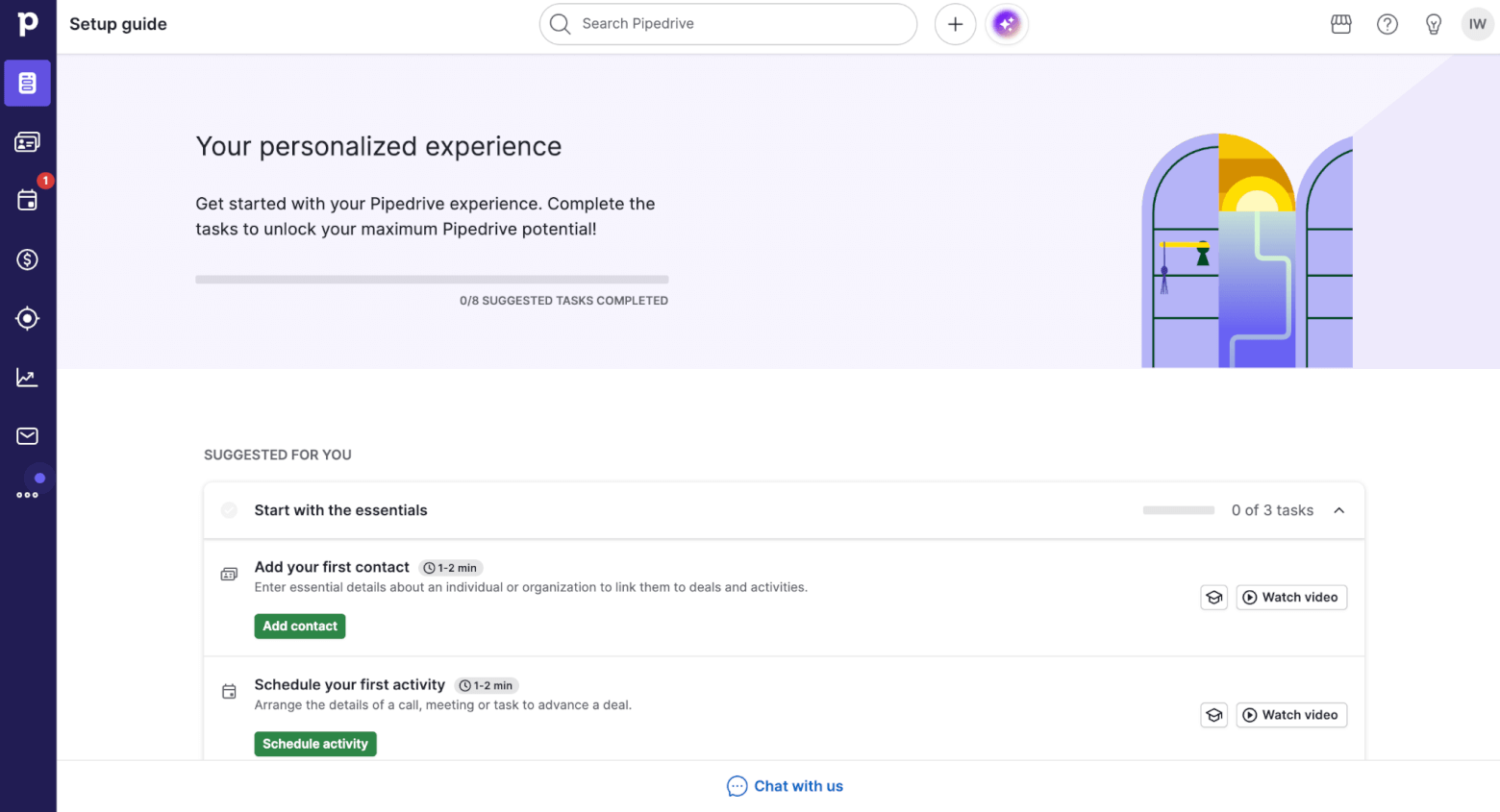
Pipedrive’s onboarding dashboard
The interface is where the biggest difference shows up. ActiveCampaign is a powerful platform, but the interface can feel busy. It’s not hard to use, but it does require more orientation, and some features are nested deeper in menus.
And while simple tasks like sending campaigns or managing contacts are manageable, building automations or combining workflows usually come with a learning curve.
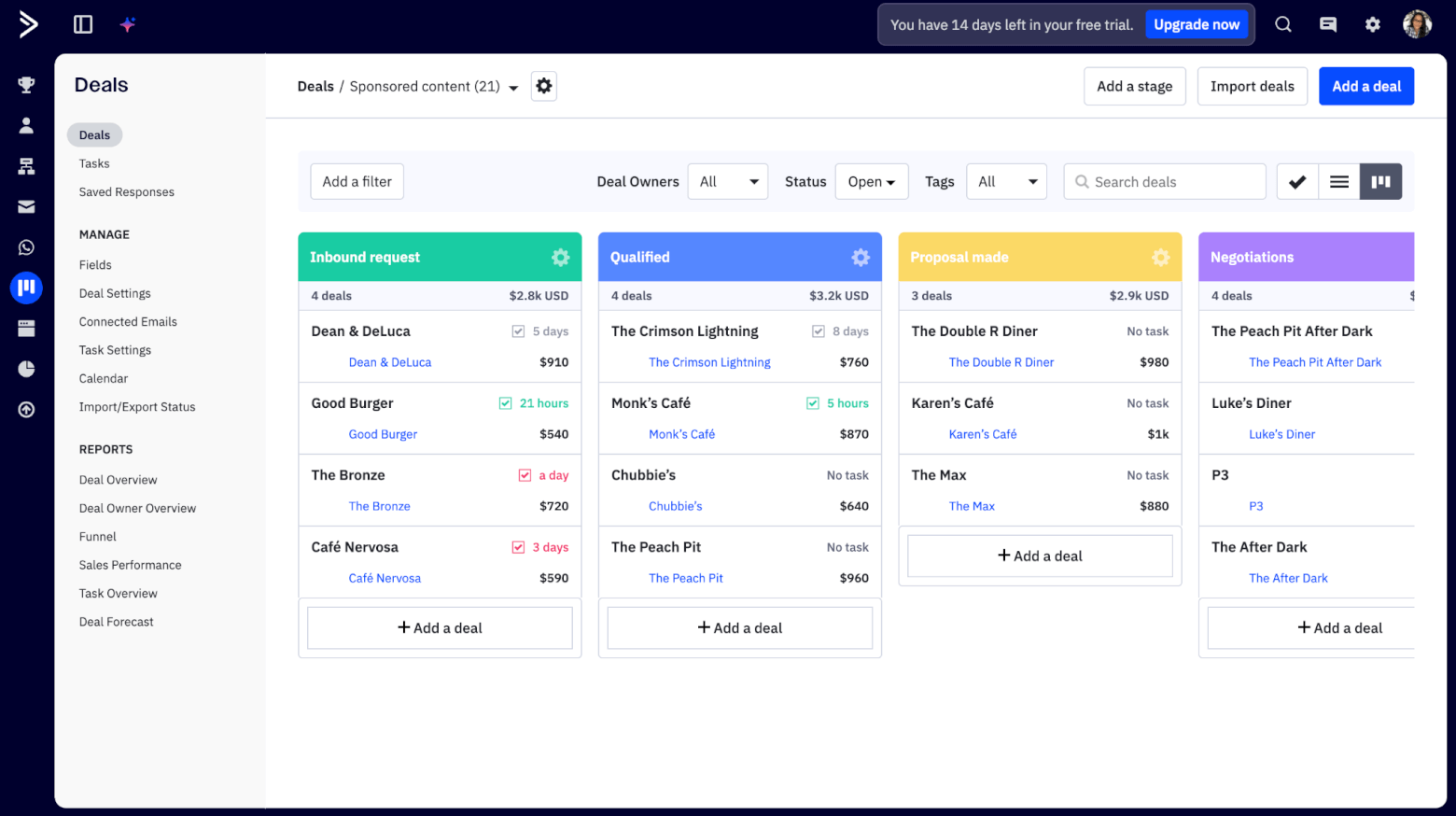
ActiveCampaign’s interface often displays menus nested within menus and can feel cluttered compared to Pipedrive’s
Pipedrive, on the other hand, is clearly designed around a single goal: moving deals through a pipeline. The layout is clean, visual, and consistent, which makes it easier to find what you need without thinking too much about where things live.
Most users will be able to create deals, move them through stages, schedule follow-ups, and stay organized without any training.
There are also plenty of clickable tooltips (denoted by an ⓘ symbol) to help explain unfamiliar terms, and guide you through getting the most out of the tool, which I think is a nice touch!
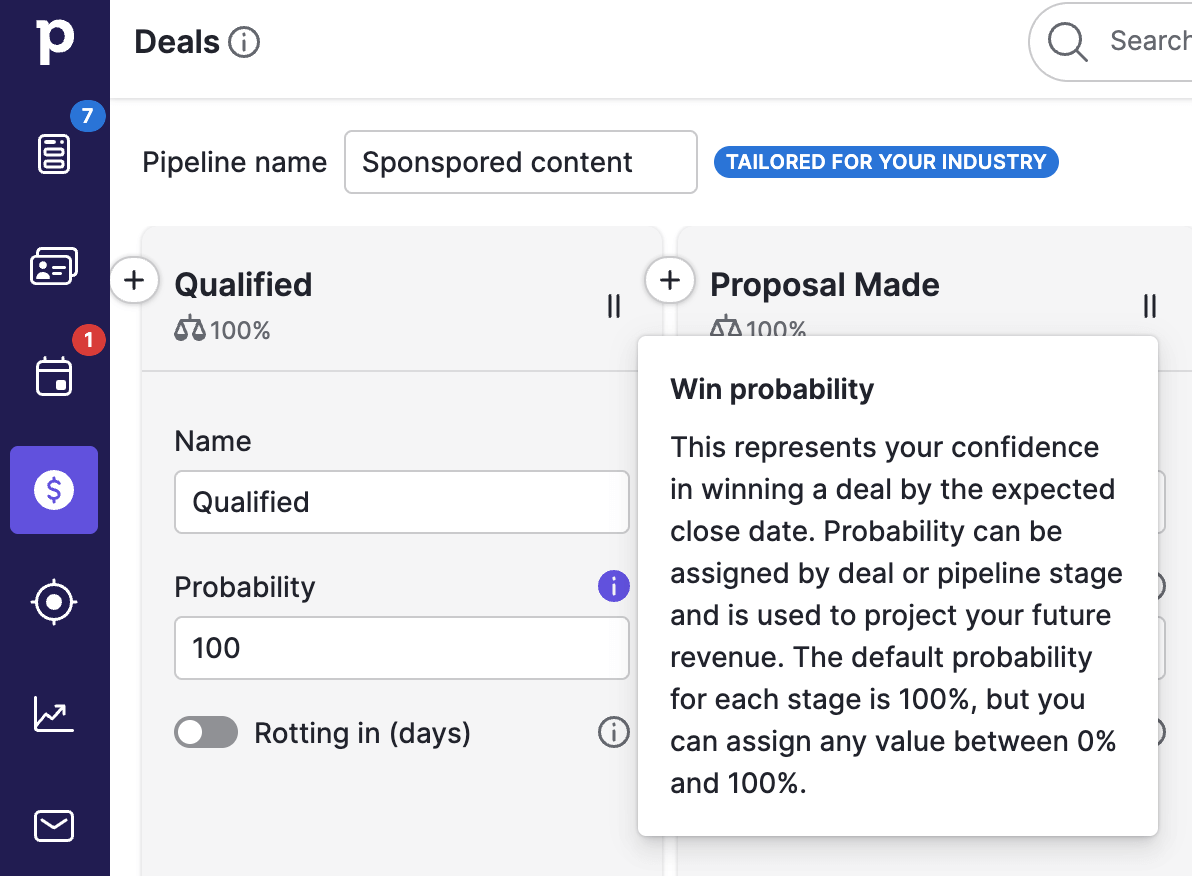
Pipedrive uses tooltips to help explain features and concepts to users
Winner: If ease of use is your top priority and you want a CRM that feels intuitive, fast, and simple to adopt, Pipedrive is the stronger choice. ActiveCampaign is still very usable, but it asks more from you upfront because it is doing more.
Score: ActiveCampaign – 0, Pipedrive – 1
Pipeline Management
When pipelines grow beyond a handful of opportunities, it becomes harder to see which deals are active, which are stalled, and what should happen next. This is where the quality of a CRM’s pipeline design really starts to matter.
Both ActiveCampaign and Pipedrive let you create multiple pipelines, and fully customize deal stages so that pipelines reflect your real sales process.
What’s great is that Pipedrive highlights stalled deals directly in the pipeline view with visual cues like the Deal Rotting feature, making inactivity easy to spot at a glance.
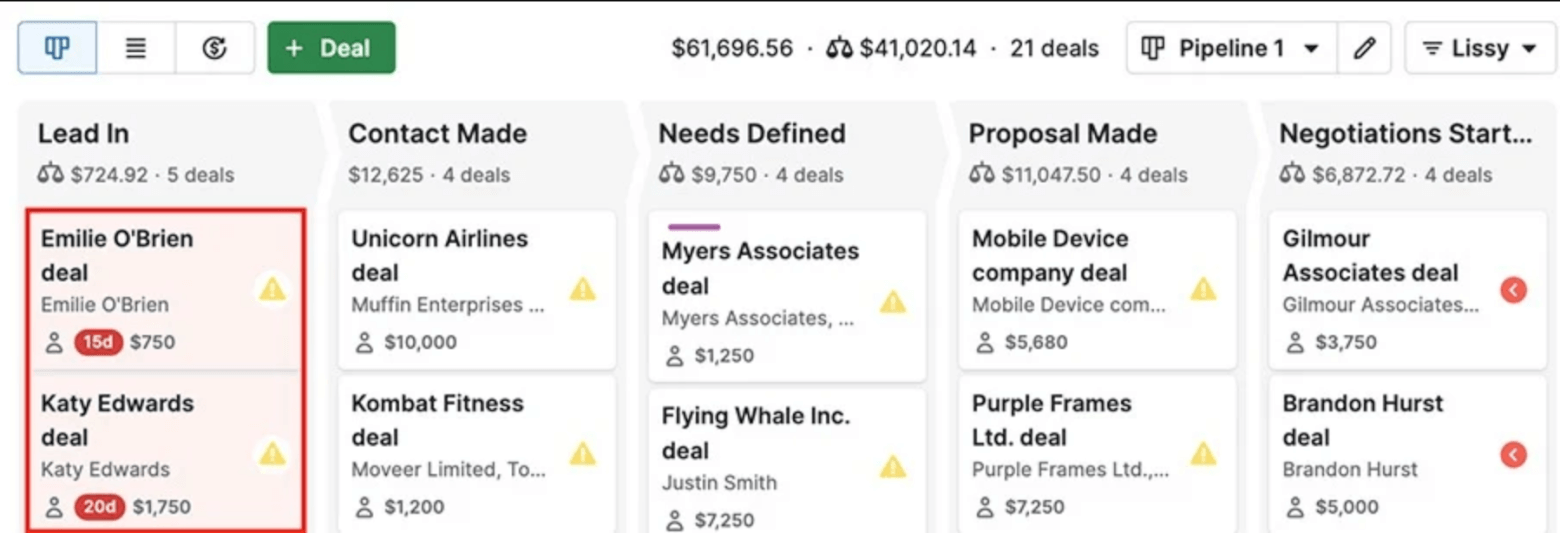
Pipedrive highlights deals that have stalled with its Deal Rotting feature
ActiveCampaign provides this visibility through filters, deal data, and reports, which usually requires a bit more configuration to see exactly what you want. But stalled deals can also be used as triggers within automations, meaning that there’s less manual intervention required to nurture and progress them.
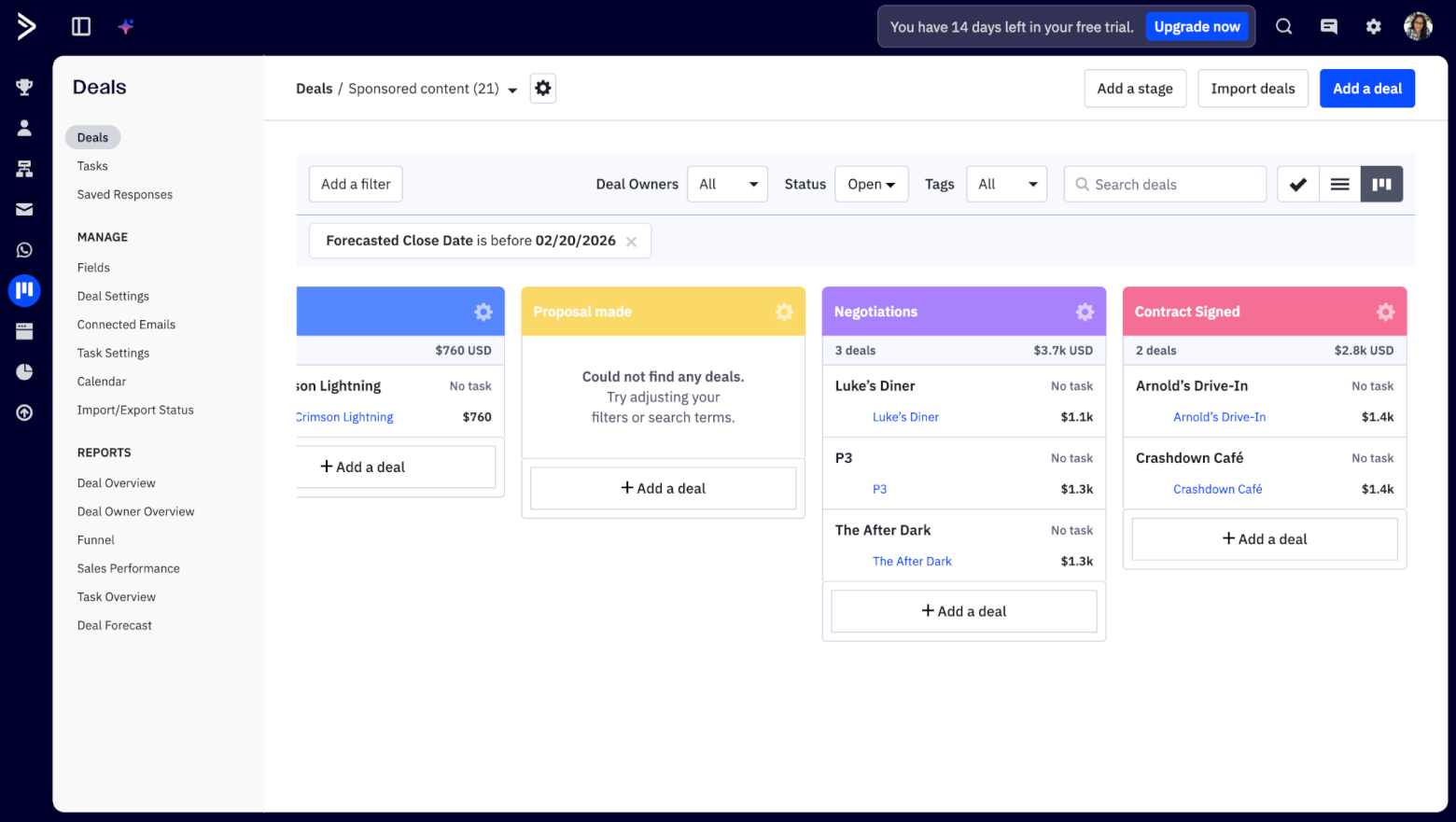
In ActiveCampaign, you can use filters to show which deals in your pipeline remain open after their forecasted close date
In both tools, you’ll also be able to easily identify ownership and next actions. In the pipeline, Pipedrive organizes deals by activities and prompts users to associate deals with activities. There’s also the AI-powered Sales Assistant that highlights overdue activities or opportunities that need attention. All of this helps to make the next steps very clear.
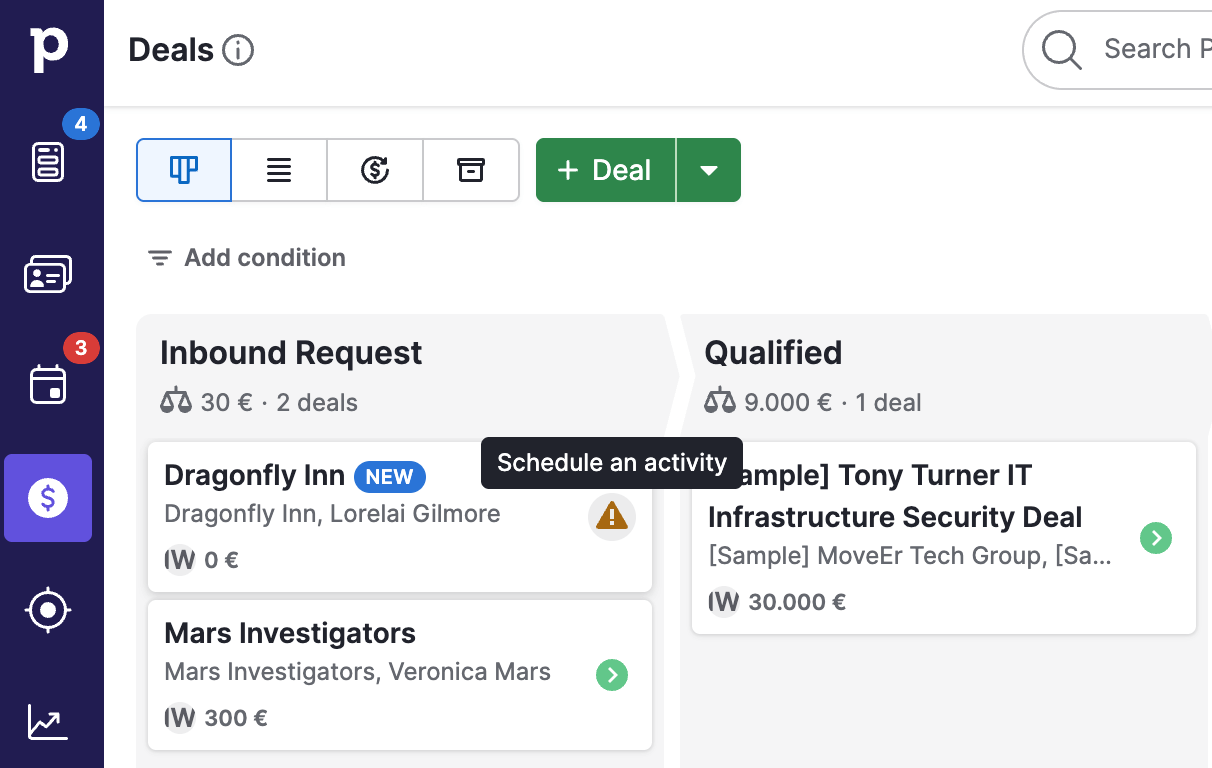
Pipedrive highlights when a deal is missing an activity, prompting users to add one to make the next step clear
ActiveCampaign supports the same concept, showing upcoming and overdue tasks within the main pipeline view, and also providing a list view that can be filtered to show relevant tasks.
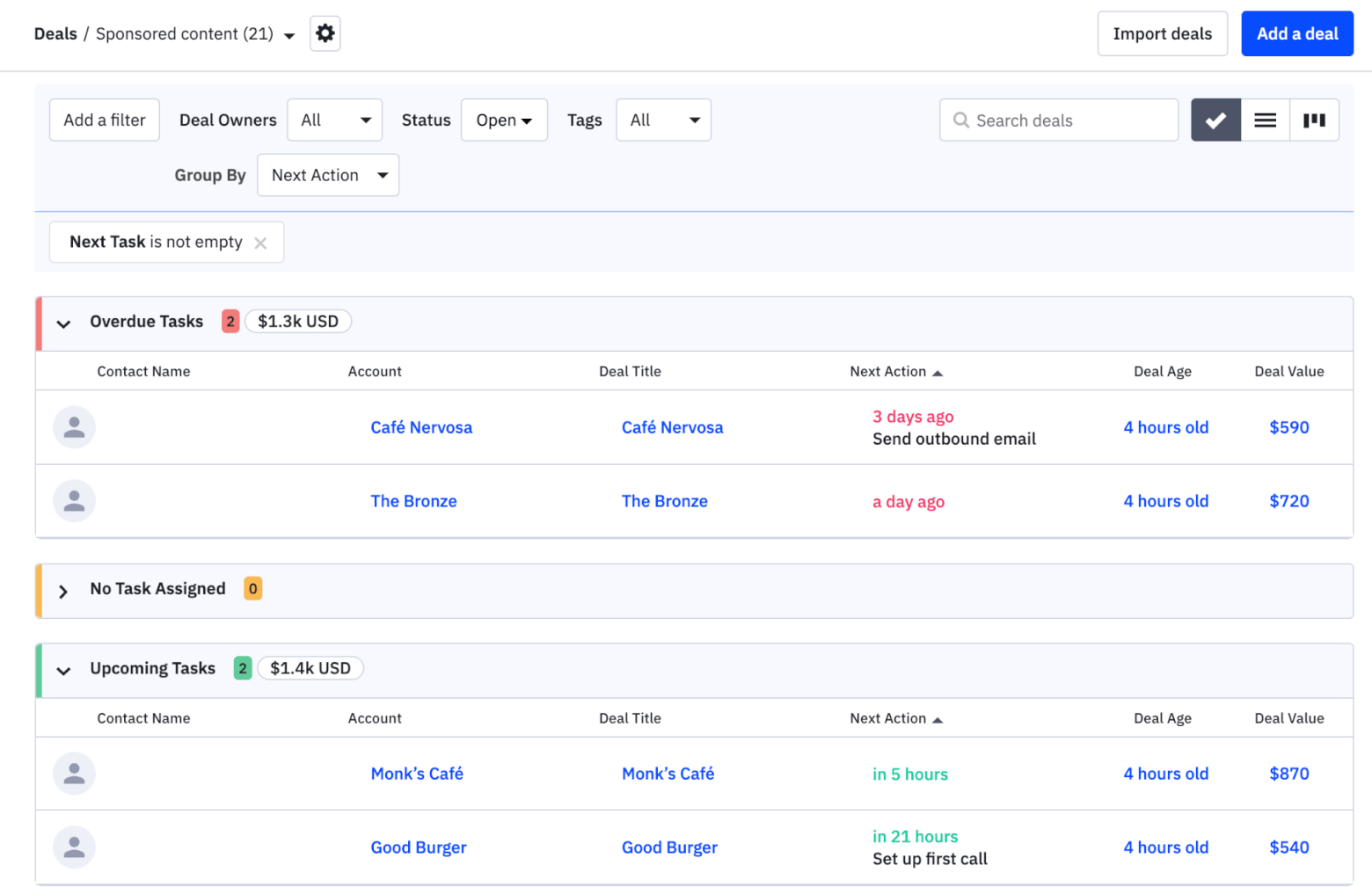
ActiveCampaign offers a list view of overdue, upcoming and scheduled tasks associated with deals
Bottom line: Both ActiveCampaign and Pipedrive offer solid, flexible pipeline management that covers the essentials, making this round a tie. Pipedrive feels more pipeline-first, while ActiveCampaign offers more configurability.
Score: ActiveCampaign – 1, Pipedrive – 2
Contact and Deal Management
When it comes to contact and deal management, both tools cover the fundamentals well. You can add custom fields for contacts, deals, and companies in both platforms, and duplicate handling is also solid in both tools. So from a pure “can I store the data I need?” perspective, it’s evenly matched.
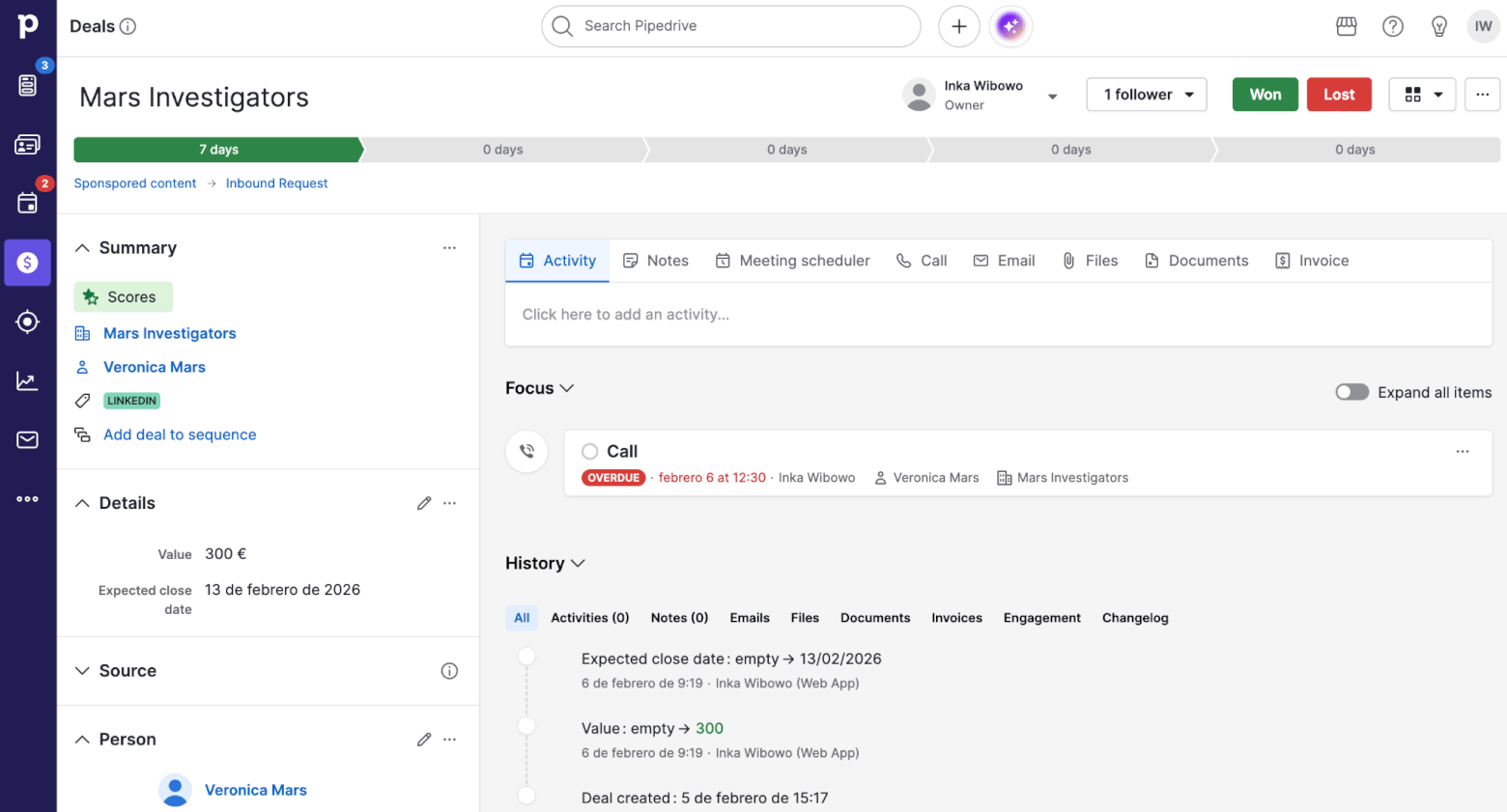
The Deal view in Pipedrive is fully customizable and shows you key information related to the contact, organization, activities, and products associated with a deal
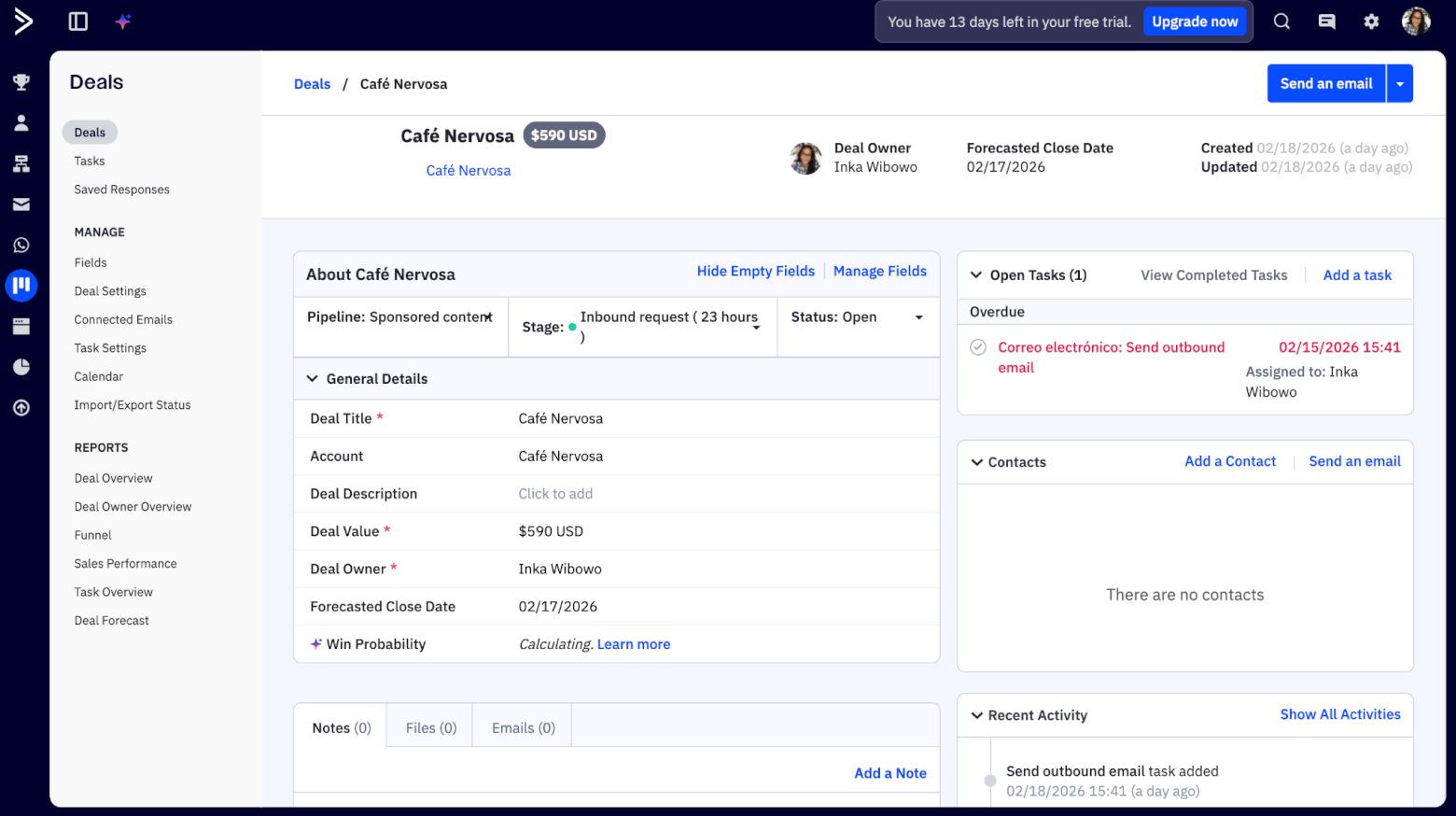
The deal view in ActiveCampaign is just as detailed as Pipedrive’s
Where things really start to diverge between ActiveCampaign and Pipedrive is in how leads and contacts are handled. Pipedrive manages leads separately to contacts through the Leads Inbox, where you can store and organize unqualified or early-stage leads.
It assumes a relatively linear path from lead to deal to customer, and is less adaptable if your definition of a lead or customer changes depending on context, product, or timing.
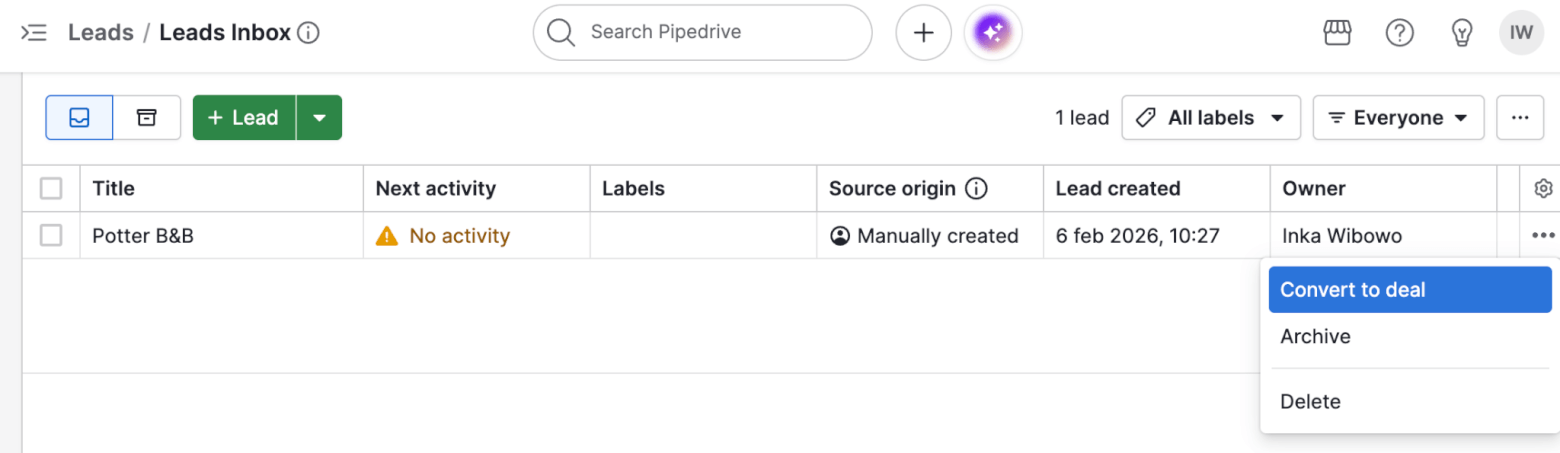
In Pipedrive, leads are opportunities that haven’t yet converted into deals, and the actions you can take with them are limited.
ActiveCampaign handles nuance better. It’s built around a flexible, contact-centric system that uses lifecycle stages, tags, segments, and automations to represent whether someone is a lead, customer, churned account, or something in between.
You aren’t locked into a single interpretation of what a lead or customer is, and for businesses with longer lifecycles, overlapping sales and marketing ownership, or non-linear journeys, that flexibility can be a real advantage.
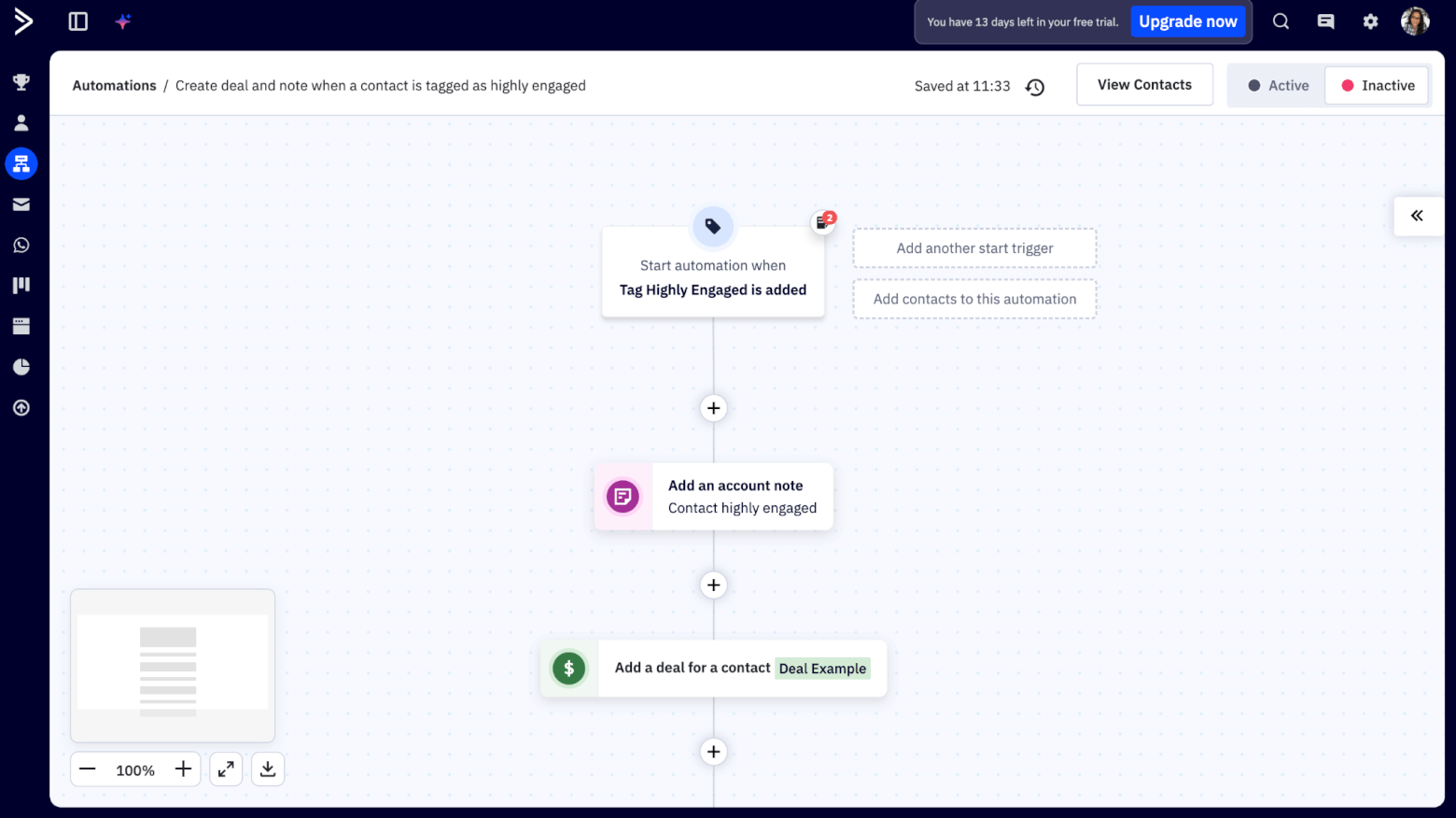
In ActiveCampaign, you can combine tags, segments, scores and automations to manage your deals with more flexibility
Bottom line: If you want a CRM that enforces clarity with minimal setup, Pipedrive does a great job. But if you want a system that can adapt to complex lifecycles, ActiveCampaign is the stronger choice for deal and contact management, taking out this round.
Score: ActiveCampaign – 2, Pipedrive – 2
Email Features
Both ActiveCampaign and Pipedrive cover the basics when it comes to email. They sync natively with Gmail and Outlook, let you send one-to-one emails from inside the CRM, and automatically log conversations on the contact and deal record. For simple sales communication, both tools do the job.
But here’s where they start to diverge. ActiveCampaign includes full email marketing out of the box. You can run campaigns, segment audiences, personalize content, and track performance. In Pipedrive, email marketing exists, but mostly as an add-on and with more limited depth.
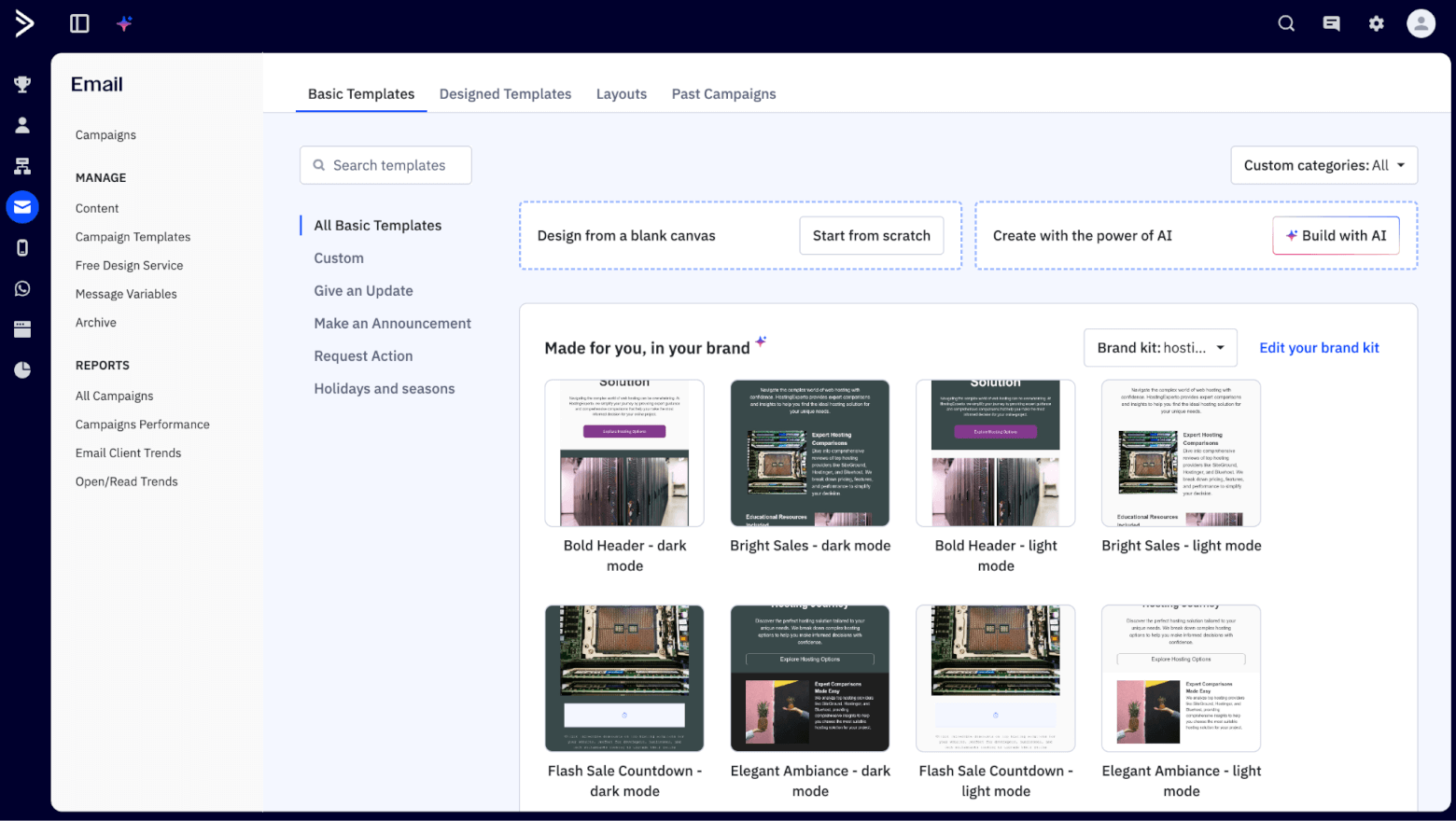
ActiveCampaign’s extensive email marketing tools include AI-generated templates
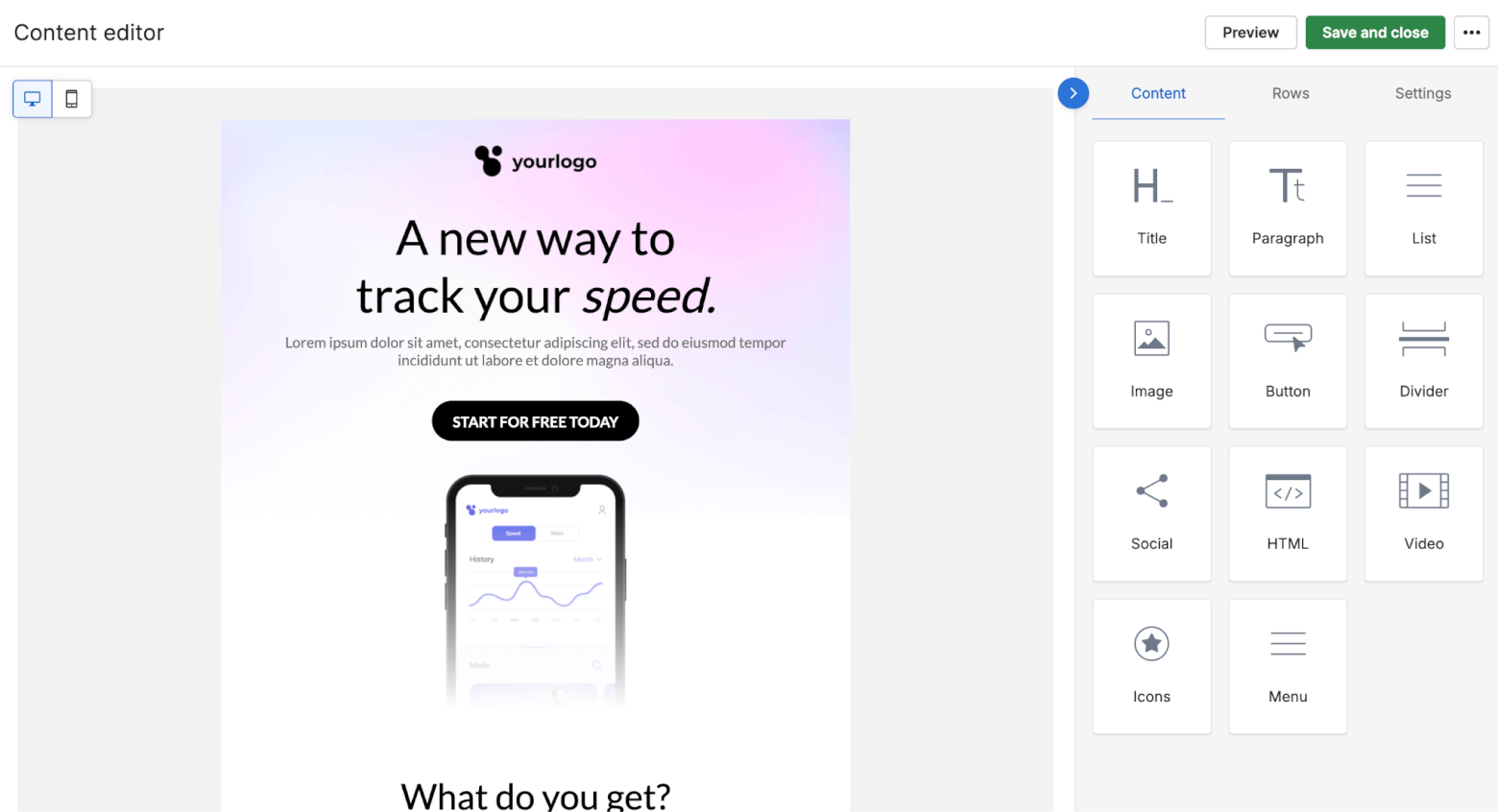
Pipedrive’s email marketing editor is simple to use but basic compared to ActiveCampaign’s
Both tools also offer an activity timeline where emails, calls, meetings, notes, and deal changes appear in chronological order. Pipedrive’s timeline is clean and easy to scan, but ActiveCampaign’s timeline goes a step further by mixing in marketing activity and automation events, so you get more context around how and when someone engaged, not just what your team did.
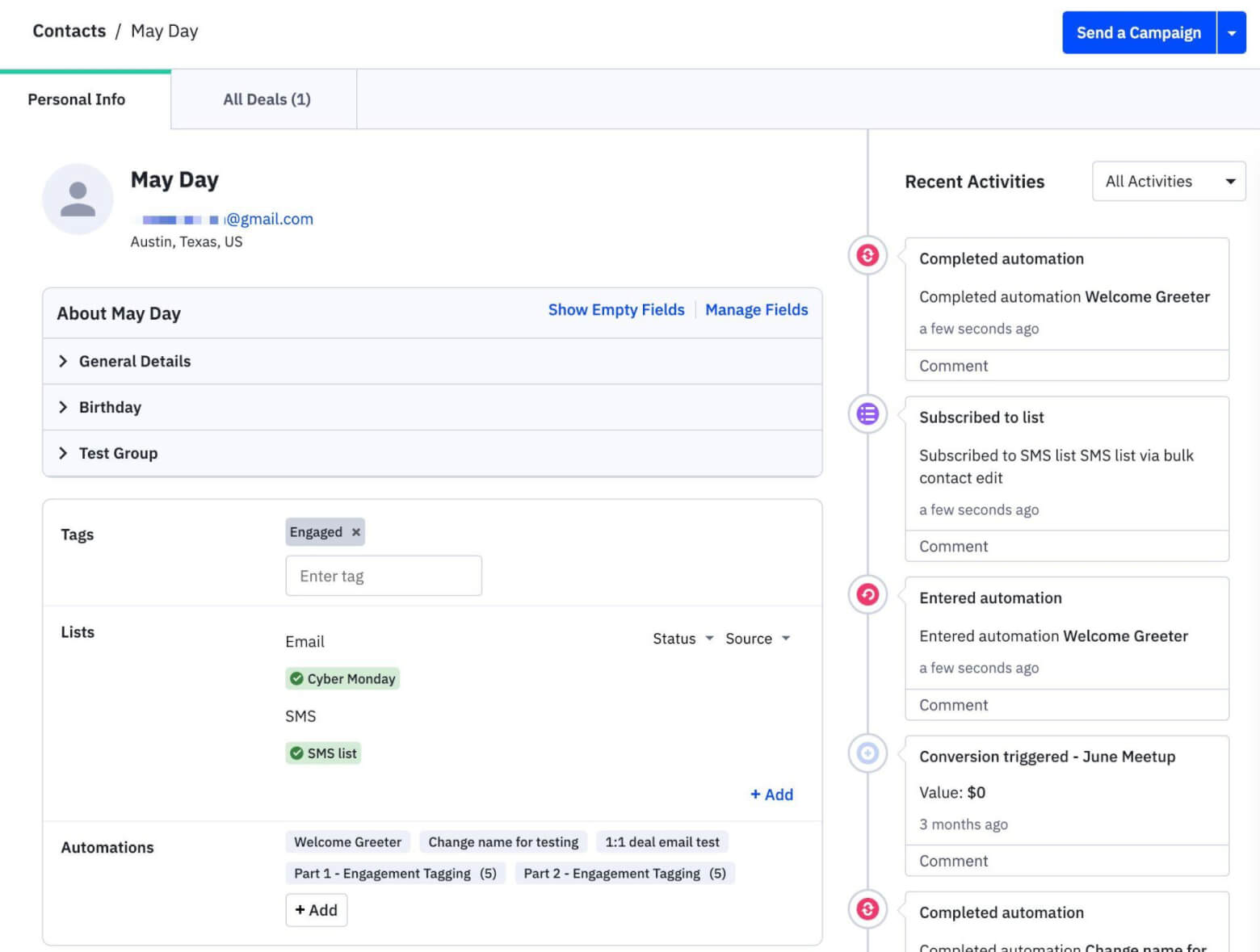
ActiveCampaign’s contact records show a complete activity history of actions taken by the contact
Engagement tracking is another area where ActiveCampaign pulls ahead. Both platforms show opens, clicks, and replies for one-to-one emails, but ActiveCampaign lets you actually use that data. Opens, clicks, and replies can trigger automations, change lead scores, or kick off follow-ups automatically. In Pipedrive, these signals are mainly there to inform sales judgment.
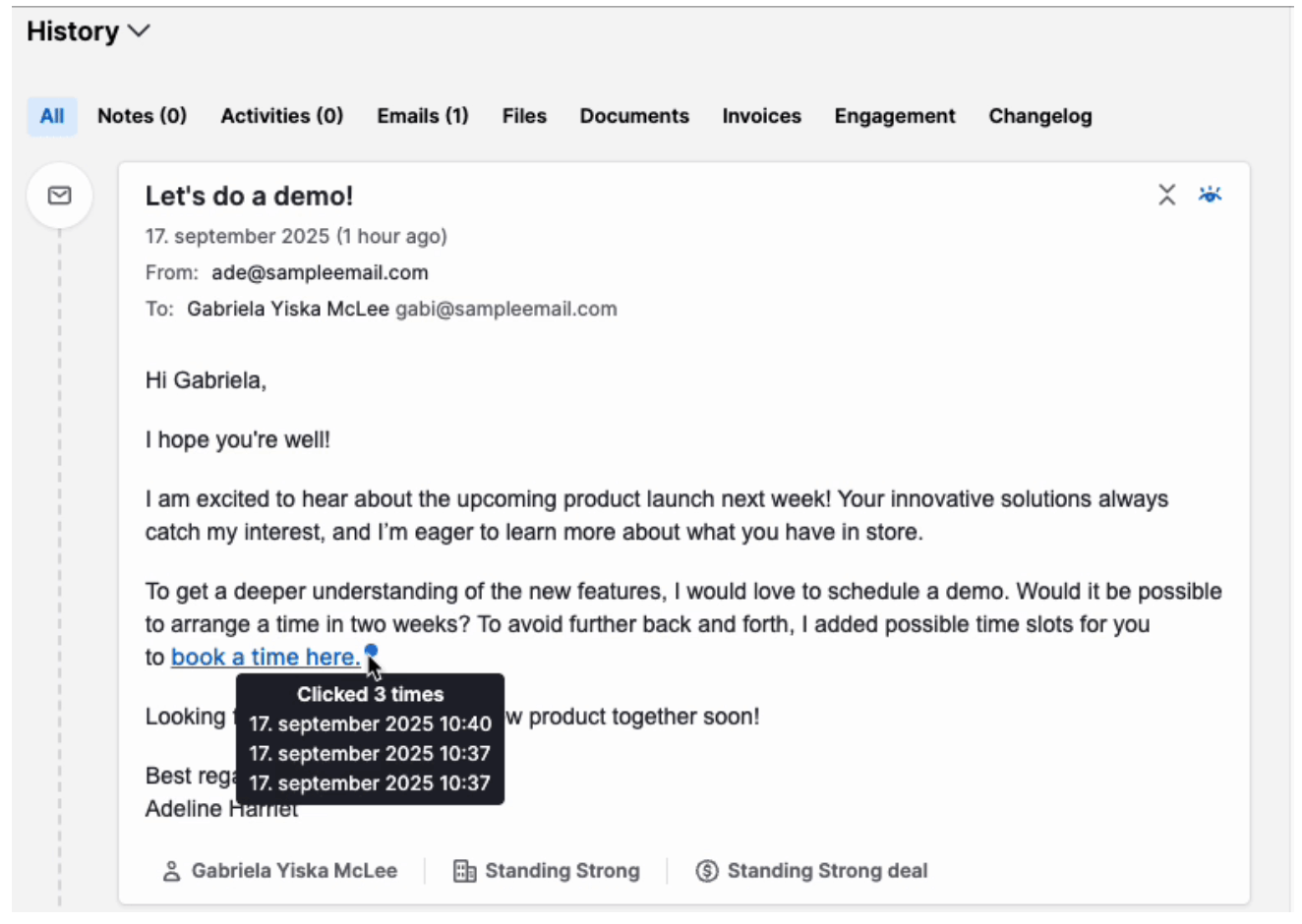
Pipedrive’s Email Tracking feature lets you see when contacts have opened and clicked one-on-one emails, but it’s not possible to trigger automations off these events
Bottom line: If email is mostly about keeping a record of conversations, Pipedrive is perfectly fine. But if email is central to how you nurture, follow up, and engage leads at scale, ActiveCampaign is clearly the stronger option in this round.
Score: ActiveCampaign – 3, Pipedrive – 2
Automation
On paper, both ActiveCampaign and Pipedrive promise to save time by automating repetitive work. But once you try to build something slightly more than a simple rule, there’s one that will take you a lot further.
On the visual front, ActiveCampaign’s automation builder is easy to understand at a glance. You get a drag-and-drop workflow canvas where you can see triggers and actions laid out clearly, and follow the path logic without guessing. There are also hundreds of pre-built workflows, or “Recipes”, to help you get started quickly, and pre-designed email templates that can be adapted to your campaigns.
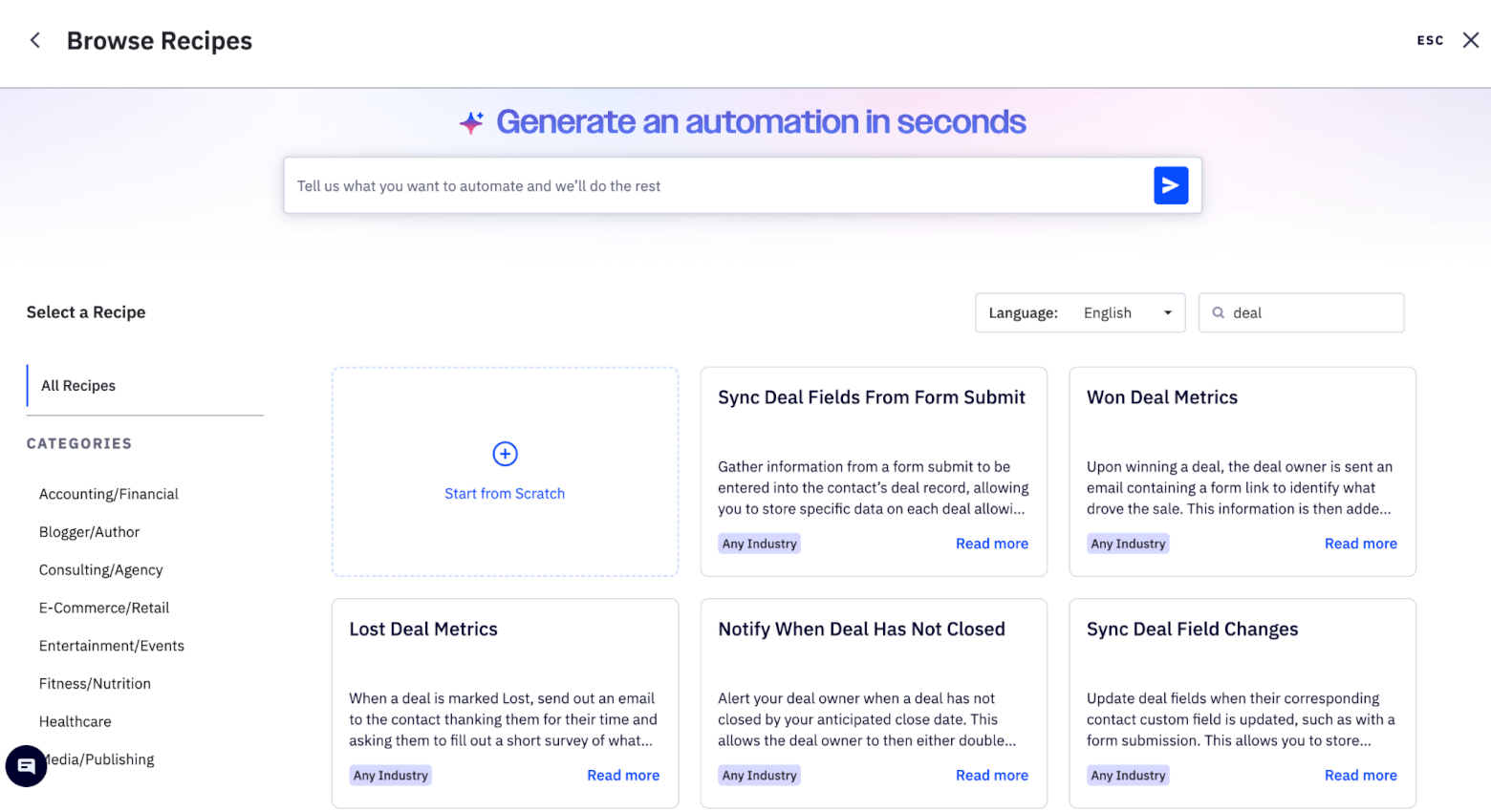
ActiveCampaign offers hundreds of “Recipes” to help you set up automations easily
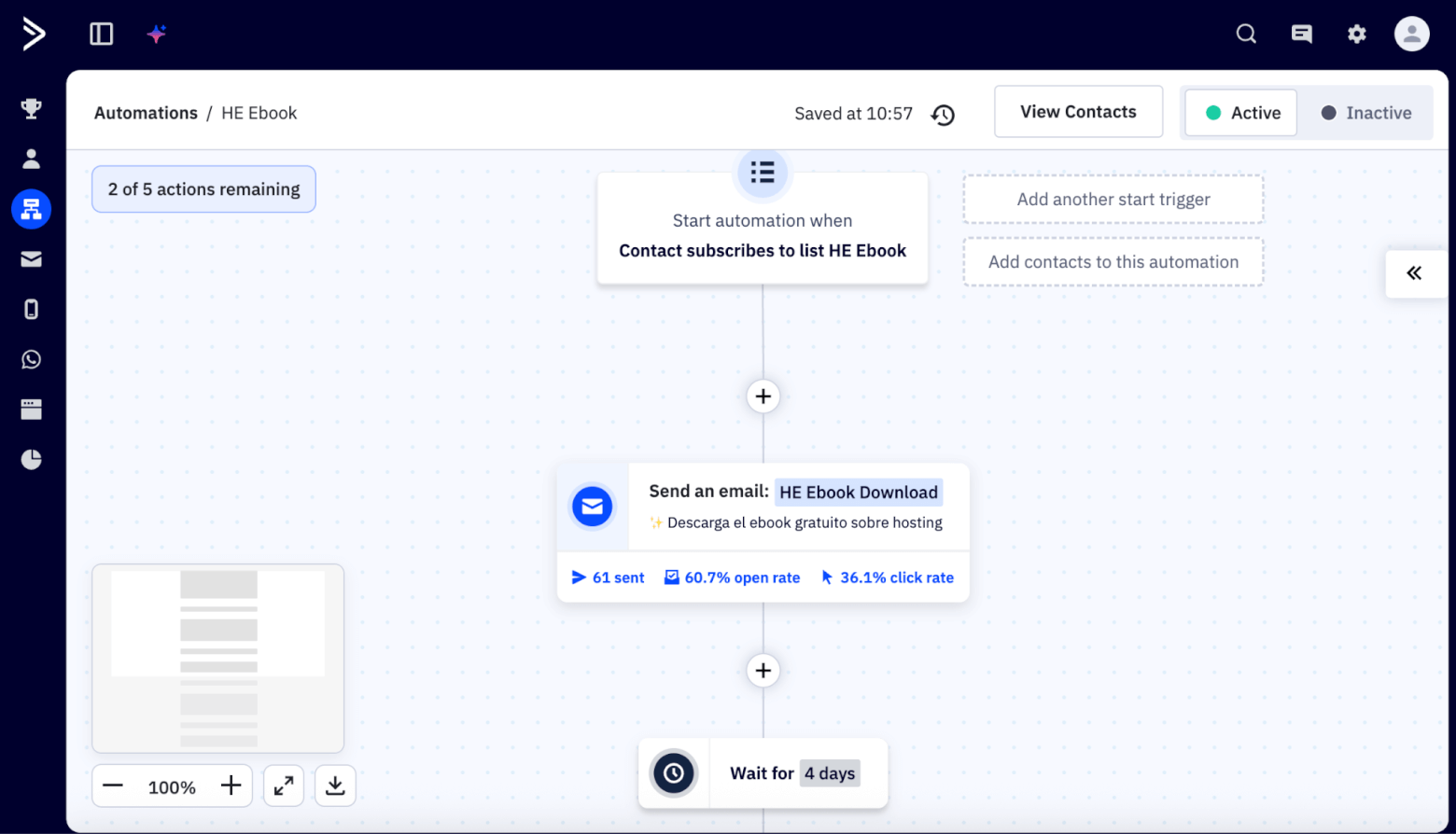
An automated workflow in ActiveCampaign
Pipedrive offers automated workflows two ways: via its Automations feature, and its Sequences feature (which focuses mainly on email sequences). However, both are a lot less flexible than ActiveCampaign’s automation builder. You can generally only add one step per stage, and the “if/else” branching logic is also more limited in terms of possibility. 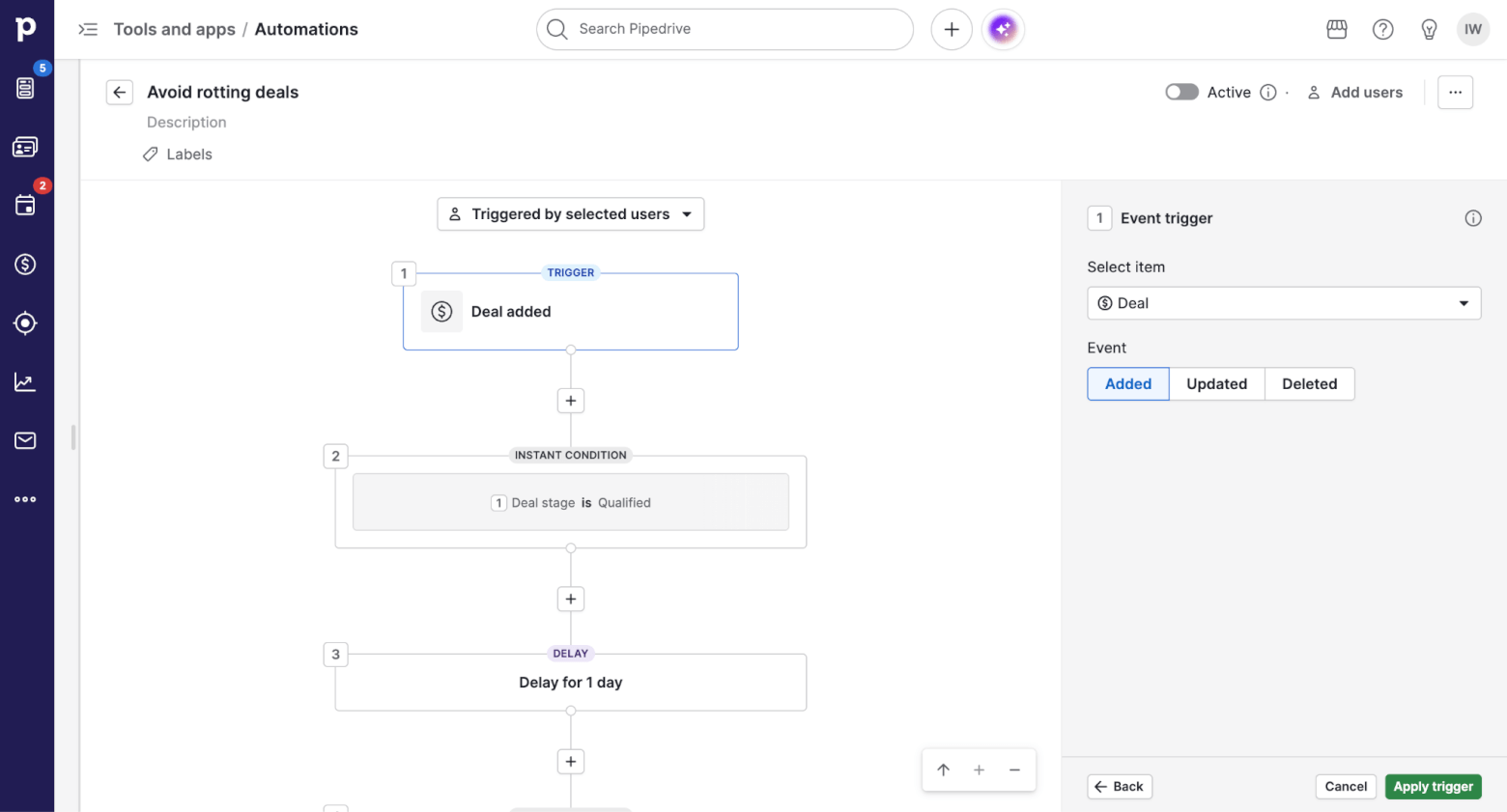
Trigger options are another place where ActiveCampaign stands out. It can fire up a workflow based on contact actions like web visits, form submissions, email opens, link clicks, or tag changes. It can also be triggered by deal events such as a stage change, a newly created deal, or a won/lost deal – and you can even mix these conditions together.
Pipedrive’s automation triggers are useful for typical sales tasks, but are generally more limited and sales-centric, and don’t reach as deeply into engagement signals. Their triggers tend to focus on whether data has been added, updated or deleted, rather than based on specific contact behaviour, and it’s not possible to combine multiple triggers like it is with ActiveCampaign.
Once a workflow starts, both ActiveCampaign and Pipedrive give you a broad range of actions. You can create deals, send emails, fire internal notifications, update data (like custom fields or deal properties), assign owners, and more. Time-based or inactivity conditions, such as “if no activity in 3 days, send follow-up”, are also easy to build.
However, ActiveCampaign takes automated actions further, with the ability to add or remove tags, adjust contact scores, send an SMS, and even trigger AI actions – tasks that can’t be performed within Pipedrive.
Bottom line: Pipedrive can help you automate routine sales tasks, but ActiveCampaign’s automation features are broader, more visual, and better suited to workflows that span sales, marketing, and ongoing customer engagement.
Score: ActiveCampaign – 4, Pipedrive – 2
Reporting
Both ActiveCampaign and Pipedrive let you report on deals, contacts, activities, and users. You can filter by time ranges and ownership and get a general overview of what is happening in a relatively intuitive way.
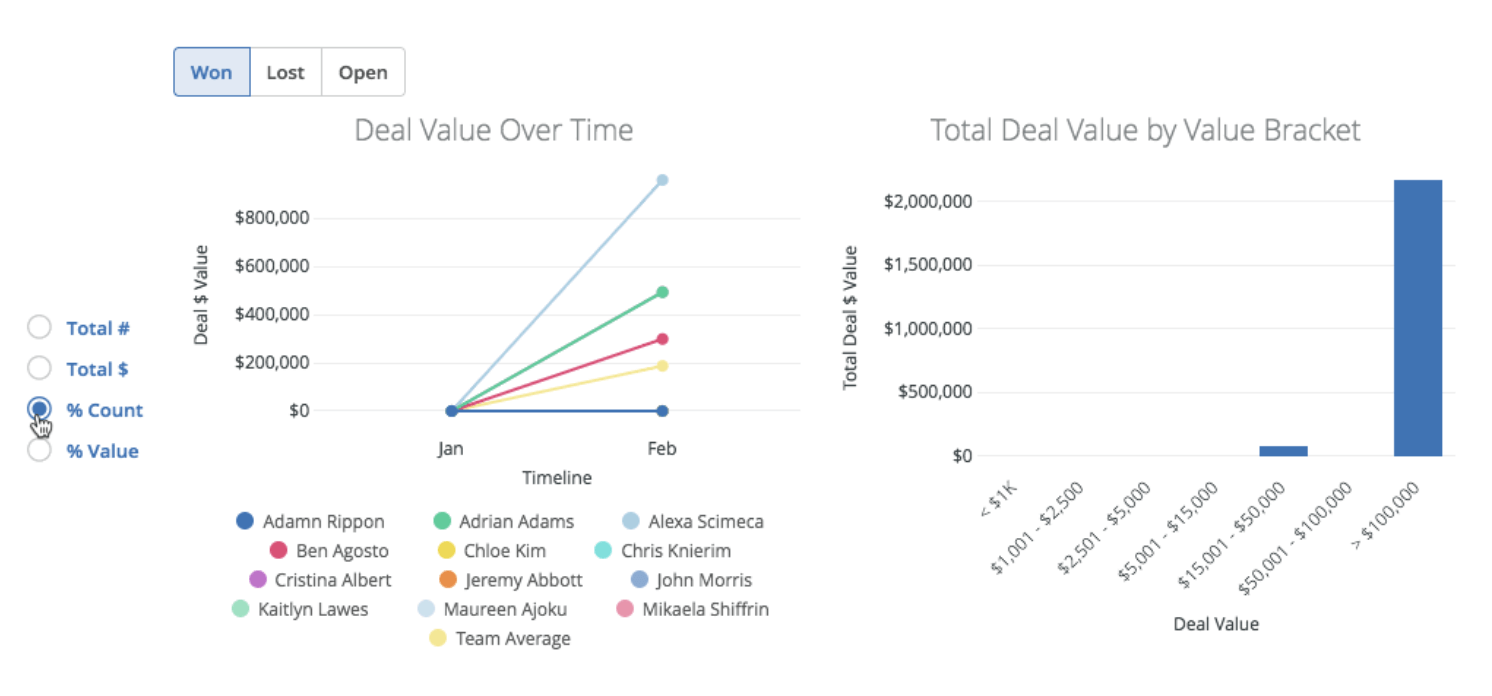
Some of the deal reports available within ActiveCampaign
The difference appears when you want more control. Pipedrive offers a custom report builder through its Insights feature, which lets you combine multiple filters and conditions, and build reports around how your sales process actually works. It’s particularly strong when it comes to pipeline analysis, such as stage-to-stage conversion rates, win probabilities, and activity performance. These insights are easy to access and useful without much configuration.
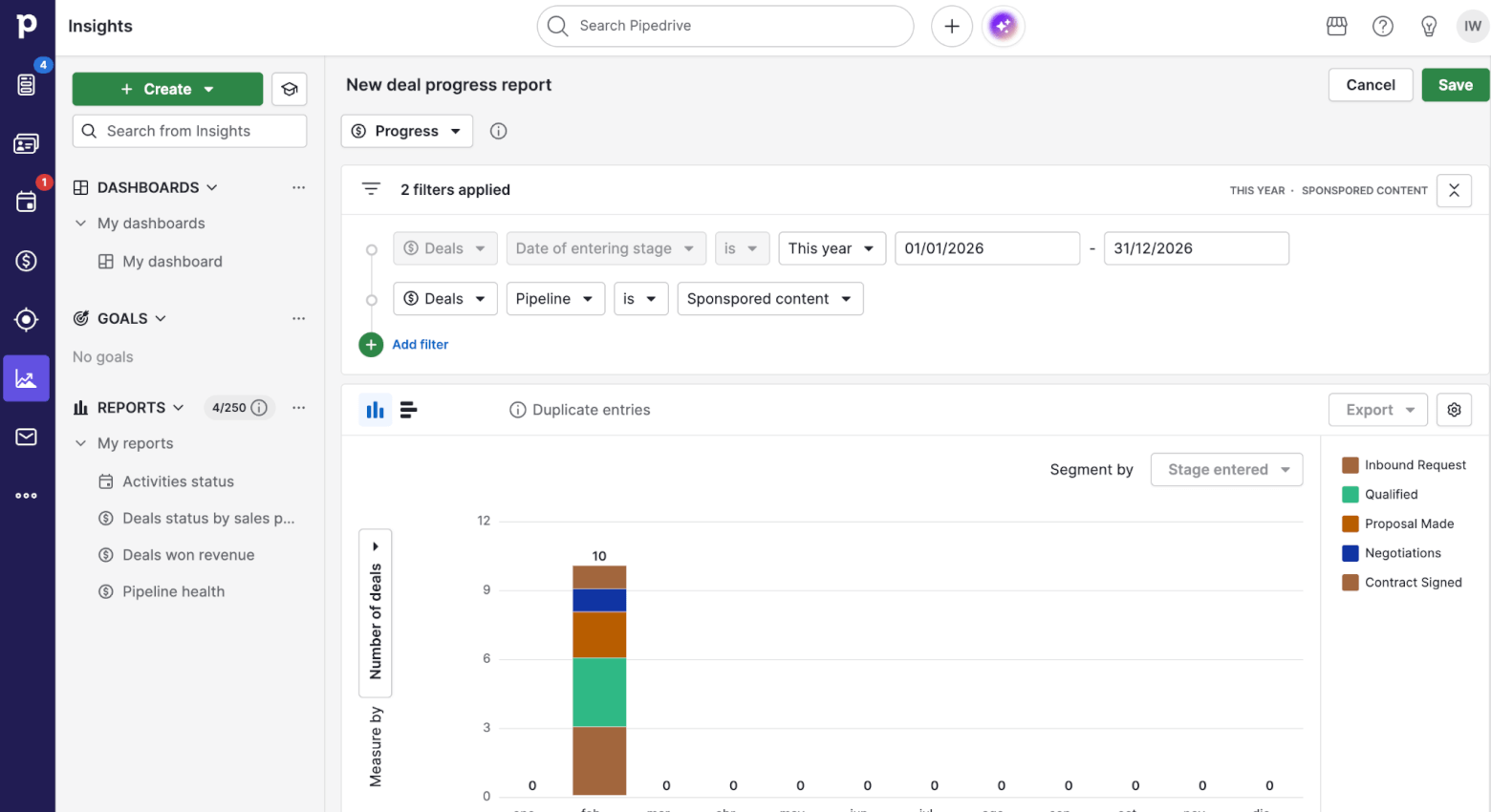
Using filters to create custom reports in Pipedrive
You can even generate reports with the help of Pipedrive’s AI assistant, which lets you create a custom report with just a prompt.
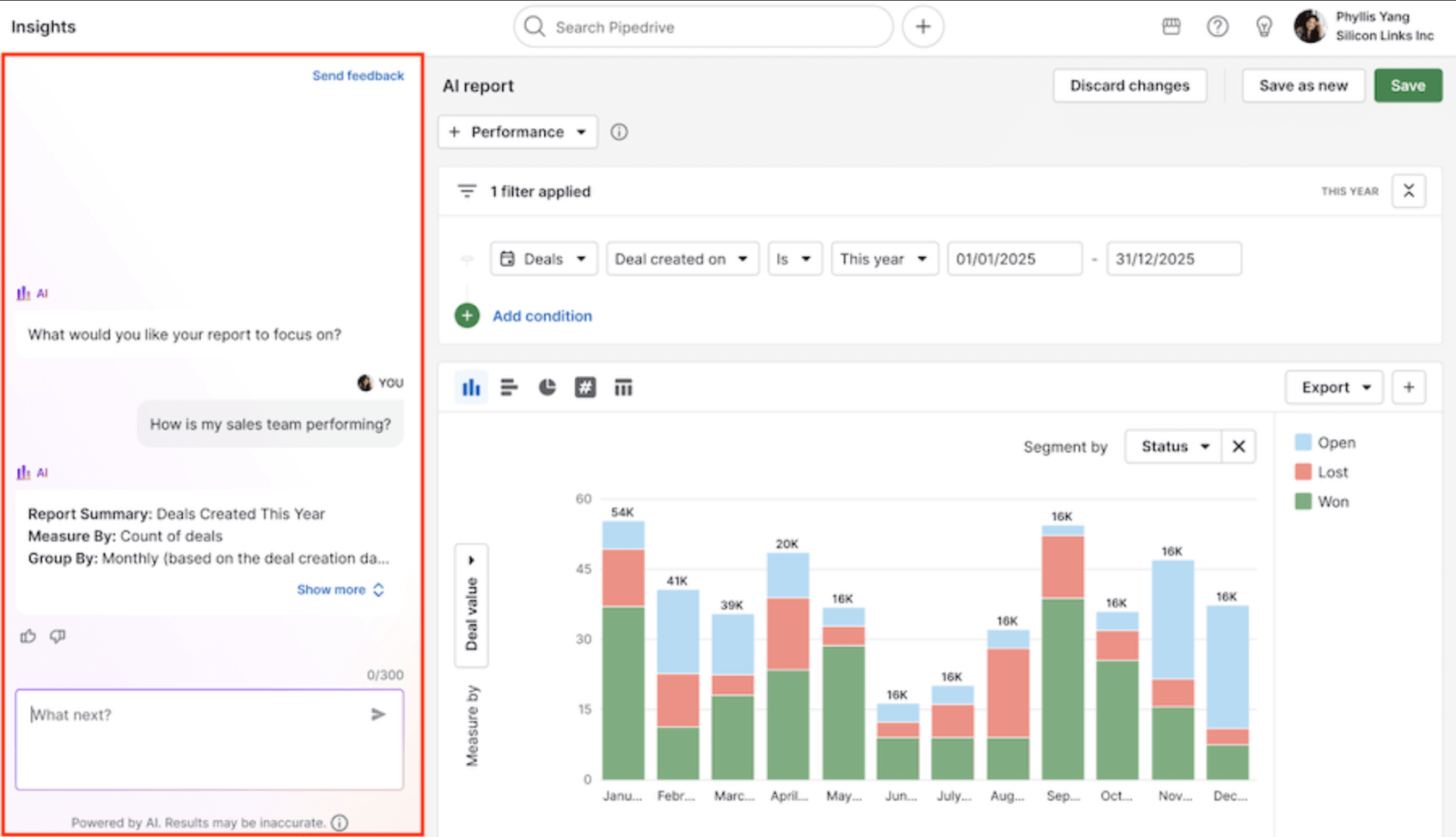
Using Pipedrive’s AI agent to create a custom report
ActiveCampaign’s reporting is more focused on engagement and marketing performance. It provides detailed views into email campaigns, automations, and contact behaviour, but just a handful of deal-related reports are included by default, including:
- Deal overview
- Sales performance
- Task overview
- Deal forecast
What’s more, custom reports for deeper pipeline analysis need a paid add-on, and creating a central view of pipeline health takes more setup.
Bottom line: If your priority is clear, flexible sales reporting that helps you understand pipeline performance and team activity at a glance, Pipedrive is the stronger option.
Score: ActiveCampaign – 4, Pipedrive – 3
Lead Scoring
When your lead volume grows, a good scoring system can make a real difference in follow-up quality.
Pipedrive recently introduced “Scores”, which was still in Beta at the time of writing. It’s designed to help teams prioritize deals by assigning points based on criteria you define. Right now, those criteria can be built using deal and activity fields only (so, things like deal data and logged activities). Scores update automatically as deal data changes, and you can test your scoring logic in a preview before turning it on.
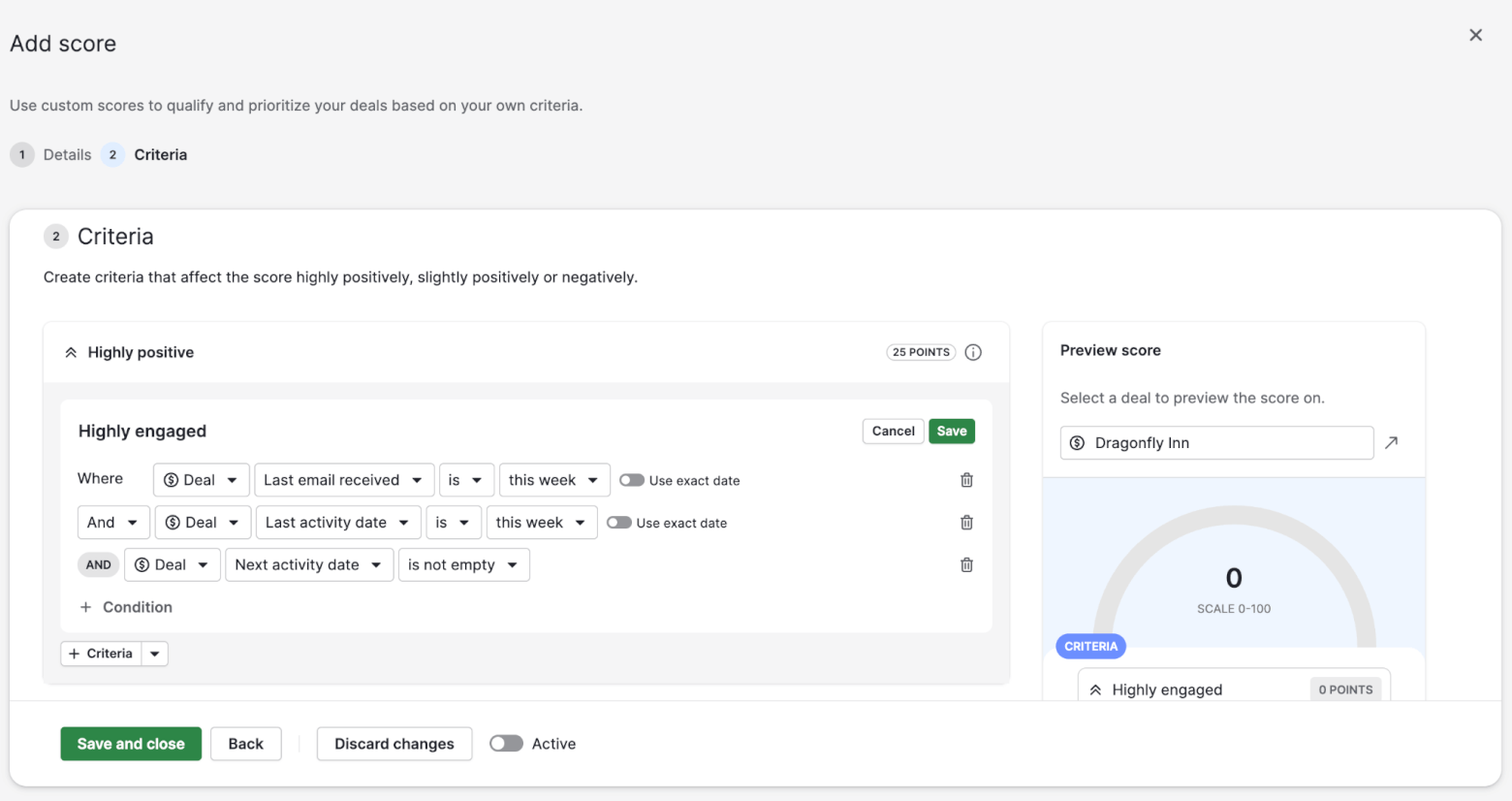
This is useful for sales teams that want a clearer, more consistent way to rank deals, but it’s not the same as a behavior-driven contact score.
ActiveCampaign’s scoring is broader and more mature. It supports contact scoring as well as deal scoring, and you can build rules and automations that add points based on a wide range of signals, including email engagement and website behavior. It also supports negative scoring, which helps avoid “stale” leads staying hot forever.
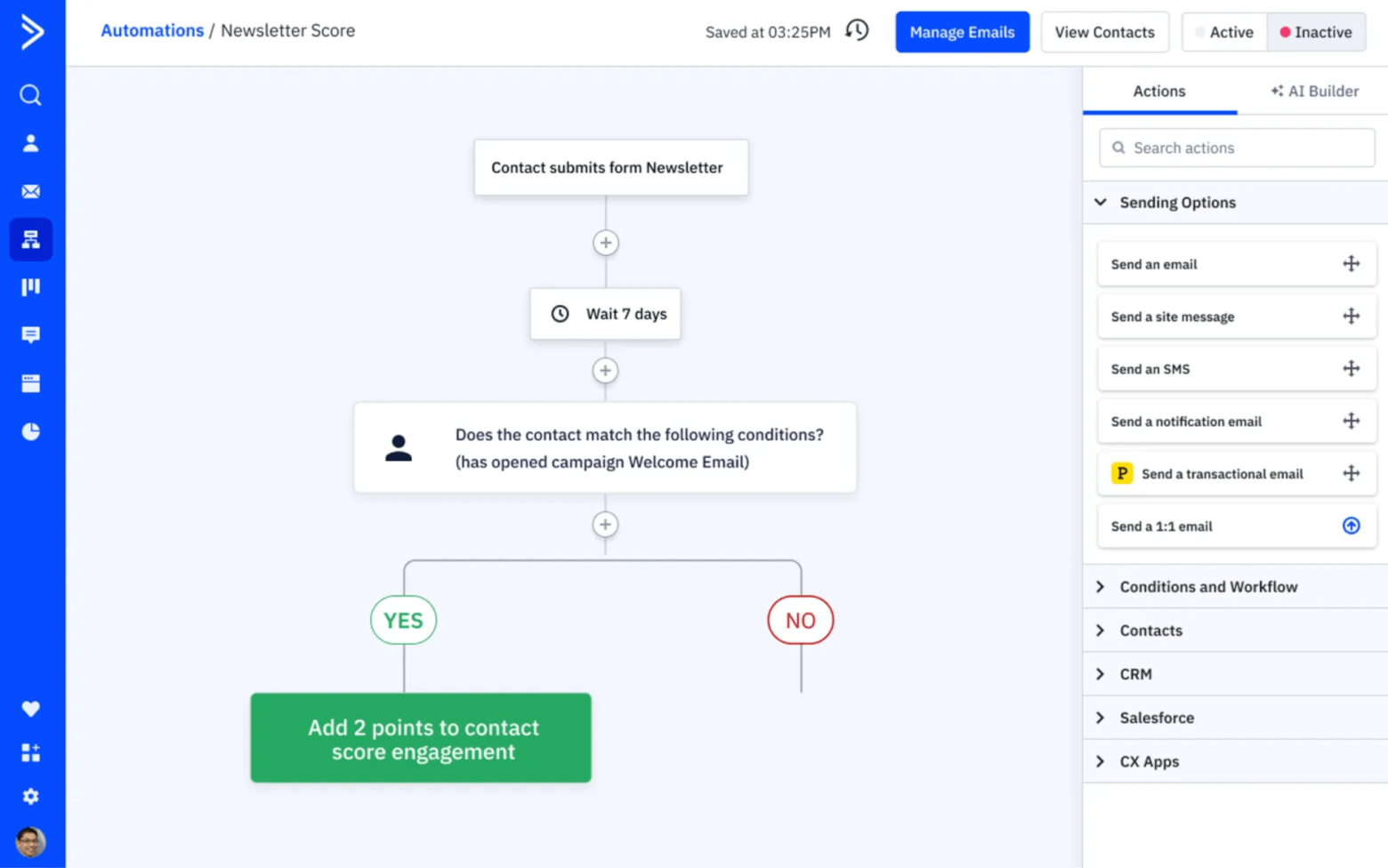
The biggest practical difference is what you can do once a score changes. In ActiveCampaign, score changes are meant to plug directly into automations. You can adjust scores dynamically when behaviors occur, and then use those scores to drive routing and follow-up logic (for example, alerting sales when a lead crosses a threshold).
Pipedrive’s Scores are primarily about prioritization and visibility in the pipeline, which is valuable, but they’re narrower in scope and currently focused on deals rather than contacts.
Bottom line: Pipedrive’s new Scores feature is a strong step for deal prioritization, especially if you want a simple scoring model based on deal and activity data. But ActiveCampaign wins this round because it gives you more flexibility, and tighter ties into automation.
Score: ActiveCampaign – 5, Pipedrive – 3
Integrations
On the surface, ActiveCampaign and Pipedrive look very similar when it comes to integrations. Each offers hundreds of native integrations across key categories like email, forms, ecommerce, payments, support tools, and analytics. Zapier and Make are also available in both ecosystems. So, you’re unlikely to run into a situation where your core tools aren’t able to connect to either system.
Both ActiveCampaign and Pipedrive also support two-way sync for important integrations, particularly with email and calendar tools like Gmail and Outlook. And both CRMs make it easy to import contacts, deals, and related data from spreadsheets or other CRMs, which reduces the pain of switching tools.
Where ActiveCampaign pulls ahead is in what happens after data arrives via an integration. Events coming from connected tools, such as form submissions, ecommerce activity, or app updates, can immediately trigger automations, adjust lead scores, update deal data, or assign tasks.
In Pipedrive, integrations tend to play a more supportive role. They reliably sync data and keep records up to date, but they are less central to automation logic. And more advanced workflows often rely on webhooks or external automation platforms (like Zapier) rather than being handled natively inside the CRM.
Bottom line: ActiveCampaign wins this round not because of its number of integrations, but because of how deeply those integrations connect to automation. If you want integrations to actively drive automated workflows and decisions inside your CRM, ActiveCampaign has the edge.
Score: ActiveCampaign – 6, Pipedrive – 3
AI Features
AI is increasingly part of how CRMs help teams work smarter rather than harder. But ActiveCampaign’s AI toolkit is broader and more directly tied to core workflows. It can help you with tasks like:
- Generating email content
- Suggesting segments and contacts worth targeting
- Creating or improving automations based on engagement
Pipedrive’s AI features are narrower, and tend to focus on assistive tasks like:
- Drafting emails and summarizing conversations
- Suggesting next steps and sending reminders
- Providing insights into deal health.

These are valuable, especially for sales reps managing heavy inboxes and pipelines. But they don’t extend as deeply into workflow optimization as ActiveCampaign’s AI does.
Bottom line: Pipedrive’s AI functionality is helpful for personal productivity, but it doesn’t quite match ActiveCampaign in terms of impact, making ActiveCampaign the logical winner in this round.
Score: ActiveCampaign – 7, Pipedrive – 3
Support
ActiveCampaign and Pipedrive both offer a comprehensive knowledge base, where you’ll find setup guides, how-to articles, and troubleshooting documentation. ActiveCampaign’s help center is particularly strong around automations, email, and advanced use cases, while Pipedrive’s documentation is very clear and approachable for core sales workflows.
Live chat support is also available in both tools, which is important when you need help quickly. However, availability and priority will usually depend on your plan. It’s also important to note that only Pipedrive offers 24/7 support, although this is limited to Premium and Ultimate plan users. ActiveCampaign’s live chat support is available during business hours from Monday to Friday, and during limited hours on Sunday.
In both cases, I found that support agents give clear, actionable answers. That said, ActiveCampaign’s support team is generally more experienced with complex scenarios, especially around automation logic, integrations, and deliverability issues. If your setup is more advanced, that extra depth can save time.
Bottom line: Both ActiveCampaign and Pipedrive provide good support, with strong documentation and helpful agents. This round is a tie!
Score: ActiveCampaign – 8, Pipedrive – 4
Pricing
We’ve reached our final round – pricing. So which of the two platforms is more affordable?
At first glance, ActiveCampaign can look competitively priced, especially if you focus on its entry-level plans (like the Starter plan). But it’s important to understand that ActiveCampaign’s primary focus is email automation – and CRM features are not included by default.
To create deals, pipelines, and sales workflows, you’ll need to add a paid CRM add-on on top of a base ActiveCampaign plan (Plus, Professional, or Enterprise). The entry-level Starter plan does not support CRM add-ons at all.
For users on the Plus plan, you’ll need to choose from one of the following CRM add-ons:
- Pipelines add-on: from $39/month
- Sales Engagement add-on (includes the ability to trigger automations based on sentiment changes, and send automated 1:1 emails): from $68/month
For Professional plan users:
- Pipelines: from $68/month
- Sales Engagement: from $111/month
On top of that, Custom Reporting is a separate add-on starting at $159/month. This means that if you want advanced reporting on sales performance, pipelines, or custom data, your monthly cost can increase quickly.
It’s also important to note that ActiveCampaign pricing scales mainly with the number of contacts, so the larger your list of contacts grows, the more you’ll be paying. At the very low end of the scale, you’ll be paying around $88/month for a database of 1,000 contacts + the Pipelines CRM add-on. But if your list grows to 5,000 contacts, you’ll be paying close to double that.
If you’re just focused on CRM features, Pipedrive’s pricing is more straightforward. CRM functionality, pipelines, reporting, and activity tracking are all included within its core plans, which start at just $14/month per seat (although to access email syncing and automations, you’ll need the Growth plan, which starts at $39/month per seat).
Pipedrive’s pricing is more closely tied to users and feature tiers, which often makes budgeting simpler for sales-led teams. As you move up tiers, you unlock more advanced features, but you’re not required to bolt on separate CRM modules to access core sales functionality.
That said, Pipedrive also offers paid add-ons for extra capabilities that certain teams might want:
- Campaigns (email marketing) – from $13.33/month
- Lead Booster (chat widget, web forms, chatbot, and prospect finder) – from $32.50/month
- Website visitors – from $41/month
ActiveCampaign bundles these features more tightly (especially if you’re already on its higher tiers), which can make it a compelling option for full lifecycle automation.
Bottom line: ActiveCampaign can offer strong value if you are already committed to its marketing and automation platform and want to layer CRM functionality on top. However, if you’re comparing these tools primarily as CRMs, Pipedrive is the more affordable option – which is why they take out this final round.
Score: ActiveCampaign – 8, Pipedrive – 5
Pipedrive vs ActiveCampaign: Final Thoughts
As we’ve seen, choosing between Pipedrive vs ActiveCampaign ultimately depends on what you need your CRM to do every day. In our comparison, ActiveCampaign comes out ahead thanks to its deeper automation, lifecycle flexibility, lead scoring, and tighter integration between marketing and sales data.
If your goal is to reduce manual follow-ups, trigger actions based on behavior, and manage contacts across multiple stages of engagement, ActiveCampaign offers more room to grow.
That said, Pipedrive still has clear strengths. If your priority is a clean, visual pipeline that sales reps can adopt instantly, with strong reporting and straightforward pricing, it can feel easier and more focused. For teams that mainly need to track deals, log activities, and forecast revenue without building complex workflows, Pipedrive remains a very practical choice.
I hope that’s helped to make the decision easier for you. If you’re ready for the next step, you can:
> Try ActiveCampaign for free for 14 days (and save 15% off an annual subscription)
> Try Pipedrive for free for 30 days
The authors
Learn more about us

Our Methodology
This article has been written and researched following our EmailTooltester methodology.
Our Methodology