


Finding the best CRM with AI isn’t as simple as picking the tool with the longest feature list. Almost every CRM now claims to offer AI, but as I’ve discovered from testing and using these tools, the usefulness of those features can vary a lot.
For small and medium-sized businesses, the real question is whether the AI actually:
- Save your team time
- Help you follow up with leads faster
- Improve your sales process
- And make your customer data easier to use.
In this guide, I’ll compare five of the best AI CRM tools for small businesses. Some are stronger for sales pipelines, others shine when it comes to marketing automation, and a few offer impressive all-around AI features for growing teams.
I’ve focused this list on CRMs that are realistic options for SMBs. Many of these tools are ones that I’ve helped set up for small business clients, and they don’t require an enterprise budget, a dedicated CRM admin, or months of onboarding before you start seeing value.
I’ll show you what each CRM’s AI can actually do, and which type of business it’s best suited for, so you can choose a CRM that supports your team in practical, everyday ways.
Best CRM with AI: The Top 5
| CRM | Best for… |
|---|---|
| HubSpot | SMBs that want the strongest all-round AI CRM |
| Pipedrive | Sales teams that want a simple, focused AI CRM |
| Zoho | SMBs that want advanced AI features at a lower price |
| Freshsales | Growing sales teams that want an affordable AI CRM |
| monday | Teams that want a flexible AI CRM for sales, projects, and workflows |
HubSpot CRM
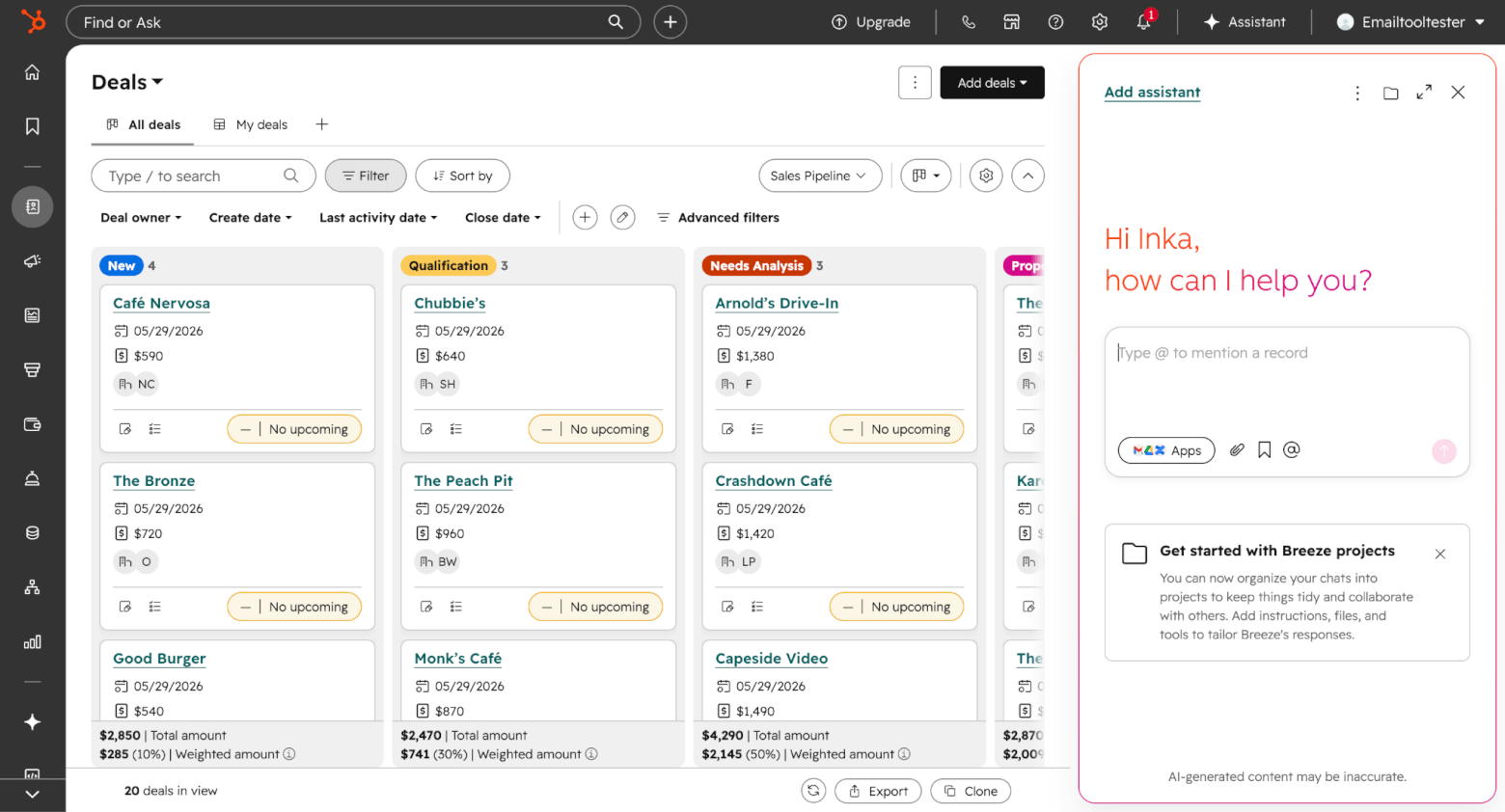
HubSpot is one of the strongest AI CRM options for small and medium-sized businesses, especially if you want your sales, marketing, customer service, and CRM data all in one place. It was always a popular pick at the marketing agencies I previously worked for, precisely because of its versatility.
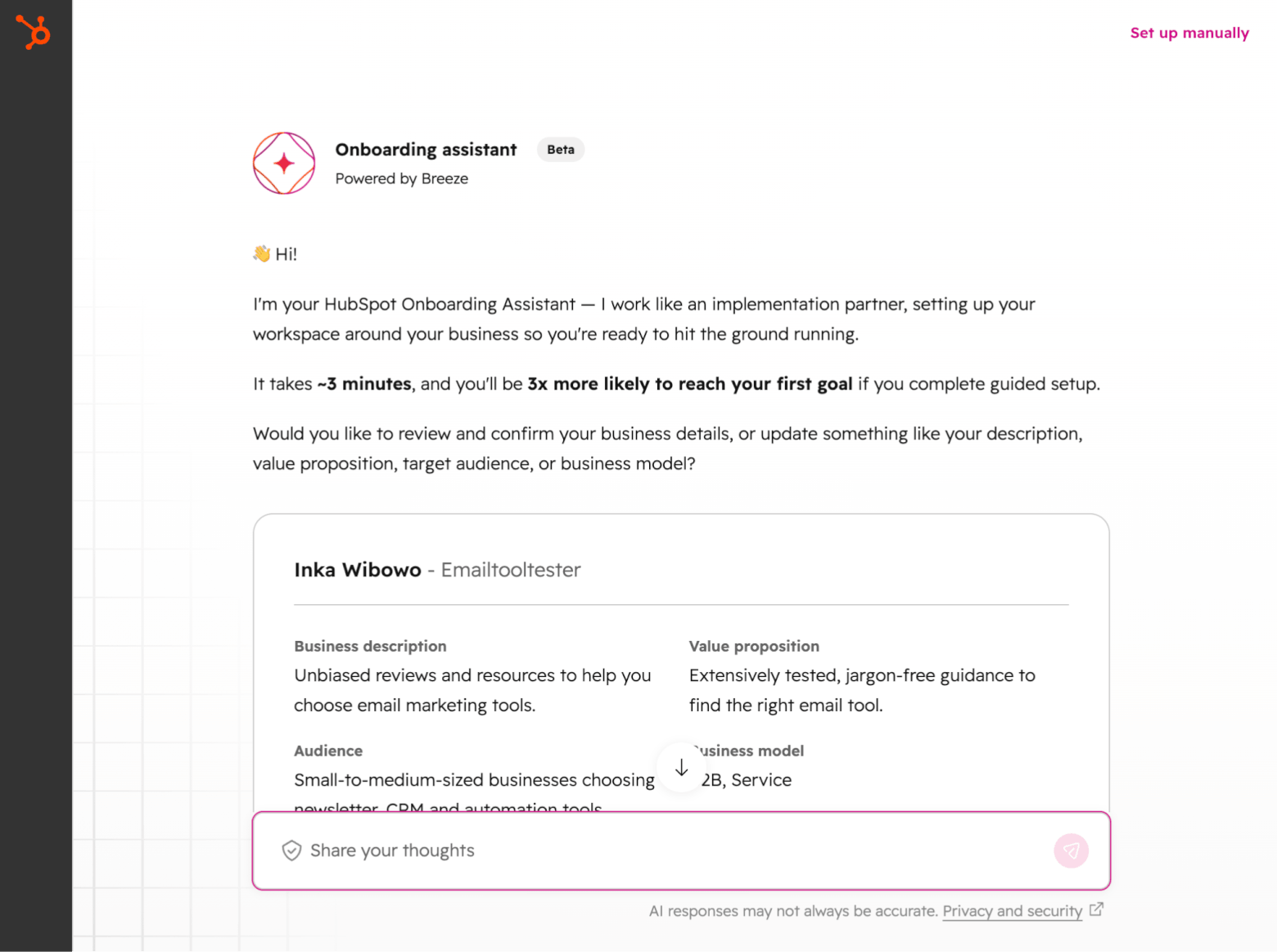
One of HubSpot’s biggest advantages is how widely AI appears across the HubSpot ecosystem. That starts right from signup, where Hubspot’s AI assistant, Breeze, can help you with setting up your account, customizing your pipeline, and personalizing your sales dashboards:
In fact, you’ll find that the Breeze Assistant can be easily accessed from anywhere within the platform. As a conversational assistant, you can ask it to help you with common sales tasks, including preparing for meetings, researching companies, generating follow-up ideas, and prioritizing deals:
For everyday CRM users, one of the most useful features is AI record summaries, which can summarize contacts, companies, deals, and tickets, pulling from a wide range of CRM properties. This is exactly the kind of AI feature that can save time for SMB sales teams, as reps don’t have to dig through a long activity timeline before a follow-up call.
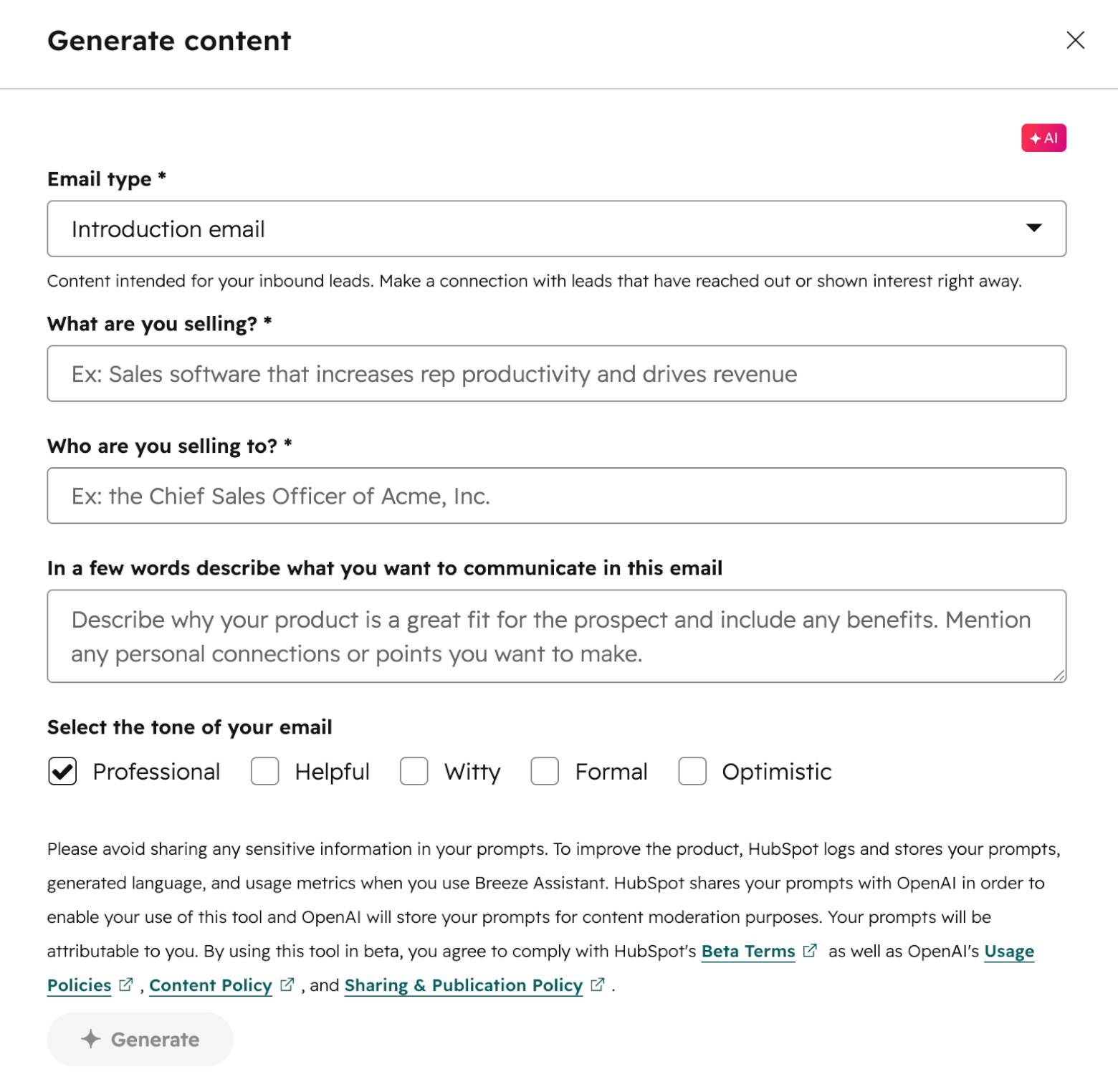
Another handy feature is the AI email template generator, which helps reps turn a few basic inputs into a reusable outreach email. These can be edited and saved as a sales template for one-to-one emails or sequences, helping to reduce the time spent writing repetitive introductions or follow-up emails.
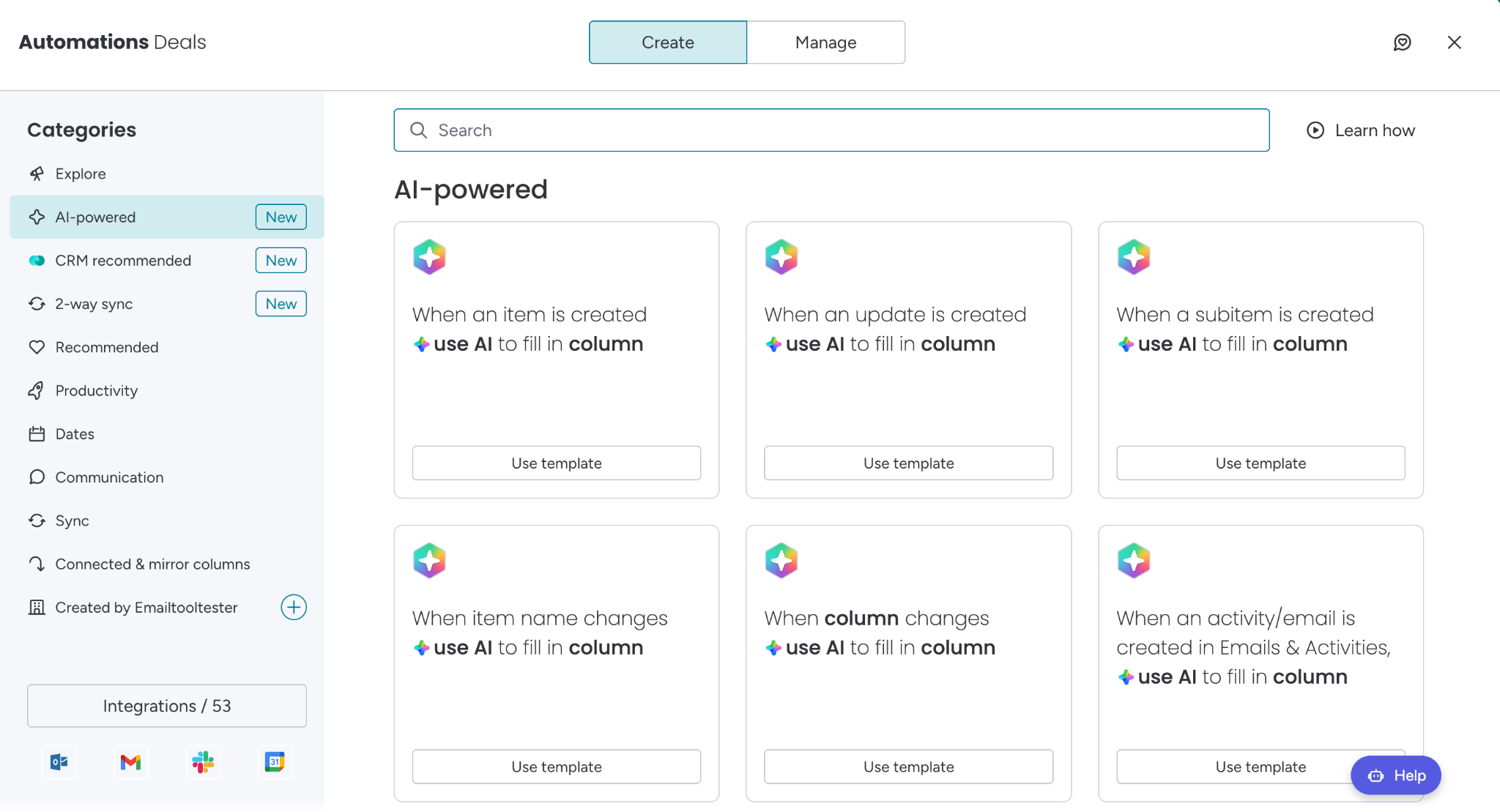
Where HubSpot becomes especially powerful is when you move beyond simple AI assistance into AI-powered automation. On Professional and Enterprise plans, Breeze can help build workflows, suggesting triggers based on form submissions, property changes, and page views, and adding actions such as creating tasks, or sending internal notifications.
Other useful features include:
- Data enrichment for contact and company records using HubSpot’s commercial dataset
- A Data Agent, which allows users to ask questions about customers across CRM data, calls, emails, and documents
- A Prospecting Agent that can research contacts and companies, monitor buying signals, generate personalized outreach, and execute outreach strategies
- Deal scores that predict likelihood to close, sales analytics, and forecasting
Just note: while HubSpot is one of the most complete AI CRM platforms in this list, the best AI features are spread across different plans. SMBs can access Breeze Assistant, AI summaries, content generation, and CRM-based assistance on lower tiers. But if you want AI prospecting, advanced workflow AI, AI-powered scoring, or deeper automation, you’ll likely need to budget for Professional or Enterprise plans, and in some cases HubSpot Credits too.
- Excellent all-round CRM for SMBs that want sales, marketing, service, and CRM data in one platform
- Useful everyday AI features, especially record summaries, Breeze Assistant, and content generation
- Strong AI automation potential on Professional and Enterprise plans
- Good admin controls for AI access, data sources, and model training
- Offers more flexibility when it comes to data management, e.g. the ability to make deal fields mandatory, and ability to customize how the data entry form appears to users
- Offers official MCP servers, including one for connecting MCP-compatible AI tools or agents to HubSpot CRM, making it easier to query CRM data, write records, and bring HubSpot context into agentic workflows.
- Some of the most interesting AI features require Professional, Enterprise, or HubSpot Credits
- AI contact lead scoring is only available on Marketing Hub Enterprise
- HubSpot’s offerings can be tricky to navigate, and it can become expensive as you add hubs (e.g. marketing or service), seats, automation, and advanced AI features
- HubSpot’s migration services can be pricey – if you’re moving from another CRM, you might be better off using their integrations to handle the migration yourself
- Free plan available
- Sales Hub Starter starts at $20/month/seat
- Sales Hub Professional starts at $100/month/seat
- Sales Hub Enterprise $150/mo/seat
Discounts for annual plans available. HubSpot credits for AI usage are available on each plan, but you can purchase more if needed (e.g. for the Data Agent and Prospecting Agent). More pricing information is available here.
Best for: SMBs that want a powerful, scalable CRM with AI built across sales, marketing, and customer service, and are willing to upgrade as their needs become more advanced.
Pipedrive
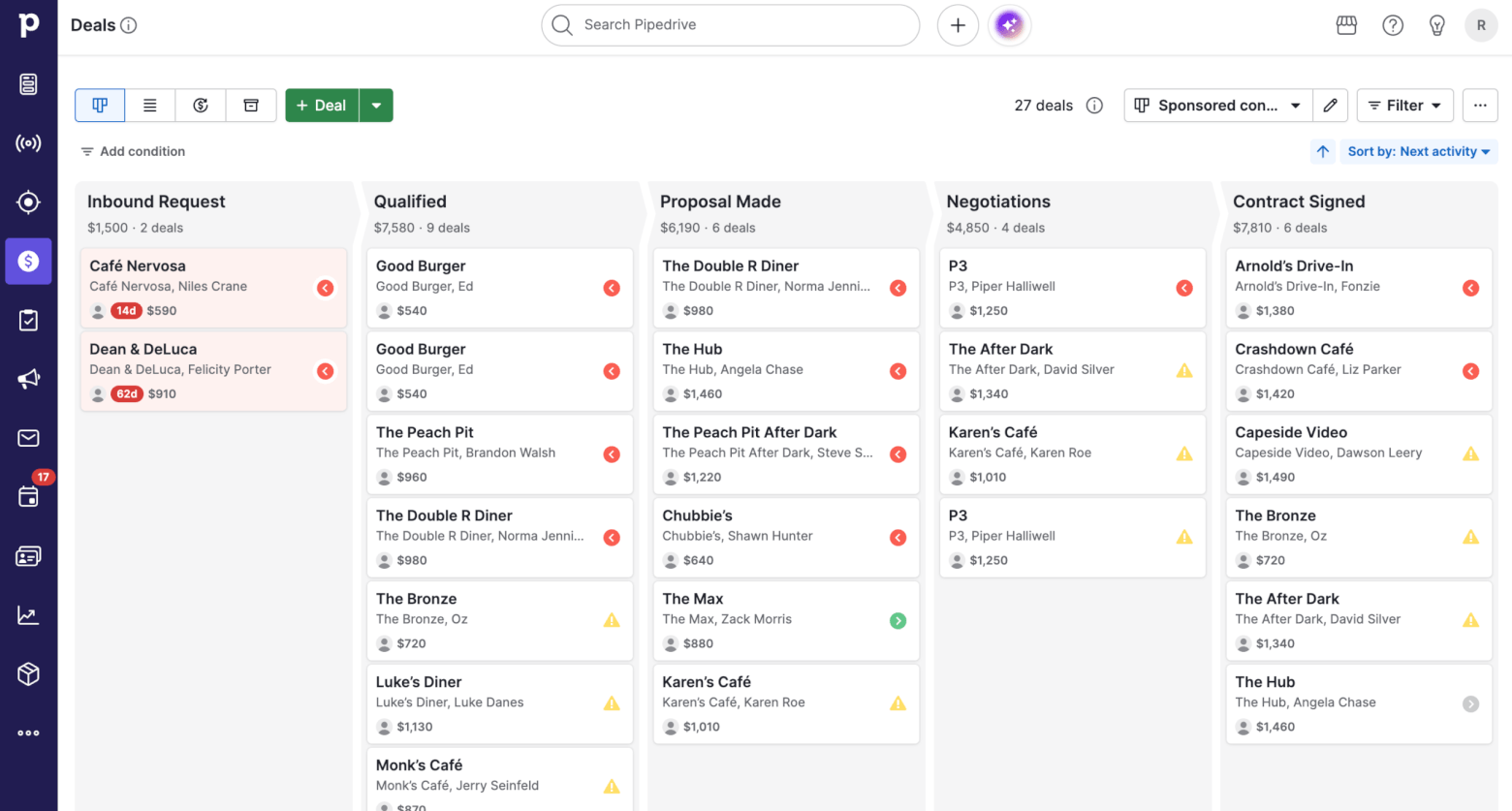
Looking for a CRM that’s laser-focused on sales? Pipedrive is one of the best AI CRM options for small and medium-sized businesses that want a simple, sales-first system rather than a full marketing, service, and operations suite. It keeps the CRM experience focused on the essentials: pipelines, deals, activities, and follow-ups.
Pipedrive’s AI can help with:
- Highlighting and prioritizing deals
- Drafting one-on-one emails and replies
- Summarizing emails, and
- Creating reports.
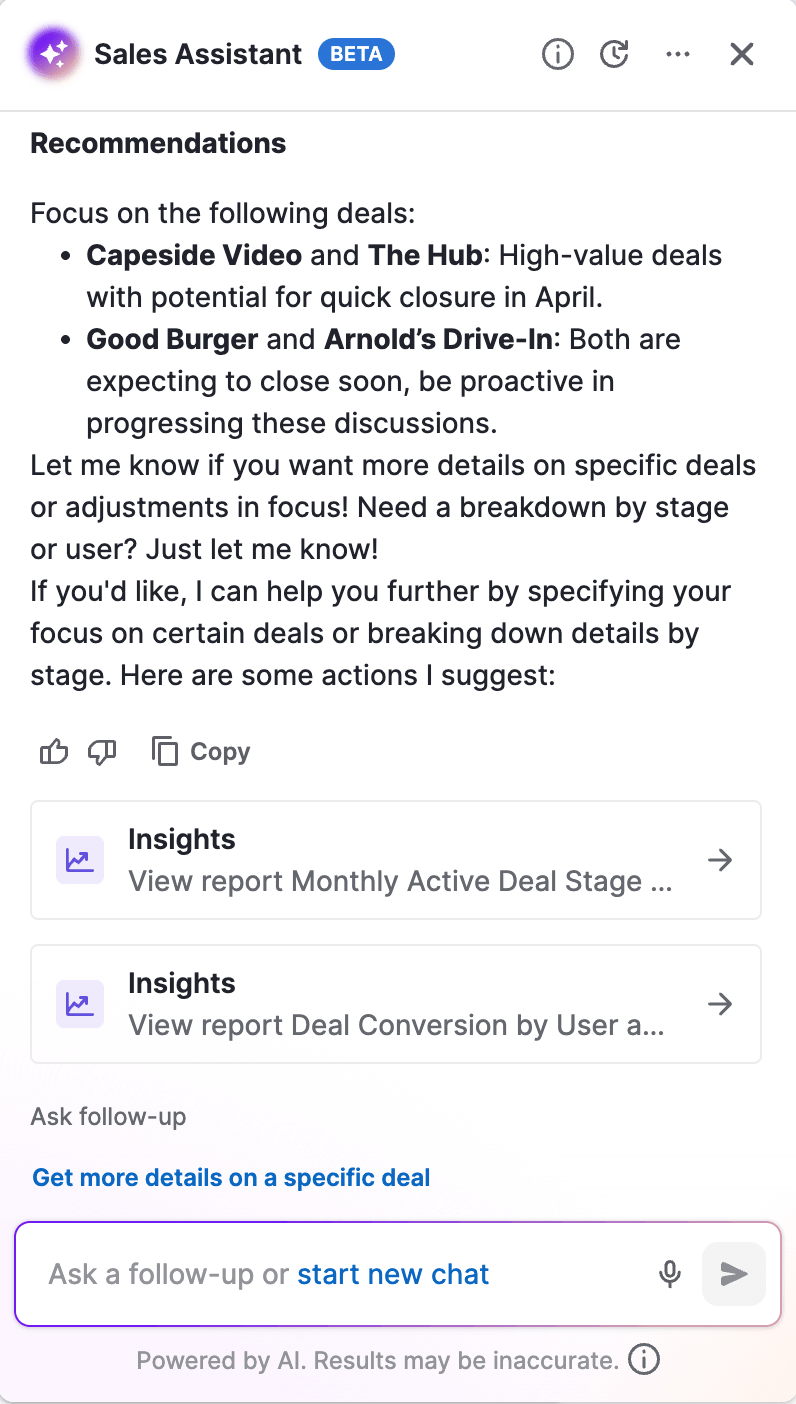
The AI-powered Sales Assistant, which was in beta at the time of writing, can help to summarize content, generate text for notes and emails, provide step-by-step help, and answer questions about deals, activities, contacts, and team performance.
Pipedrive also includes AI email tools, which are useful for sales reps who spend a lot of time writing follow-ups. Its AI email assistant uses CRM data to help create tailored follow-up emails. There are also AI email summaries for long threads, which can help reps quickly catch up before replying or jumping on a call.
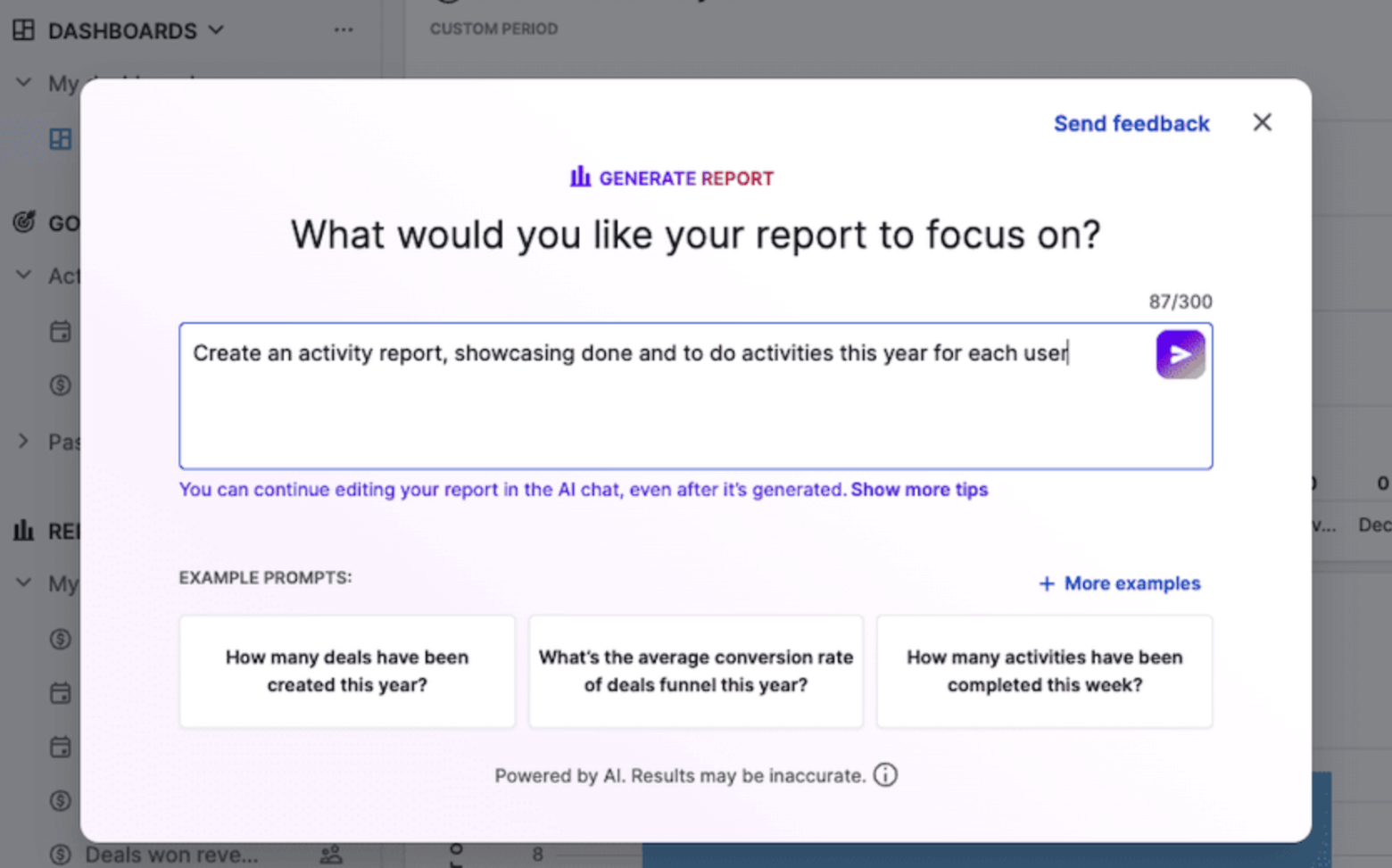
However, one of the most useful AI features for SMBs is Pipedrive’s AI-assisted report creation. Instead of building a custom report from scratch, users can enter a prompt in Insights and have Pipedrive generate a ready-made report. This makes the reporting layer easier to use, especially for teams that know what they want to measure but don’t want to spend time configuring every filter manually.
From our own testing and comparison work, we found Pipedrive’s AI useful, but also relatively focused. At the moment, it doesn’t feel as deep for marketing automation or lifecycle optimization compared to HubSpot. If you want AI to help build complex nurturing journeys or connect deeply with behavioral email automation, Pipedrive probably won’t be the strongest option.
That said, if your main goal is to help a small sales team follow up faster, understand deal progress, and keep the pipeline moving, Pipedrive is one of the most accessible AI CRMs on this list.
- Very easy to use, especially for sales teams that want a clear visual pipeline
- Makes it easy to spot “rotten” deals and understand the next activities for each deal
- AI-assisted reports are available across all plans
- Practical AI tools for sales emails, summaries, reminders, and deal insights
- Less overwhelming than broader platforms like HubSpot or Zoho CRM
- Some useful AI email features (e.g. writing, summarizing, and replying to emails instantly) are only available on the Premium and Ultimate plans
- Sales Assistant is still marked as beta and may not be available to every account
- Custom scoring only available on higher-level plans, and criteria can only be built using deal and activity fields (not contact data)
- AI features are helpful, but narrower than HubSpot
- Not the best choice if you need advanced marketing automation built into the CRM
- Lite starts at $24/month
- Growth starts at $49/month
- Premium starts at $79/month
- Ultimate starts at $99/month
Discounts for annual plans available. Learn more about Pipedrive pricing in our guide.
Best for: Small and medium-sized sales teams that want an easy-to-use CRM with practical AI features for pipeline management, reporting, follow-ups, and sales productivity, without the complexity of a larger all-in-one platform.
> Try Pipedrive for free for 30 days (and get 20% off the first year if you upgrade)
Zoho CRM
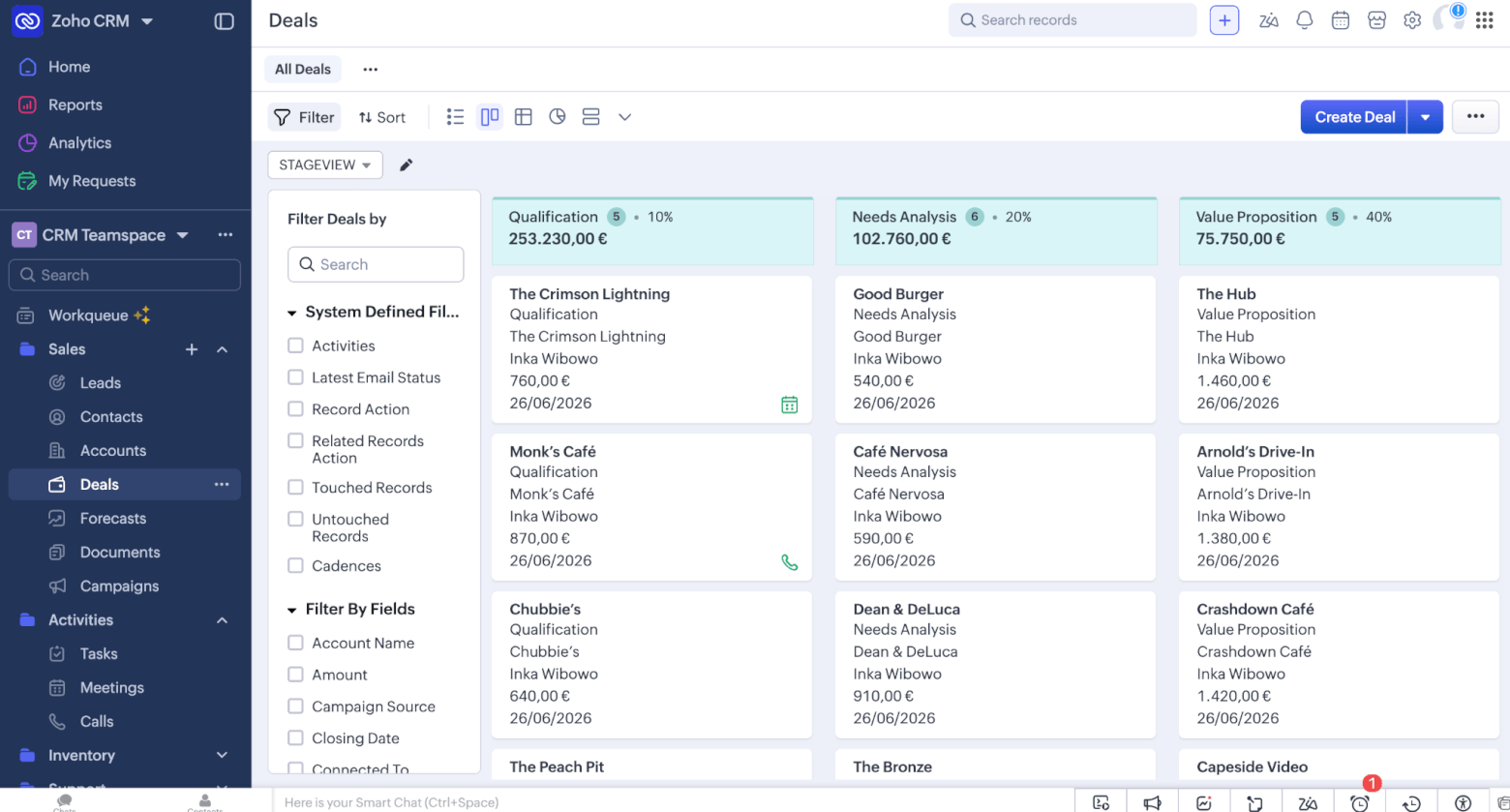
I first used Zoho CRM nearly twenty years ago in my first marketing agency role, and it’s surprising how strong it still is – especially for small and medium-sized businesses that want a lot of CRM and AI functionality, without the premium price tag. Its AI assistant, Zia, has been around for longer than many of the newer “AI CRMs” on the market, and Zoho has continued expanding Zia’s capabilities over time.
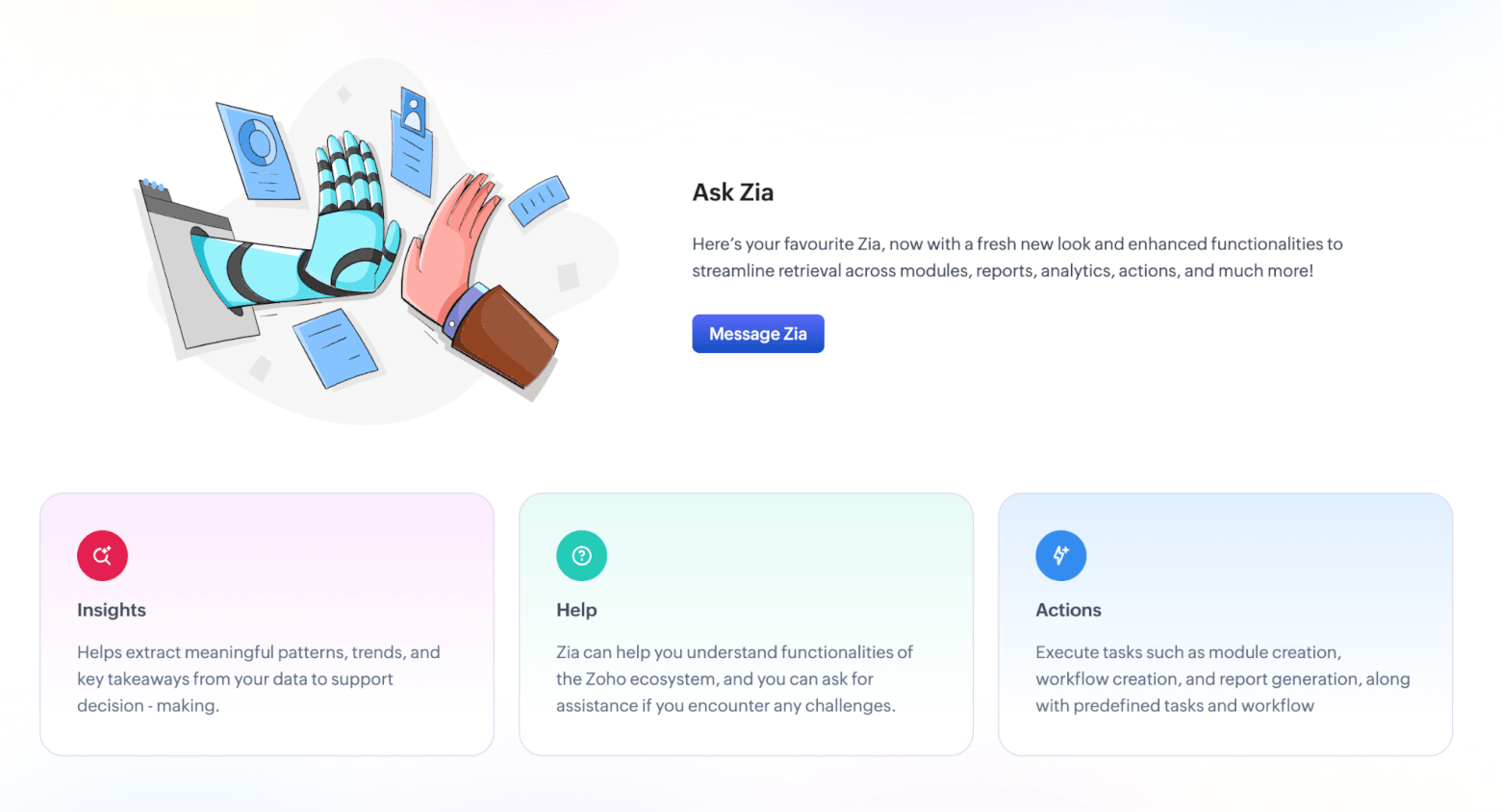
As a result, Zoho’s AI features aren’t limited to simply writing emails or summarizing records. Zia can help:
- Score leads and predict churn
- Suggest the best time and channel to contact a customer
- Enrich CRM data
- Identify anomalies in sales trends
- Suggest automations, and
- Keep you notified of what competitors are doing.
That gives Zoho one of the broadest AI feature sets in this list, especially for the price.
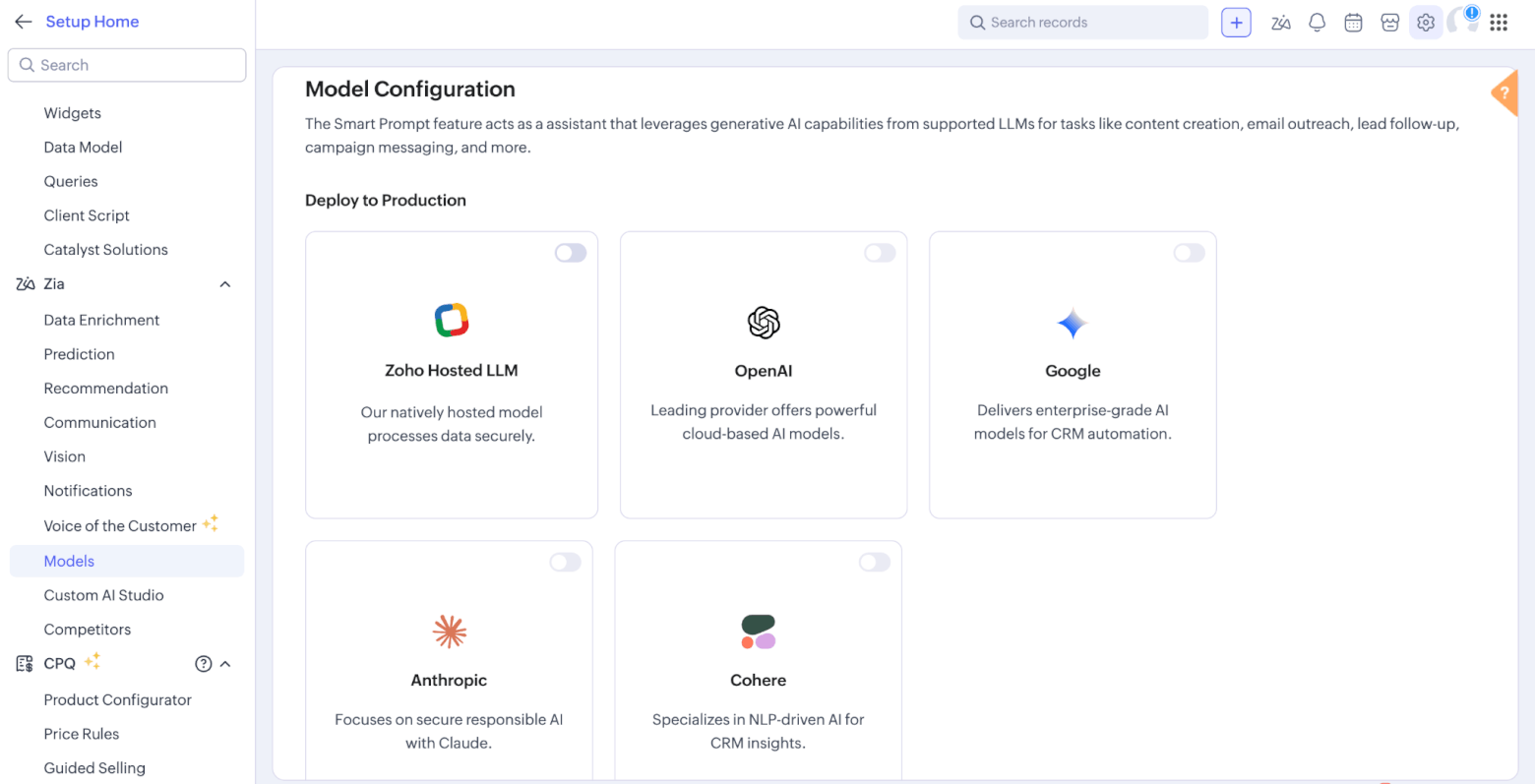
Zoho also offers Smart Prompt, which brings generative AI into everyday CRM work. It can summarize conversations, draft or rephrase emails and notes, and help create email templates. Interestingly, Zoho lets users connect different language models, including Zia, ChatGPT, Gemini, Anthropic, and more.
Ask Zia is another useful feature, especially for teams that don’t want to dig through reports manually. It acts as a conversational assistant inside Zoho CRM, helping users retrieve CRM data, create visual analytics, get help with CRM settings, and perform actions such as configuring workflows or building reports.
One unique feature is Voice of the Customer, which uses Zia to analyze customer feedback from sources such as emails, call transcripts, support tickets, and survey responses. It helps teams spot what customers are happy or unhappy about without manually digging through every interaction (note that availability is limited to higher-level Zoho CRM editions).
On that note, while Zoho does offer a free CRM for up to 3 users, this doesn’t give you full access to Zia’s AI feature set. In fact, many of the AI features that make Zoho stand out require paid plans.
Overall, Zoho offers a lot of AI functionality for the money, and some of it goes much deeper than the AI features in simpler CRMs. The trade-off, though, is that Zoho can feel more complex to set up and navigate, and there is a learning curve to using it.
- Very broad AI feature set, including summaries, predictions, recommendations, enrichment, anomaly detection, and conversational analytics
- Strong value for SMBs that want advanced CRM features without paying enterprise-level prices
- Useful generative AI features for emails, notes, templates, summaries, and reports
- Ask Zia can help non-technical users query CRM data and create reports more easily
- Offers Zoho MCP, a dedicated Model Context Protocol product that lets AI agents interact with Zoho apps, tools, actions, and contextual business data across the Zoho ecosystem
- The free plan is useful, but it does not include the full Zia AI experience
- Many of the best AI features require Professional, Enterprise, or Ultimate plans
- Some features depend on language, data center, permissions, or daily usage limits
- More powerful than simple CRMs, but also more complex to configure and maintain. The interface also isn’t as modern or intuitive as other CRMs
- Importing deals from other CRMs can be a bit of a painful process, as new contacts and accounts won’t get created – they already need to exist within Zoho
- The field mapping process is more manual than with other tools
- Zoho’s expansive product range can be confusing to understand, and many tools (e.g. marketing tools, forms etc) require separate plans
- Free plan available for 3 users
- Standard starts at $14/user/month
- Professional starts at $23/user/month
- Enterprise starts at $40/user/month
- Ultimate starts at $52/user/month
Discounts for annual plans available. Learn more about Zoho’s pricing here.
Best for: SMBs that want a highly customizable CRM with a broad set of AI features at a relatively affordable price, and don’t mind spending a little more time setting it up properly.
Freshsales
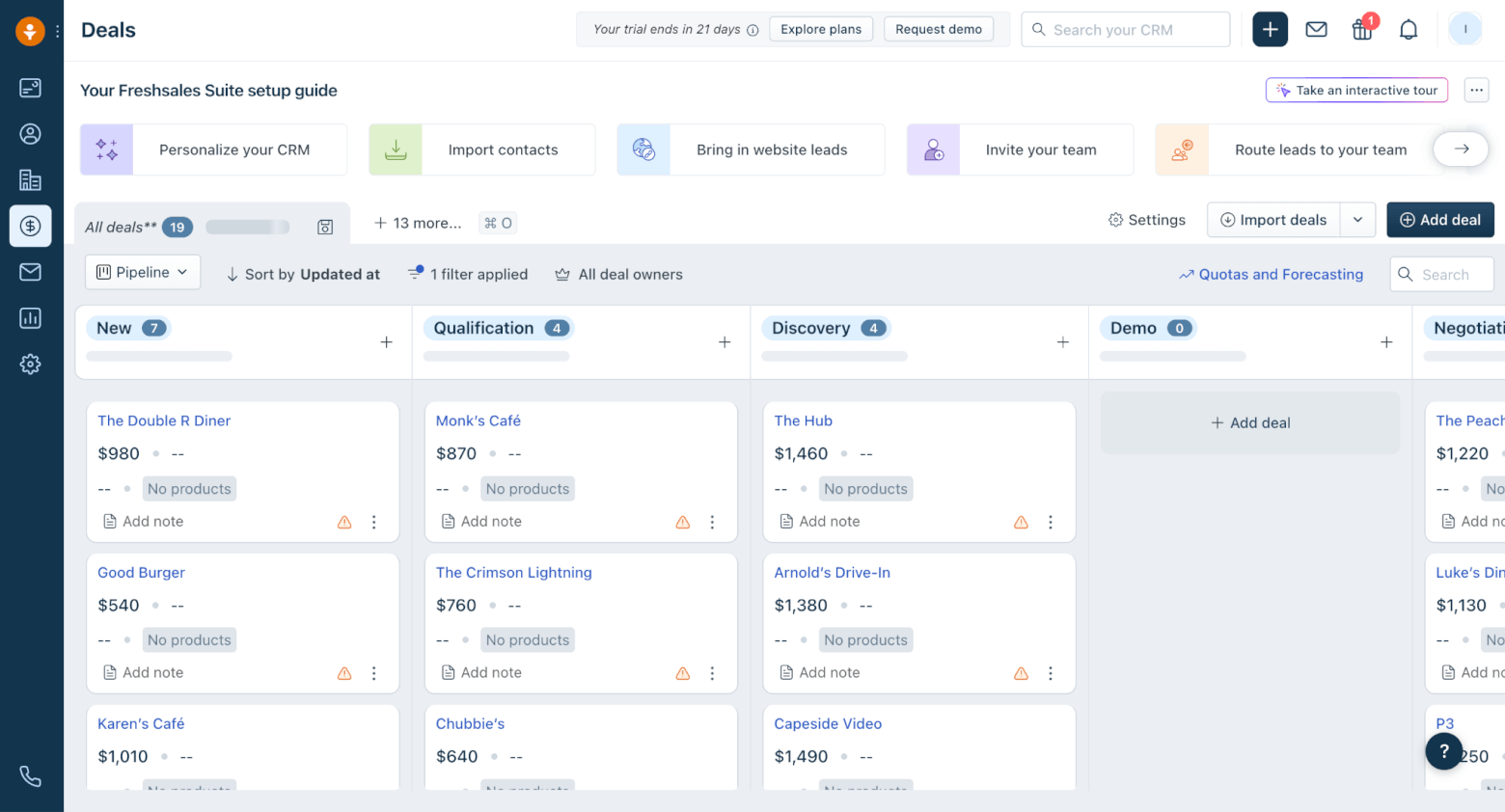
You’re no doubt familiar with Freshworks – the SaaS company that provides tools for customer service, IT support, sales, and marketing. Freshsales, which represents the CRM portion of the product suite, is a strong option for small and medium-sized businesses that want a solid CRM, without the complexity or cost of a larger platform.
Its AI assistant, Freddy, can help sales teams find potential customers, create personalized emails, score contacts, and surface insights to close deals faster. That makes Freshsales particularly interesting for SMBs that want AI to help with prioritization, not just content generation (although Freddy’s email writer can do this too).
One of the most useful AI features is Freddy-powered contact and account summaries, which include an overview of recent email sentiment, notes, and deal context. For a small sales team, this is exactly the kind of practical AI that can reduce admin and make handoffs easier.
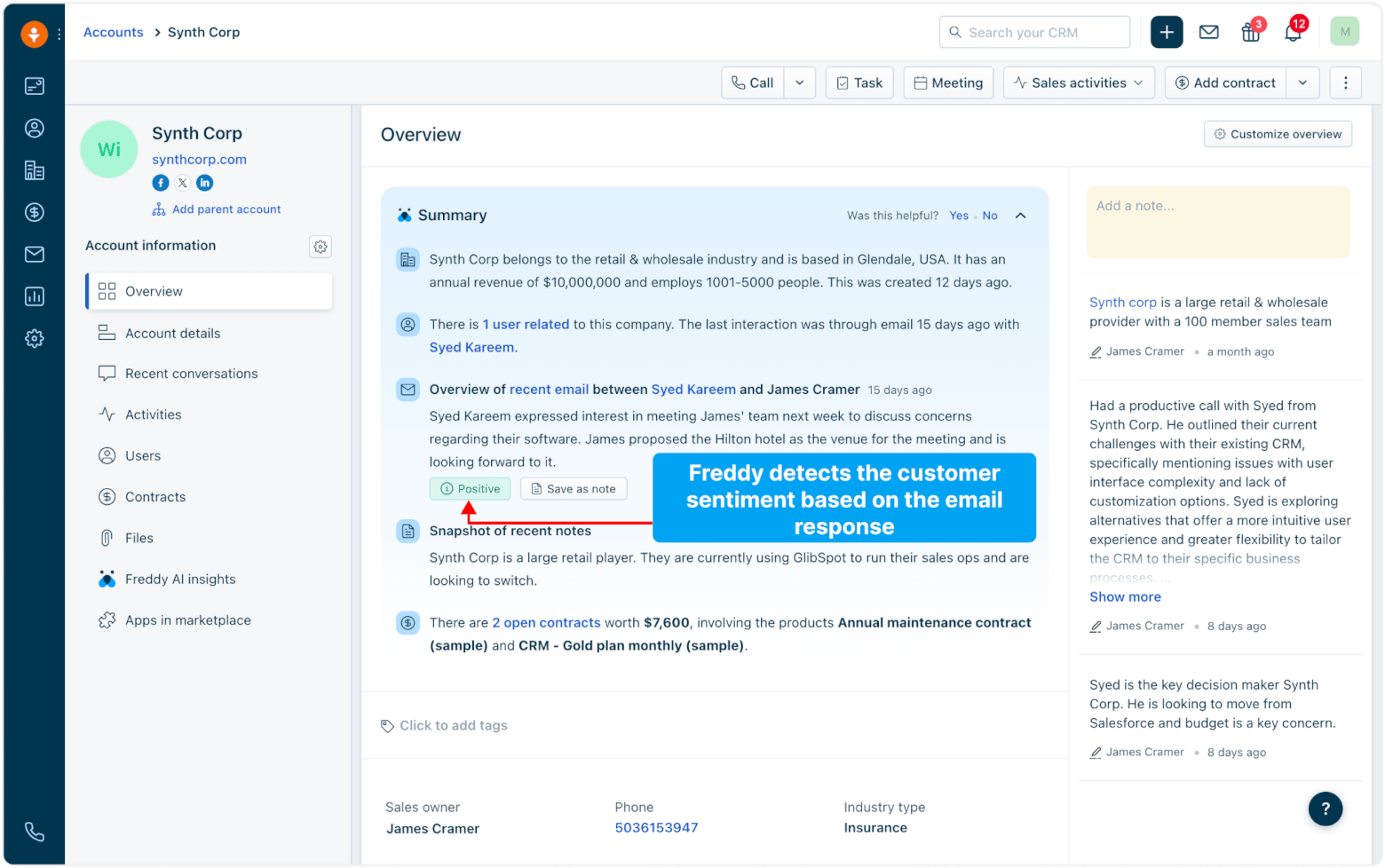
Image source: Freshsales
Freshsales also includes Freddy Deal Insights, which uses machine learning to track deal activity, predict outcomes, and tag deals with labels such as “Likely to Close,” “Trending,” or “At Risk” (although this depends on there being enough historical deal data in the account).
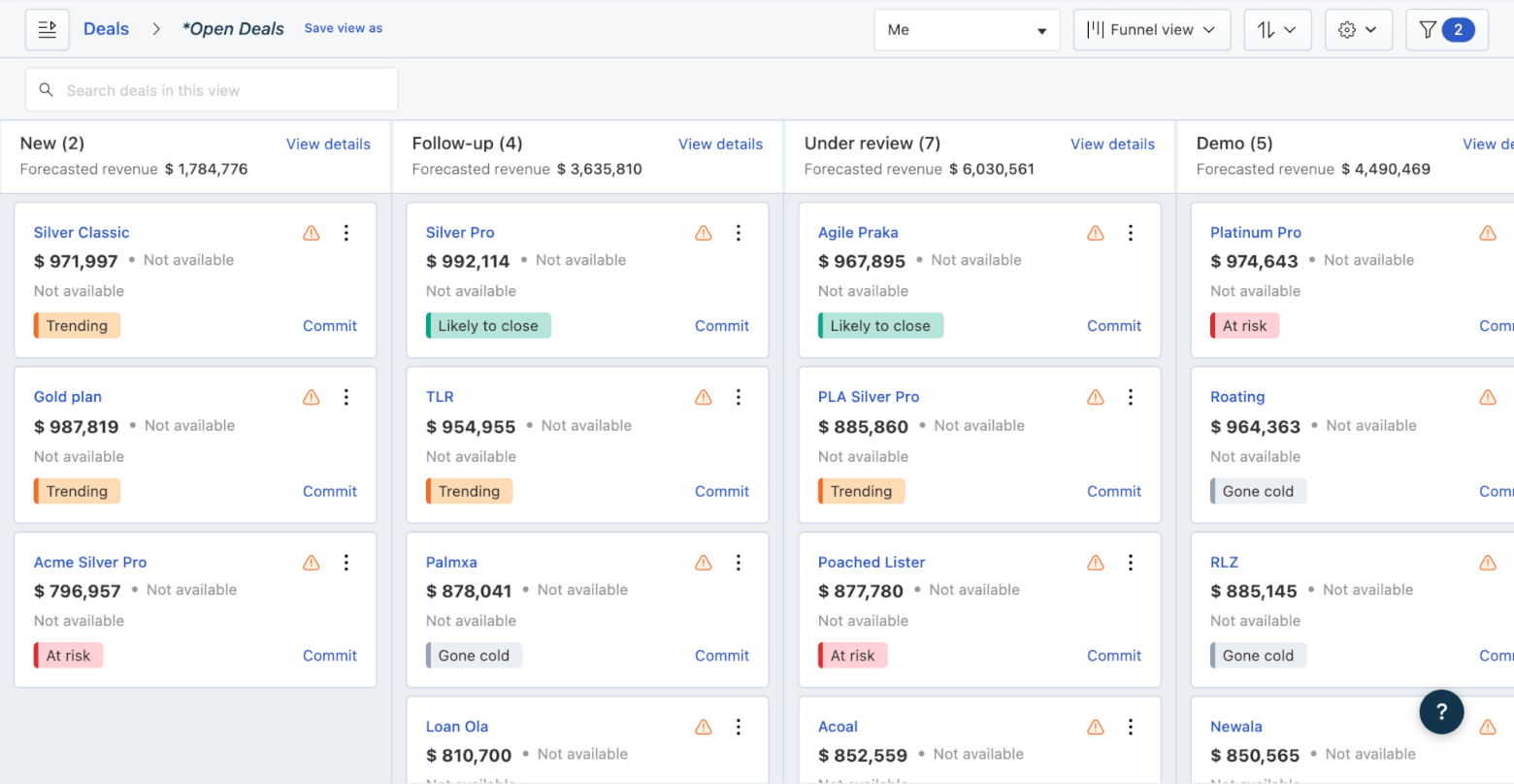
Image source: Freshsales
On the pricing side, Freshsales is quite SMB-friendly at the entry level. There’s a free plan for up to 3 users, and paid pricing starts from $9 per user/month when billed annually. However, as we’ve seen with most CRMs, the more interesting AI and automation features sit higher up the plan ladder. AI-powered features like sales emails and deal insights are available only on higher-tier plans, while Forecasting Insights by Freddy AI appears only on the Enterprise plan.
Freshsales Suite is also worth mentioning, because it brings sales and marketing together in a more complete setup with personalized campaigns, and web tracking. This could be appealing to SMBs that want sales CRM plus marketing automation, although it also means you need to be careful when comparing Freshsales CRM with Freshsales Suite, as they are not exactly the same product experience.
Overall, Freshsales feels like a practical AI CRM rather than a flashy one. The interface is relatively approachable, the pricing starts low, and the AI features are mostly tied to everyday sales tasks. While it probably won’t match other CRMs for breadth or depth, it’s a capable CRM for teams wanting a gentler learning curve.
- Affordable entry point, including a free plan for up to 3 users
- Practical AI features for summaries, lead scoring, email assistance, and deal insights
- Built-in phone, email templates, live chat, Kanban views, and sales automation
- Great personalization options, e.g. the ability to rename “contacts” and “accounts” to match the language your sales team uses
- Upgrading to Freshsales Suite gives sales and marketing teams a more unified option
- Some of the best AI features are limited to higher-tier plans
- Freddy Deal Insights needs enough CRM history before it becomes truly useful
- Not as broad as HubSpot or Zoho for advanced CRM and AI use cases
- Freshsales CRM and Freshsales Suite can be slightly confusing to compare
- Free plan for 3 users
- Growth starts at $11/user/month
- Pro starts at $47/user/month
- Enterprise starts at $71/user/month
Discounts for annual plans available. More information here.
Best for: SMB sales teams that want an affordable, easy-to-use CRM with practical AI features for prioritizing leads, summarizing customer context, writing sales emails, and keeping deals moving.
monday CRM
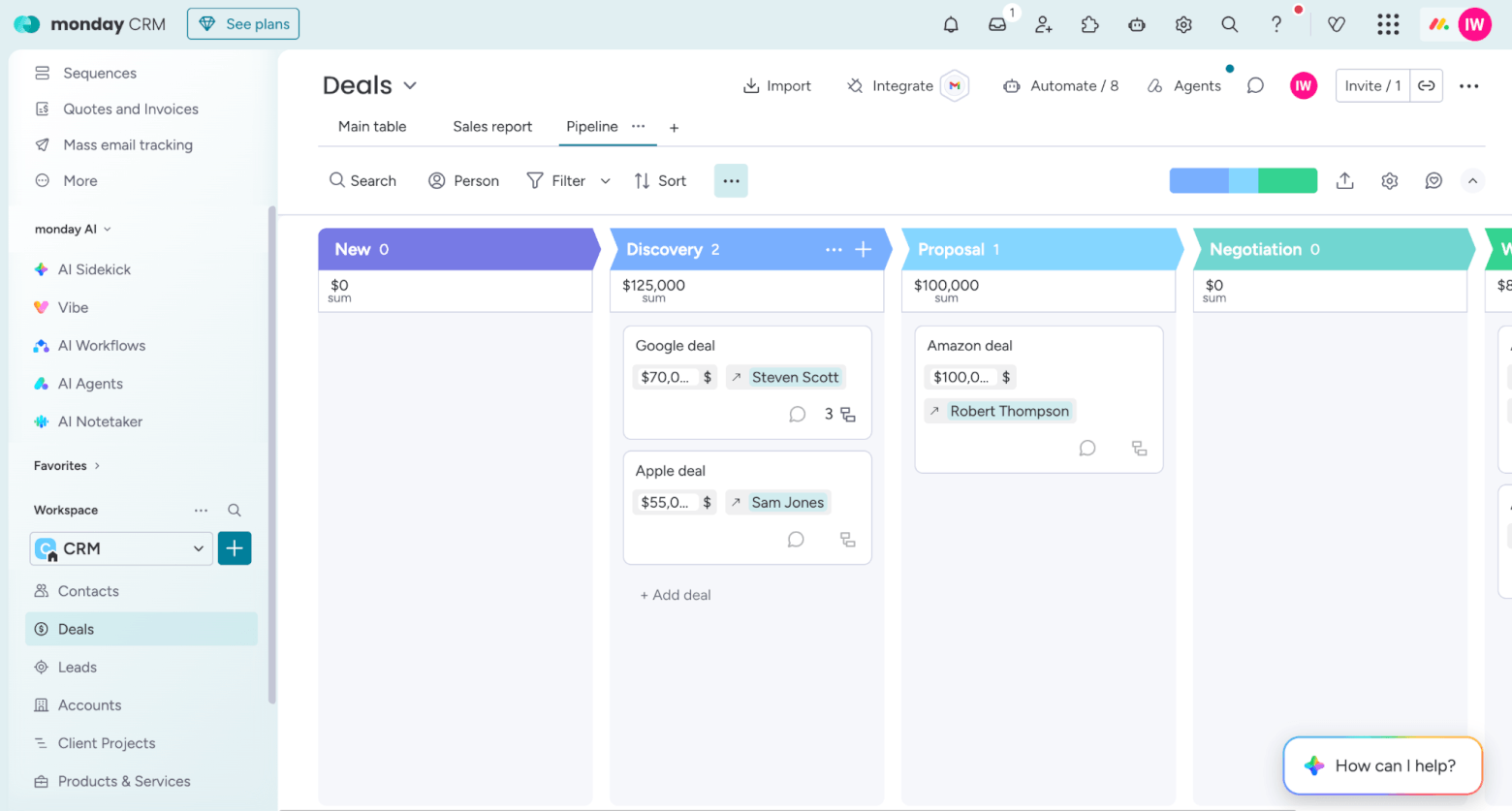
I like to think of monday CRM as a new-generation CRM that sits somewhere between sales and marketing, workflow management, and team collaboration. This modernity is also reflected in its bright, fun design, which is something of a novelty within the CRM world. You can manage leads, contacts, deals, pipelines, tasks, projects, client onboarding, and internal handoffs in one highly visual workspace.
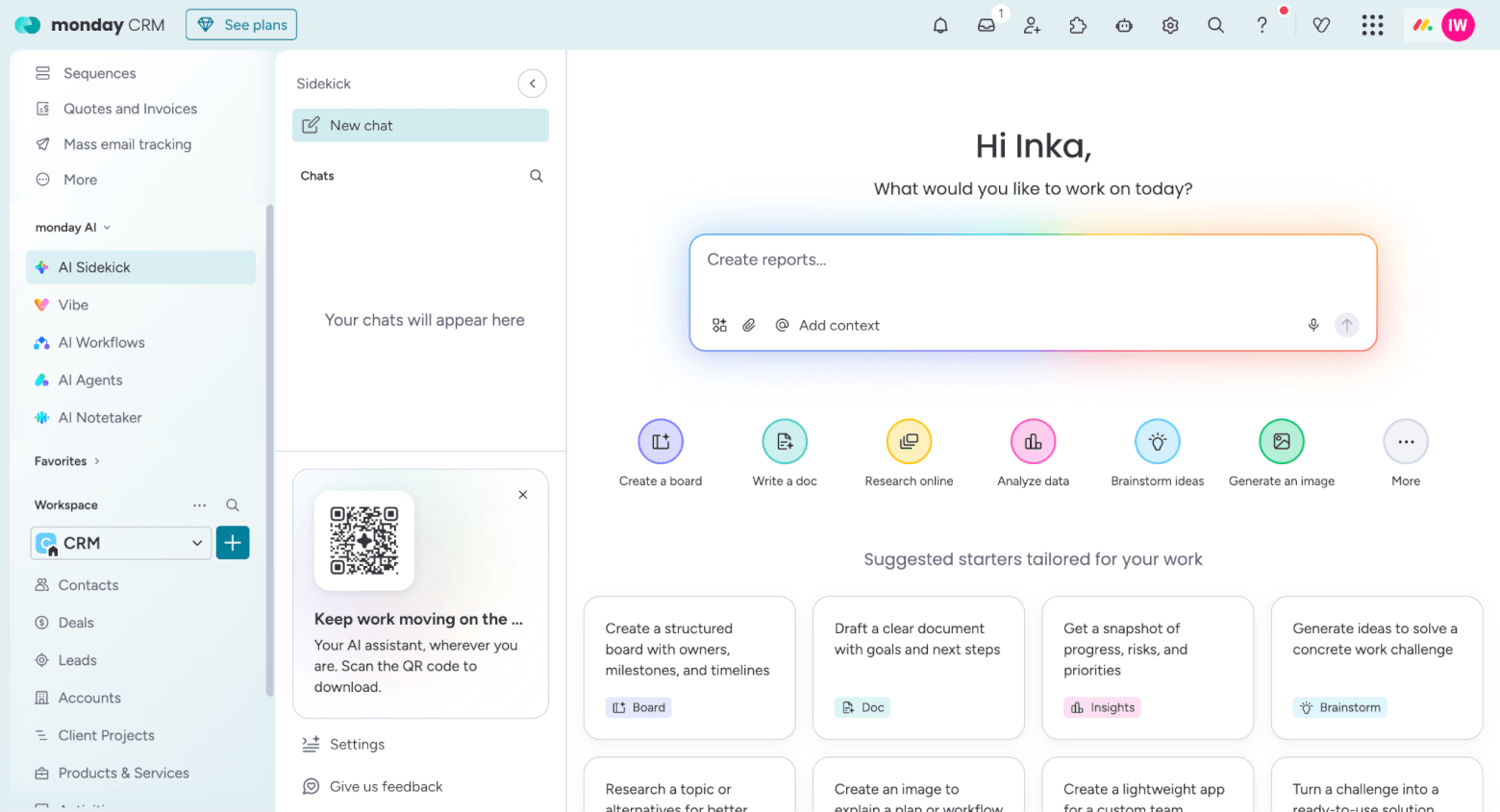
As a newer tool, it has also been faster to integrate new AI features within the platform than other CRMs. You can see its “AI-first” philosophy very clearly, with tools accessible directly from the main menu to help teams sell faster and reduce manual work. These include:
- AI Sidekick: monday’s conversational AI assistant that summarizes information, creates content, updates tasks, and moves projects forward.
- Vibe: A code-free AI app builder that generates a functional custom app inside monday.com for their team’s workflow.
- AI Workflows: AI-powered workflow automation that can run steps automatically, using AI to process or act on work rather than relying only on fixed rule-based automations.
- AI Agents: Purpose-built AI “teammates” that can take action inside monday.com, including sales-focused agents such as AI Sales Agent and AI Lead Agent.
- AI Notetaker: An AI meeting assistant that captures, transcribes, and summarizes meetings, then organizes notes and action items.
The email features are probably the most immediately useful for smaller sales teams. If your team tracks leads and deals inside monday CRM, the AI email composer can help reps write outreach and follow-up messages faster.
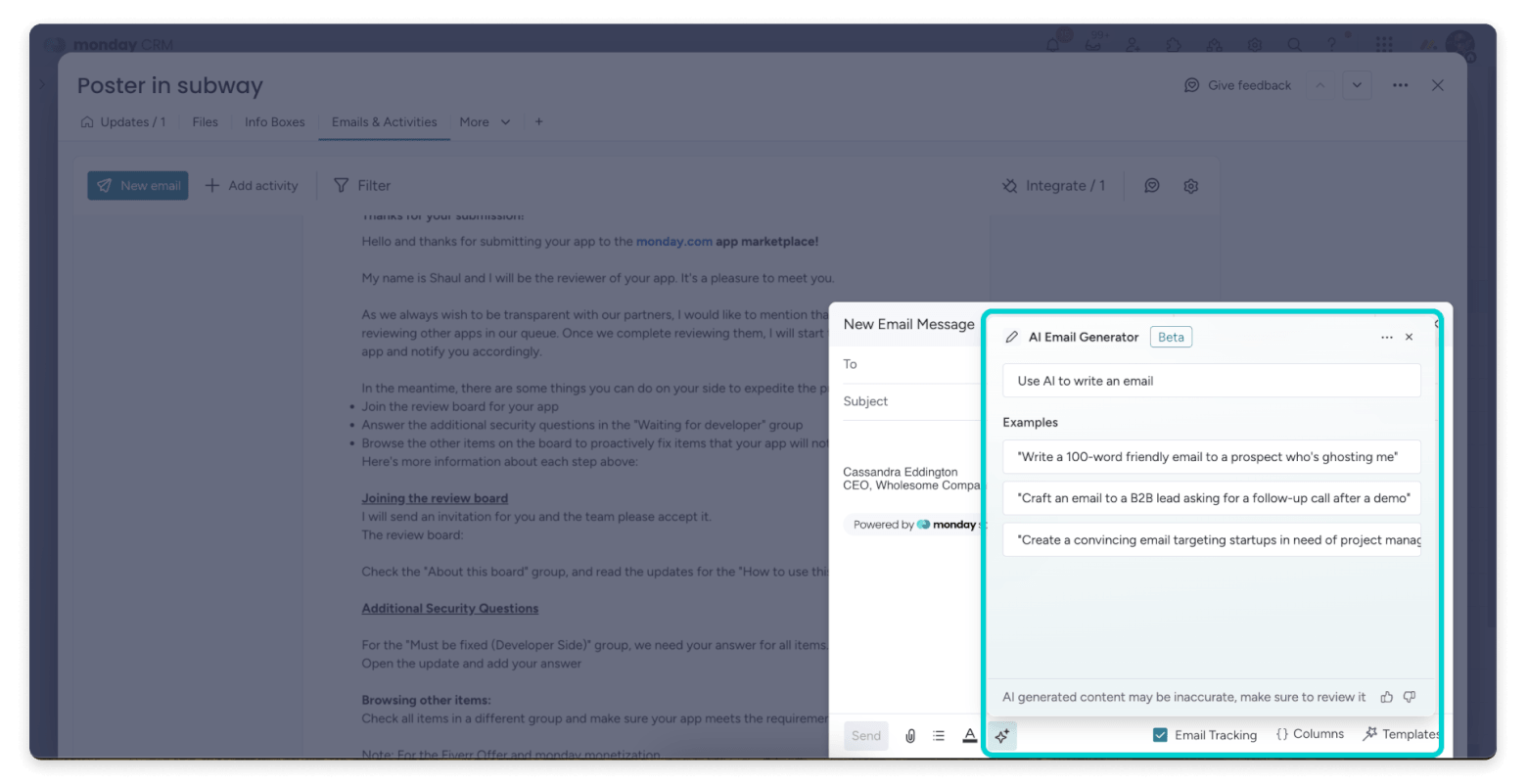
Image source: monday
The AI-powered timeline summary feature is also useful, especially if multiple team members touch the same account. Instead of reading through a long activity history, a rep can quickly understand what has happened and what needs to happen next.
In my opinion, one of the most powerful features is AI-powered automations for deals. These let you trigger monday’s AI when something happens in your CRM. For sales teams, this could be useful for tasks like summarizing a new lead inquiry, extracting next steps from an email, or even using AI to automatically generate information and write it back into a CRM field (rather than asking a sales rep to fill everything manually).
The main thing to watch is access and pricing. monday’s broader AI capabilities, including AI Notetaker, Agents, and AI Workflows, use AI credits. These need to be purchased separately. Admins can also manage AI permissions and governance across the account, which is useful, but it means SMBs should check exactly which AI features are included in their plan and how quickly credit usage could add up.
Overall, monday CRM is a good option for small and medium-sized businesses that want a CRM they can shape around their own sales process. If your CRM needs to sit alongside project work, client delivery, internal workflows, and team collaboration, it’s a very practical choice.
- Very flexible and visual, especially for teams that want to customize their CRM workflow
- AI features include email drafting, timeline summaries, column filling, deal summaries, and workflow suggestions
- Good fit for teams that want CRM, project tracking, and internal collaboration in one workspace
- Broader AI toolkit includes Sidekick, Vibe, AI Workflows, AI Agents, and AI Notetaker
- CRM AI features are available from the Standard plan upward when enabled by an admin
- Offers monday MCP, a hosted MCP server that connects monday.com workspaces to AI assistants like Claude, Cursor, and Copilot Studio
- Not as sales-specialized as Pipedrive or as marketing-focused as HubSpot
- Some newer AI agent features may be more advanced than many small teams actually need
- AI availability depends on plan and admin activation, and AI credits need to be purchased separately to base plan (they are not included within your monthly subscription). Note that you can’t purchase additional credits on the Basic plan
- AI features are broad, but not always deeply CRM-specific, and it’s less mature when it comes to AI-powered customer insights, marketing automation, lead scoring, data enrichment, and sales forecasting
- monday.com’s work management, service, and dev products are standalone products that require separate plans
- Basic starts at $18 seat/month
- Standard starts at $25 seat/month
- Pro starts at $41 seat/month
- Ultimate – pricing available by contacting Sales
Discounts for yearly plans are available.
Best for: SMBs that want a flexible, visual CRM with useful AI features, especially if they also need to manage projects, client workflows, onboarding, or internal sales processes alongside their pipeline.
> Try Monday for free for 14 days
Best CRM with AI: Final Thoughts
AI can make a CRM much more useful, but only if it supports the way your team already works. The quality of the AI will depend heavily on the quality of your CRM data, so it’s important to pick a CRM that your sales team will be able to use consistently, update properly, and trust as part of their daily workflow.
If reps don’t log activities, update deal stages, add notes, or keep contact records clean, even the smartest AI features will have very little to work with.
Also, keep in mind that most CRMs won’t reliably understand your entire sales process, clean up messy data perfectly, qualify every lead accurately, or know the right message to send without human review – which makes choosing a CRM your team will actually use even more important.
With all that in mind, here’s how I’d narrow it down:
- Choose HubSpot if you want the most complete AI CRM experience, with AI features spanning sales, marketing, service, data enrichment, content generation, automation, and customer insights.
- Choose Pipedrive if your priority is a simple, sales-focused CRM that helps your team manage deals, follow up faster, and keep the pipeline moving.
- Choose Zoho CRM if you want strong AI functionality and deep customization at a more affordable price.
- Choose Freshsales if you want an affordable CRM with practical AI features for lead prioritization, contact summaries, sales emails, and deal insights.
- Choose monday CRM if you want a flexible, visual CRM that also supports project management, client workflows, and internal collaboration.
Have any questions about choosing the right CRM for your business? Let me know in the comments below.
The authors
Learn more about us

Our Methodology
This article has been written and researched following our EmailTooltester methodology.
Our Methodology