



EmailTooltester is supported by readers like you. When you purchase through our links, we may earn a commission that helps keep our reviews independent and free.
If you’re running a small business or online brand like we do at EmailTooltester, you’ve probably had the same thought at some point: do I really need this many tools?
A few years back, this was a real problem for us. We were juggling not just one, but three email marketing platforms. And our landing pages and lead generation tools were scattered across a handful of other platforms.
As you can imagine, managing it all was a nightmare.
Which is exactly why platforms like ActiveCampaign and Ontraport exist. Both promise to bring order to the chaos by pulling your sales and marketing workflows into a single system, with ActiveCampaign focusing on sales and marketing automation, and Ontraport providing a wide range of business tools in one place.
So which one is right for you? Without giving the answer away, here’s my verdict: both tools boast impressive feature sets, but only one delivers a truly polished, streamlined experience, giving it a much stronger advantage in most – but not all – use cases.
In this comparison, I’ll break down where each platform shines and help you figure out which one actually fits the way your business works.
Ontraport vs ActiveCampaign: The Main Differences
- Automation: If reducing manual work and prioritizing leads is your goal, ActiveCampaign is the way to go. It’s perfect if you want to create sophisticated workflows based on how your contacts interact with your emails, deals, or website. Ontraport also has automation, but it's more focused on overall business management, with fewer advanced marketing options.
- All-in-one tools: If you’re looking for a one-stop shop, Ontraport is hard to beat. It combines everything you need – email marketing, CRM, sales funnels, payments, landing pages, membership sites, and even affiliate programs – all in one platform. ActiveCampaign, on the other hand, is great for email marketing but requires external tools if you want things like payment processing or sales funnels.
- Pricing: ActiveCampaign is more budget-friendly if you're just getting started with email marketing. As your business grows, though, you'll need to pay for extras like advanced CRM features and custom reporting. Ontraport, while pricier upfront, includes a wider set of features from the start, making it a good value for businesses that need everything in one place.
Now let’s take a closer look at how each one performs in terms of:
- Ease of use
- Email marketing features
- Automation
- CRM and sales management
- Landing pages
- Monetization features
- Pricing
Ease of Use
ActiveCampaign and Ontraport both promise to streamline your operations, but how easy are they to actually use?
From the moment you sign in with ActiveCampaign, it’s clear the platform is designed to guide you through every step. It offers a simple yet effective onboarding tour that walks you through the basics, helping you get up and running quickly. Although there are a lot of features to explore, I could easily find my way around, with clear sections for campaigns, automations, and contacts right on the dashboard.
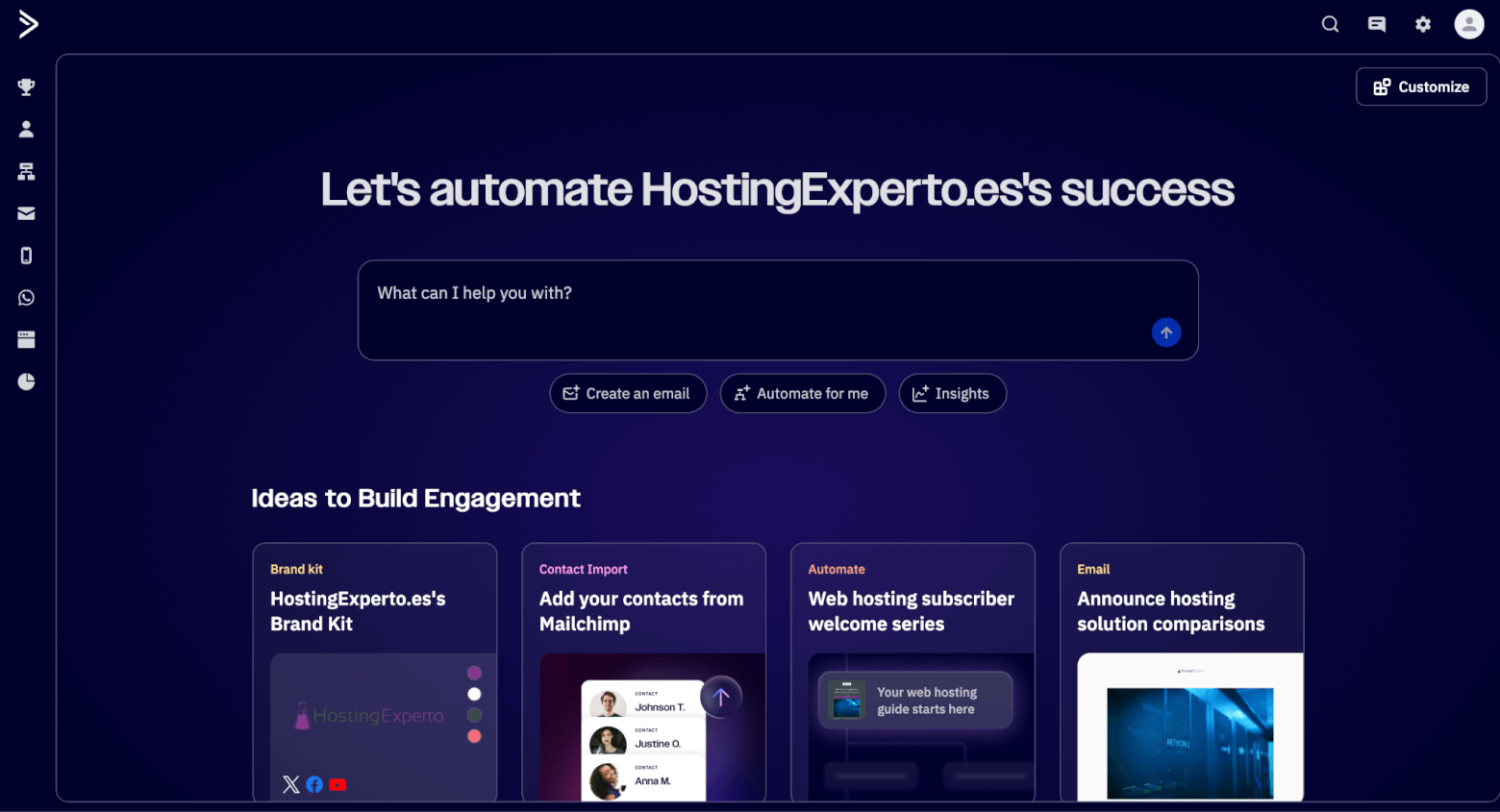
ActiveCampaign's dashboard
On the other hand, I found Ontraport’s platform somewhat messy to navigate. There isn’t a guided tour to show you around, at least not at first – you just get a quickstart checklist, and an information button to explain the purpose of every page (which doesn’t always work).
The design of the interface also wasn’t as modern as ActiveCampaign’s, and some pages were a little slow to load.
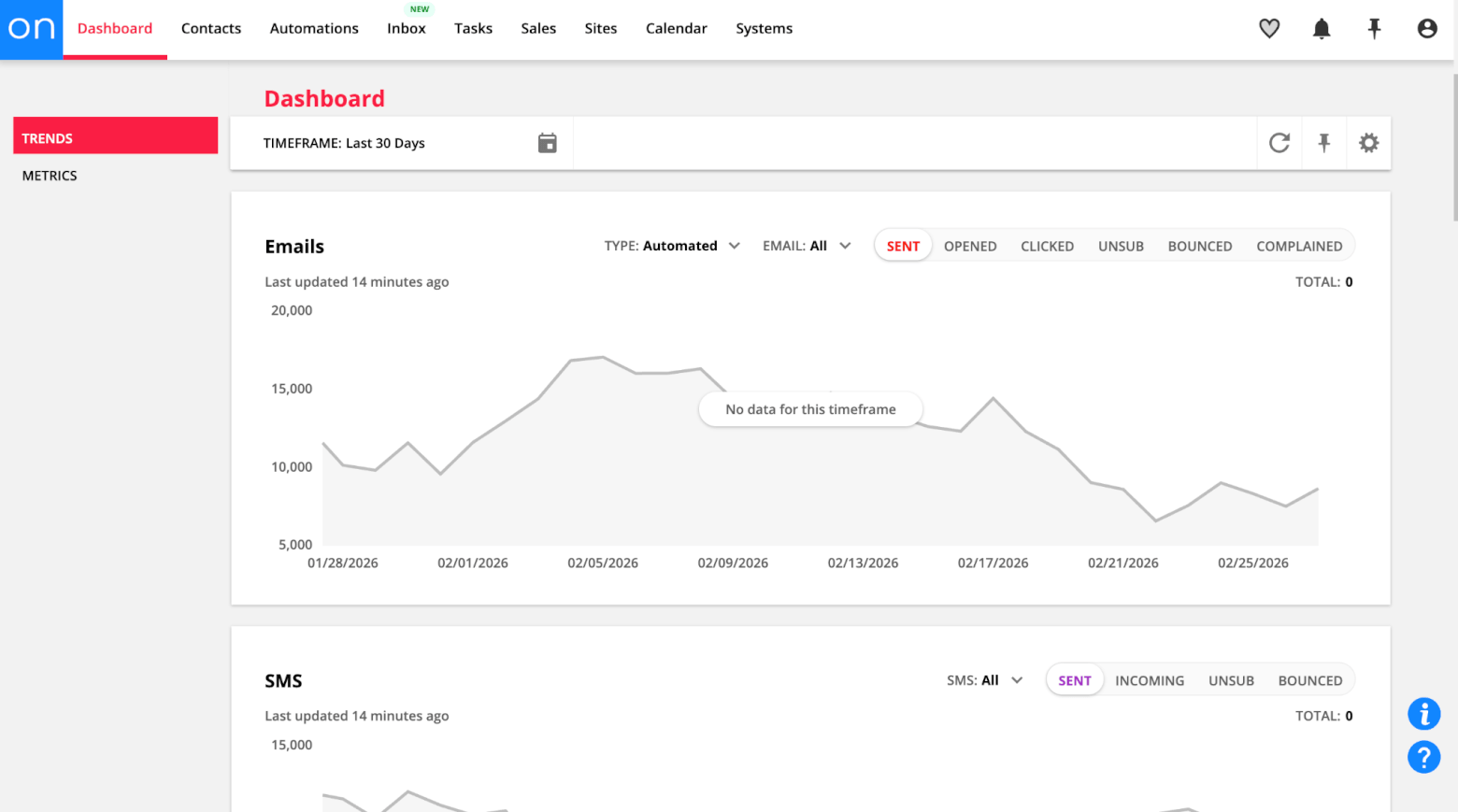
Ontraport’s dashboard
Like ActiveCampaign, Ontraport also packs in a lot of different features, and there are guided tutorials for basic functions such as uploading contacts, creating segments and creating pages.
However, I did find the organization of some of the more advanced functions (like sales management features and sales funnels) to be a little disjointed. I also wasn’t too clear on what some of the functions actually did, and had trouble finding clear guidance on how to start using them.
However, digging in deeper reveals the “Systems” feature, which allows you to organize different assets into logical workflows (e.g. pipelines, newsletters, sales funnels). Through this feature, Ontraport also walks you through how to set these workflows up. So while Ontraport does give you the tools needed to help you keep everything organized, it does require a little more manual set-up upfront.
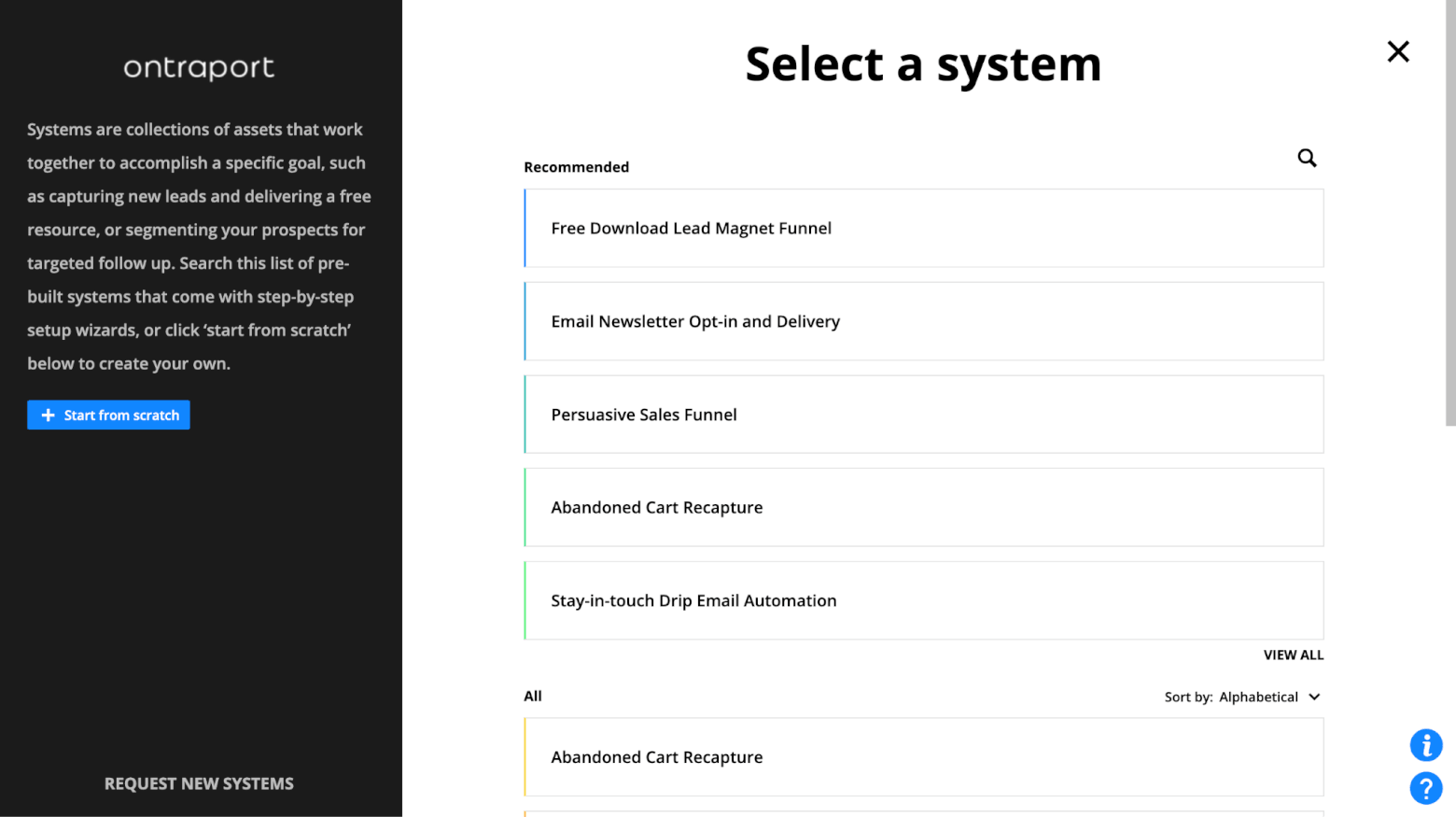
Ontraport’s Systems is a niche feature that lets you organize assets together into key marketing workflows
Winner: ActiveCampaign comes out on top for ease of use. Although it does come with a learning curve for some of its more advanced features, its clean interface, straightforward setup, and logical organization of features make it ideal for businesses that want to get up and running quickly.
Score: Ontraport – 0, ActiveCampaign – 1
Email Marketing Features
Since both tools fall into the marketing automation category, email marketing is naturally a big part of the comparison. But in Ontraport, email marketing feels somewhat tucked away rather than front and center.
For example, if you want to send a one-off email or newsletter, you actually need to select your recipients first before you can even start creating the email itself. That felt a little unusual to me, especially compared to most email marketing tools, where you design the email first and choose the audience later.
Ontraport gives you a few different ways to build emails. There’s a simple editor for text-only messages, a drag-and-drop builder for more visual newsletters, and an HTML editor if you want full control over the design with HTML and CSS.
The visual builder gives you around 30 templates to start with, or you can create your own from scratch. The templates are clean and usable, although I do feel like they could do with a bit of a refresh design-wise.
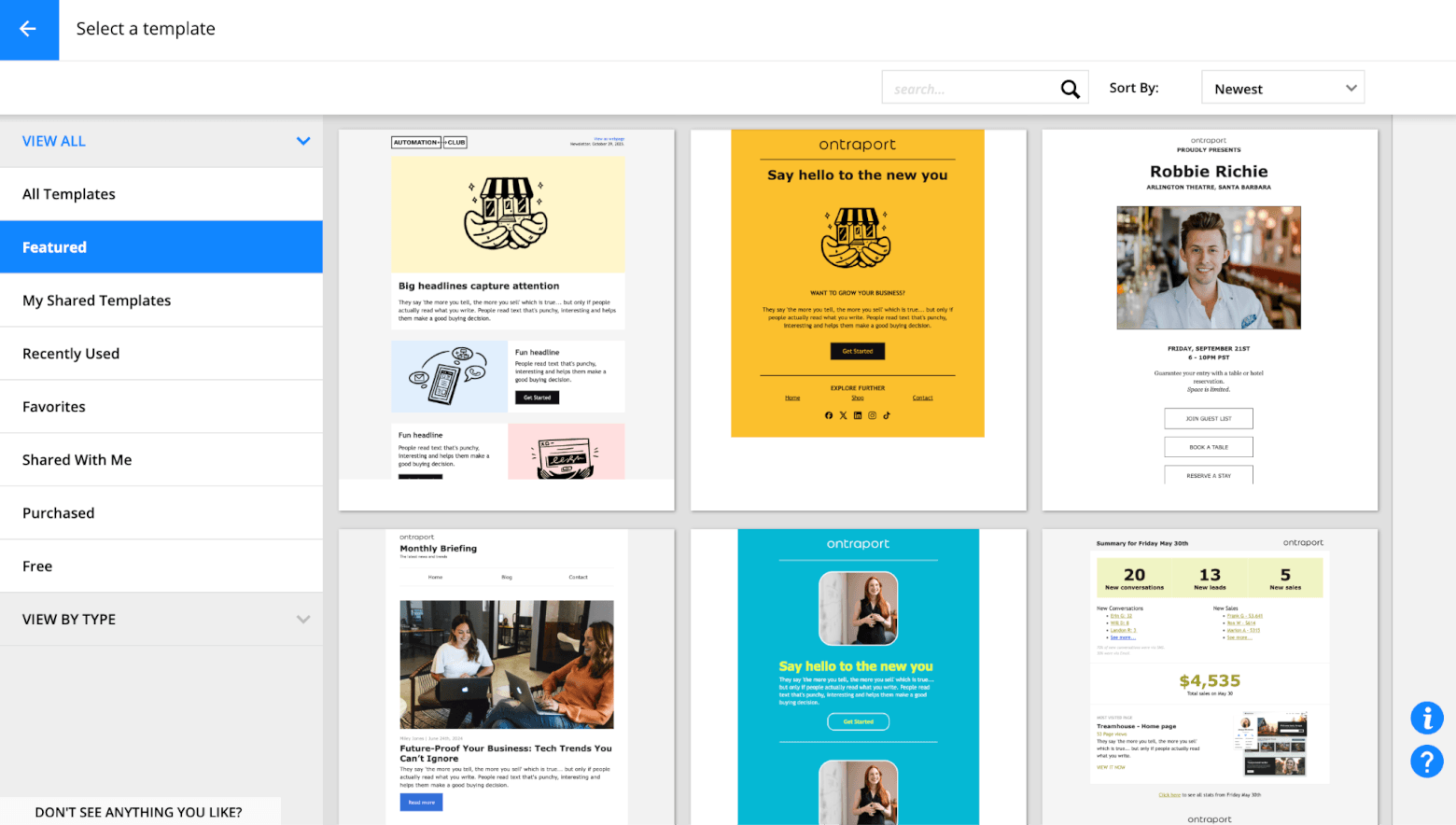
Ontraport’s email templates
The drag-and-drop builder itself is fairly straightforward, but I did notice some limitations. There aren’t many content blocks available, which means your final designs will usually stay fairly basic.
Another thing I missed was a simple undo and redo button. Instead, you have to rely on version history, which works but feels less convenient when you’re quickly experimenting with layouts.
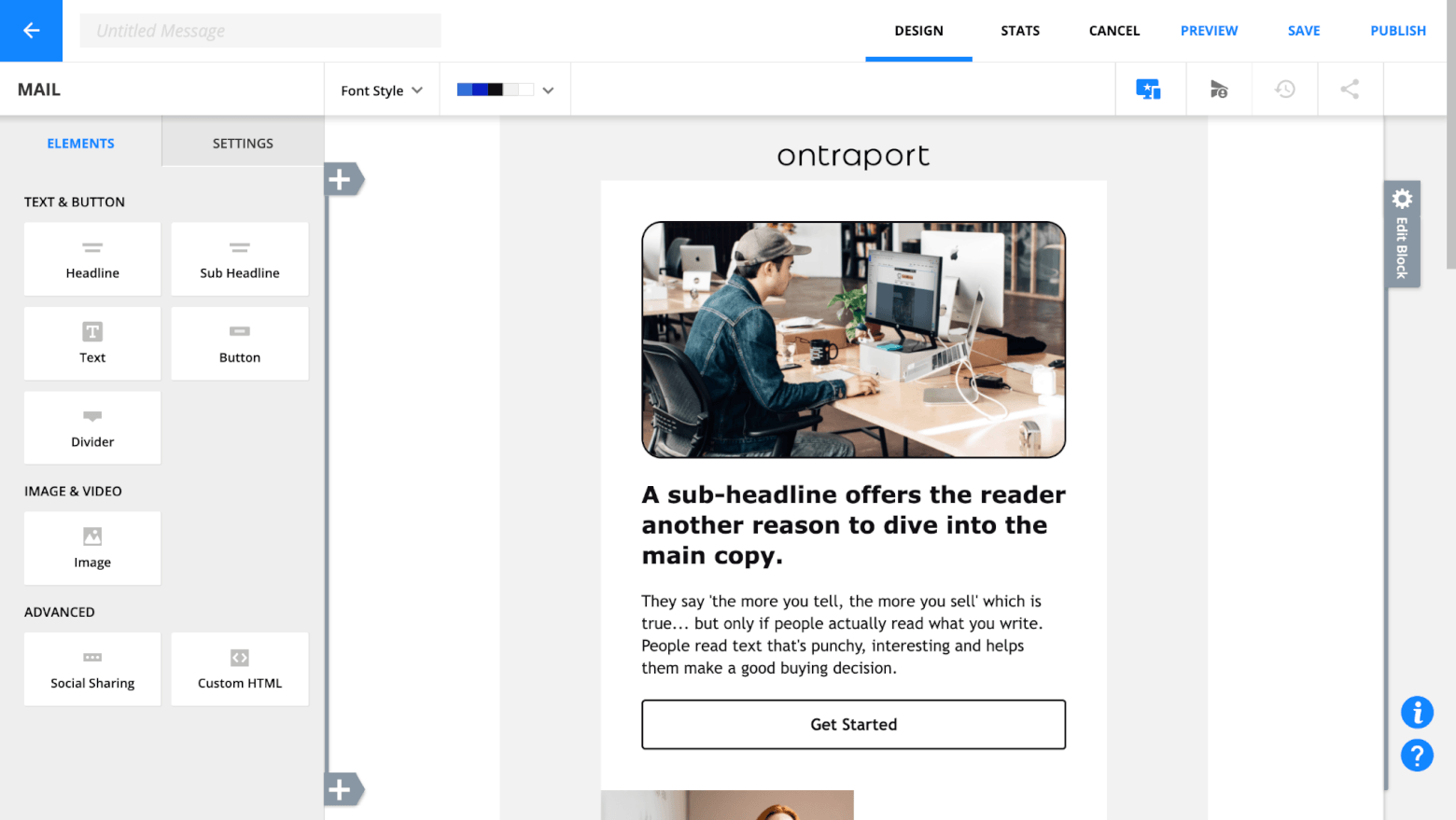
Ontraport’s email editor
There is an integrated AI assistant that can help generate copy from prompts, which is a nice touch. It also provides a spam score to help you spot potential deliverability issues.
However, other tasks felt less intuitive than they should be. For example, adding personalization or merge fields wasn’t as straightforward as I expected, and even something as common as A/B testing requires setting up an automation rather than simply enabling it inside the email editor.
By contrast, ActiveCampaign clearly treats email marketing as a core feature of the platform. Creating a campaign feels much more natural. You start by designing the email, and then decide who should receive it, which is the workflow most marketers are used to.

ActiveCampaign's email editor
The email editor itself feels far more refined. The drag-and-drop builder offers a wide variety of content blocks, making it easier to build more polished layouts without touching code. Templates also feel more modern and diverse, which helps you get to a professional-looking email much faster.
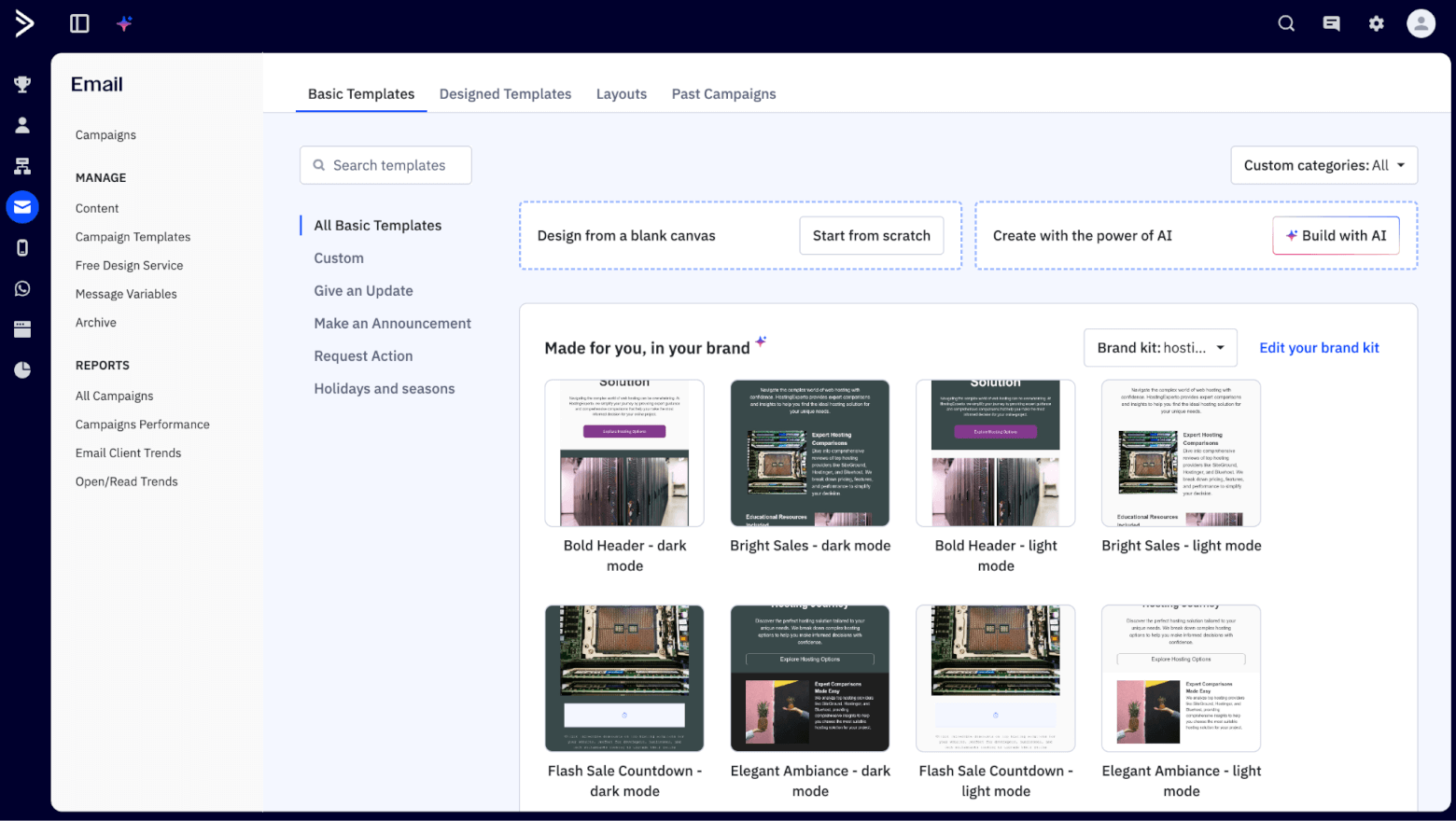
ActiveCampaign's email templates
Personalization is another area where ActiveCampaign shines, with the ability to add merge tags and conditional content. This makes it much easier to create emails that adapt to different segments of your audience without having to build multiple versions of the same campaign.
Split testing is also far easier to set up. You can create A/B tests directly within the campaign builder, whether you want to test subject lines, content variations, or different sending options.
ActiveCampaign also leans heavily into AI to speed up the email creation process. You can use AI to generate subject lines, draft entire email campaigns, or rewrite sections of text if you want something shorter, more engaging, or more persuasive.
And of course, ActiveCampaign’s automation capabilities (which we’ll explore in more detail in the next round) tie directly into email marketing, helping you to send super-targeted campaigns without lifting a finger.
Winner: While Ontraport covers the basics and works well if email is just one part of a broader system, ActiveCampaign clearly wins this round. Its editor is more polished, personalization is easier to implement, and testing and automation are better integrated into the email workflow.
Score: Ontraport – 0, ActiveCampaign – 2
Automation
Automation is where both ActiveCampaign and Ontraport really try to prove their value. After all, the whole point of these platforms is to reduce manual work by letting your marketing and sales processes run in the background. So how well does each one do?
With ActiveCampaign, automation feels like the centerpiece of the platform. The visual workflow editor is clean and easy to follow, with triggers, actions, and conditions laid out in a simple drag-and-drop interface. You can start from scratch, but there are also hundreds of pre-built automation recipes to help you get started quickly.
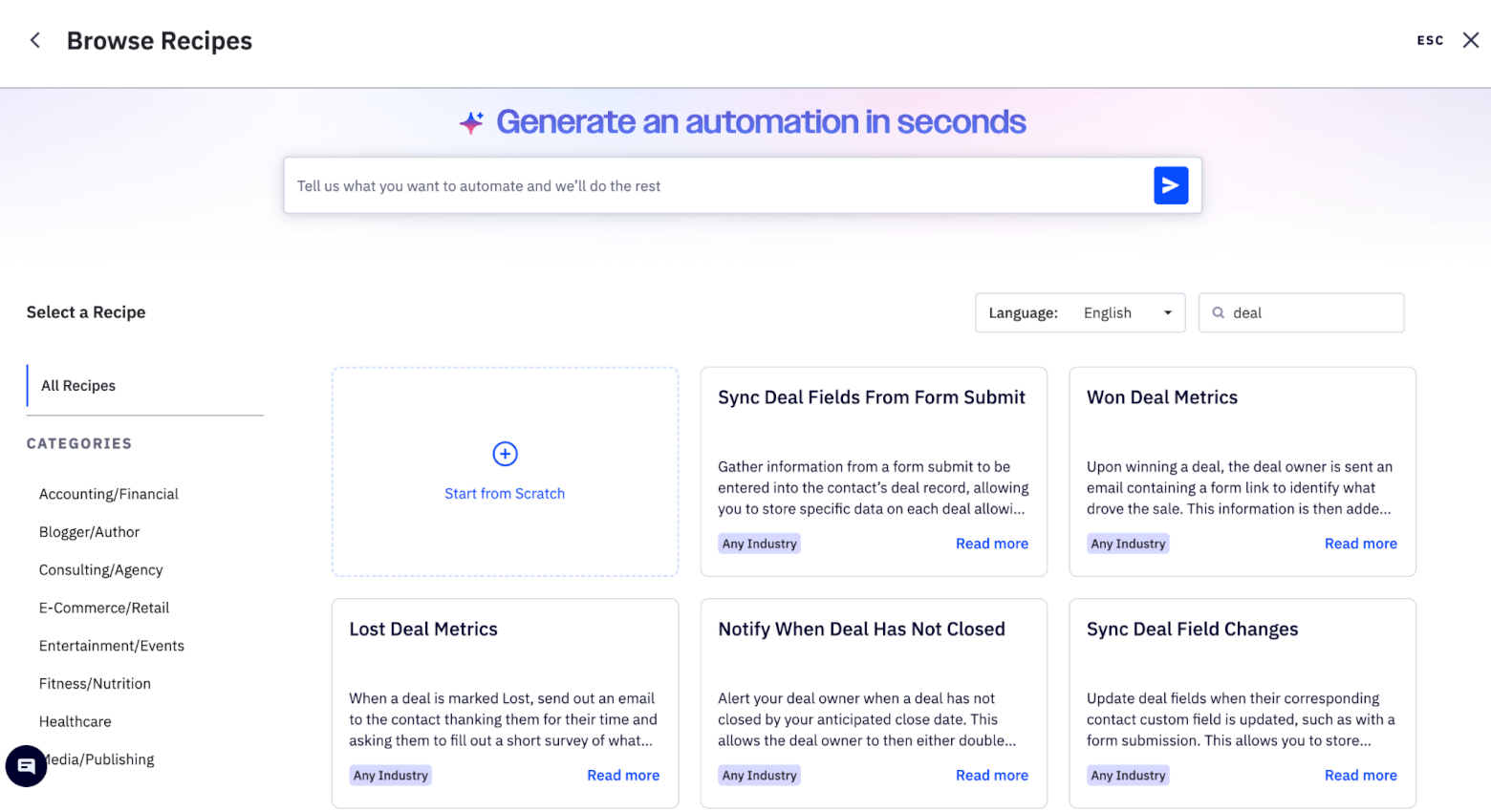
ActiveCampaign's automation recipes
These templates cover a wide range of use cases. You can quickly set up workflows to welcome new subscribers, nurture leads over time, recover abandoned carts, re-engage inactive contacts, or automatically move deals through your sales pipeline (if you opt for their CRM add-on).
During testing, I was able to set up a simple lead magnet automation in just a few minutes using an AI prompt: a contact fills out a form, receives the download email, then enters a follow-up sequence introducing them to our content and services.
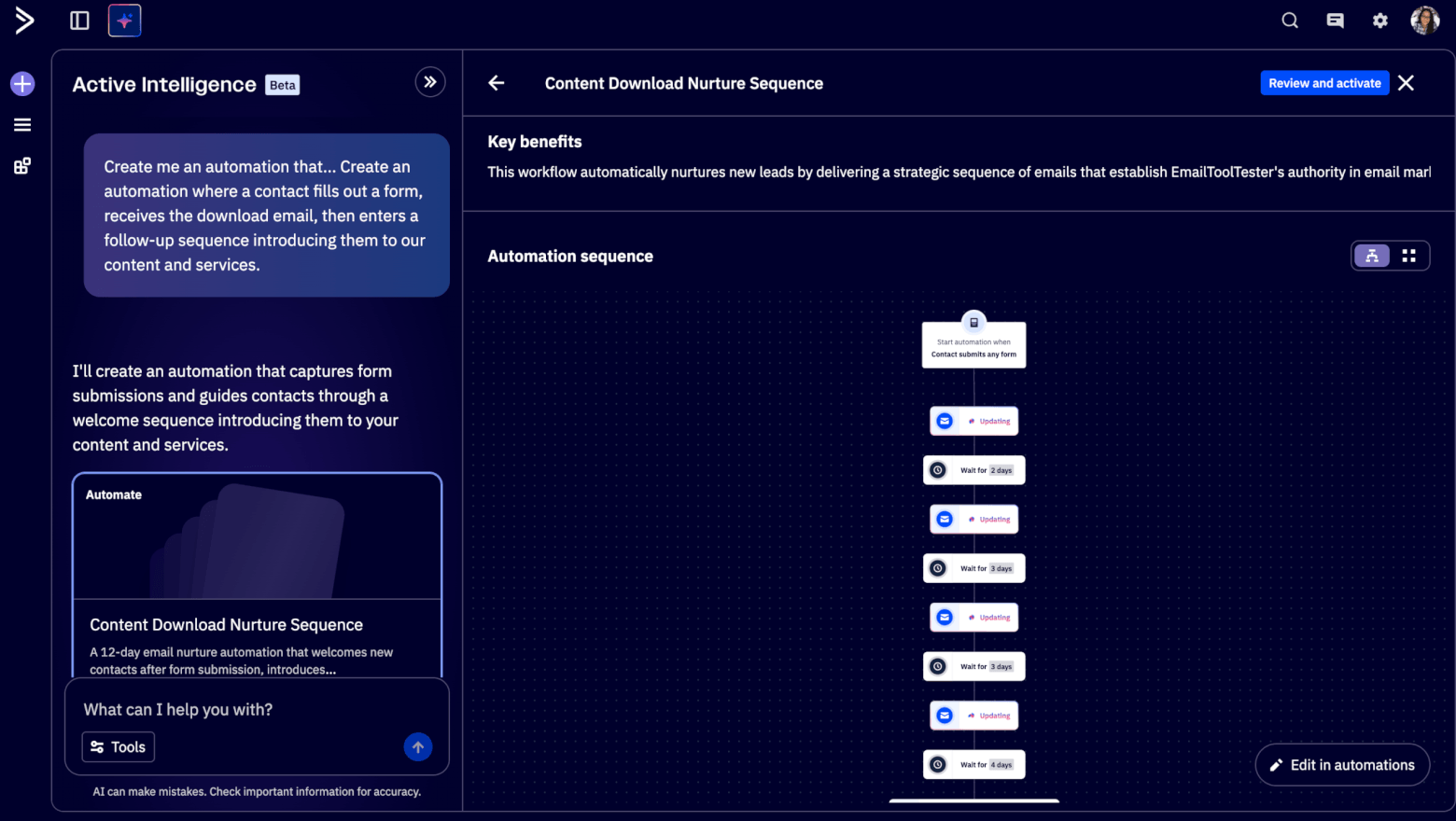
ActiveCampaign's AI can build you automations based on a single prompt
What I liked most is how flexible the triggers are. You can start automations based on actions like someone opening an email, clicking a link, visiting a specific page on your website, submitting a form, making a purchase, or even changing stages in a sales pipeline. From there, you can branch workflows using conditions and logic, which makes it easy to create personalized customer journeys, while automatically keeping your sales team in the loop.
Moving over to Ontraport, automation is also very powerful, but it feels more tied to broader business processes rather than purely marketing workflows. The automation builder works through what Ontraport calls “Campaigns”, which are built using a visual canvas where you connect triggers, actions, and rules.
There are also prebuilt campaign templates, though the library is smaller than ActiveCampaign’s. Many of the templates focus on broader business use cases, e.g. onboarding new customers, delivering digital products, and managing subscription payments.
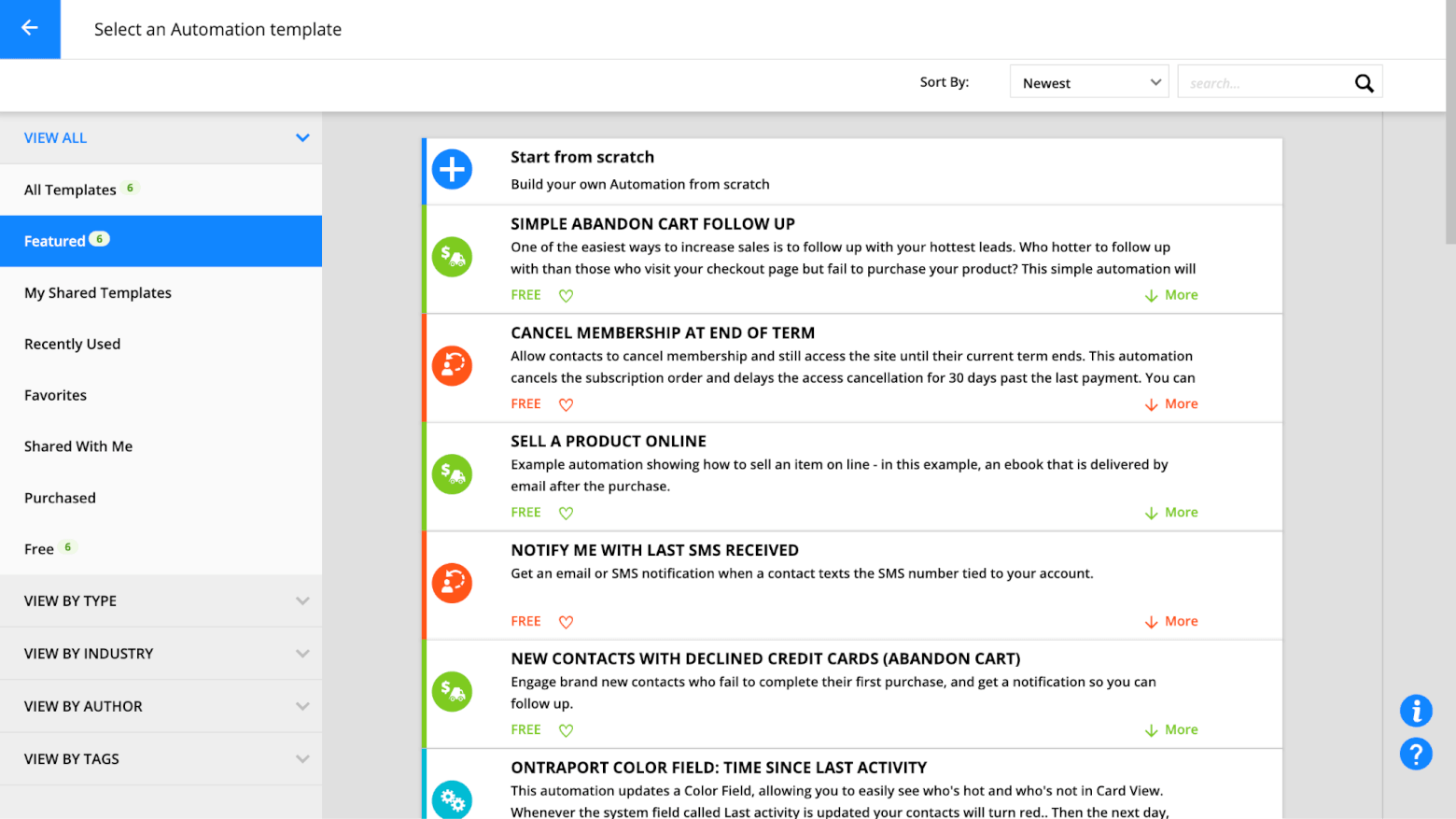
Ontraport offers a wide range of both free and paid automation templates
Cross-system automation is where Ontraport really shines. For example, you could build a workflow where someone purchases a course, automatically receives login credentials, gets added to a membership area, receives onboarding emails, and triggers a follow-up sales offer a few weeks later.
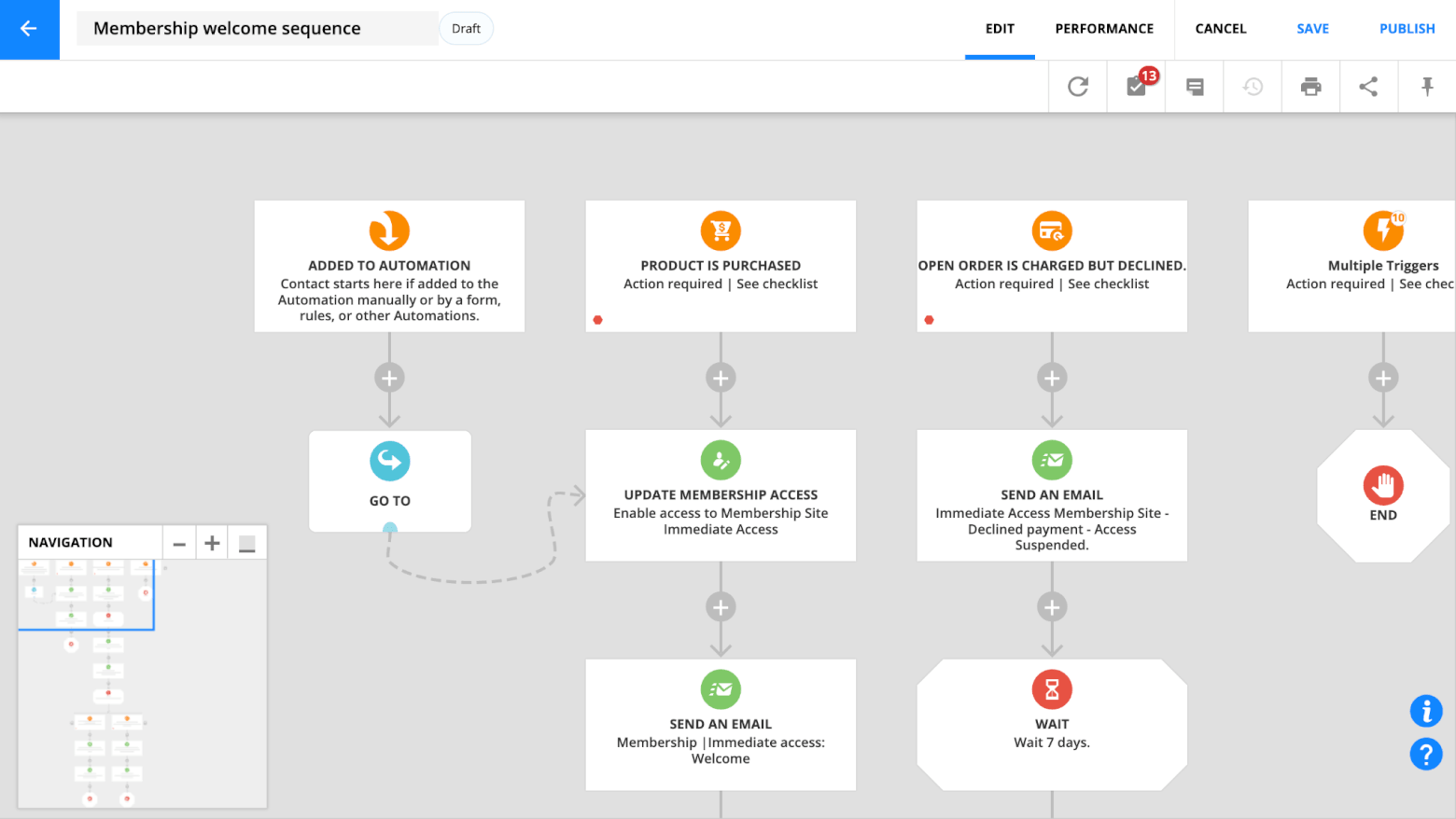
Ontraport’s automation builder
That said, I did find the automation editor a little less intuitive at first. The canvas can get busy quickly, and some actions require digging through menus to find the right option. It works well once you understand the structure, but it takes longer to feel comfortable compared to ActiveCampaign’s simpler visual builder.
Another difference is how easily you can build marketing-focused automations. In ActiveCampaign, it feels natural to quickly create email sequences based on engagement. In Ontraport, you can do many of the same things, but the platform seems more optimized for business process automation rather than pure marketing flows.
Winner: For most businesses focused on email marketing and lead nurturing, ActiveCampaign takes the win in this round. Ontraport is excellent if you want to automate entire business processes that involve payments, memberships, and CRM actions. However, when it comes to marketing automation specifically, ActiveCampaign feels more intuitive, offers a much larger library of templates, and makes it easier to build complex customer journeys.
Score: Ontraport – 0, ActiveCampaign – 3
CRM (Contacts, Deals and Pipelines)
Both ActiveCampaign and Ontraport offer built-in CRM features. Starting with ActiveCampaign, managing contacts is refreshingly straightforward. You get a clean contact view with tags, custom fields, notes, and a full activity timeline showing email engagement, site visits, and automation history. It’s easy to filter contacts, build segments, and quickly understand where someone is in their journey.
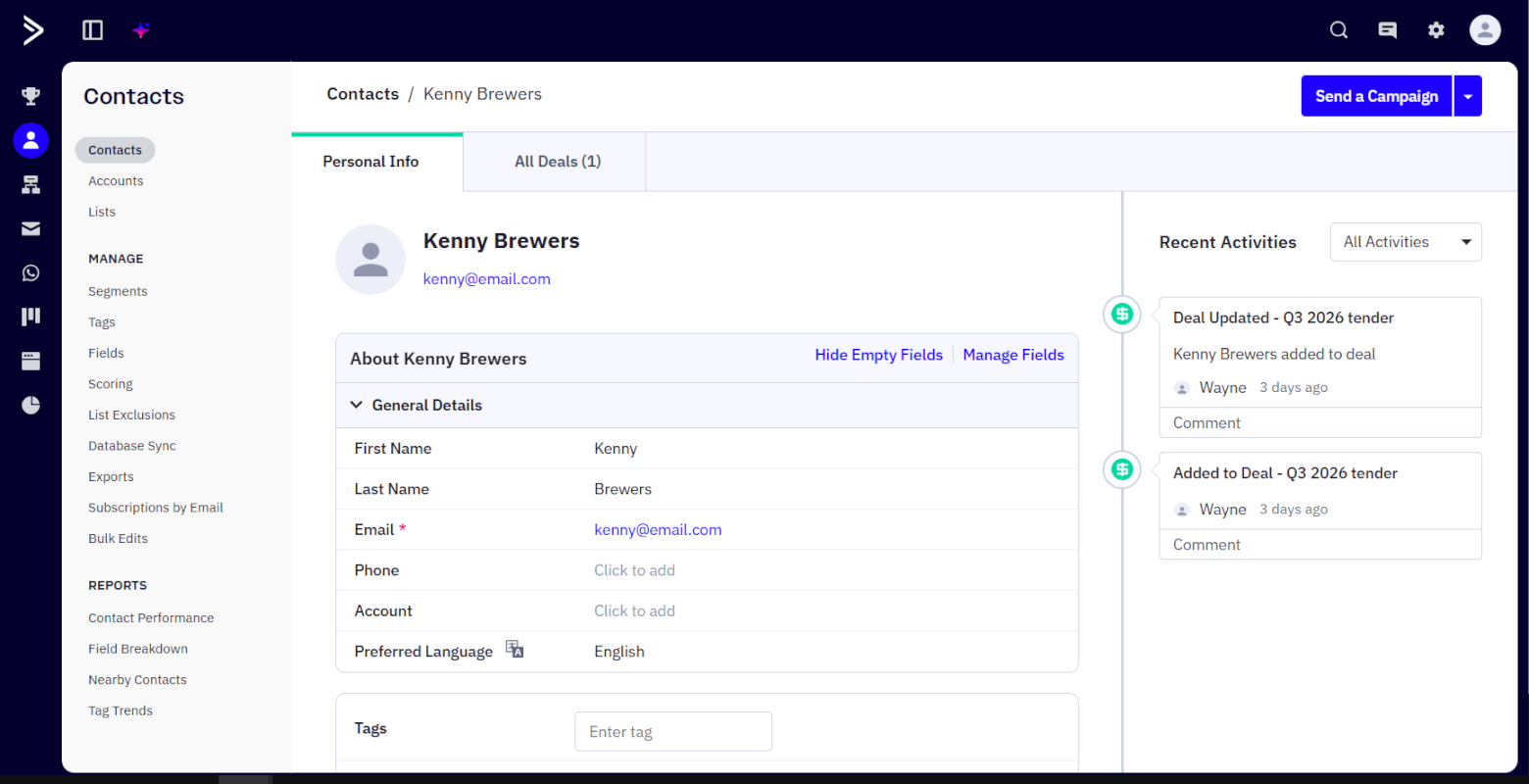
A contact profile in ActiveCampaign
Where ActiveCampaign really adds value is in lead management and scoring. You can assign points based on actions like email opens, link clicks, or website visits, and use that to prioritize your most engaged leads.
For example, I could automatically increase a contact’s score when they visit a pricing page, and then trigger a notification to the sales team once they cross a certain threshold. This makes it much easier to focus on leads that are actually ready to convert.
The Deals CRM is also nicely integrated. You can create pipelines, move deals between stages, assign tasks, and trigger automations when something changes. For most small to mid-sized teams, it covers everything you need without feeling overcomplicated.
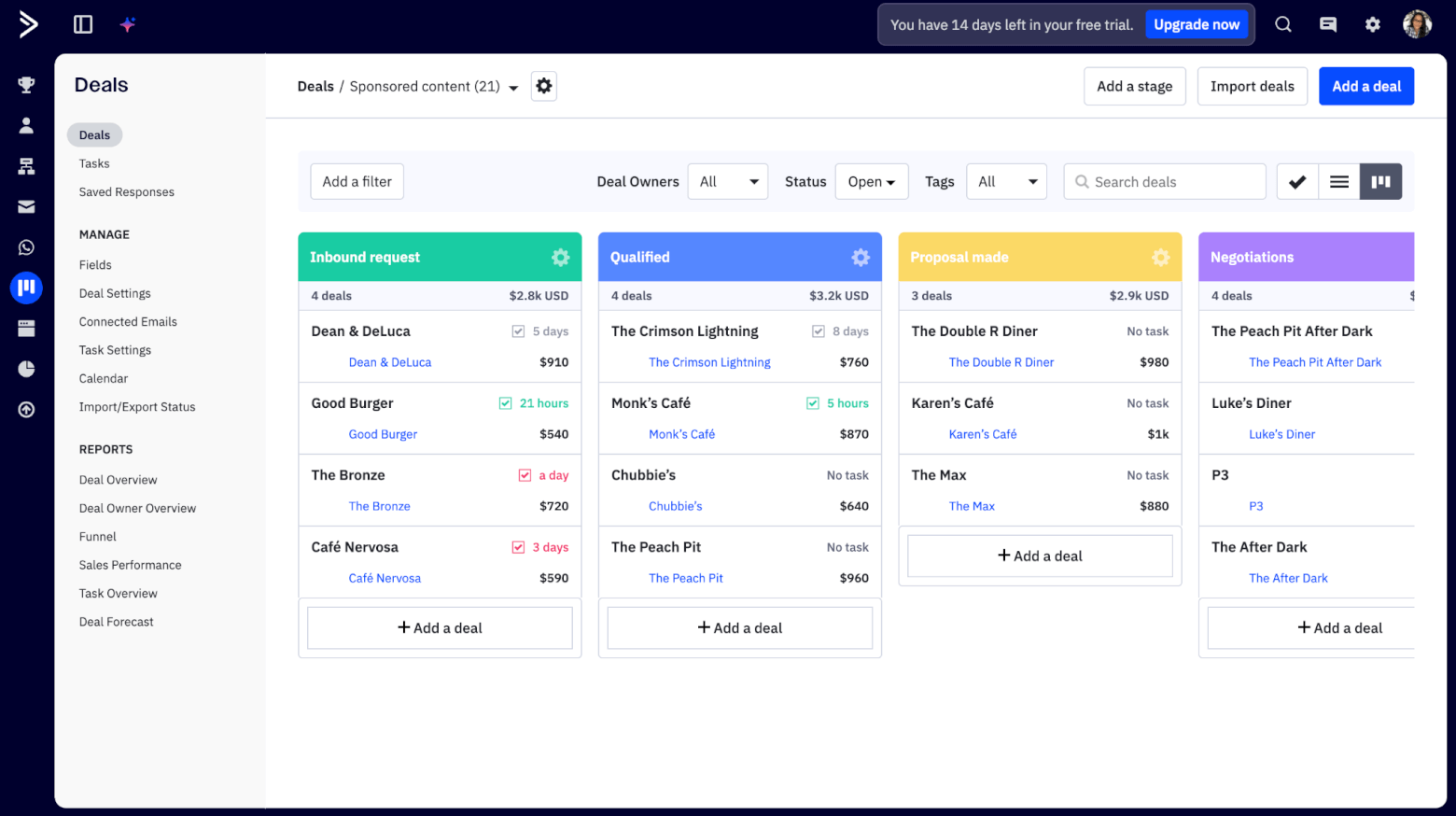
Managing sales pipelines with ActiveCampaign's Deals feature
One thing to be aware of, though, is that ActiveCampaign’s CRM isn’t included in its basic plans. If you want access to deals, pipelines, and sales automation features, you’ll need to purchase an add-on. So while it’s easy to use, it’s not part of the entry-level package.
Switching to Ontraport, things feel a bit different from the start. One thing that initially confused me is that key CRM components like the “Deals” and “Companies” apps aren’t enabled by default. I had to activate them manually, which made the CRM feel slightly hidden at first.
Once everything is set up, Ontraport’s CRM is definitely powerful. Contacts are highly customizable, and you can track a wide range of data across marketing, sales, and payments.
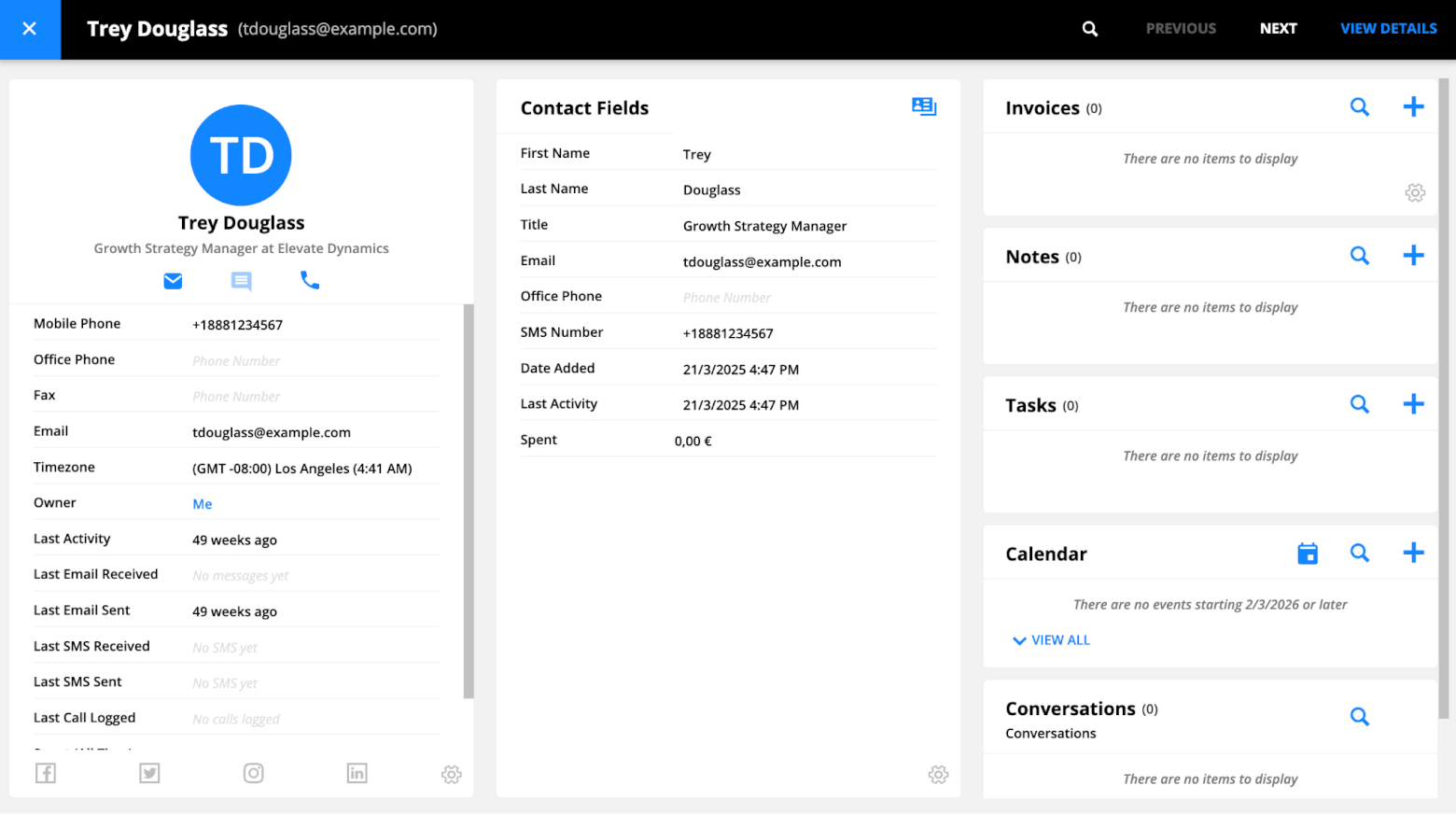
A contact record in Ontraport
The Deals pipeline is flexible, with visual stages, the ability to drag and drop deals across stages, task automation, and built-in follow-ups, although again, the design of the interface isn’t as modern as we’ve seen in other CRMs.
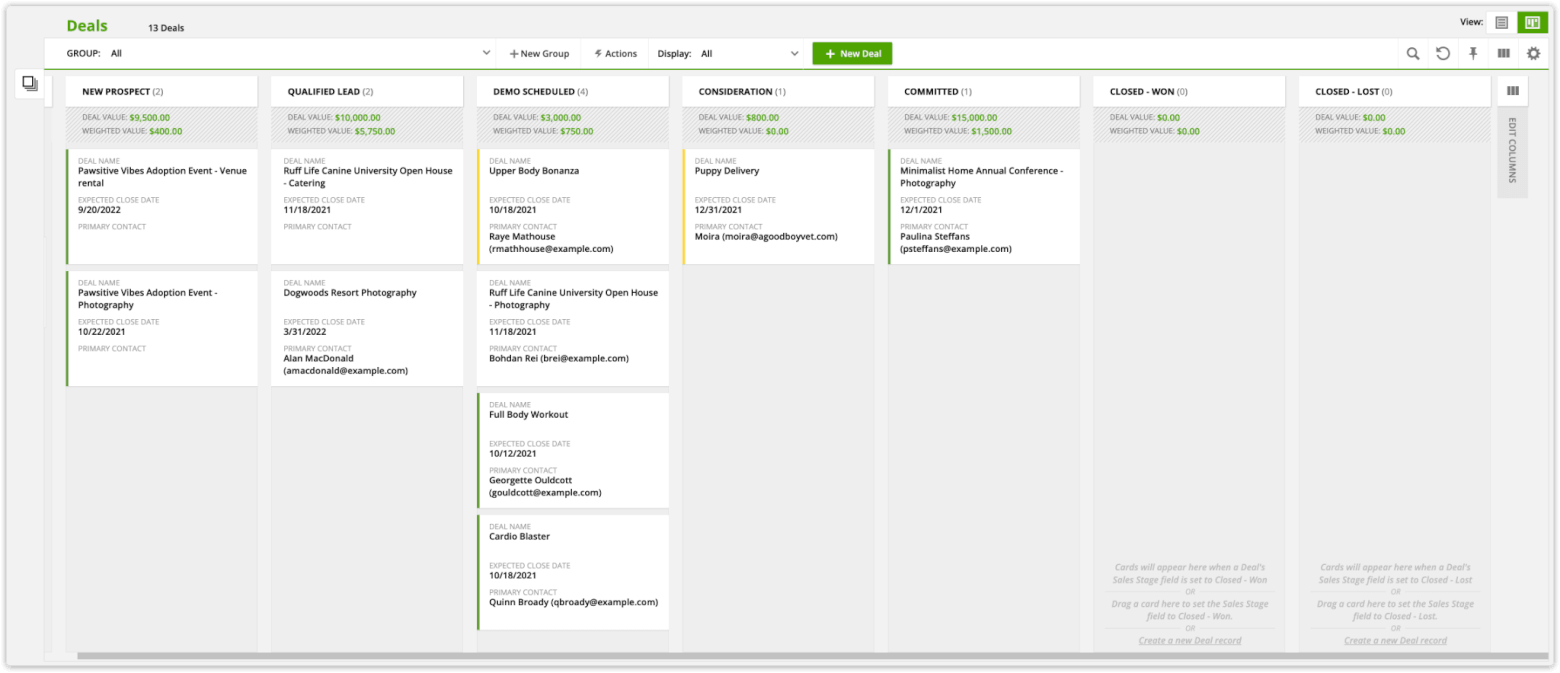
Ontraport’s deals pipeline
Ontraport also supports lead scoring, which is useful for sales teams to identify promising prospects and prioritize outreach. However, compared to ActiveCampaign, I found the lead management experience less intuitive overall. Things like segmentation, scoring, and tracking engagement didn’t feel quite as tightly connected or easy to act on.
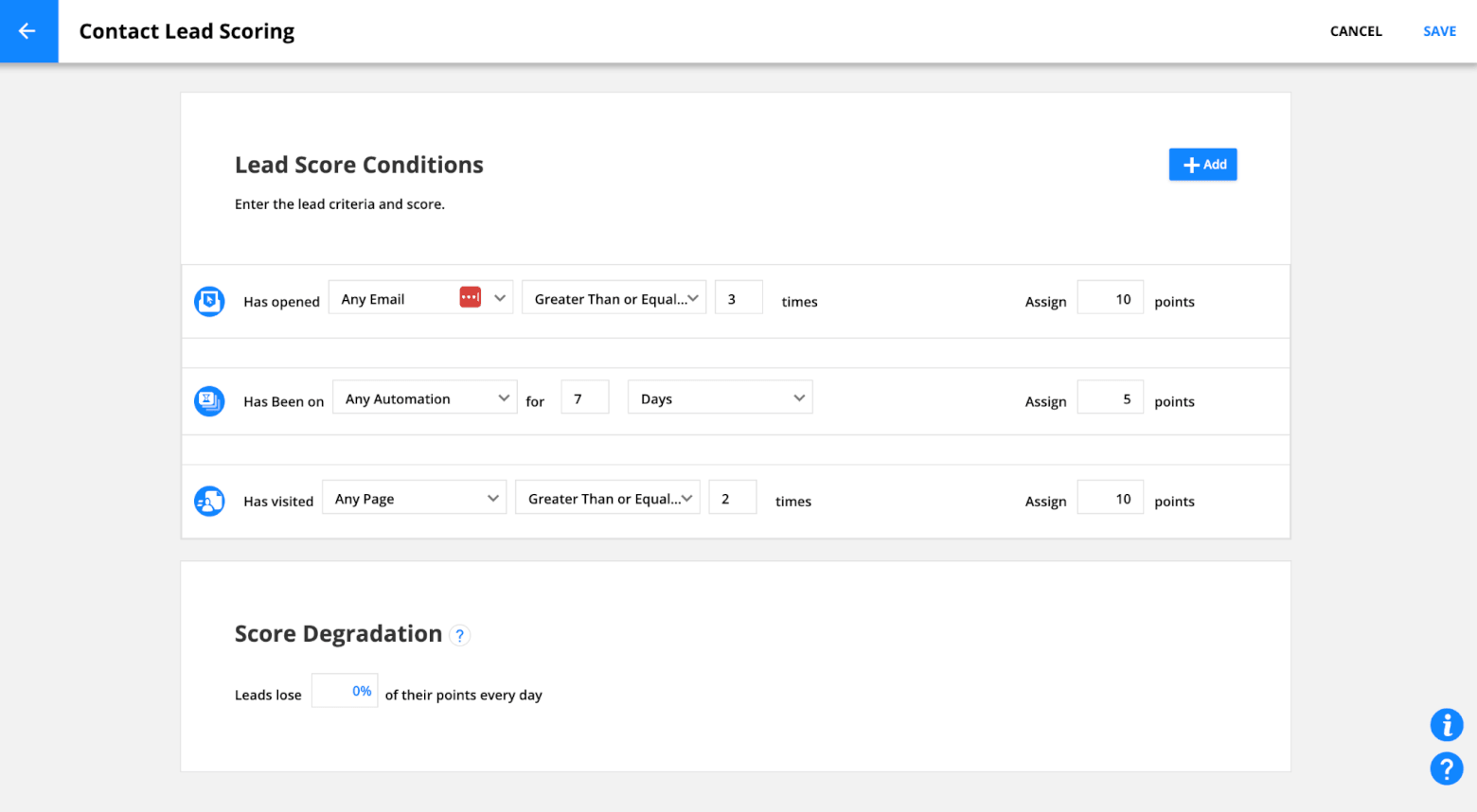
Lead scoring in Ontraport
In practice, both tools can handle core sales workflows like assigning leads, automating follow-ups, and moving deals through pipelines. The difference is more about how it feels to use them day to day.
Where Ontraport stands out is in how deeply it connects CRM with the rest of the platform. Deals can tie directly into payments, subscriptions, and onboarding flows. So you could move a lead through a pipeline, process a payment, and trigger access to a product, all in one system.
But again, this comes with a trade-off. Compared to ActiveCampaign, I found Ontraport’s CRM harder to navigate and slower to fully understand. There are more moving parts, and it takes longer before everything clicks.
Winner: While both platforms offer solid CRM functionality, ActiveCampaign comes out ahead in this round, striking a better balance between power and usability. Managing contacts, scoring leads, and moving deals through pipelines feels more intuitive, and most common sales workflows can be set up quickly without a steep learning curve. Ontraport connects the CRM with payments and broader business processes, but it comes at the cost of complexity.
Score: Ontraport – 0, ActiveCampaign – 4
Landing Pages
Landing pages are one of those features that can either feel like a quick win or a bit of a chore, depending on how well the builder works. So I spent some time creating a few pages in both tools to see how they compare in real use.
Starting with Ontraport, I actually found it to be more capable than expected. You get around 30 templates, which are fairly simple but cover the main use cases like opt-in pages, sales pages, and basic funnels. The drag-and-drop builder itself feels light and snappy, which makes it easy to put a page together quickly.

Ontraport’s landing page templates
That said, there are a few quirks. There’s no undo button, which makes testing changes a bit nerve-wracking, and I did run into a couple of moments where edits didn’t save properly. The design options are also somewhat limited, so most pages end up looking quite similar unless you spend time customizing them.
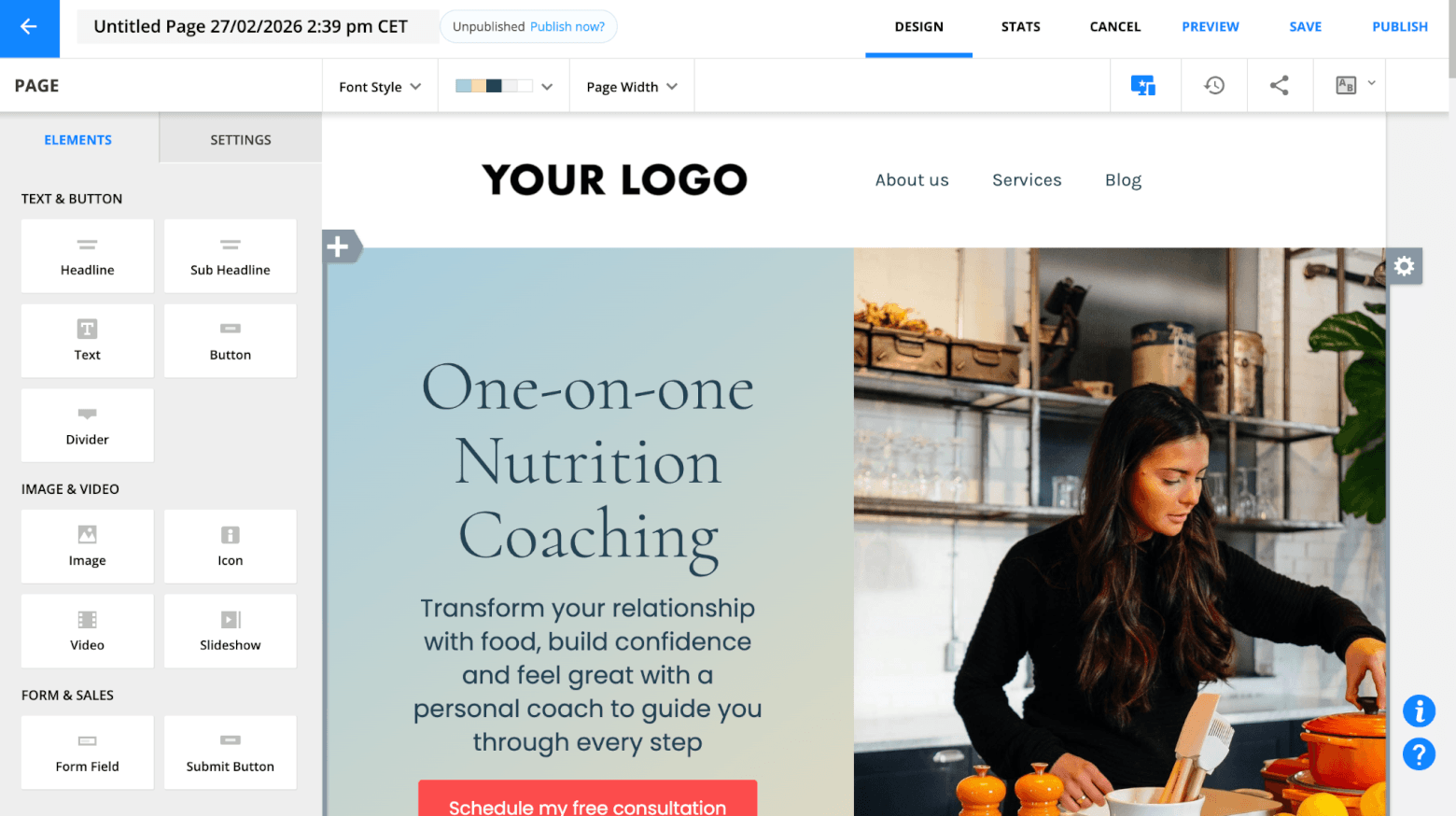
Ontraport’s landing page builder
Where Ontraport really stands out, though, is in what you can actually do with your pages. You can create full sales pages, connect them directly to Stripe or PayPal, and start taking payments right away.
On top of that, Ontraport lets you build full websites, not just standalone landing pages. That gives it a much broader range of use cases compared to most email-first tools.
With ActiveCampaign, the landing page builder is polished, although a little more limited in terms of what it can do (as we’ll see in a second). The builder is clean, easy to use, and includes helpful features like undo and redo, which makes experimenting much easier.
You also get a similar number of templates, but if I’m being honest, they aren’t particularly eye-catching.
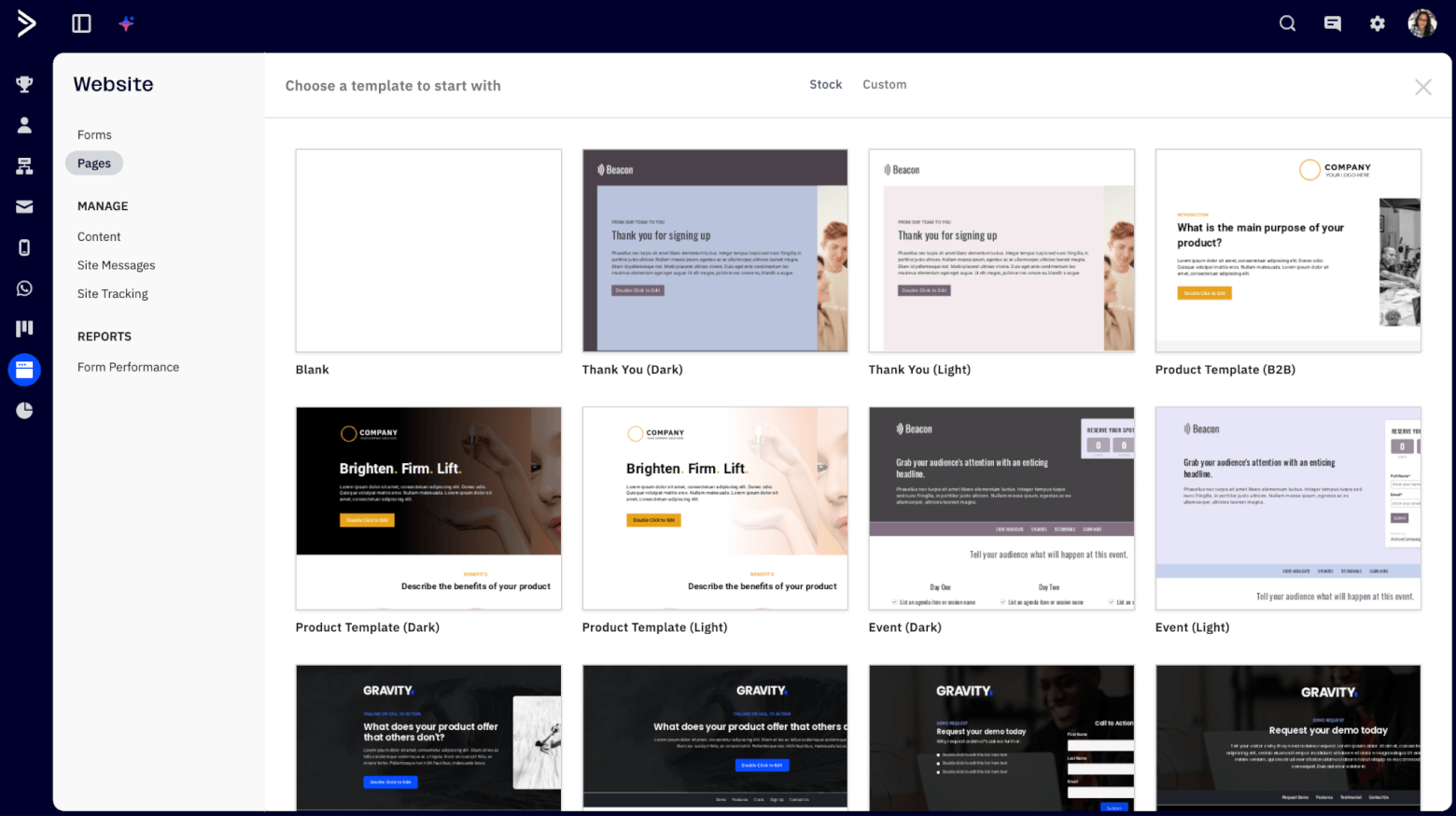
ActiveCampaign’s landing page templates
Building pages is relatively straightforward, and everything integrates nicely with your email marketing and automation workflows. You can add forms, trigger automations, personalize content, and track performance without leaving the platform, which is exactly what you’d expect from ActiveCampaign.
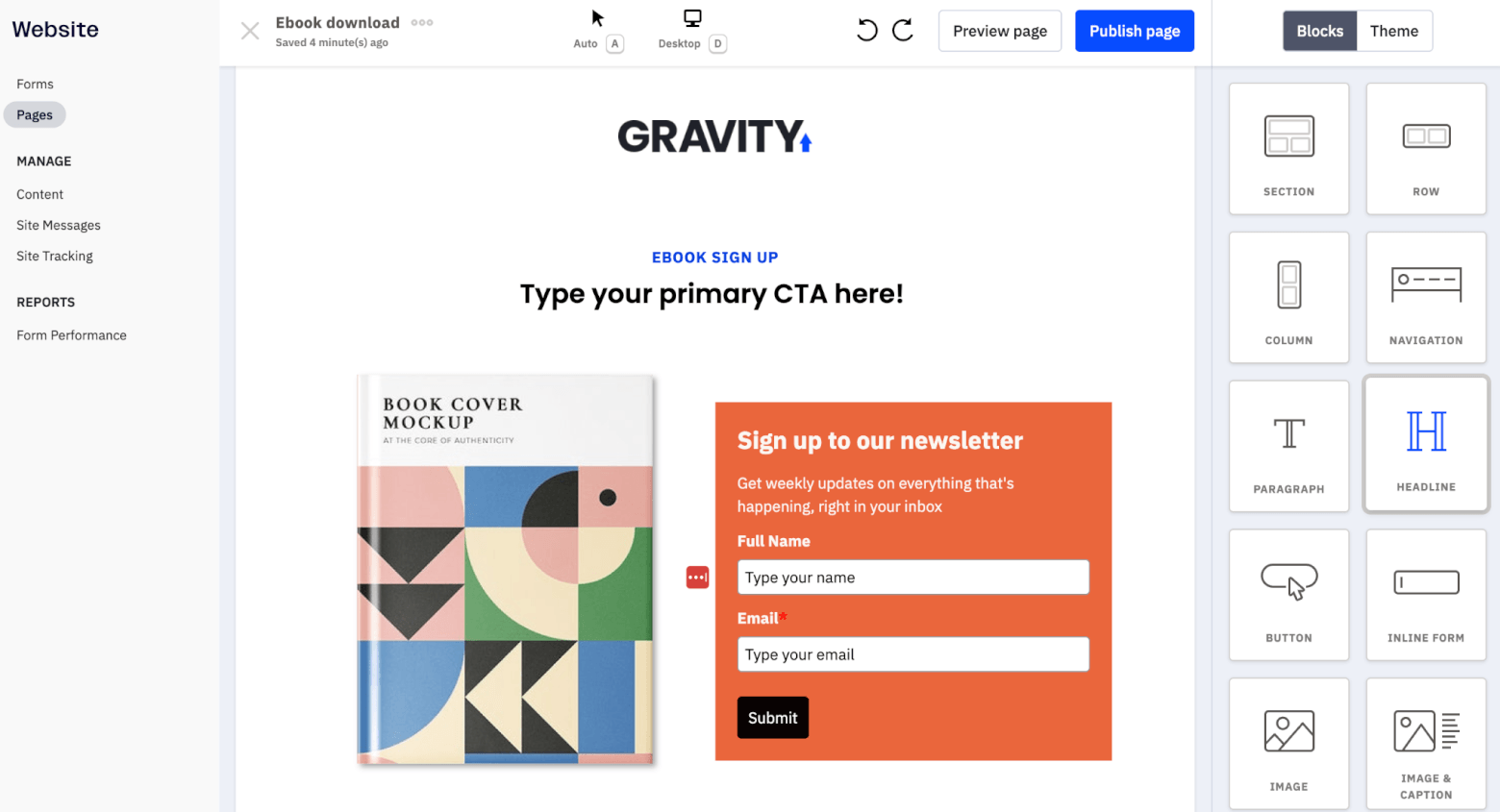
ActiveCampaign’s landing page builder
ActiveCampaign also lets you add a PayPal button, so you can accept payments from your pages. However, this functionality feels more limited compared to Ontraport’s more complete sales page and funnel setup, especially if you want to build more advanced checkout or post-purchase flows.
Winner: While ActiveCampaign is great for straightforward lead generation pages, Ontraport wins its first round here. The ability to build full sales pages, accept payments seamlessly, and even create entire websites makes it a more flexible landing page tool overall.
Score: Ontraport – 1, ActiveCampaign – 4
Monetization Features (Funnels, Memberships and Payments)
This is where the difference between ActiveCampaign and Ontraport becomes really obvious. One is built to support monetization. The other is built to run it.
Starting with Ontraport, monetization is clearly a core part of the platform. You can actually build and run your entire sales process inside the tool, including sales funnels, order forms, upsells, downsells, and even things like order bumps and payment recovery flows.
You can go from a landing page straight into a checkout, process a payment, and then trigger onboarding emails or grant access to a product, all without leaving the platform. Payments are handled through integrations with payment gateways (including PayPal, Stripe and Authorize.net), and everything ties directly into your CRM and automations.
Ontraport also includes built-in membership site functionality, which is a big deal if you are selling courses, subscriptions, or gated content. You can create protected areas, manage user access, and connect everything to your funnels and automations.
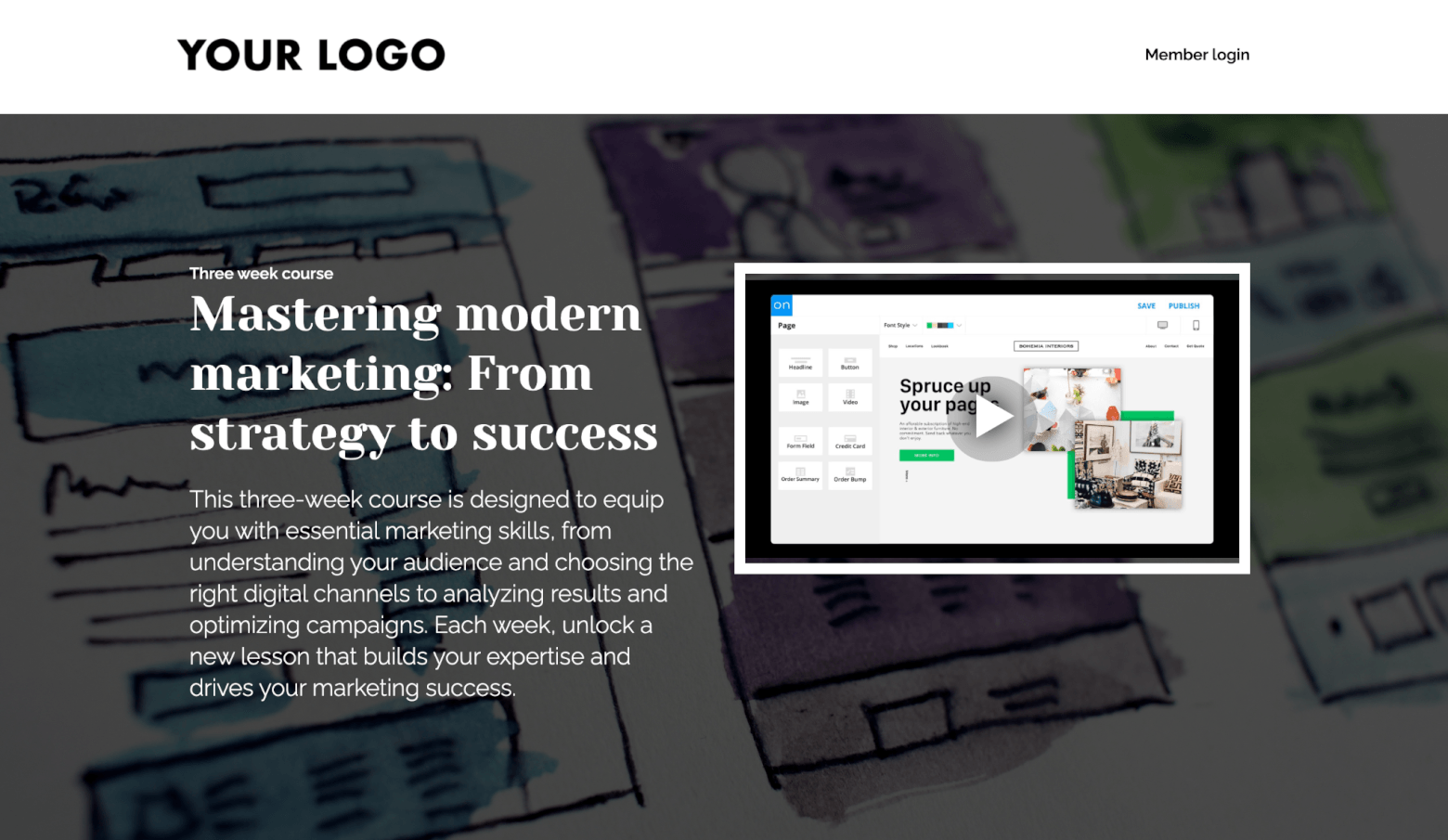
A membership site example in Ontraport
There’s also a built-in partner program system where you can create your own affiliate program, generate unique tracking links, set commission structures, and track performance directly inside the platform. While it’s not as specialized as dedicated affiliate platforms, it’s more than enough for most small to mid-sized businesses.
Put simply, Ontraport is designed to replace multiple tools at once. If you are currently using something like a page builder, a checkout tool, a membership plugin, and an email platform, Ontraport brings all of that under one roof.
With ActiveCampaign, the picture is quite different. It doesn’t try to handle monetization directly. There are no built-in sales funnels, checkout systems, or membership site features. Instead, ActiveCampaign focuses on what happens around the sale.
For example, you can build powerful automations that nurture leads before a purchase, follow up after a purchase, or recover abandoned carts. But the actual transaction usually happens in another tool, like Shopify, WooCommerce, or a checkout platform, which you then connect to ActiveCampaign via integrations.
This approach has its pros and cons. On the plus side, you can choose best-in-class tools for each part of your stack. But it also means more integrations, more setup, and more moving parts to manage.
Winner: It’s a clear win for Ontraport. If your goal is to sell products, run funnels, manage memberships, and process payments, Ontraport gives you everything in one place. ActiveCampaign is still incredibly useful for supporting sales through automation and follow-ups, but it relies heavily on external tools to actually complete the transaction.
Score: Ontraport – 2, ActiveCampaign – 4
Pricing
We’ve reached the final round – and as you’ll see, pricing is where the differences between ActiveCampaign and Ontraport become very real, very quickly.
With ActiveCampaign, the entry point is quite attractive. The Starter plan starts at just $15/month, which makes it easy to get up and running if your main focus is email marketing.
That said, it is limited. You won’t get access to more advanced features like landing pages, conditional content, or deeper automation capabilities at this level, and more than likely will need to upgrade to the Plus plan (starting at $49/month) at some point.
Another thing to keep in mind is that pricing scales with your contact list size, which can add up as your business grows. And importantly, if you want CRM features, you’ll need to not only purchase an add-on – you’ll also need to upgrade to a higher-tier plan first. So realistically, to access email marketing and CRM features, you’ll be looking at spending at least $88/month for a database of 1,000 contacts.
Switching to Ontraport, there’s no getting around it – it’s significantly more expensive. The lowest plan starts at around $83 per month for just 500 contacts, which is a big jump compared to ActiveCampaign’s entry pricing. Like ActiveCampaign, pricing also increases as your contact list grows.
Here’s a quick comparison of the pricing of ActiveCampaign’s mid-tier Plus plan, vs Ontraport’s Plus plan:
| No. of contacts | ActiveCampaign pricing | Ontraport pricing |
|---|---|---|
| 1,000 | $19 / month | $108 / month |
| 2,500 | $49 / month | $141 / month |
| 5,000 | $99 / month | $183 / month |
| 10,000 | $189 / month | $283 / month |
However, what you get for that price is quite different. Ontraport includes a much broader set of features out of the box, including CRM, sales funnels, payments, and membership tools. So instead of paying for multiple tools, you’re essentially paying for one platform that does it all.
One last thing to note – although Ontraport’s lowest plan (Plus) includes most features, you do need to upgrade to higher tiers to access partner/affiliate programs, split automations, transactional emails, and lead scoring.
Winner: For most small businesses, ActiveCampaign wins this round. It offers a much lower barrier to entry, and you can start small and scale as you grow. Ontraport may offer better value if you plan to replace multiple tools with one platform, but the higher starting price makes it harder to justify for many businesses, especially early on.
Score: Ontraport – 2, ActiveCampaign – 5
Final thoughts: Ontraport vs ActiveCampaign
So, coming back to that original question: do you really need this many tools to run your business?
Both ActiveCampaign and Ontraport bring multiple functions under one roof, and help you move away from the messy setup of disconnected tools.
But as we’ve seen throughout this comparison, they go about it in very different ways.
ActiveCampaign doesn’t try to do everything, but what it does, it does really well. Its email marketing, automation, and lead management features are more refined, easier to use, and feel like they’ve been designed with real day-to-day workflows in mind.
Overall, it gives you more flexibility and a smoother experience than Ontraport, and is especially well-suited if you prefer using a few best-in-class tools that integrate well together.
Ontraport, on the other hand, brings together CRM, sales funnels, payments, membership sites, and more into a single platform. That’s incredibly powerful if you want to consolidate your entire tech stack. But as we experienced, that breadth comes with more complexity and a steeper learning curve.
So, if you’re clear on which one is right for you and are ready to take the next step, you can:
> Try ActiveCampaign for free for 14 days
> Try Ontraport for free for 14 days
The authors
Learn more about us

Our Methodology
This article has been written and researched following our EmailTooltester methodology.
Our Methodology