

If there are two somewhat unexpected things we’ve seen take off in email marketing over the last few years, they would be:
- AI, and
- newsletters.
AI needs no introduction. But newsletters? A few years ago, I’m not sure many of us would have predicted such a comeback.
And yet, here we are. Creators, SaaS companies, ecommerce brands, and small businesses are all investing more time into newsletters. Our own business is no exception – we’ve recently reactivated our previously-dormant Tooltester newsletter (which has now grown to over 6,000 subscribers), and have even started monetizing it through ads and sponsorships.
One thing that’s helped us move faster is, of course, AI. We’ve used it for brainstorming ideas, polishing copy, and speeding up our production workflow. But until now, that has mostly meant piecing together several tools and prompts ourselves.
That’s why the new wave of AI newsletter generators is interesting. Instead of just helping with one part of the process, these tools claim they can help you create a full newsletter, from the design, down to the structure and copy.
But do they actually save time? And more importantly, would we trust them enough to send their output to our subscribers?
In this article, I’ll test the most interesting AI newsletter generators, including tools from Hostinger Reach, HubSpot, Beehiiv, ActiveCampaign, and others, to see how useful they really are.
Best AI Newsletter Generators: Top 7
| Provider | Best for… |
|---|---|
| HubSpot | Teams that want AI newsletters connected to CRM, brand voice, and marketing data |
| Hostinger Reach | Beginners who want AI to create both the newsletter design and copy |
| Beehiiv | Monetization-focused newsletter creators who want AI support, but still want to stay hands-on |
| ActiveCampaign | Automation-heavy businesses that want AI to help create newsletters, optimize send times, and connect campaigns to broader customer journeys |
| GetResponse | Creators who want AI-generated emails plus monetization tools like courses and paid content |
| MailerLite | Simple newsletters where AI helps with copy, subject lines, and polishing (with the chance to sell paid subscriptions) |
| Mailchimp | Ecommerce newsletters, promotions, and automated customer journeys |
HubSpot
HubSpot is in a slightly different category from most AI newsletter generators, because it isn’t just a newsletter tool. It’s a full CRM, marketing, sales, and support platform, with AI now built into almost every corner of the product.
As a newsletter generator, HubSpot is probably one of the more capable tools I’ve tested. You can create marketing emails with AI, using either an existing email layout or a template. The AI generates the subject line, preview text, body copy, and CTAs, based on details such as your target audience, the action you want readers to take, and the key information you want to include.
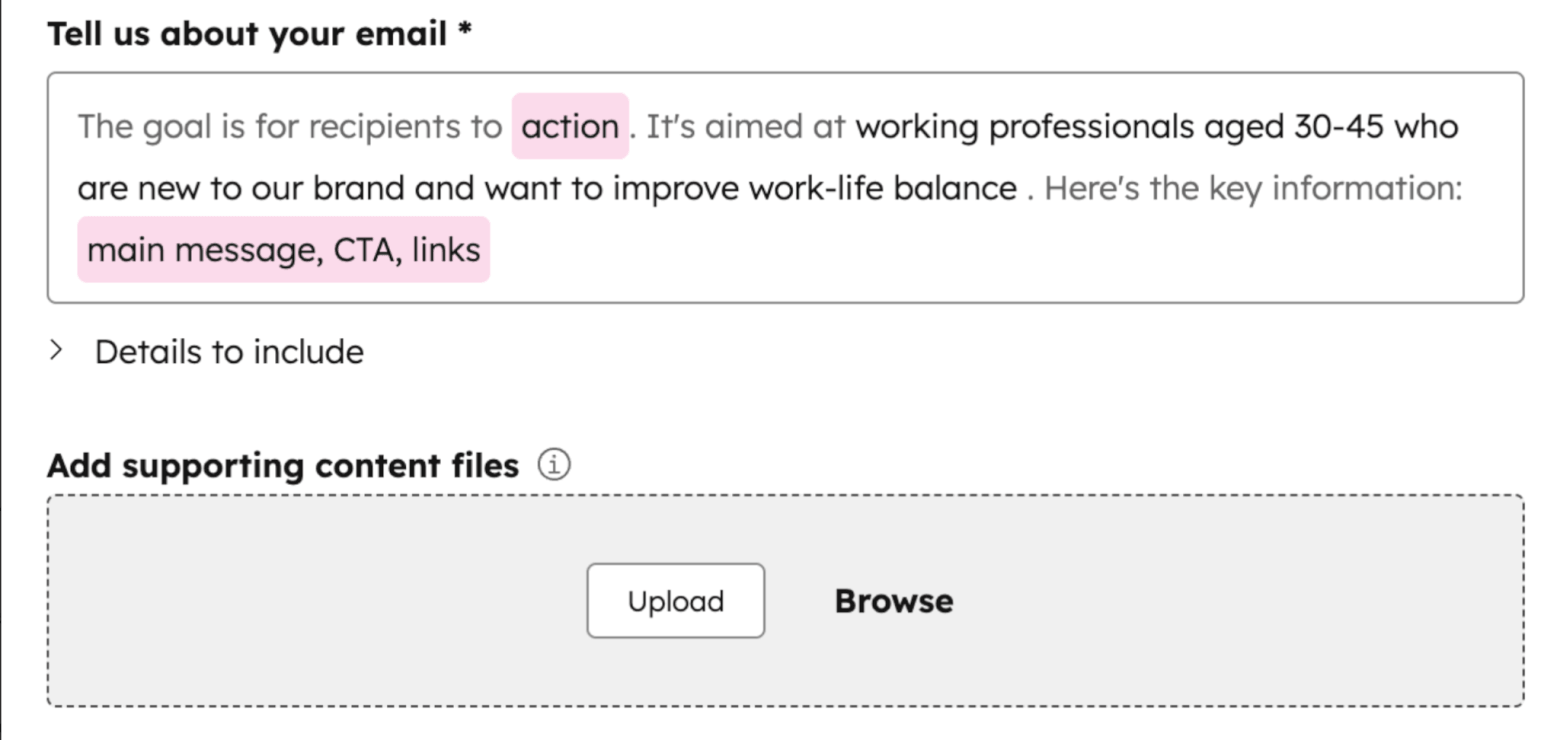
What impressed me most is how you can configure AI data sources, including your brand kit, company details, ideal customer profile, and more. There’s also a dedicated brand voice feature, which can analyze your writing style and help keep AI-generated content closer to your tone.
It’s great because it means the AI is not just guessing from a generic prompt, but working with actual information about your business, audience, and positioning – something I haven’t really seen other AI newsletter generators do.
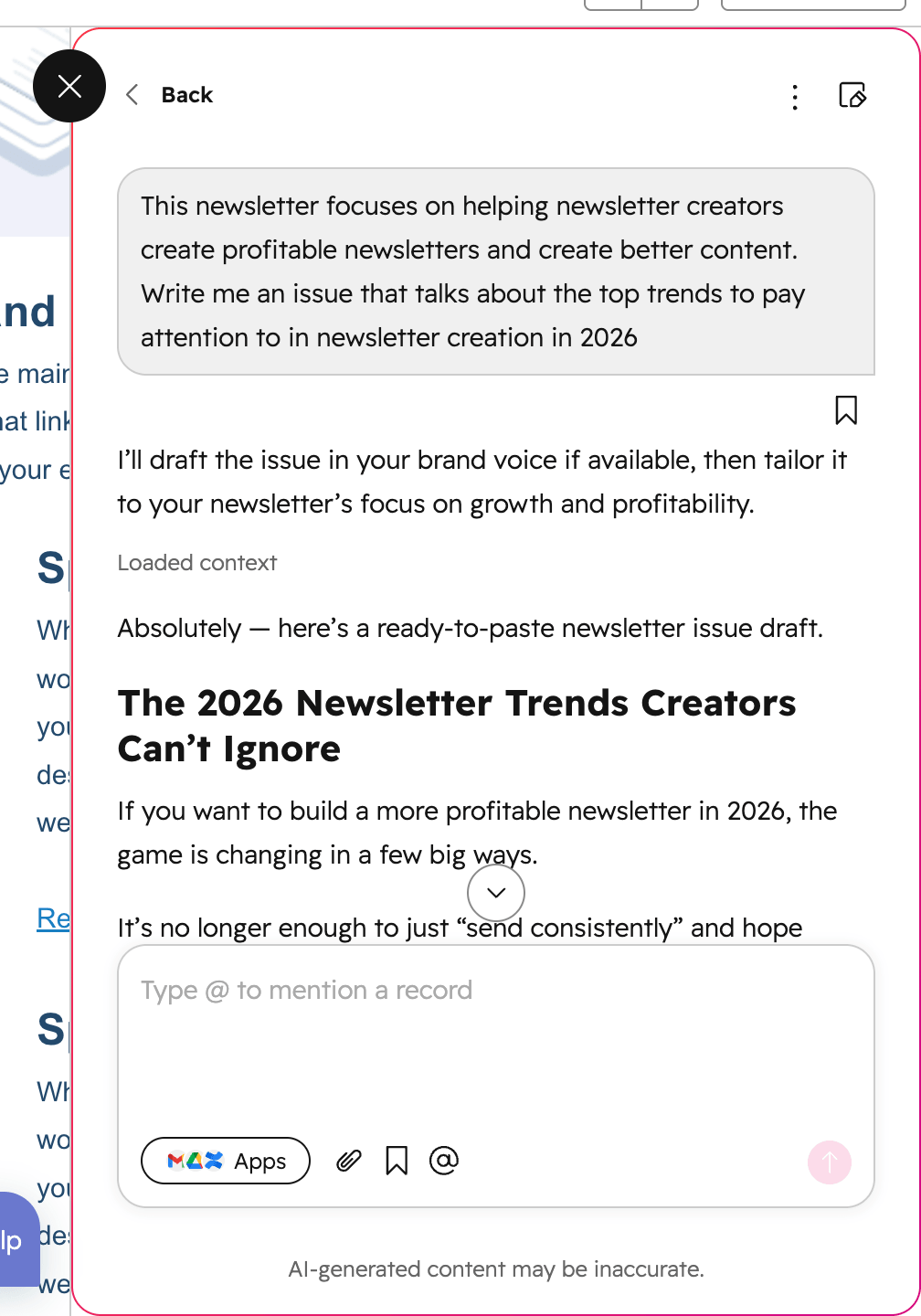
Inside the email editor, The Breeze Assistant can help you draft, refine, rewrite, and improve newsletter copy. In my experience, the output was noticeably stronger than many simpler AI writing tools: more complete, and much closer to an on-brand marketing email.
You can also generate images with AI for emails, choose image styles and sizes, and edit them with Adobe Express or Canva.
One unique feature is HubSpot’s ability to recreate external email templates using AI. You can export the HTML of an email built elsewhere, upload or paste it into HubSpot, and ask AI to recreate it as a drag-and-drop email template.
This isn’t quite the same as asking AI to design a newsletter from scratch, but it’s handy if you’re migrating templates from another platform.
HubSpot also uses AI after the newsletter has been sent to generate a summary of how your email performed, compare results against benchmarks, and suggest improvements for future campaigns. You can then ask follow-up questions in Breeze Assistant, which is a nice touch if you want to turn reporting into actual next steps.
Overall, HubSpot includes some really impressive tools for AI newsletter generation – but like most HubSpot features, the really interesting parts are tied to higher-tier plans.
Pros
- Can write a full marketing email, including subject line, preview text, body copy, and CTAs
- Strong AI writing quality inside the email editor
- Brand voice feature helps keep content closer to your company’s tone
- Supports brand voice in English, Spanish, Portuguese, French, German, and Japanese
- Can generate AI images directly for emails and other marketing assets
- Can recreate external HTML email templates as drag-and-drop HubSpot templates
- Useful AI controls, including the ability to manage feature access and data sharing
- Goes far beyond newsletters, with AI also available across CRM, workflows, agents, reporting, and more
- Free plan available with some AI features
Cons
- No true AI design generation for newsletters from scratch; relies on pre-existing templates
- Template choice can feel limited compared with some dedicated email design tools
- The AI template upload feature has design limitations, including no custom fonts, gradients, or overlapping elements
- Advanced options for personalizing content (e.g. dynamic text tokens) are available for automated emails, but not regular newsletters
- There’s a lot of power here, but also more setup and complexity than in simpler newsletter platforms
- No native tools for selling paid newsletter subscriptions, managing ads, or monetizing content
- The most useful email AI creation features are limited to Marketing Hub Professional and Enterprise. The cheapest plan (Starter) only includes some AI writing features + image generation
- HubSpot can get expensive, especially if you only need newsletters
Pricing
- Free plan for 1,000 contacts and 2,000 emails per month
- Starter plan starts at $15/month (yearly discount available)
- Professional plan starts at $890/month (yearly discount available)
Who I’d recommend HubSpot to:
HubSpot is ideal for businesses that want AI newsletter creation as part of a broader marketing and CRM setup, not as a standalone newsletter tool. If you already use HubSpot, or you need your newsletters to connect with contacts, lifecycle stages, CRM data, campaigns, workflows, and reporting, its AI features are genuinely useful.
However, if you’re a solo creator who just wants to publish a simple weekly newsletter, HubSpot may be more platform than you need.
Hostinger Reach
Hostinger is best known for web hosting, but over the last few years it has been steadily expanding into a broader toolkit for small businesses that want to get online. One of its newer additions is Hostinger Reach, an AI-powered email marketing platform aimed at creators, solo entrepreneurs, and small businesses.
Hostinger has always been one of the more AI-forward website builders, especially when it comes to generating designs, and you can see that same thinking in Reach.
Unlike many tools that simply help you rewrite a paragraph or suggest a subject line, Hostinger Reach can generate an entire email from a prompt, including the layout, design, and copy. It’s one of the few tools on this list that feels like a genuine AI newsletter generator rather than just an AI writing assistant.
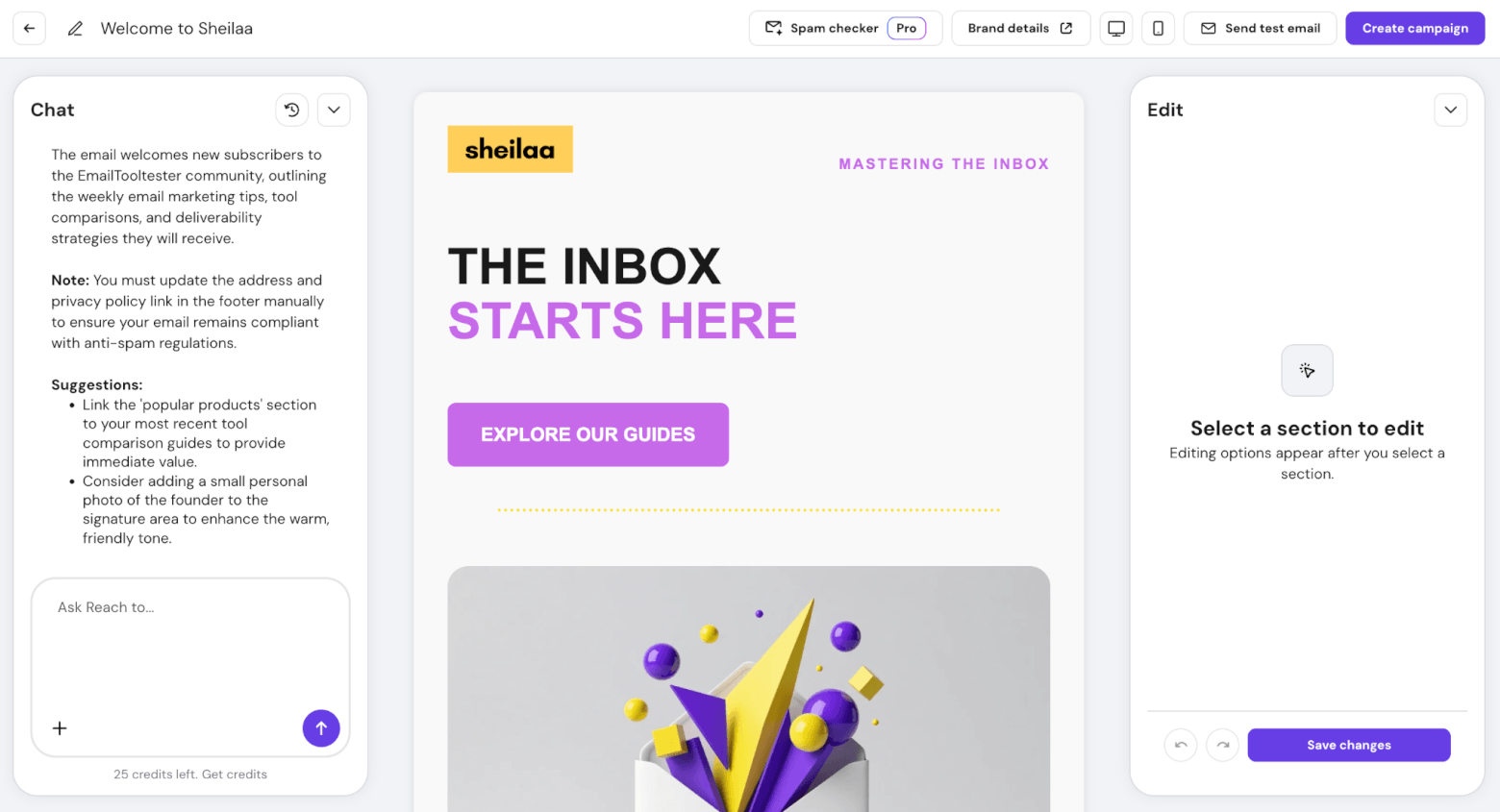
One of the most useful parts is the brand setup. You can enter your website, and Reach will scan it to pull in brand details such as your logo, colors, keywords, selling points, and other information.
These details are then used in the AI-generated designs, which look modern and professional, and come mobile-ready. The editor is also very beginner-friendly. You can manually edit sections yourself, or ask the AI chat assistant to make changes for you.
The AI can also suggest practical improvements, such as updating your business address and privacy policy link in the footer to help keep the email compliant, or adding a small founder photo near the sign-off to make the newsletter feel warmer and more personal.
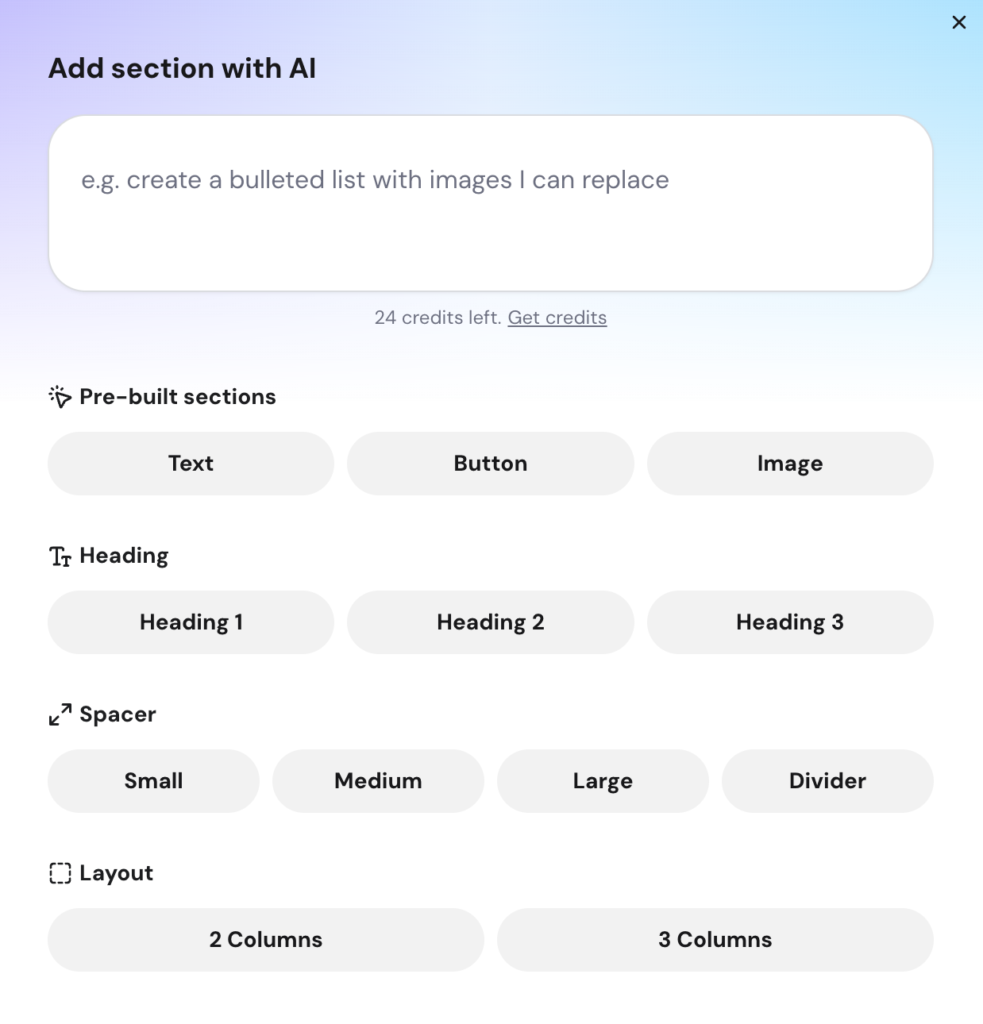
You can even use AI to add new sections to an existing email. For example, you can ask it to add a short section with bullet points, a CTA button, and a supporting image, and it will generate both the copy and the visual structure.
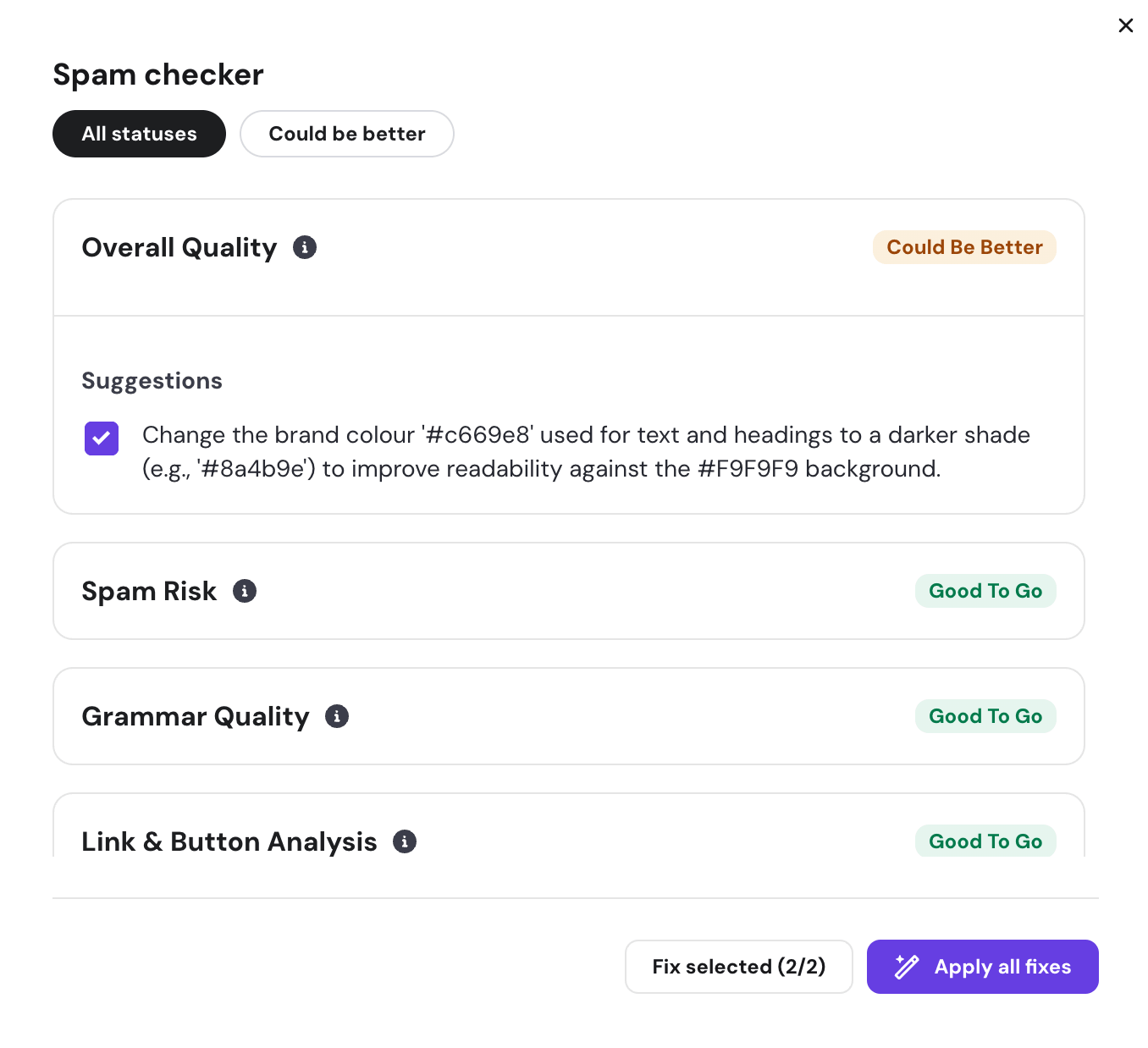
Another helpful feature is the spam and quality checker, which checks spam risk, grammar quality, accessibility, and more. You can even use AI to automatically apply any fixes that it suggests.
The AI also extends beyond the email editor. Reach includes signup forms, welcome sequences, and audience segments that can be created manually or with AI.
That said, Reach is still a simpler email marketing platform compared with more established standalone ESPs. If you need advanced automations, detailed segmentation, or deep reporting, you’ll probably hit limits.
But for basic newsletters, promotional campaigns, and simple automations, especially if you’re already using Hostinger for your website or WordPress hosting, it feels like a surprisingly capable option.
Pros
- One of the few tools that can generate a full email with both copy and design
- Very beginner-friendly interface
- AI can scan your website and pull in brand details such as logo and colors to create customized templates
- AI chat assistant can help refine emails and suggest practical improvements
- Spam and quality checker helps review emails before sending
- AI-powered audience segments
- Tight integration with Hostinger Website Builder and WordPress
- Very affordable compared with many dedicated email marketing platforms
Cons
- Email marketing features are still basic compared with dedicated ESPs
- Limited customization options in the email editor
- Advanced segmentation and automation options are limited
- Few native integrations compared with more established email marketing platforms
- No native newsletter monetization tools, such as paid subscriptions, sponsorship management, or referral monetization
- AI credits are limited to 10 per month, so heavy AI users may need to buy more. Credit packages start from $2.49 for 10 credits
Pricing
- Free plan for 100 contacts and 200 emails per month
- Monthly plan for 500 contacts and 3,500 emails per month starts at $5.99/month
- Yearly plan for 500 contacts and 3,500 emails per month starts at $2.49/month
Who I’d recommend Hostinger Reach to:
Hostinger Reach is best for beginners, small businesses, and creators who want the fastest possible way to create good-looking newsletters without having to write and design everything from scratch. It’s especially appealing if you already use Hostinger for your website, or if you want your website, forms, email marketing, and simple automations under one roof.
More advanced email marketers may find it too limited, but as an AI newsletter generator for getting simple campaigns out quickly, it’s one of the more interesting tools I’ve tested.
> Try Hostinger Reach for free
Beehiiv
Beehiiv is one of the most exciting tools in the newsletter space right now. What started as a fairly focused newsletter platform has quickly grown into a much broader platform for creators, with features for publishing, audience growth, monetization, digital products, podcasts, and even webinars.
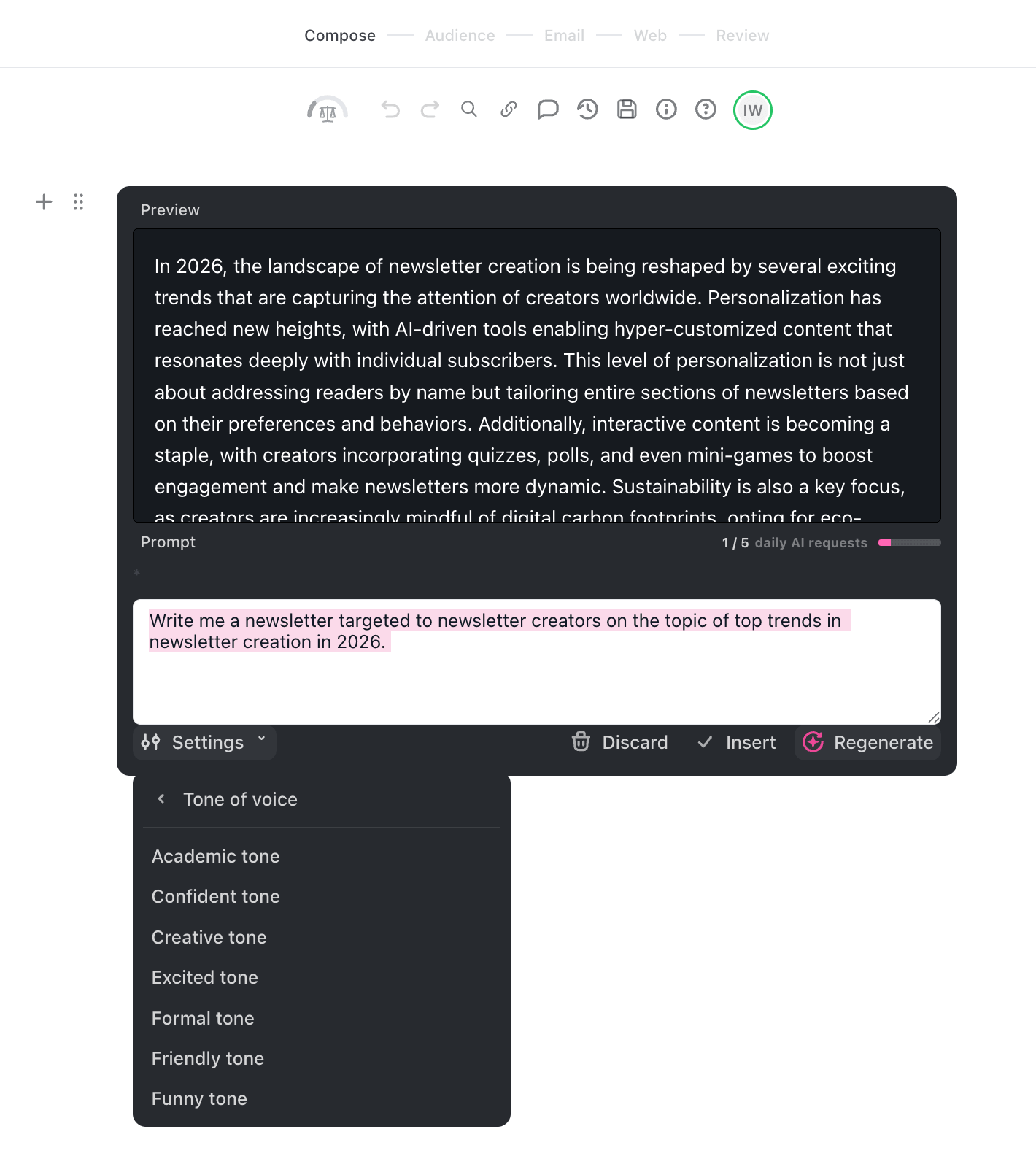
That momentum also shows up in its AI features. Beehiiv now includes a Writing Assistant that can help you improve your copy, change the tone, check spelling, translate text, and adjust the structure of your content. For example, you can ask it to rewrite a section in a more friendly tone, or tell it how many paragraphs you want the output to have.
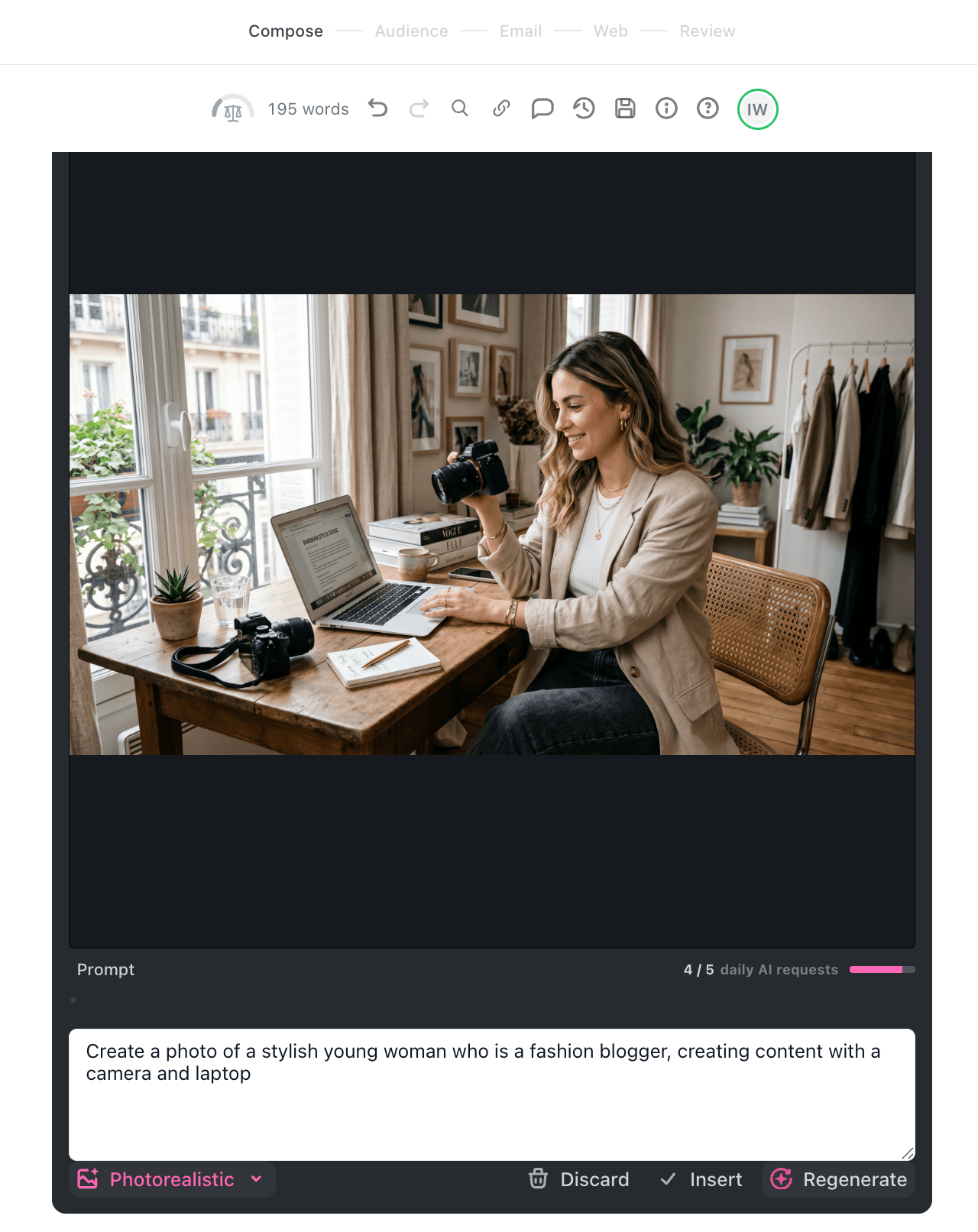
There’s also built-in image generation, which I found surprisingly impressive. You can create visuals directly inside the editor, with options such as photorealistic images and digital art. In my test, the image quality was one of the stronger parts of Beehiiv’s AI toolkit.
However, I wouldn’t describe Beehiiv as a full AI newsletter generator, at least not yet. It can help you write, improve, and illustrate parts of your newsletter, but it won’t take a rough idea and turn it into a fully designed, ready-to-send newsletter from scratch. It takes more of a piecemeal approach, where you work block by block to put a complete newsletter together.
The written output also needed more editing than I’d hoped. It was useful as a starting point, but I still had to spend time making it sound more conversational, adding detail, and shaping it into something I’d actually send to our subscribers.
That said, Beehiiv is clearly moving fast with AI. Its recently released MCP features suggest that they’re thinking beyond simple “rewrite this paragraph” tools, and I wouldn’t be surprised if more advanced AI newsletter creation features arrive soon.
Pros
- Strong AI writing assistant for improving, rewriting, translating, and adjusting tone
- Impressive built-in AI image generation
- One of the strongest platforms overall for newsletter creators looking to branch out into different content formats (e.g. blogs, podcasts)
- Excellent monetization features, including paid subscriptions, digital products, ads and referrals
- Fast-moving product with frequent feature releases
- Beehiiv MCP opens up interesting possibilities for AI-assisted workflows and reporting
Cons
- Can’t generate an entire newsletter from scratch, and no option to create a full newsletter design with AI yet
- AI-generated copy still needs a good amount of editing and formatting
- Templates are fairly limited compared with some traditional email marketing tools
- Daily AI request limits depend on your plan
- AI Social Helper is only available on Max and Enterprise plans
- Better suited to enhancing your workflow than replacing it
Pricing
- Free plan for 2,500 contacts and unlimited emails
- Scale plan starts at $43/month (yearly discount available)
- Max plan starts at $96/month (yearly discount available)
Who I’d recommend Beehiiv to:
Overall, I’d recommend Beehiiv to creators who already have a clear idea of what they want their newsletter to be. If you’re looking for a tool that can generate a complete newsletter, including copy, structure, and design, from a single prompt, Beehiiv isn’t quite there yet.
On the other hand, if you know your angle, your audience, and roughly what you want to say, Beehiiv’s AI features can definitely help you move faster, especially when it comes to polishing copy and creating supporting images.
ActiveCampaign
ActiveCampaign has always been one of the strongest platforms for email marketing automation, so I wasn’t surprised to see AI becoming a much bigger part of the product. What did surprise me is how far it now goes beyond the standard “write this email for me” feature.
Its newer AI features sit under what ActiveCampaign calls Active Intelligence, which uses AI across the whole campaign workflow: planning, writing, designing, segmenting, sending, and optimizing.
For newsletter creation specifically, the most interesting feature is the AI Campaign Builder. This lets you create an email from a simple prompt, including subject line, preheader, layout, images, content, and CTA.
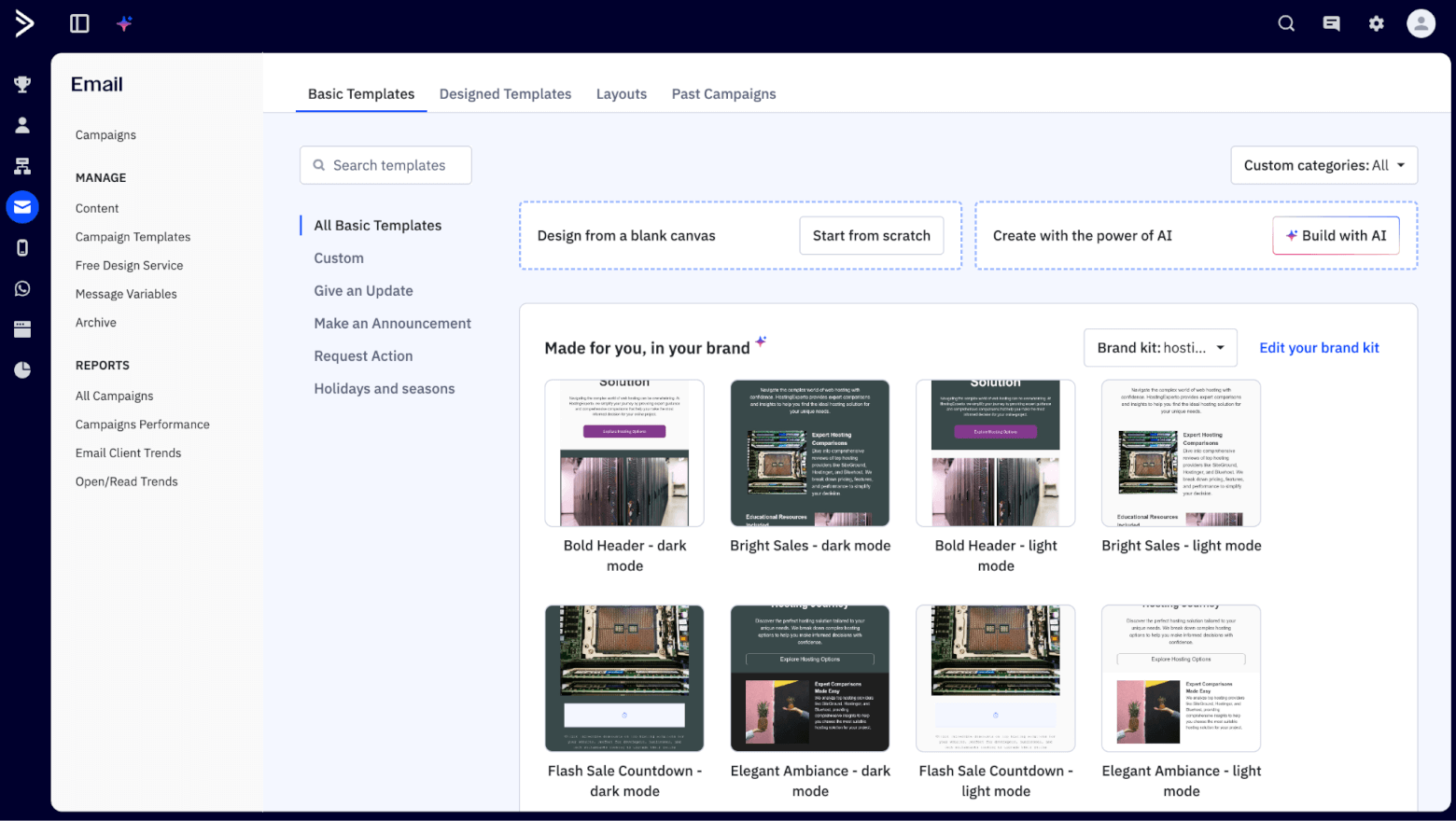
You can also use AI directly inside the Email Designer. Add a text block, enter a prompt, and ActiveCampaign will generate multiple text options for you. This is useful for newsletter intros, product blurbs, promotional blocks, CTAs, or sections you want to quickly rework.
Another standout newsletter feature is the AI Brand Kit. ActiveCampaign can import your logo, fonts, and colors from your website, then use them to generate on-brand email templates, content, and images.
There’s also AI image generation, although I’d be a little cautious here. In theory, it’s helpful to generate supporting visuals directly for a campaign. But from experience, AI images can still feel generic or overly polished, depending on the prompt and style.
Where ActiveCampaign really pulls ahead is after the newsletter has been created. Predictive Sending uses machine learning to send emails to each contact based on their habitual open times, and it can be used for both campaigns and automations.
And then there’s automation, which is still ActiveCampaign’s biggest strength. Its AI automation builder can help you create automations from a description of what you want to achieve, rather than forcing you to map every trigger, condition, and action manually. For newsletter publishers, this could be useful for welcome sequences, re-engagement campaigns, lead magnet follow-ups, or product education flows.
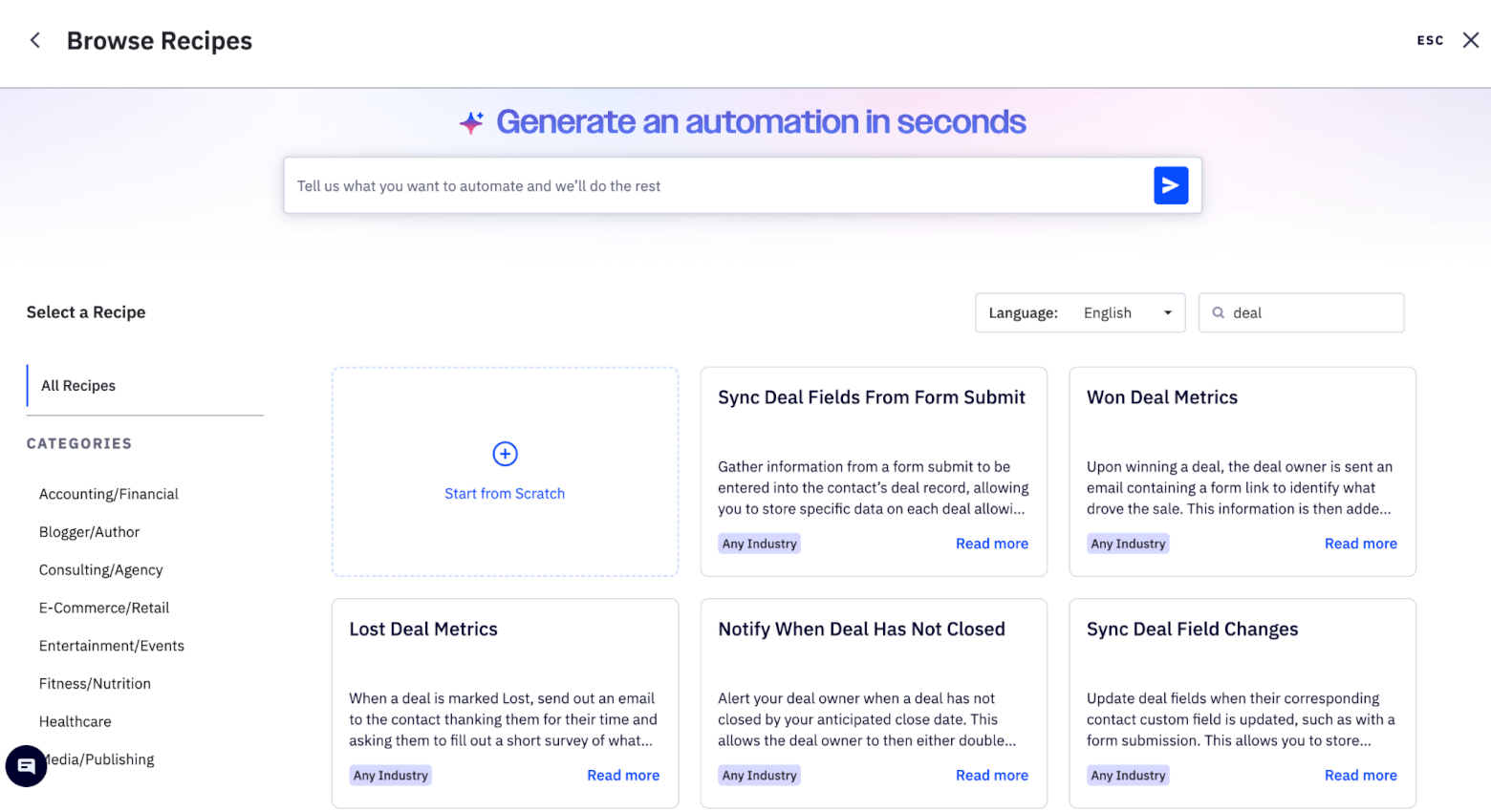
ActiveCampaign is also pushing into more advanced AI workflows, including suggested segments and integrations with external AI tools like Claude and ChatGPT.
Pros
- AI Campaign Builder can generate a campaign from a prompt, including subject line, preheader, layout, images, content, and CTA
- AI writing tools are available inside the Email Designer for generating newsletter sections and campaign copy
- AI Brand Kit can import logos, fonts, and colors from your website to create more on-brand templates
- Can generate AI images for email campaigns
- Predictive Sending helps send campaigns and automations when each contact is most likely to engage
- AI automation builder is useful for creating newsletter-related workflows, such as welcome sequences and re-engagement campaigns
- Strong segmentation and automation capabilities compared with many newsletter-first tools
- Connects with many external tools, with 1,000+ app integrations
Cons
- More complex than simpler newsletter tools like Hostinger Reach or MailerLite
- Not as creator-focused as Beehiiv, especially for publishing, referrals, or newsletter monetization
- Some of the most useful AI features are tied to higher-tier plans
- Pricing can rise quickly as your list grows
- Better suited to marketers who want automations and lifecycle campaigns than creators who only need a lightweight newsletter editor
Pricing
- Starter plan starts at $19/month (yearly discount available)
- Plus plan starts at $59/month (yearly discount available)
- Pro plan starts at $89/month (yearly discount available)
Who I’d recommend ActiveCampaign to:
ActiveCampaign is best for businesses that want AI newsletter creation to sit inside a bigger automation and customer journey strategy. If your newsletter is connected to lead nurturing, ecommerce follow-ups, sales pipelines, onboarding, or re-engagement campaigns, ActiveCampaign’s AI features can save a lot of time.
GetResponse
GetResponse is one of the more established names in email marketing, but it has been moving well beyond “just email” for a while now. Alongside newsletters, automations, landing pages, webinars, ecommerce features, and integrations, it now also includes a growing set of AI tools.
As an AI newsletter generator, GetResponse is one of the more complete options I’ve looked at. You start by entering information about your company, choosing the design direction, and specifying the tone (convincing, informative, formal, friendly, inspirational, or neutral). You can also upload your logo so that it uses it within the design.
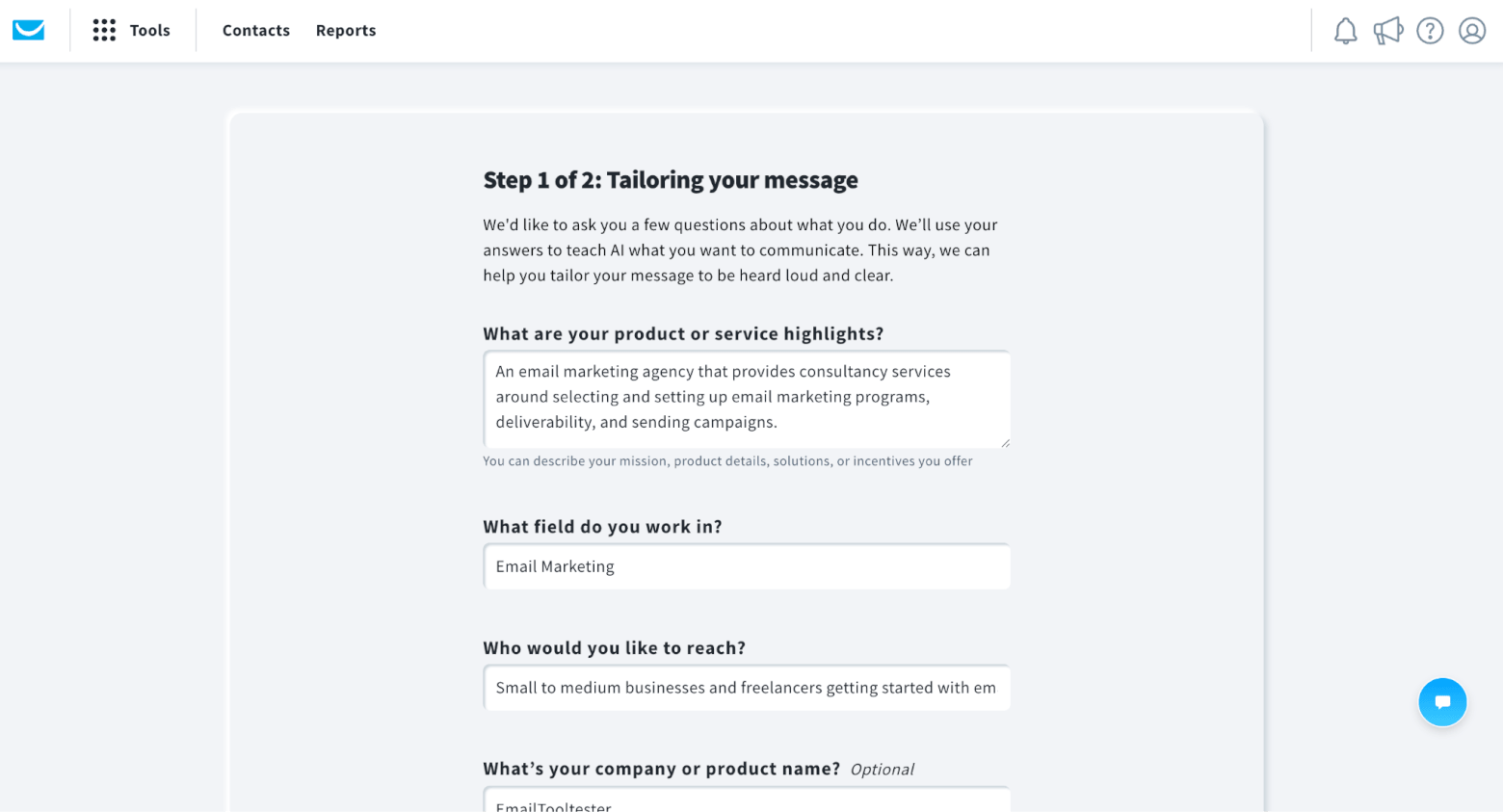
GetResponse then generates a complete set of campaign assets for you, including a landing page, welcome email, and first newsletter.
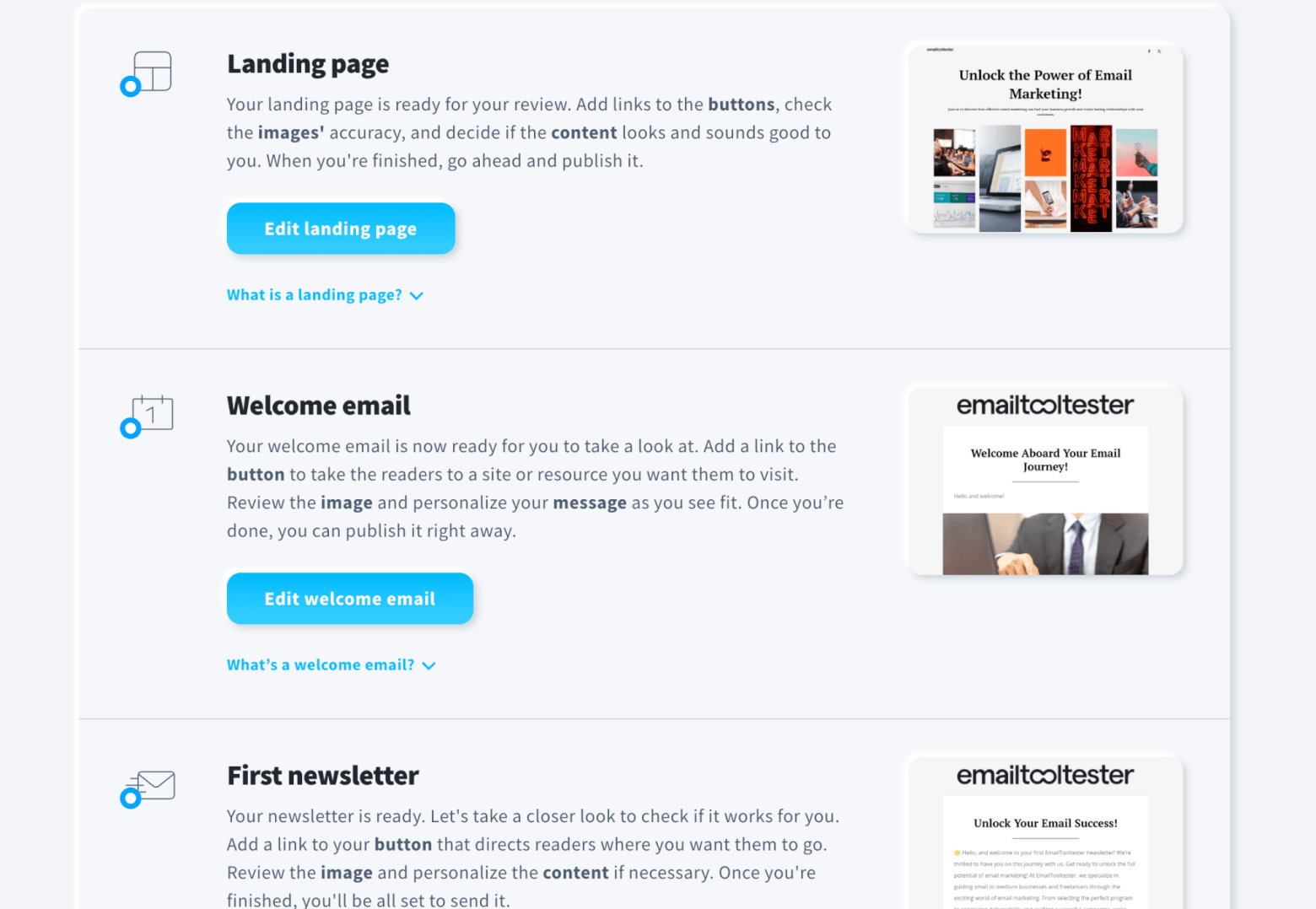
Within your newsletter, AI generates the subject line (which you can regenerate to include specified keywords), layout, color palette, and even a relevant stock image if the chosen layout includes one.
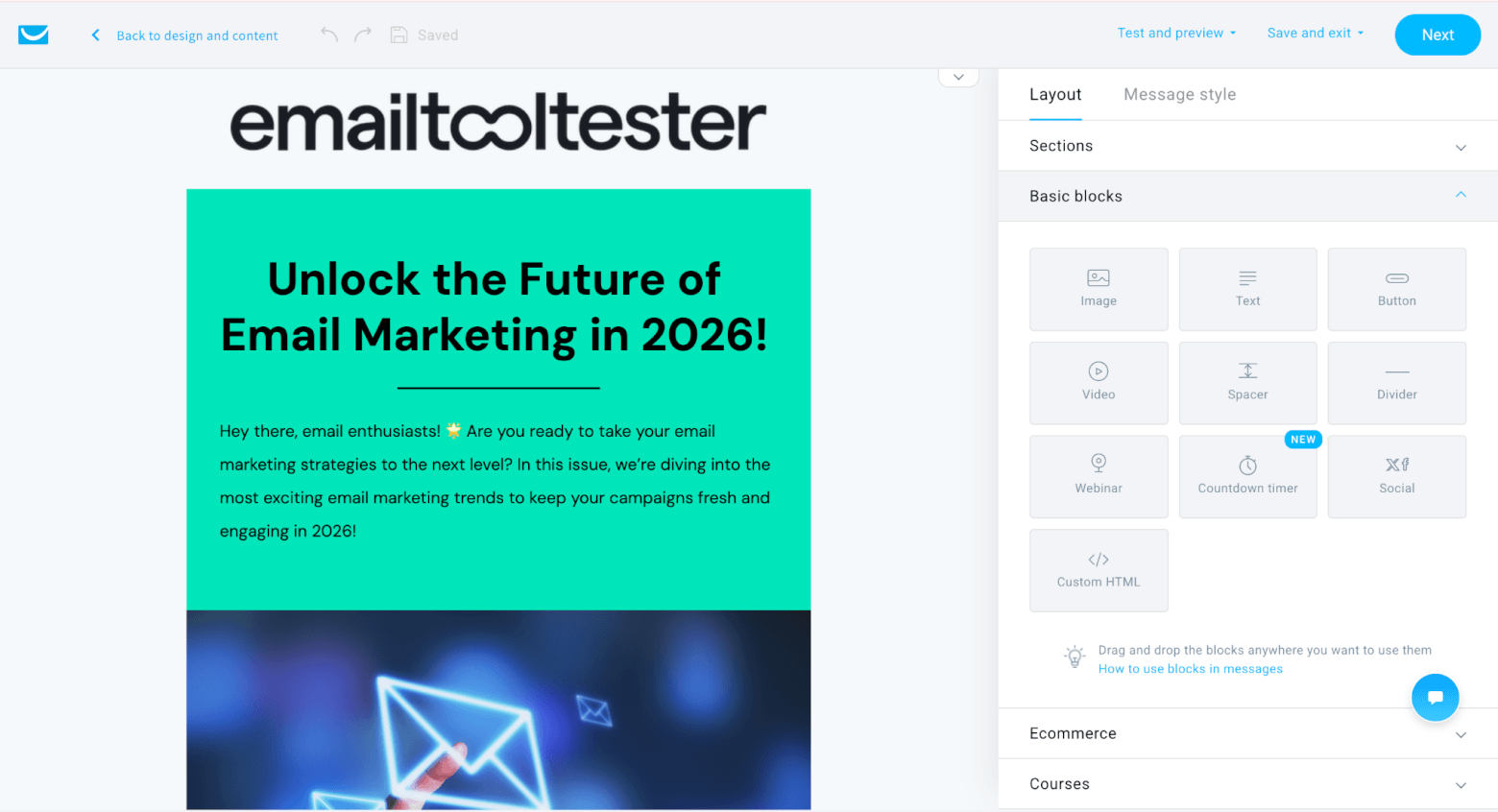
You can also ask the AI to make changes to your content by highlighting the section you want changed, and asking it to add details, shorten/lengthen, change tone, or even translate to another language.
In practice though, I’d still treat the output as a solid first draft rather than something I’d send untouched. The structure can be useful, and the copy is usually cleaner than starting from a blank page, but you’ll still want to add your own examples, opinions, links, and personality.
I also found the design options a little limited, and not overly attractive. While you can ask it to regenerate the template in a new color palette, it doesn’t give you a brand new design, and the suggested stock image was also a little generic.
However, where GetResponse becomes more interesting is when you look beyond the newsletter editor. It has a website builder, marketing automation, landing pages, and hundreds of integrations, so it’s much more complete than many lightweight newsletter tools.
Its monetization features are also a big advantage. The Creator plan includes online courses, paid newsletters, digital products, webinars, membership areas, and other content monetization tools.
That makes GetResponse especially interesting for creators who don’t just want to send a newsletter, but want to build a business around it. For example, you could use the AI Email Generator to draft promotional emails, landing pages to capture leads, automations to nurture subscribers, webinars to sell, and the course creator or paid newsletters to monetize the audience.
Pros
- Can generate a full email, including copy, subject line, layout, color palette, and stock image
- More of a true AI newsletter generator than a simple rewrite tool
- Lets you choose email type, industry, tone, layout, and design direction
- Useful for newsletters, welcome emails, promotions, educational emails, invitations, and more
- Supports translations in Spanish, German, Italian, French, Portuguese, Vietnamese and Dutch
- Stronger email marketing feature set than many newer AI newsletter tools
- Advanced monetization features, including paid newsletters, AI-powered course creator, webinars, and content monetization tools
- Good fit for building a broader funnel around a newsletter
Cons
- AI-generated emails still need editing to make them feel personal and brand-specific
- Design generation is more guided than fully flexible, since you choose from layouts and color palettes rather than prompting any design you want
- Not a lot of options in terms of layout – only text and single column (although 2 and 3 column layouts are apparently coming soon)
- The output can feel a bit generic if you don’t give it strong inputs
- Starter plan users are limited to 3 uses of the AI Email Generator (higher paid plans have fewer restrictions)
- The creator monetization features are tied to the high-tier Creator plan
- Not ideal if you only want a very lightweight publishing tool
Pricing
- Free plan for 500 contacts and 2,500 emails per month
- Starter plan starts at $19/month (yearly discount available)
- Marketer plan starts at $59/month (yearly discount available)
- Creator plan starts at $69/month (yearly discount available)
Who I’d recommend GetResponse to:
I’d recommend GetResponse to creators, educators, and small businesses who want an AI-assisted newsletter tool that connects directly to monetization. If your newsletter is part of a bigger funnel, for example selling courses, webinars, paid content, or digital knowledge products, GetResponse is one of the more compelling options on this list.
MailerLite
MailerLite has always been one of the easier email marketing tools to recommend to beginners. It’s clean, affordable, and much less intimidating than platforms like HubSpot or GetResponse. So I was curious to see whether its AI features followed the same approach.
The short answer: yes, but with limits.
MailerLite’s main AI feature is its AI writing assistant, which is built into the drag-and-drop editor for campaigns, landing pages, and pop-up forms. It can generate titles, short paragraphs, long paragraphs, and CTAs, and you can choose from four tones: Natural, Catchy, Professional, and Persuasive. It can also help with grammar, spelling, simplifying text, summarizing, and adjusting tone.
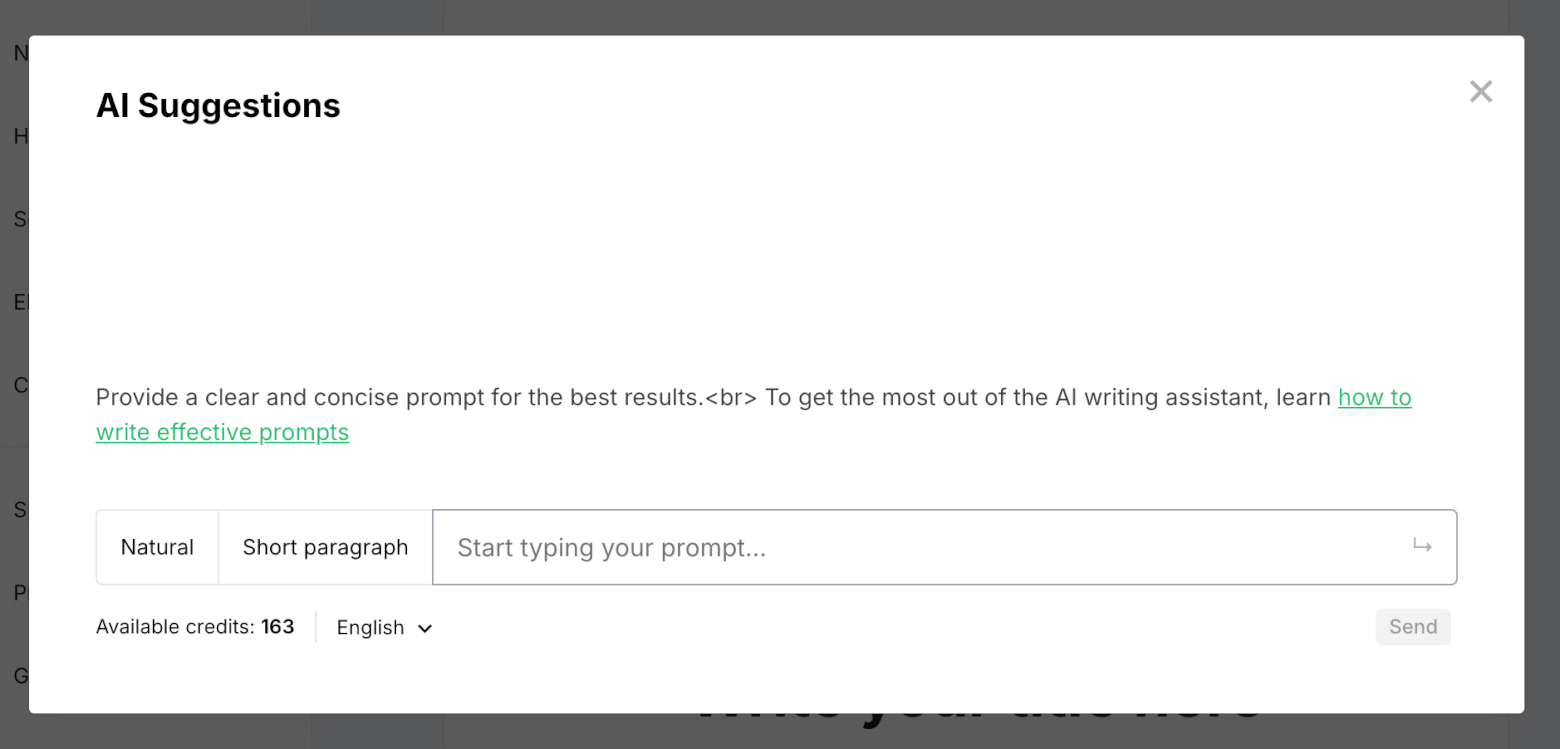
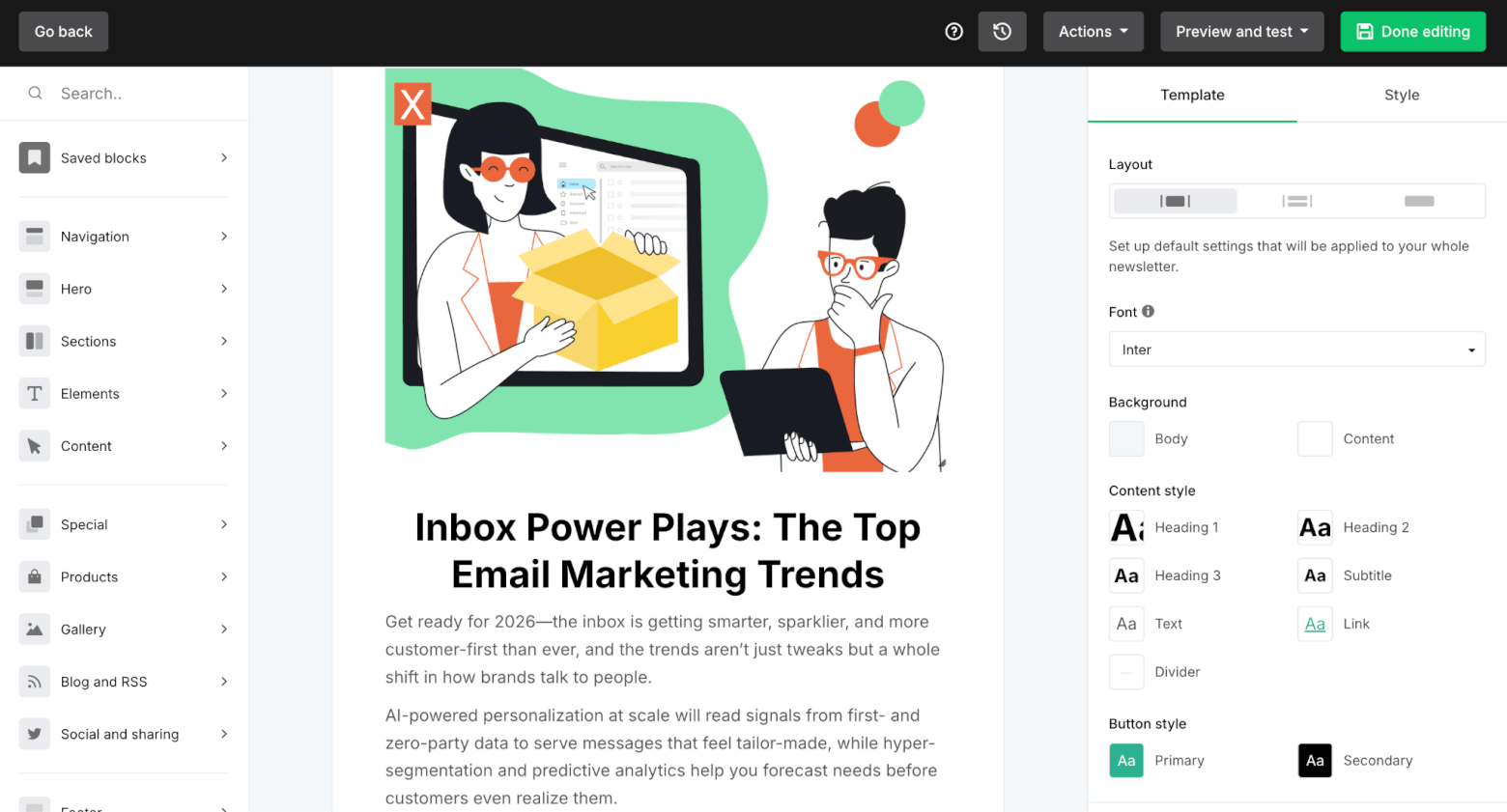
It’s handy for when you already know what you want to say, but need help getting the wording right. For example, if you have a rough intro, product blurb, or CTA, MailerLite’s AI can quickly turn it into something cleaner and more email-friendly, and its editor makes it easy to place that content into a nice-looking email.
You can also use AI for generating subject lines, and for determining the best time to send an email to a recipient.
As an AI newsletter generator, though, it’s not as advanced as tools like Hostinger Reach or HubSpot. MailerLite can help you write parts of a newsletter, but it doesn’t generate a complete newsletter from scratch. You’re still choosing the template, building the email, and guiding the AI block by block. And while you can integrate AI-generated images, this is handled through its Canva integration rather than a built-in image generator.
One newer development that makes MailerLite more interesting is its MCP server. You can connect external AI tools like Claude or ChatGPT to your MailerLite account, giving the AI access to marketing data and letting it help with tasks like creating draft campaigns from notes or blog posts, and suggesting subject lines based on past performance.
That sounds promising, especially for more technical users or teams already experimenting with AI workflows. But for the average newsletter creator, it’s probably not as simple as using a built-in “generate my newsletter” button.
Where MailerLite does stand out, especially compared with some AI newsletter tools, is monetization. You can sell digital products, recurring subscriptions, and paid newsletters through Stripe. MailerLite also lets you add product blocks to emails, landing pages, and websites, and track sales performance inside the platform.
Pros
- Very easy to use, especially for beginners and small teams
- AI writing assistant is built directly into the email editor
- AI can generate titles, paragraphs, and CTAs, as well as helping with spelling, grammar, rewriting, simplifying, and summarizing
- Subject line generator and Smart Sending add useful AI-style support around the campaign workflow
- MCP server opens up more advanced AI workflow possibilities
- Strong monetization features, including paid newsletters, recurring subscriptions, and digital products via Stripe
- Product blocks can be added to emails, landing pages, and websites
- Good balance of simplicity, affordability, and useful email marketing features
Cons
- Doesn’t generate a complete newsletter from scratch
- AI image generation relies on Canva rather than being fully native
- The AI writing assistant works best for individual blocks of text, not full campaign strategy
- Prompt length is limited to 200 characters, which can make more detailed instructions harder
- Advanced automation and segmentation features are still lighter than in more powerful ESPs
- Free plan is somewhat limited – you need to be on a paid plan to access AI writing assistant and email/landing page templates
Pricing
- Free plan for 500 contacts and 12,000 emails per month
- Growing Business plan starts at $10/month (yearly discount available)
- Advanced plan starts at $20/month (yearly discount available)
Who I’d recommend MailerLite to:
MailerLite is perfect for creators, bloggers, small businesses, and solo founders who want a simple newsletter platform with helpful AI writing support. It’s a good choice if you still want to control the content and design yourself, but would appreciate AI help with headlines, CTAs, paragraph rewrites, subject lines, and basic content polish.
And if monetization is part of your newsletter plan, MailerLite has a real advantage over many basic email tools, thanks to its paid newsletter and digital product features.
Mailchimp
Mailchimp is one of the best-known names in email marketing, so it’s no surprise that AI is now becoming a bigger part of the platform. What’s interesting, though, is that Mailchimp’s AI features don’t just focus on newsletters. They also fit into its broader push toward ecommerce, automation, and revenue-focused marketing.
For newsletter creation, Mailchimp gives you a few different AI tools. Its AI content creation feature can write subject lines based on a prompt, and you can ask it to edit/regenerate suggestions:
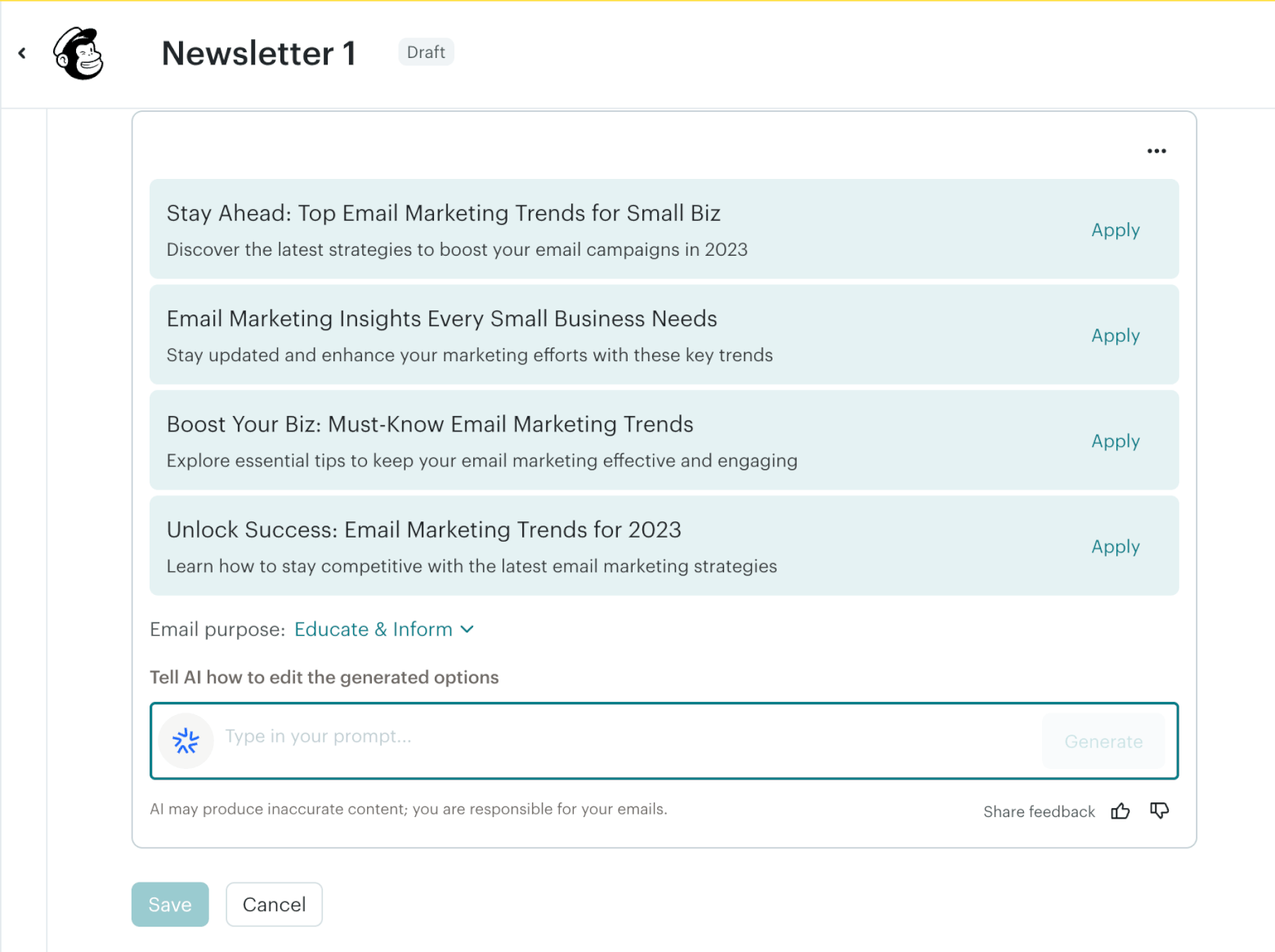
There’s also a unique feature that lets you insert AI-generated columns such as article summaries, upcoming events, product/service promotions, or profiles (e.g. of employees or event speakers). What’s great is that you can feed the AI existing content, such as an article URL or text, and it will automatically generate the section for you. You can then choose from suggested text and layout options, insert them into your email, and refine them until they fit your brand voice.
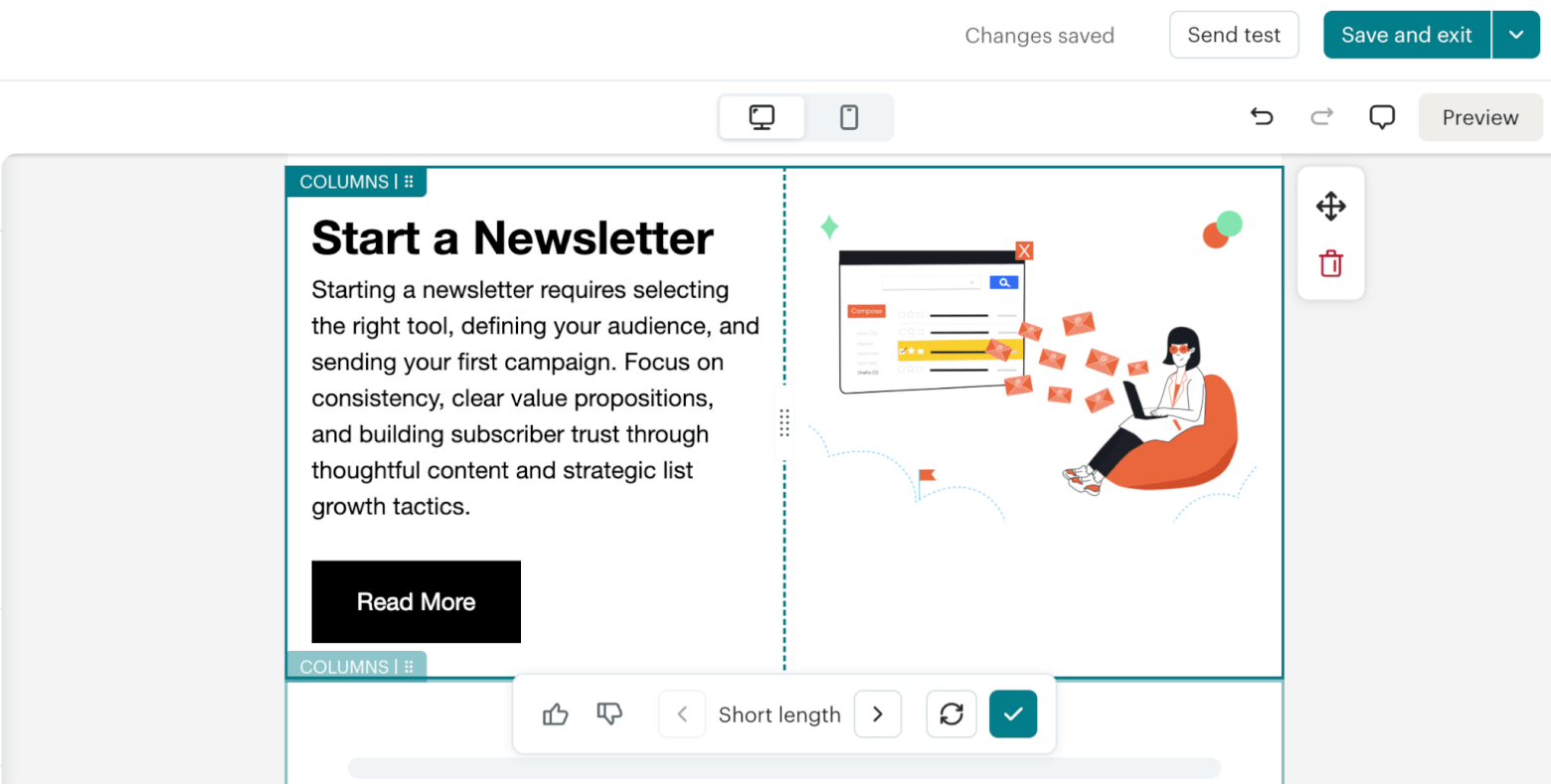
There’s also Write with AI, powered by Intuit AI, which works inside the email editor. It can generate new copy from prompts, rewrite existing text, change the tone, fix spelling and grammar, and help create announcements, invitations, summaries, welcome messages, and CTAs.
So, can Mailchimp generate a full newsletter from scratch? Not quite in the same way as Hostinger Reach or GetResponse. It can create AI-generated sections and help write or improve individual blocks, but you’re still very much assembling the newsletter yourself.
Where Mailchimp becomes more interesting is automation. Intuit AI can be used to help create emails inside pre-built flows, which could be especially helpful for ecommerce businesses that don’t want to build every journey from scratch.
That ties into Mailchimp’s ecommerce strength. Once you connect an online store, Mailchimp can support features such as order notifications, abandoned cart automations, follow-ups, product recommendations, and more.
Mailchimp also leans heavily on AI for optimization. Its AI tools include send time and send day optimization, predictive analytics, content improvement recommendations, pre-send tips, and the ability to turn email campaigns into SMS and social posts.
In my view, Mailchimp is not the most exciting AI newsletter generator if you’re thinking purely about creator-style newsletters. But if your newsletter is tied to an online store, product launches, seasonal promotions, abandoned cart flows, or customer lifecycle campaigns, Mailchimp starts to look much stronger.
Pros
- Familiar, beginner-friendly email editor
- AI can generate campaign sections from prompts, URLs, and other existing materials
- Useful for newsletter blocks such as summaries, announcements, CTAs, invitations, and product promotions
- Strong ecommerce features, including abandoned cart automations, order notifications, follow-ups, and product recommendations
- Good fit for ecommerce newsletters, product launches, sales campaigns, and lifecycle emails
- Send time and send day optimization help improve campaign timing
- Predictive analytics and segmentation features can help identify contacts more likely to buy
- AI can help repurpose email campaigns into SMS and social content
Cons
- Doesn’t generate a complete newsletter from a single prompt
- AI works more at the section and content-block level than as a full newsletter creator
- Write with AI is only included on the Standard plan or higher, and availability depends on location (you must have a primary mailing address in Australia, Canada, United Kingdom, or United States)
- Less creator-focused than tools like Beehiiv
- No native paid newsletter or creator monetization tools like subscriptions, sponsorship management, or referral monetization
- Can get expensive as your list grows
- Free and lower-tier plans are more limited than they used to be
Pricing
- Free plan for 250 contacts and 500 emails per month
- Essentials plan starts at $13/month (yearly discount available)
- Standard plan starts at $20/month (yearly discount available)
Who I’d recommend Mailchimp to:
Mailchimp is suited to ecommerce businesses that want AI to support sales-driven email marketing rather than pure newsletter publishing. If you’re running a store and want to combine newsletters with product promotions, abandoned cart emails, follow-ups, recommendations, SMS, and automation flows, Mailchimp is still a strong option.
But if your main goal is to build a creator-style newsletter with AI-generated editorial content and native monetization, I’d probably look at tools like Beehiiv, MailerLite, or GetResponse first.
Final Thoughts: Is an AI Newsletter Generator Worth It?
After testing these tools, my main takeaway is this: AI newsletter generators can definitely save time, but they won’t replace a good editor, strategist, or human point of view just yet.
The most impressive tools, like Hostinger Reach and GetResponse, can generate a full newsletter with copy and design, which is genuinely useful if you’re starting from scratch. HubSpot also stands out for businesses that want AI-generated emails connected to CRM data, brand voice, and reporting.
But in most cases, I wouldn’t send the AI-generated output exactly as it comes. The best results still came when I used AI as a starting point, then added our own examples, opinions, links, tone, and structure. That’s especially important for newsletters, where trust and personality matter more than polished-sounding copy.
So, which tool should you choose?
- If you want the fastest route to a good-looking AI-generated newsletter, I’d start with Hostinger Reach.
- If monetization is a priority, Beehiiv, MailerLite, and GetResponse are stronger options.
- If you’re running ecommerce campaigns, Mailchimp is still very relevant.
- If your newsletter is part of a bigger CRM and marketing setup, HubSpot is probably the most powerful choice.
- If you want AI-assisted newsletters that connect to advanced automations, segmentation, and customer journeys, then ActiveCampaign is the best fit.
AI newsletter generators aren’t perfect, but they’re already useful enough to speed up the parts of newsletter creation that usually slow us down: getting started, structuring ideas, polishing copy, and building a first draft. And given how quickly it’s evolved over the past couple of years, it’s definitely exciting to see where this category is heading!
The authors
Learn more about us

We keep our content up to date
22 Jul 2026: Added ActiveCampaign
Our Methodology
This article has been written and researched following our EmailTooltester methodology.
Our Methodology