


EmailTooltester is supported by readers like you. When you purchase through our links, we may earn a commission that helps keep our reviews independent and free.
If you’re comparing Kartra and ActiveCampaign, you might be looking for a marketing platform. After all, that’s what both platforms call themselves.
But while Kartra and ActiveCampaign can both help you market your online business, they work differently:
- ActiveCampaign is a powerful email marketing and CRM platform, helping users manage deals and automate their email marketing.
- Kartra is an all-in-one marketing and sales platform, offering email marketing plus other features for visualizing funnels, selling digital products, and running memberships.
Which tool is right for you?
Read this in-depth Kartra vs ActiveCampaign review to find out.
Kartra vs ActiveCampaign: Main Differences
The main differences between Kartra and ActiveCampaign are that:
- ActiveCampaign has more extensive email marketing and automation capabilities than Kartra, making it a better fit for businesses that rely heavily on sophisticated email campaigns, behavioral automations, and advanced audience segmentation.
- ActiveCampaign has native CRM deal and pipeline features, while Kartra doesn’t. This makes it the stronger choice for B2B companies or sales teams that need structured pipeline management alongside their marketing automation.
- Kartra has native funnel and memberships features, while ActiveCampaign doesn’t, making it a better fit for course creators, coaches, and infopreneurs who want an all-in-one platform for selling and delivering digital products.
Kartra vs ActiveCampaign: In-depth Comparison
Now, let’s see how Kartra and ActiveCampaign fare over these eight comparison rounds:
- Ease of use
- Email marketing & automation power
- CRM capabilities
- Funnels & landing pages
- Memberships & course hosting
- Reporting
- Integrations
- Pricing & value
1. Ease of Use
To consider a platform’s ease of use, I look at how easy it is to:
- Find a feature I’m looking for, and
- Do something in the platform.
ActiveCampaign does great for both. It has intuitively grouped its features into categories like “Contacts,” “Automations,” and “Email,” which are accessible from the left navigation menu.
Here’s the “Automations” category, for example:
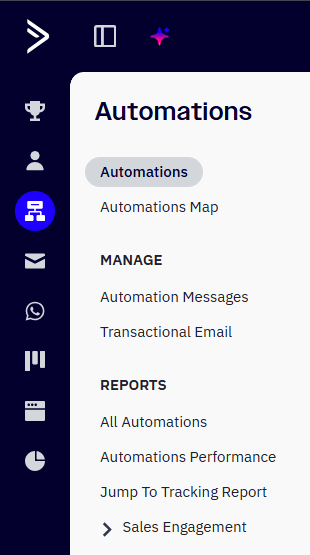
Plus, the email marketing service’s screens load lightning-fast, with barely any lag.
But what impresses me more is Active Intelligence — ActiveCampaign’s built-in AI engine. When you log in to your account, you’ll see a ChatGPT-style chatbox:

Type into it to have Active Intelligence write an email, create an automation, or even analyze your email marketing data for you.
For example, when I asked Active Intelligence to create a product announcement campaign, the AI engine took less than a minute to generate an email with a subject line, body copy, call-to-action buttons, and images. From there, I just had to tweak the email to my liking.
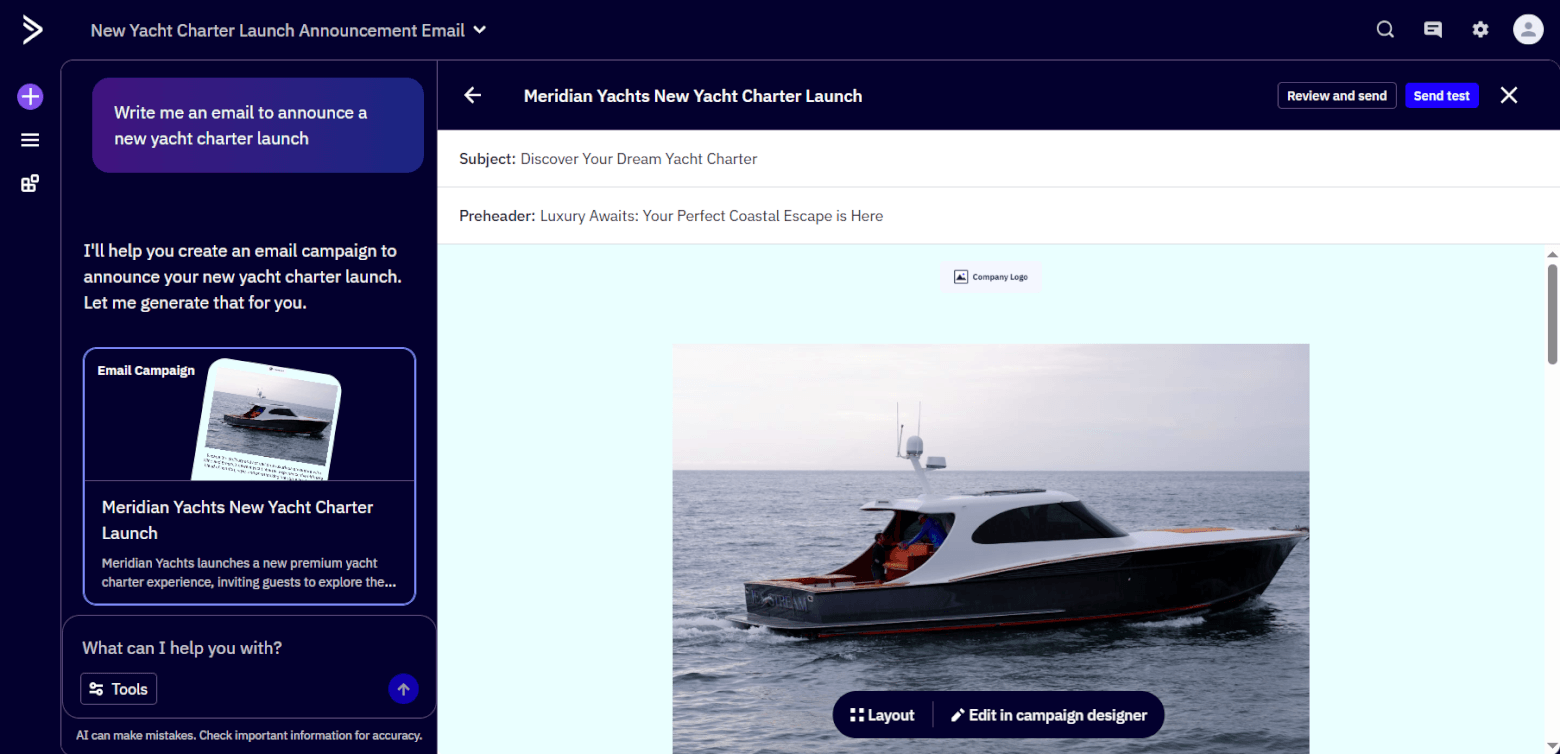
How much easier can writing emails get?!
Just one thing to note: as you use ActiveCampaign, you’ll realize the platform has a lot of functionality. So, expect to face a learning curve (especially if you aren’t using Active Intelligence).
Now, let’s check out Kartra.
The platform’s navigation menu is also on the left, and unlike ActiveCampaign, you can read each icon’s label without mousing over it first. A small +1 for ease of use.
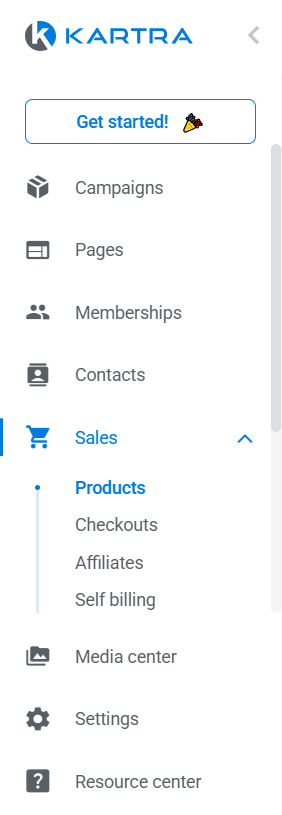
But the available options under each navigational dropdown aren’t always obvious. From the screenshot above, for instance, can you tell there are more options under “Sales,” after “Self billing”? Not really, unless you scroll down further.
Plus, Kartra names its features differently from the email industry’s conventional terms for these. The different naming could reflect Kartra’s positioning as a marketing and sales platform rather than an email marketing one. But if you’re used to email marketing terminology, you may get confused.
In Kartra, for example:
- “Campaigns” are groups of assets — like landing pages and email lists — for entire marketing campaigns, rather than email campaigns. (You’ll find email campaigns under “Marketing” > “Emails & SMS” instead.)
- “Automations” are one-step, “if this, then that”-style automations. Flowchart-style email automations, with branching conditions and actions, are called “Sequences.”
- Opt-in forms are found under “Contacts” rather than “Pages” (which contains landing pages). This isn’t the most intuitive, given that forms and landing pages both help you grow your email list, and so it might make sense to locate both features under the same category.
Kartra’s screens can take up to a couple of seconds to load. The wait isn’t too bad, but it can seem like forever when you compare it against ActiveCampaign’s snappiness.
Winner: ActiveCampaign’s the winner! Despite the platform’s sheer extent of features, finding and using them is generally a breeze — especially if you tap into Active Intelligence.
ActiveCampaign 1 – Kartra 0
2. Email Marketing and Automation Power
This is a big category, so let’s break it down into email marketing and automation.
For the email marketing section, I’ll focus on:
- Creating email forms.
- Sending one-off emails (I’ll cover automated emails in the automation section).
Email marketing: forms
Kartra offers 60+ form templates. You can customize your form’s text, colors, and fields before previewing it in either desktop, tablet, or mobile view. Pretty straightforward.
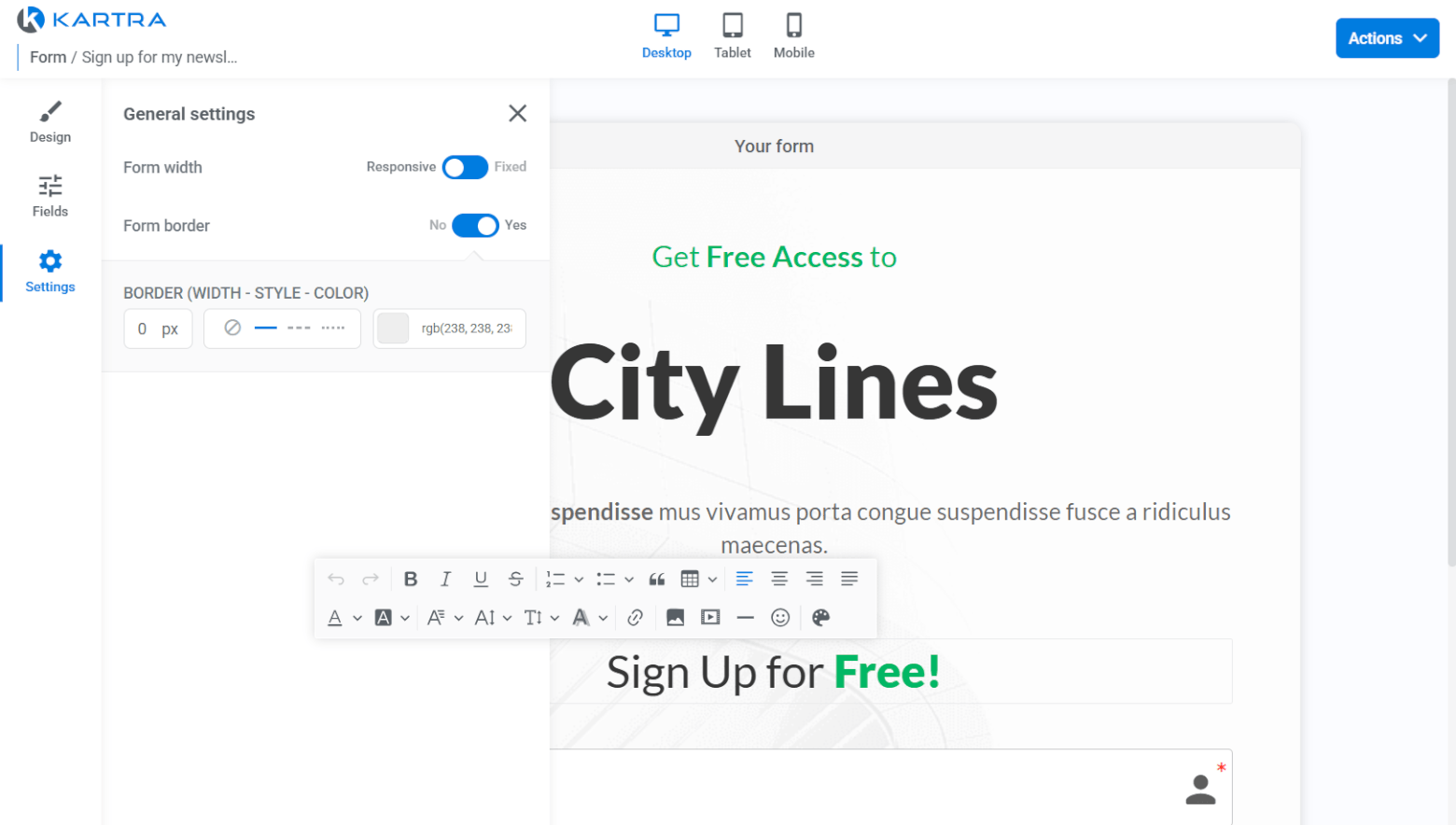
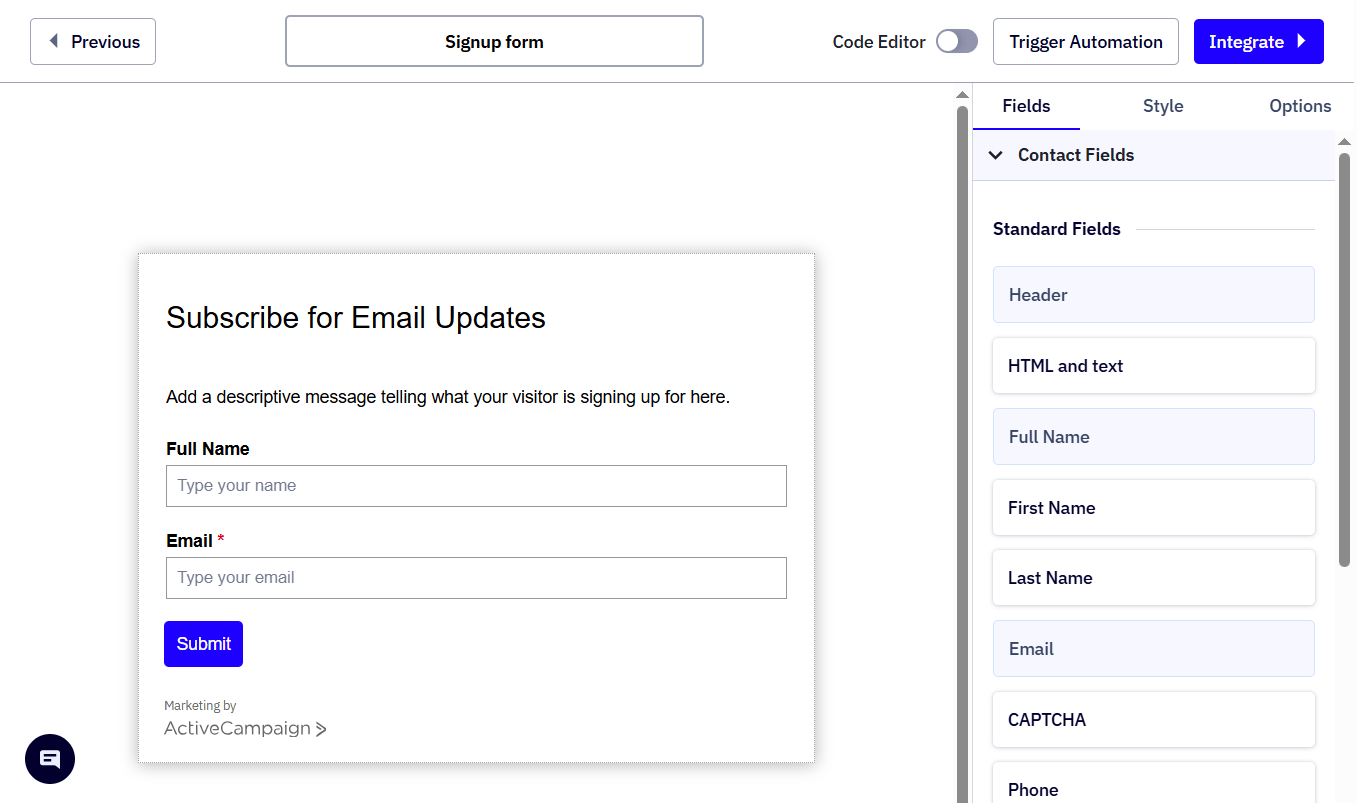
On the flipside, ActiveCampaign doesn’t have form templates. You’ll start with a basic-looking form, to which you can add fields for images, a captcha, custom fields, and more.
ActiveCampaign’s form customization options are also more limited than Kartra’s. For example, you can’t create two-column forms.
Email marketing: sending one-off emails
To send one-off emails in Kartra, you’ll create a “broadcast” from one of the platform’s 20+ templates or your own template. Then, replace existing placeholder content and drag and drop in new content blocks, ranging from text to images, buttons, and countdown timers, and more.
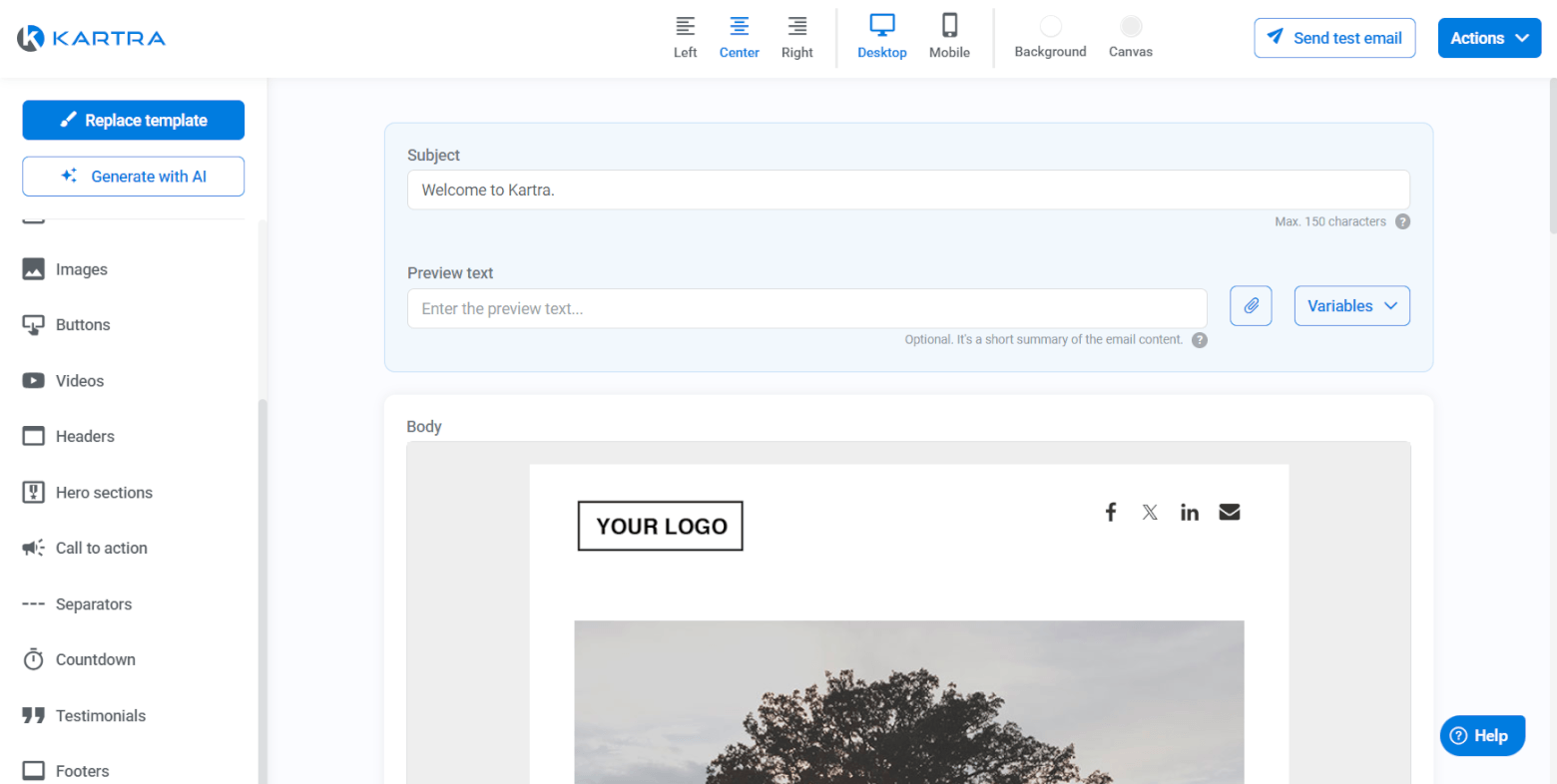
If you have writer’s block, you can tap into Kartra AI to generate email copy in your preferred tone and language.
While Kartra’s email marketing campaign creation features are decent, ActiveCampaign’s are way better.
Remember Active Intelligence? It can use your ActiveCampaign account’s email address to look up your site, analyze its contents, and then suggest email topics relevant to your niche, industry, and country.
It can also generate placeholder email text tailored to your brand — none of that generic lorem ipsum that some other email service providers (like Kartra, sorry) use.

Like in Kartra, you’ll customize your marketing emails with drag-and-drop content blocks. But ActiveCampaign offers various unique email marketing features you won’t see in Kartra. For example:
- Conditional content: Add content that displays only when contacts meet certain conditions, like being from a certain city.
- Enabling right-to-left (RTL) text direction: So that your text flows from RTL, as is the norm for languages like Arabic and Hebrew.
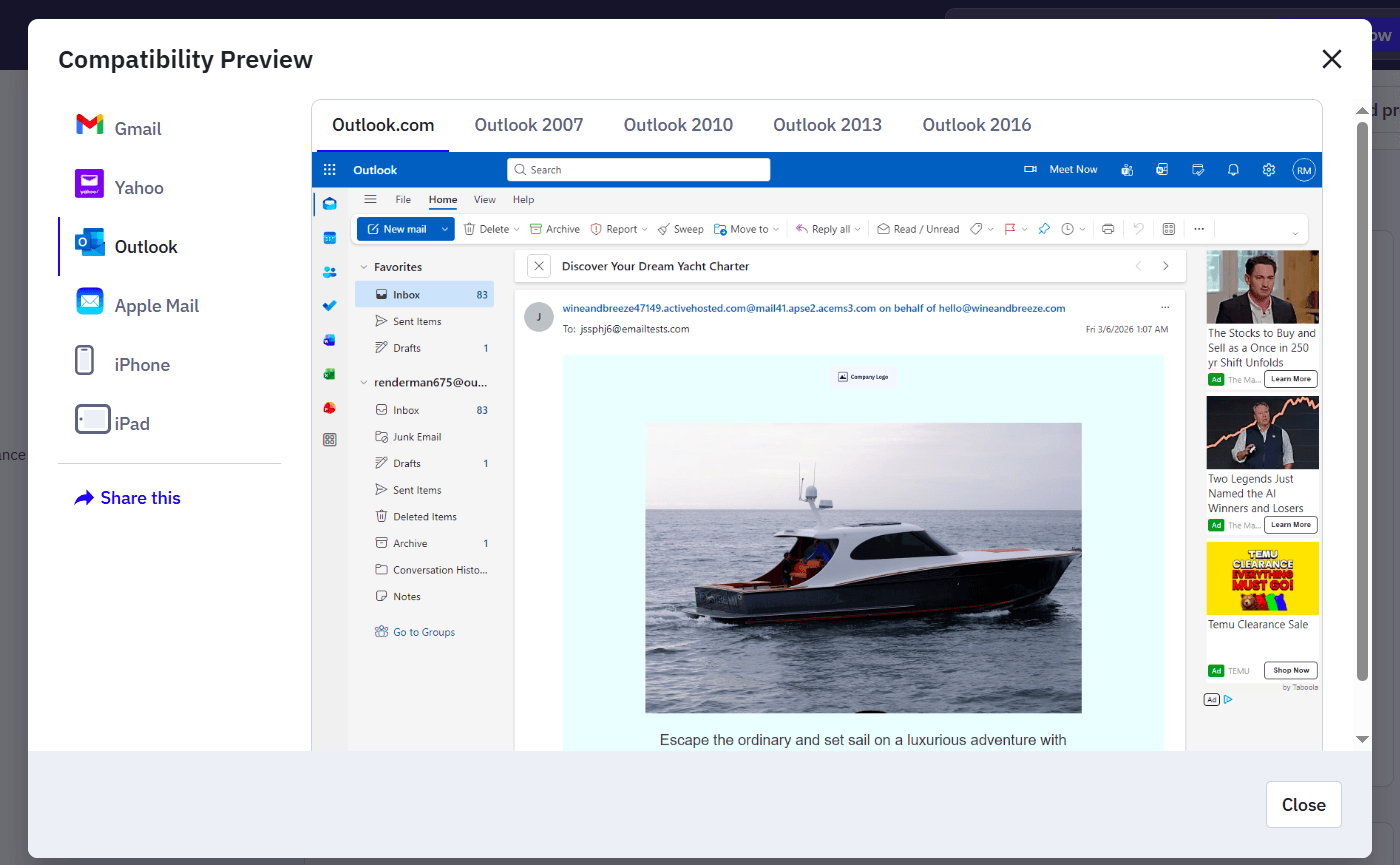
- Previewing your emails in different email clients (e.g., Gmail, Yahoo, Outlook). You can even preview your emails in multiple flavors of Outlook! Kartra limits you to previewing your emails in desktop and mobile view.
Automation
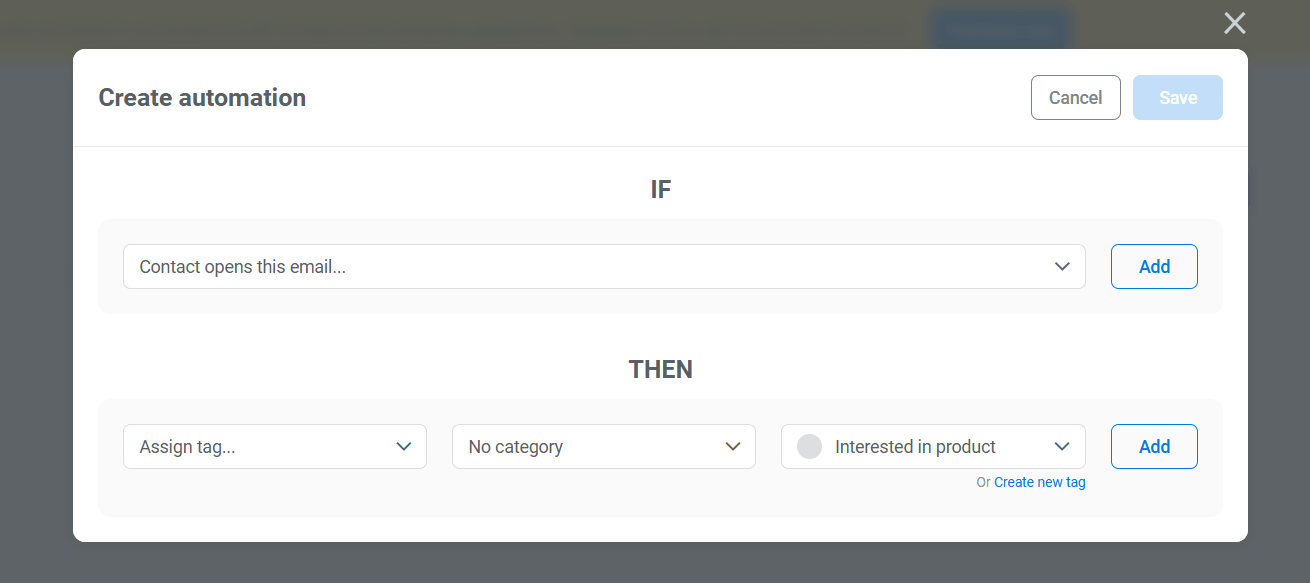
Kartra’s automations are one-step, “if this, then that”-style automations. For example: if a lead fills in a form, then add a tag to the lead.
To set up a multi-step automation, you’ll create a sequence instead. Set up your automation trigger (or “starting rule”), followed by the actions that should happen next. There’s a handful of available actions, including:
- Sending an email.
- Adding or removing a tag.
- Sending contacts down different sequence routes based on conditions.
- Delaying the next step for a number of days.
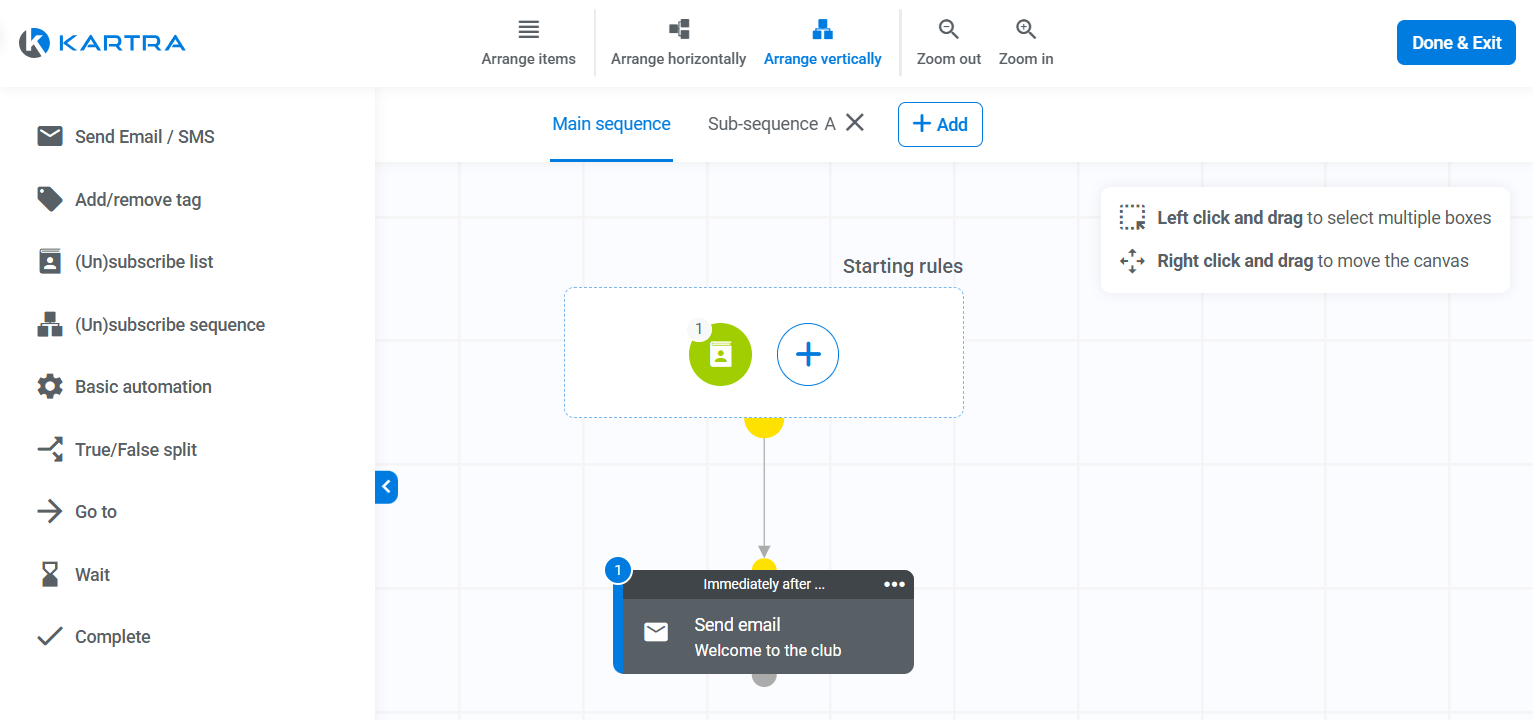
Uniquely, you can create sub-sequences, which are sequences you connect to your main sequence. They’re useful for keeping your main sequence tidy.
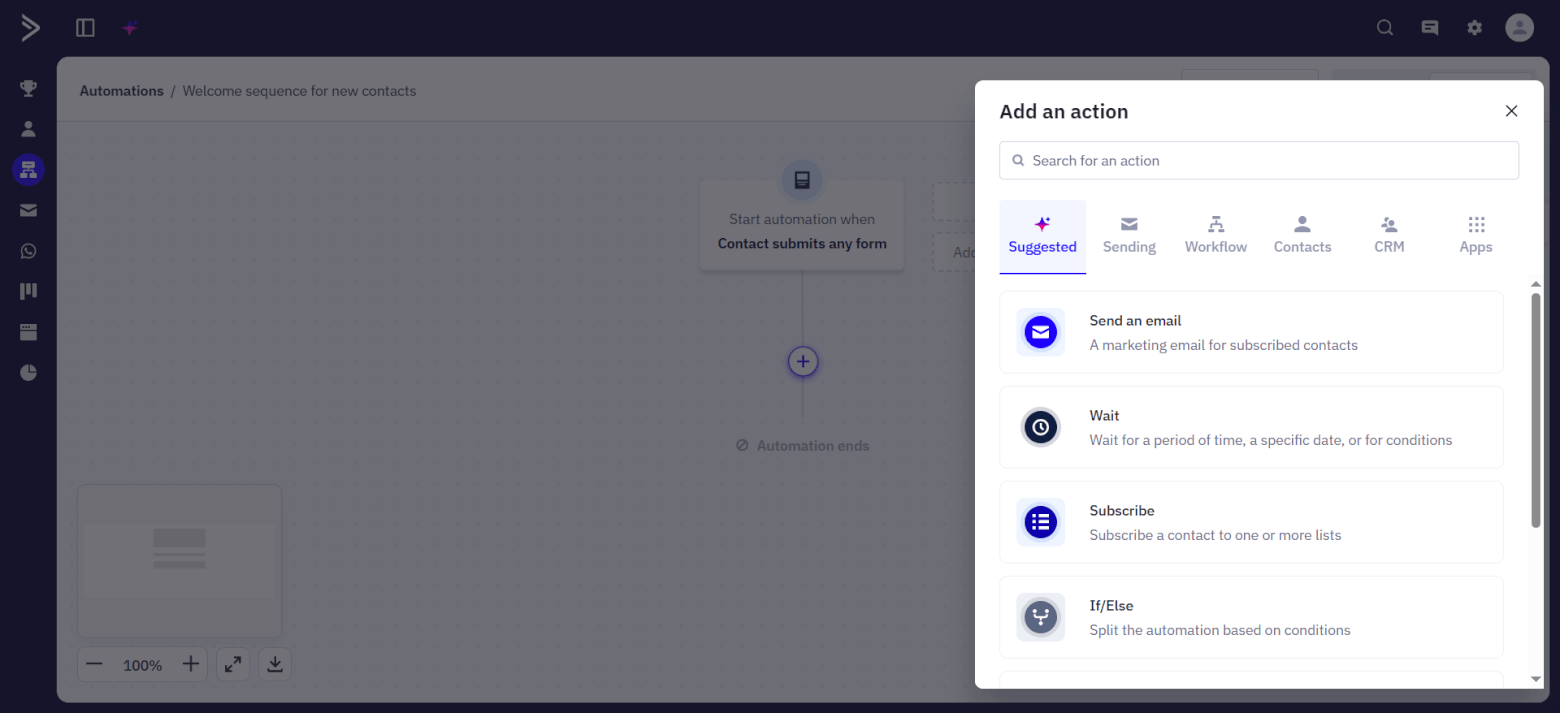
But Kartra’s capabilities are no match for ActiveCampaign, which is renowned for its email automation software. ActiveCampaign offers three ways of creating automations:
- Get AI to generate an automation.
- Use a template (called a “recipe”) as a starting point — there are over 200!
- Create your marketing automation from scratch.
There’s a wide variety of automation triggers and actions to help you automate practically any marketing action in response to any trigger event. For instance, you can have your automation trigger when a contact replies to your email or downloads a file. This isn’t possible in Kartra.
Examples of actions are:
- Adding and removing tags.
- Splitting the automation route based on conditions.
- Sending emails, WhatsApp messages, and site messages, which is good for omnichannel marketing.
- Adding and completing deal tasks.
- Adding contacts to another automation (which is similar to Kartra’s sub-sequences feature).
Winner: ActiveCampaign wins hands down, due to its more extensive email marketing and automation features.
ActiveCampaign 2 – Kartra 0
3. CRM Capabilities
If your business relies on sales-led growth to get customers, you’ll need a platform with solid customer relationship management (CRM) features to help you:
- Remember every piece of info you collect about prospects.
- Track your deals’ progress.
Well, ActiveCampaign is a powerhouse here.
It provides contact profiles for consolidating your contacts’ personal characteristics, like their email address, job title, preferred language, and social media links. You can also create custom fields and view your contacts’ tags, lists, and automations.
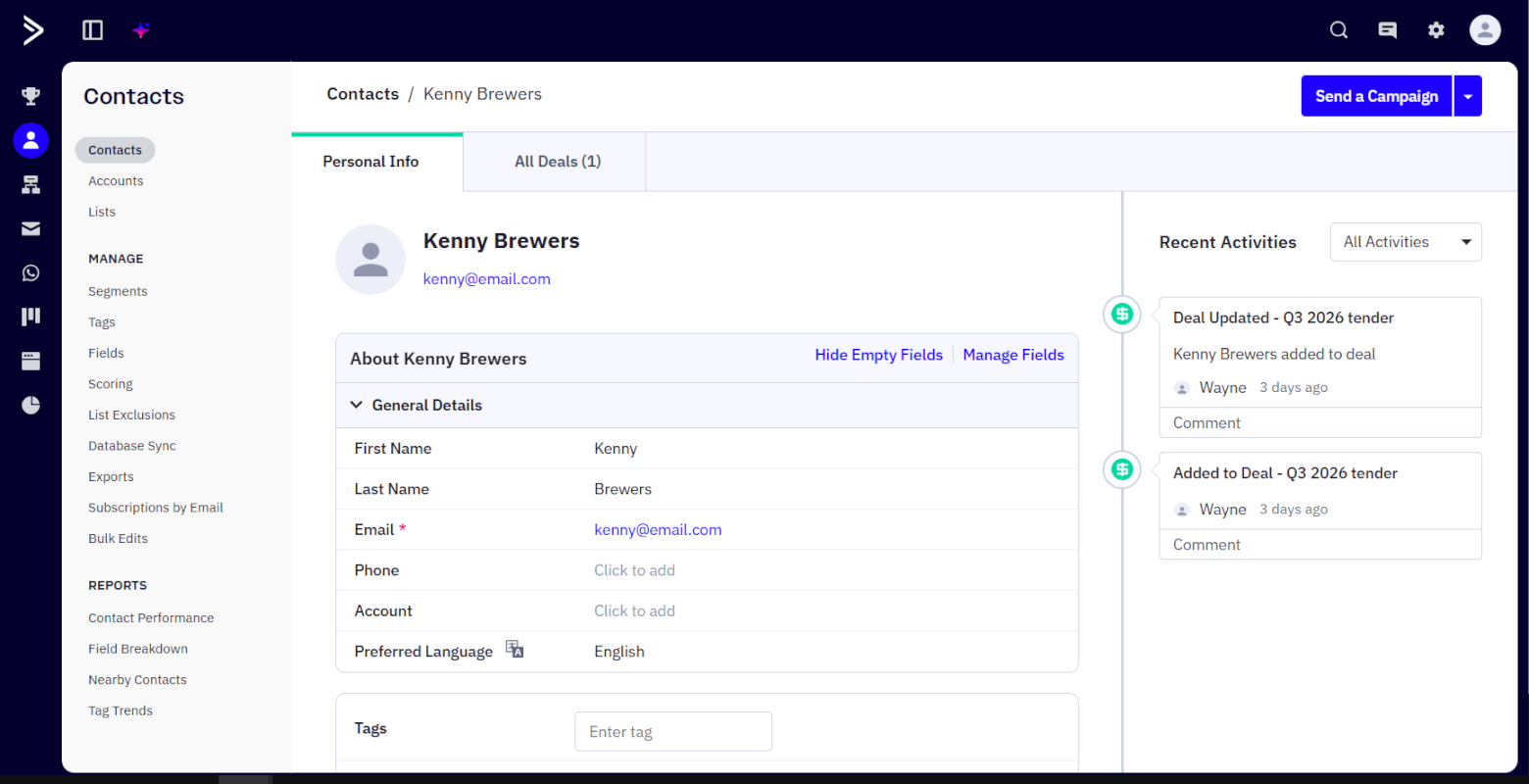
If you need to make the same edit across multiple contacts, you can do a bulk edit. It’s a lot more convenient than editing contacts one by one.
ActiveCampaign also lets you score your leads to prioritize those more likely to convert. You’ll do this by setting up one-off scoring rules and/or automations that update your leads’ scores as their activities change.
With ActiveCampaign’s CRM add-on, you can monitor your deals in ActiveCampaign’s deal pipeline, and view your deals according to task status and list view. There’s also a kanban view, where you can move your deals across deal stages (or let an automation do this for you).
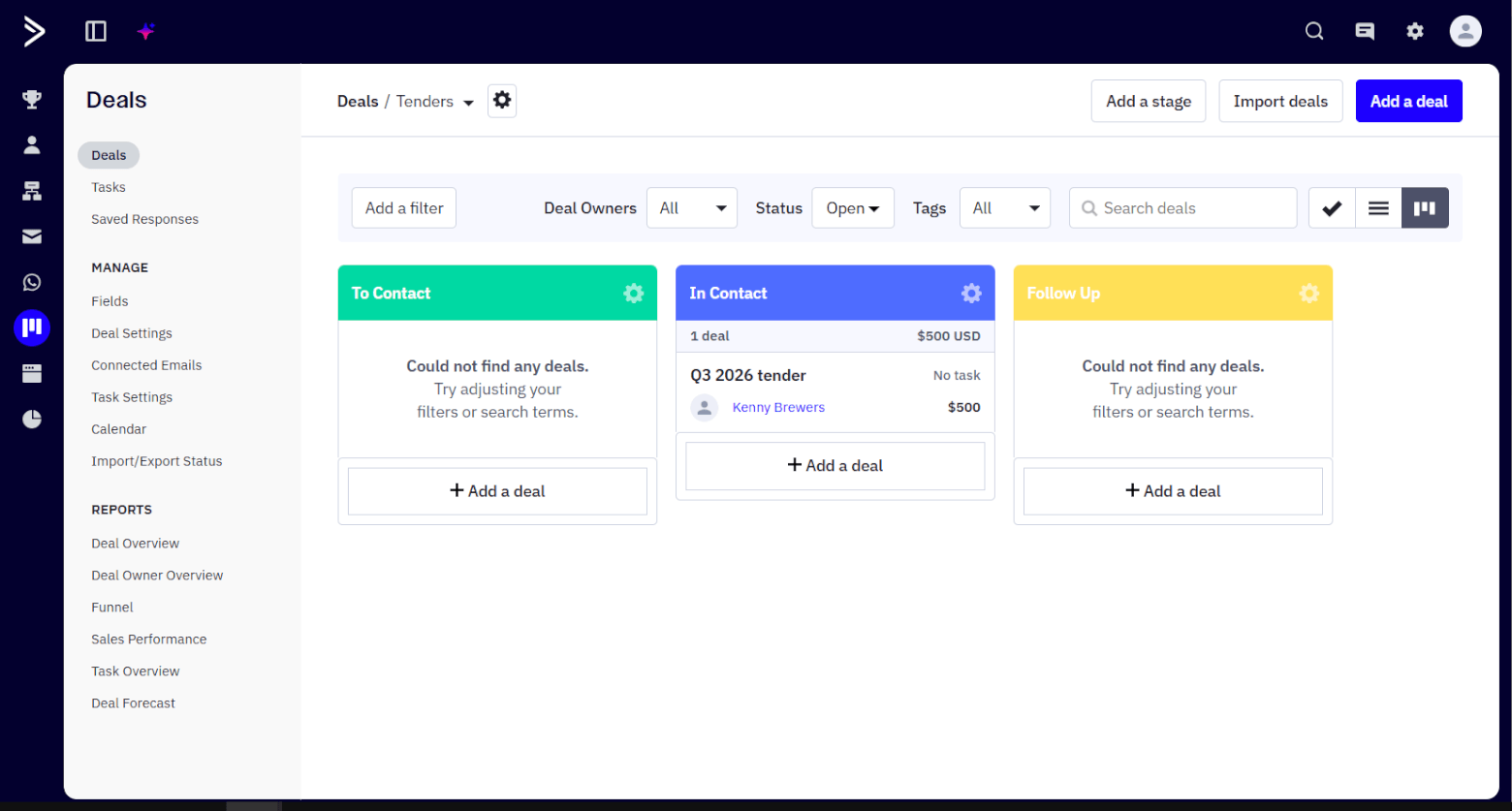
In addition, you can filter your deals by deal owner, status, and tags, and create deal tasks to delegate work. If you opt for the higher-level CRM add-on, you’ll enjoy more pro CRM features, like automated deal task creation and closing, and access to the Deal Overview report for analyzing your sales efforts’ effectiveness.
As for Kartra, you get detailed contact profiles that keep track of your contacts’ demographic information, the lists they’re in, their tags, and their automation history, among other data.
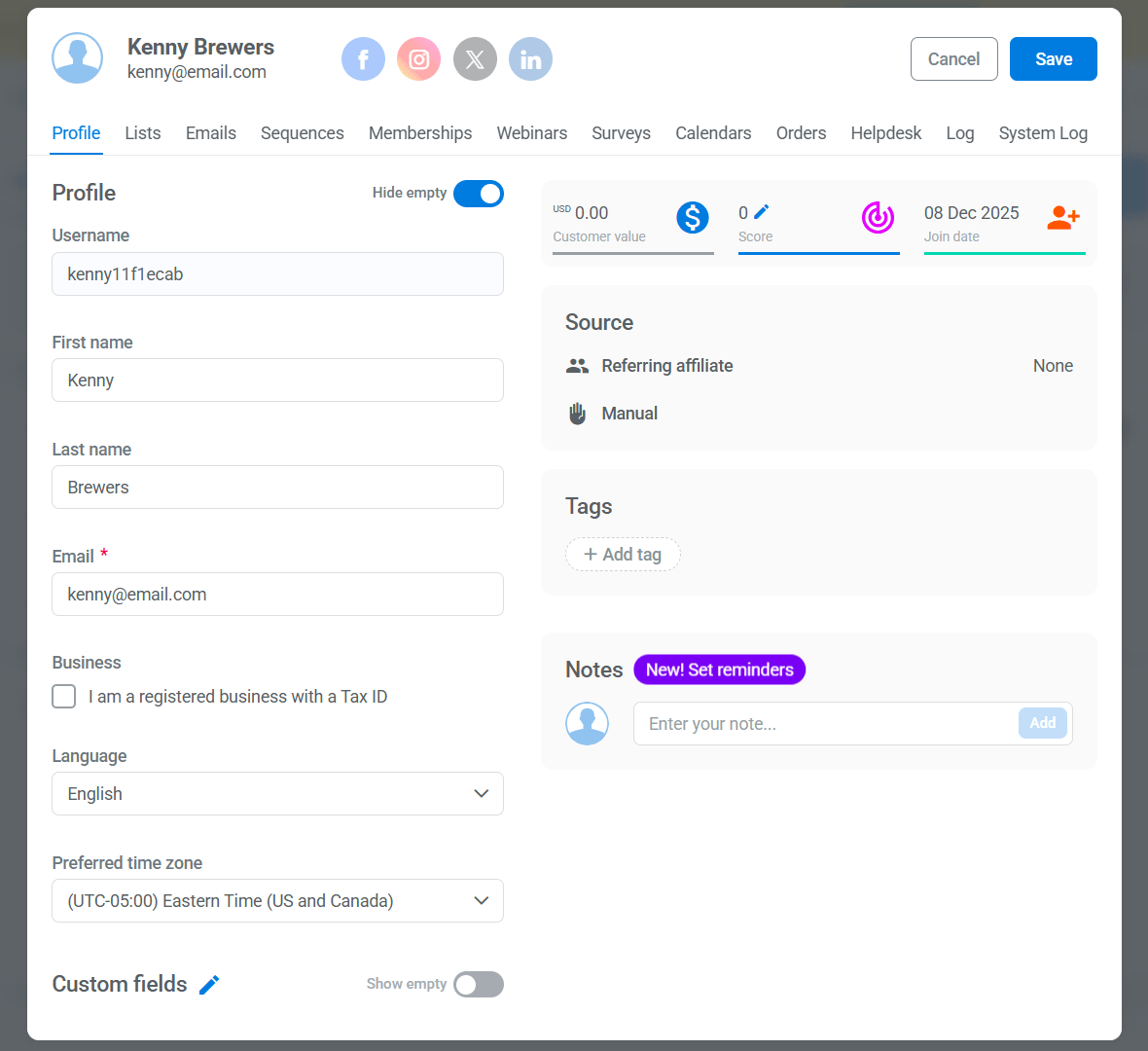
Similar to ActiveCampaign, you can score your contacts manually or automatically. But unfortunately, you can’t manage deals. That’s because Kartra doesn’t let you create deals or track them in any kind of pipeline view.
This could be because the platform focuses on enabling digital product sales, which typically doesn’t involve salespersons nurturing leads. So, if you’re after a marketing platform with deal management capabilities, only ActiveCampaign can really deliver here.
Winner: ActiveCampaign wins this round for providing deal management and pipeline features that Kartra lacks.
ActiveCampaign 3 – Kartra 0
4. Funnels and Landing Pages
Building a strong sales funnel, where you direct users through landing pages and other marketing assets to nurture conversions, is key to generating revenue. So, let’s see how well Kartra and ActiveCampaign support funnel and landing page creation.
Funnels
In Kartra, you can create visual funnel maps of your traffic sources and marketing assets. These assets include webinar registration pages, videos, emails, and thank-you pages.
You can also indicate the actions leads need to take — like completing a form registration or purchasing a product — to progress through the funnel.
Here’s an example of a simple funnel comprising one traffic source, a sales page, a purchase action, and a thank-you page:
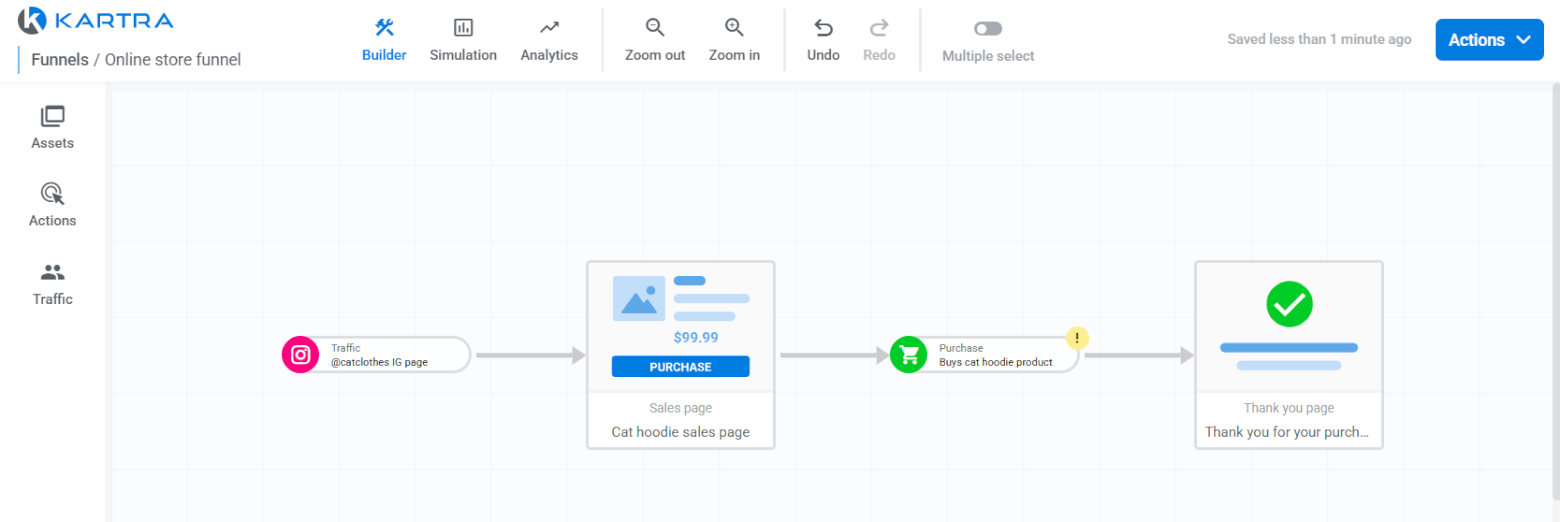
What’s more, you don’t need a separate online store to sell digital products. You can use Kartra to create digital products and take payments.
You can also run simulations to estimate how much revenue you might earn from your funnel.
While ActiveCampaign lets you create landing pages and emails for sales funnels, it doesn’t provide funnel visualization features.
You also can’t natively sell digital products or process payments. To do this, you’d have to integrate a third-party tool like ThriveCart.
Landing pages
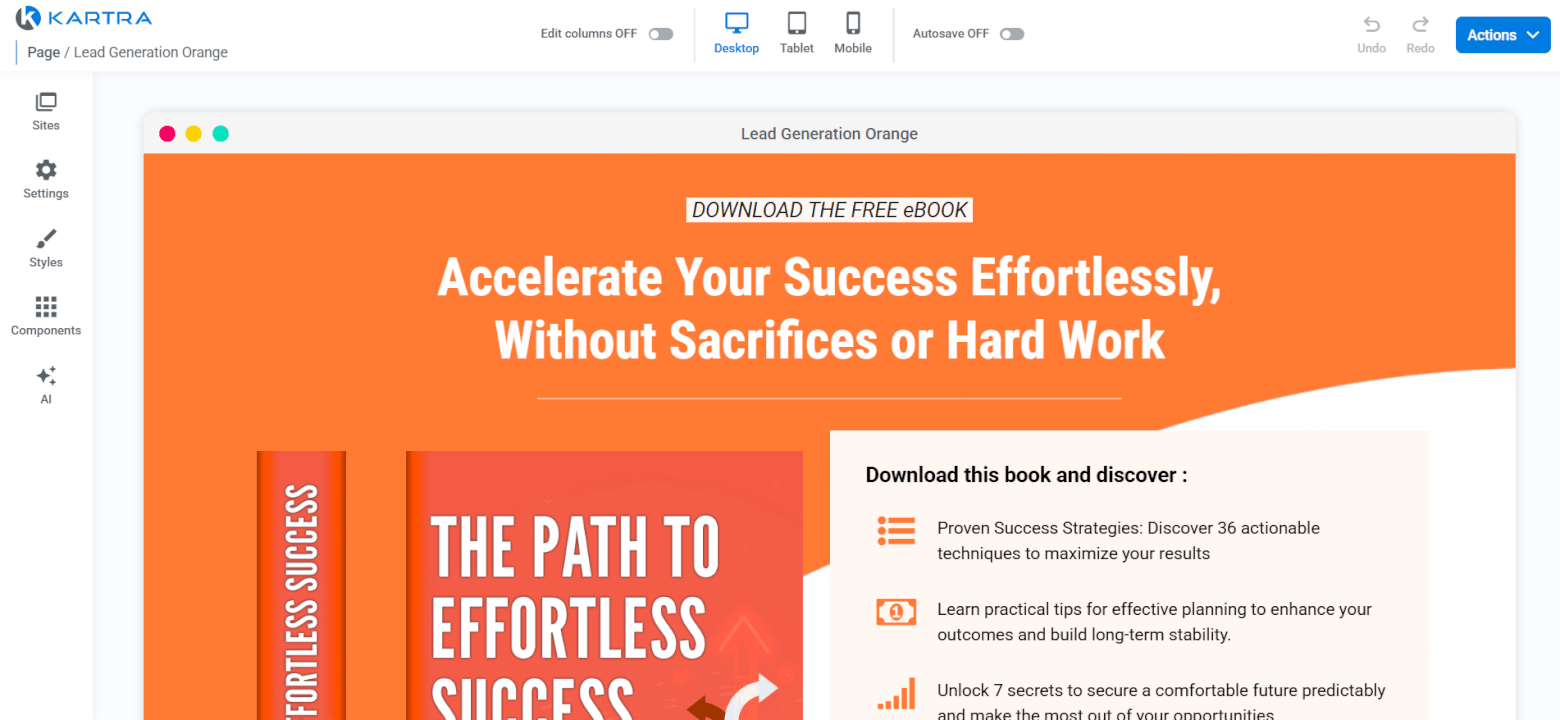
Kartra’s landing page features are fantastic. There are more than 660 landing page templates to choose from, categorized by industry, goal, page type, and colors.
You also get lots of content components for customizing your landing pages. These include text, images, icons, carousels, sound players, forms, progress bars, and more.
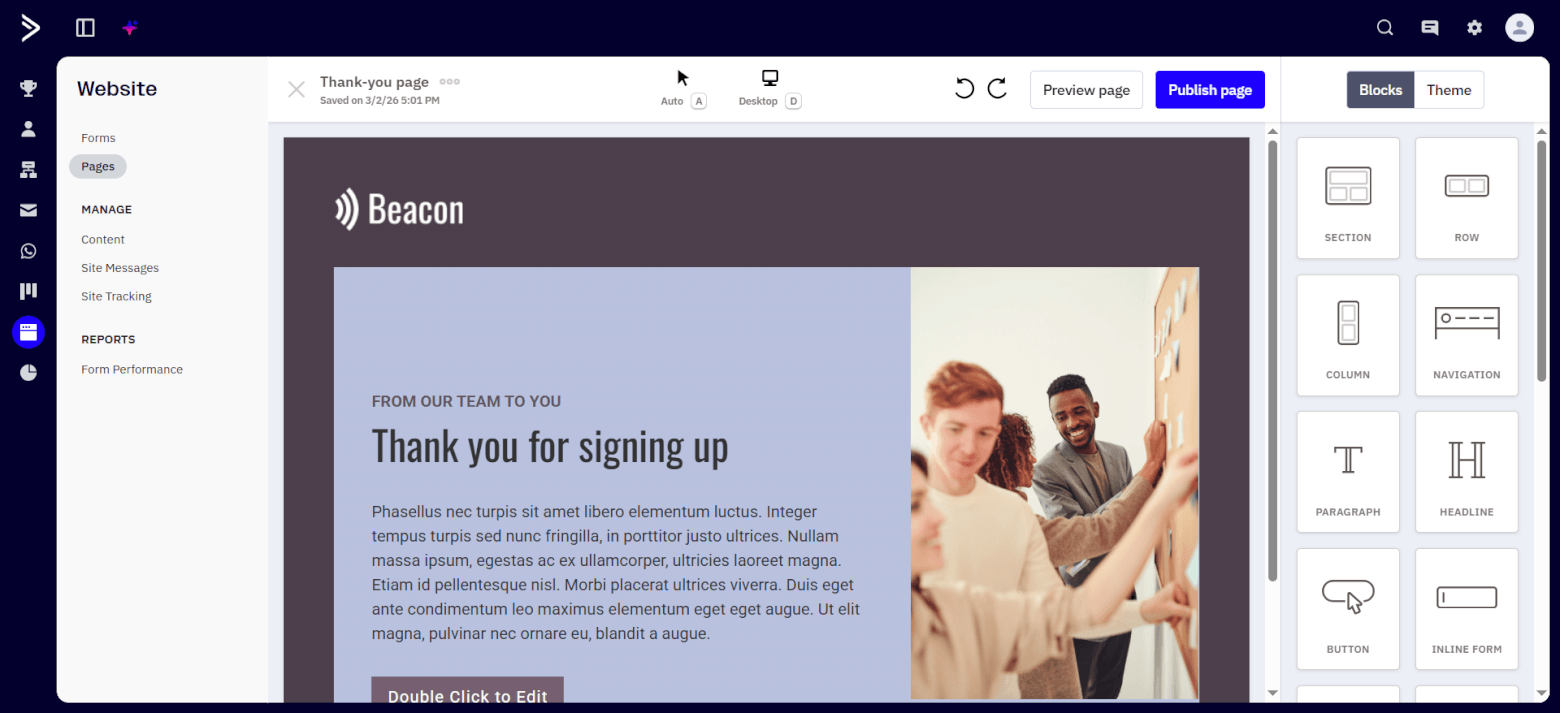
ActiveCampaign’s landing page template library is more modest, having only 60+ templates. The platform’s landing page builder’s customization features are decent: for example, you can change your page’s text, images, and layout spacing, and drag in new content blocks, but to a lesser extent than Kartra’s landing page builder.
Winner: With its dedicated funnel features and more extensive landing page capabilities, Kartra wins! (Given that Kartra is one of our all-around top choices for sales funnel software, I’m not surprised!)
ActiveCampaign’s landing page builder is all right, but it’s better equipped for capturing lead magnet and newsletter signups. The platform can’t take payments natively, which makes it a less ideal end-to-end funnel creation tool.
ActiveCampaign 3 – Kartra 1
5. Memberships and Course Hosting
If you’re planning to create memberships, whether for hosting courses or other gated content, Kartra’s a good choice.
You can build membership sites and add your member-only content to them. Then, implement access tiers and customize the content that members on different tiers see.
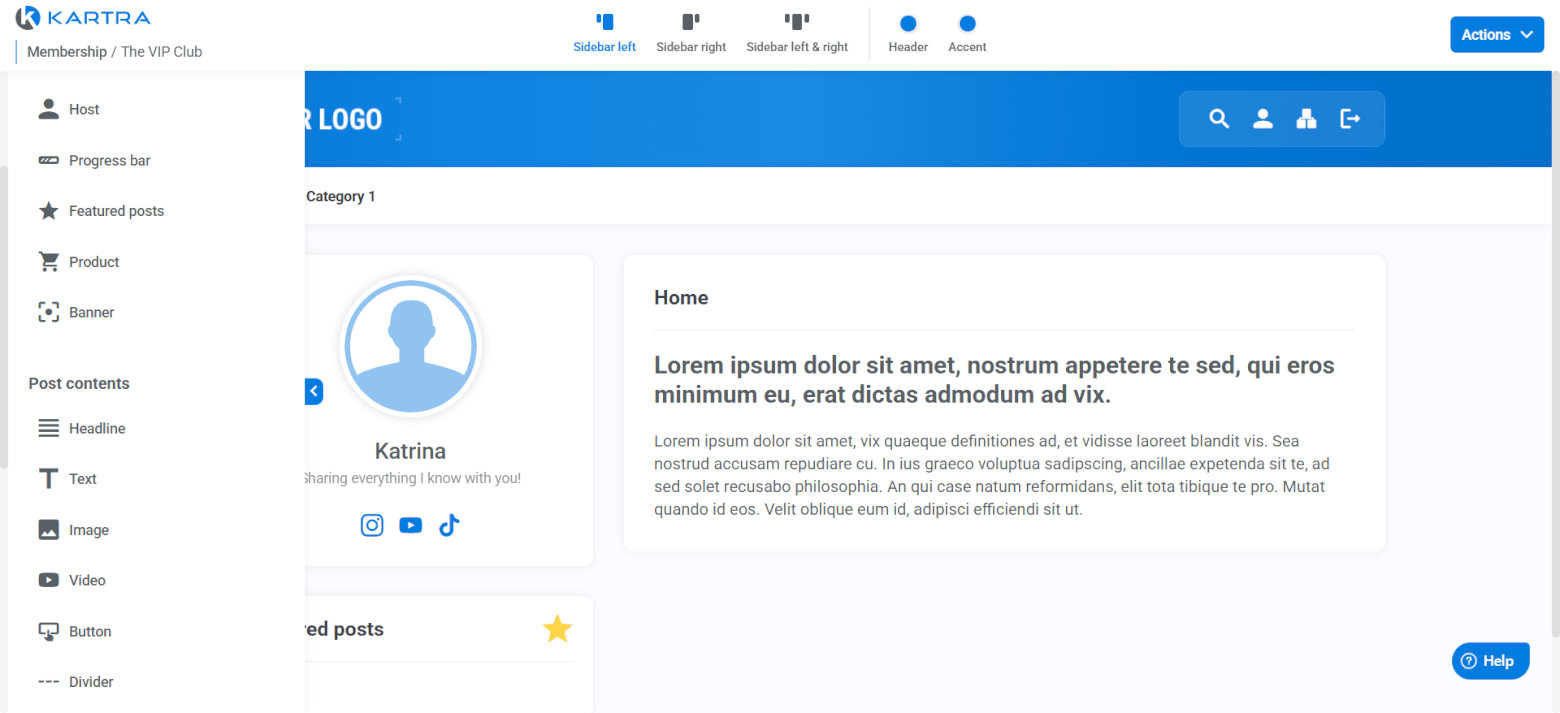
The “Comments” feature lets you configure the posts that members can comment on and set up comment moderation so that only admin-approved comments are published.
Once you’ve set up your membership, create your welcome email, which is useful for automatically giving new members their login details.
You can also automate the adding of members to tags, lists, sequences, and automations to segment your members or drip them email content, for example.
Got multiple membership sites set up in Kartra? Create a membership portal so that users can view all your memberships in one place and join the ones most appropriate for them.
In contrast, ActiveCampaign doesn’t offer native membership or course hosting features. You’d need to use a third-party tool like MemberSpace or Mighty Networks as your memberships platform, and then sync members to ActiveCampaign to engage them via email.
Winner: Kartra wins round 5 as it offers membership and course hosting features, while ActiveCampaign doesn’t.
ActiveCampaign 3 – Kartra 2
6. Reporting
Kartra’s reports give a good general overview of how your marketing and sales efforts are performing.
When you send broadcasts, for example, you can view their open rates, click rates, bounces, and unsubscribes, among other metrics. Meanwhile, you can measure your forms’ number of visitors and subscriptions, plus their opt-in ratio percentage.
On the other hand, sequence metrics include the number of active leads, subscriptions, unsubscriptions, goals, revenue, and subscriber value.
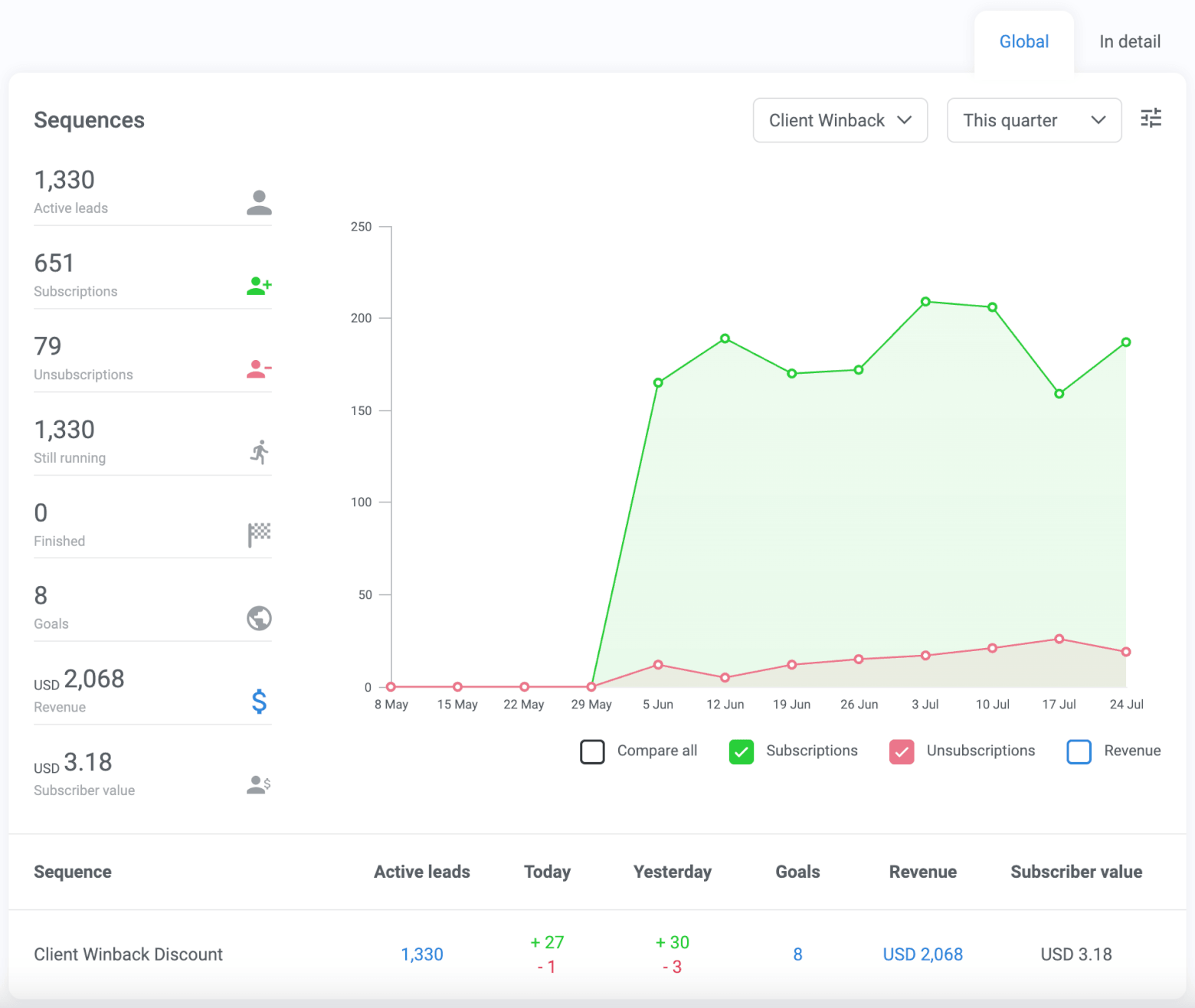
Kartra’s sequences analytics (source)
Separately, viewing real-time funnel data is possible — but only on Kartra’s pricey $549/mo Professional plan or higher.
In contrast, ActiveCampaign’s reports are more detailed.
If you’re evaluating a campaign’s performance, for example, you can view all the email marketing KPI metrics I mentioned earlier, plus email client trends, which are the number of times your email was opened in different email clients within a specific date range.
I also like how you can exclude Apple Mail Privacy Protection opens, as these can make your stats inaccurate.
As for automations, you get an Automation Overview report with a similar extent of metrics to Kartra’s equivalent report — like send, open, and click rates for emails that contacts received from automations, for example.
Alternatively, load the Automations Performance report for combined data for all automations that have sent at least one email. Uniquely, this report provides the forward rate — the rate at which recipients forwarded these emails — which I didn’t see in Kartra’s reports.
ActiveCampaign also has a Conversion Attribution report that lists conversion attribution data like sources, UTM parameters, conversion date, and total value. These are all helpful for evaluating your sales touchpoints’ effectiveness at facilitating conversions.
Winner: ActiveCampaign. I find its reports more extensive than Kartra’s.
ActiveCampaign 4 – Kartra 2
7. Integrations
ActiveCampaign offers a whopping 1,000+ integrations in categories like business operations, project management, and content creation. Ecommerce integrations are also available — including for common ecommerce platforms like WooCommerce, Shopify, and BigCommerce.
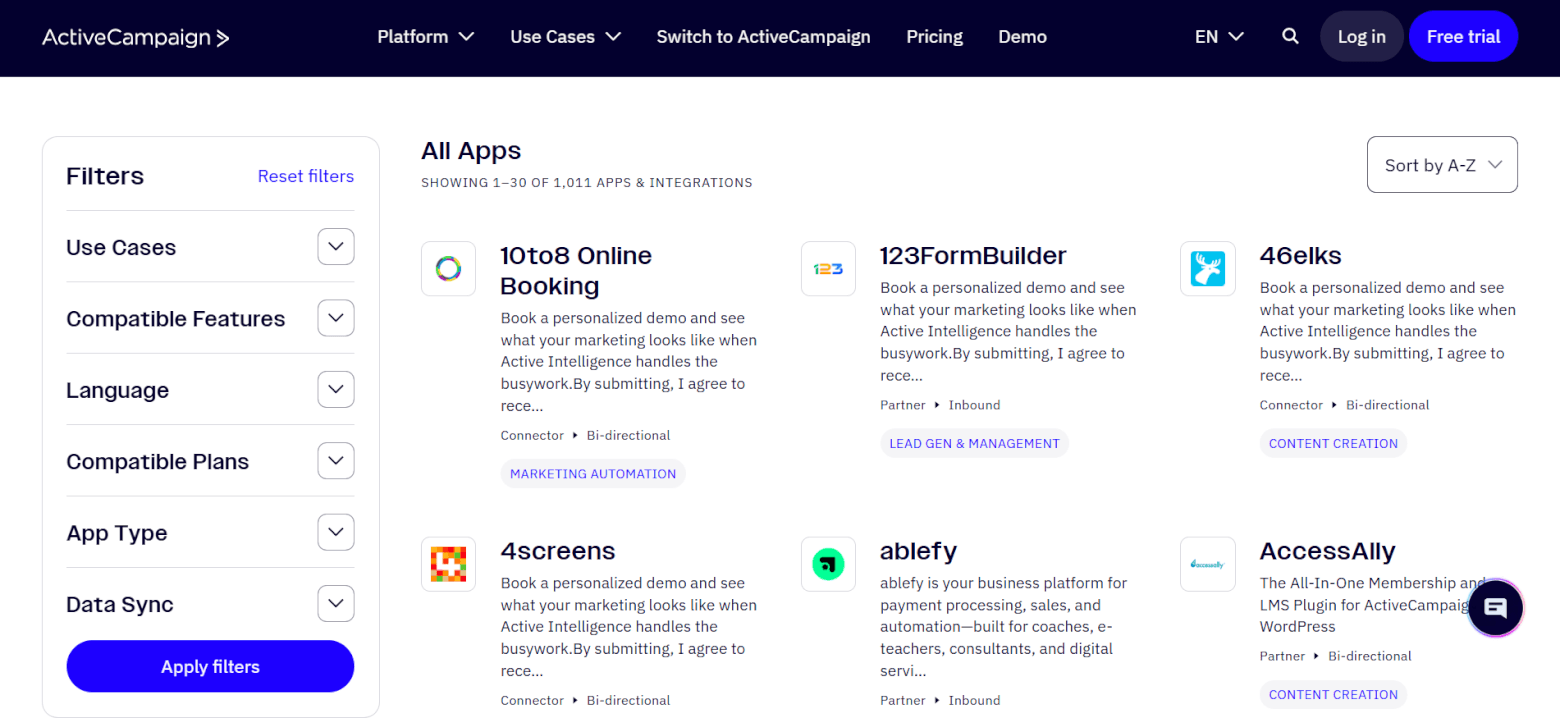
Use ChatGPT or Claude? ActiveCampaign integrates with these AI assistants, too!
But don’t fret if ActiveCampaign doesn’t support an app in your tech stack. ActiveCampaign integrates with middleman app connector Zapier, which itself has 8,000+ integrations. This means there’s a high chance you can use Zapier to connect your app with ActiveCampaign.
In contrast, Kartra has only 20+ native integrations with apps like payment and email gateways, membership platforms, and calendar apps. It also doesn’t integrate with ecommerce platforms like WooCommerce or Shopify. So, you have to be satisfied with Kartra’s built-in ecommerce features if you decide to use it for ecommerce email marketing.
On the plus side, Kartra also integrates with Zapier. You could use Zapier to bridge integration gaps.
Winner: ActiveCampaign integrates with way more apps than Kartra, making it the clear winner!
ActiveCampaign 5 – Kartra 2
8. Pricing and Value
To identify which platform offers more value-for-money pricing, you’ll need to look at:
- Which plans under both platforms have the features you need.
- How much these plans cost.
ActiveCampaign’s Starter plan includes an email send limit of 10X your contact limit, five actions per marketing automation, limited Active Intelligence use, and CRM access. Higher plans have advanced features like generative AI, conditional content, and attribution and conversion tracking.
Meanwhile, Kartra’s Essentials plan offers 10,000 monthly emails, five pages, one product, and one membership, among other features. Upgrade to a higher plan to remove these limits. In particular, Kartra’s Growth plan includes funnel simulation and advanced automations, and the Professional plan provides real-time funnel data.
As for pricing figures, ActiveCampaign pricing starts at a wallet-friendly $19/mo under the Starter plan. It then increases to:
- $59/mo under the Plus plan.
- $89/mo under the Pro plan.
- $159/mo under the Enterprise plan.
These prices are for 1,000 contacts. If you exceed this contact limit, you can pay to increase it while staying on the same plan. For example, here are the pricing for higher contact limits on the Starter plan:
| Contact limit | Starter plan pricing |
|---|---|
| 1,000 | $19/mo |
| 2,500 | $49/mo |
| 5,000 | $99/mo |
| 7,500 | $139/mo |
| 10,000 | $189/mo |
| 15,000 | $289/mo |
Users on the Plus plan and up can also get ActiveCampaign’s sales engagement enhanced CRM add-on from $49/mo.
Meanwhile, Kartra pricing starts at $59/mo for 500 contacts under the Essentials plan. It increases to:
- $119/mo for 2,500 contacts under its own Starter plan.
- $229/mo for 12,500 contacts under the Growth plan.
- $549 for 25,000 contacts under the Professional plan.
If you exceed your plan’s contact limits, you’ll automatically be bumped to the next-highest one (and enjoy its extra features). But the jumps in contact limits are huge — and so are the price increases, which practically double between plans.
This pricing structure can be off-putting, especially if you can’t scale the revenue from your email list fast enough to make the higher email bill worth it. On the flipside, ActiveCampaign increases its pricing more gradually over more contact limit tiers, which could make your email marketing costs more manageable (assuming you stay on the same plan).
Winner: Since the right pricing plan depends on your needs, I won’t be awarding points for this round—you will! Adjust the score after you’ve calculated which platform provides the features you need at a lower cost.
Don’t forget to account for the cost of other tools you’ll need — like a memberships platform if you go with an ActiveCampaign plan, for example, because ActiveCampaign doesn’t have native membership management features.
ActiveCampaign 5 – Kartra 2
Kartra vs ActiveCampaign: Which is Right for You?
After eight comparison rounds, ActiveCampaign has five points, while Kartra has two. I didn’t award points for the pricing round, but even if you’d given the point to Kartra, ActiveCampaign is still the overall winner!
I was impressed by ActiveCampaign’s strong ease of use, email marketing and automation, CRM, and reporting features, plus its wide range of integrations. It’s a great choice if you’re a small business owner who relies on sales-led growth to generate revenue. This is especially if you:
- Want to put your marketing campaigns on autopilot, or if you
- Already use (or plan on using) multiple tools to support your business needs.
That said, Kartra is still a strong contender if you’re a creator who sells digital products or memberships. It bundles email marketing, funnels, and memberships in one platform, so you can run your business with fewer tools.
Try ActiveCampaign and Kartra for free with the links below:
- Try ActiveCampaign for free for 14 days
- Try Kartra for free for 14 days
Have questions on either platform? Comment below, and we’ll get back to you!
The authors
Learn more about us

Our Methodology
This article has been written and researched following our EmailTooltester methodology.
Our Methodology