


A decade ago, choosing an email marketing tool felt a lot simpler.
If you ran a small business or nonprofit, Constant Contact was often the go-to. It was built for people who didn’t necessarily think of themselves as “marketers.” For many smaller organizations, especially those focused on newsletters, events, and simple campaigns, it was a safe default.
But these days, businesses don’t just want to send newsletters. They want to capture leads, automate follow-ups, and understand which marketing efforts are actually driving revenue. And that’s where HubSpot has gained the upper hand.
While Constant Contact has remained primarily an email marketing platform, HubSpot’s email tools are just one part of a much broader system that includes CRM tools, websites, advanced AI features, and more.
But of course, extra features often come at an extra cost. So if you’re trying to decide between Constant Contact and HubSpot, it pays to understand exactly what you’re getting with each platform – and to make sure that you’re investing in features that you’ll actually make good use of.
In this comparison, I’ll take you through how HubSpot vs Constant Contact perform across categories like ease of use, features, and pricing, to help you choose a platform that can support your marketing and sales as your business grows.
HubSpot vs Constant Contact: Summary
Before we get into the full comparison, here’s the short version:
- HubSpot is the stronger overall choice for most growing SMBs, especially if you want email marketing to connect with CRM, automation, reporting, and sales follow-up. To keep this comparison realistic for small businesses, we’ll focus mainly on HubSpot’s free tools and Starter plan features, rather than the high-tier Professional and Enterprise plans.
- Constant Contact is easier to use and still a solid choice for simple newsletters, events, and basic campaigns, but it feels more limited if you want your email marketing to connect with a wider customer journey.
- Pricing is more complicated than it first appears. Constant Contact starts at a lower monthly price, but it has one frustrating billing policy: deleting contacts does not automatically lower your contact tier. HubSpot, meanwhile, offers a generous free CRM and affordable Starter plans, but the jump to Professional is steep.
Ease of use
Constant Contact has always had a reputation for being beginner-friendly, and for the most part, that still holds true.
The signup process could be smoother, though. Unfortunately, there’s no free plan, and during the trial signup, Constant Contact asks for your credit card details upfront.
You can skip this step and continue with the free trial, but it’s not immediately obvious. It could easily create the impression that you need to pay before you’ve really had a chance to explore the platform, which could be rather off-putting.
Once you’re inside, however, the experience improves considerably. Constant Contact feels very guided, with a clear dashboard and simple prompts to help you start building campaigns, adding contacts, and setting up your first email campaigns.
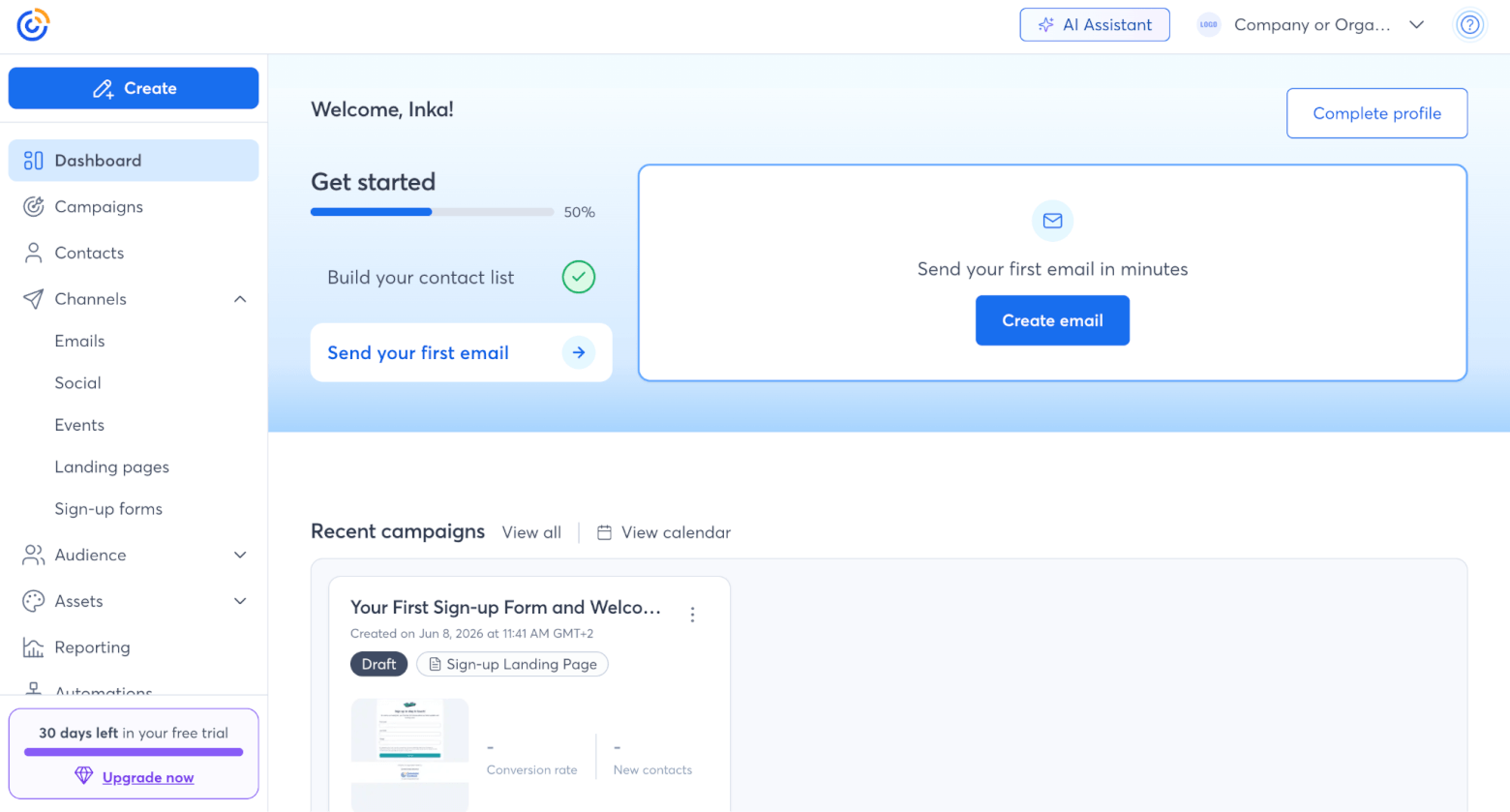
A standout feature for us was Constant Contact’s Brand Kit feature, which makes it easy to keep your branding consistent. You enter your website URL, and Constant Contact attempts to pull in your logo, colors, and branding automatically. I say “attempts” because when I tested it, the results were a little hit and miss. In some cases, I still had to manually add our logo and adjust the colors. But when it worked, the generated templates were clean, professional, and genuinely useful, especially if you want to get a campaign up and running quickly.
HubSpot, on the other hand, feels more like stepping into a full business platform than a simple email marketing tool.
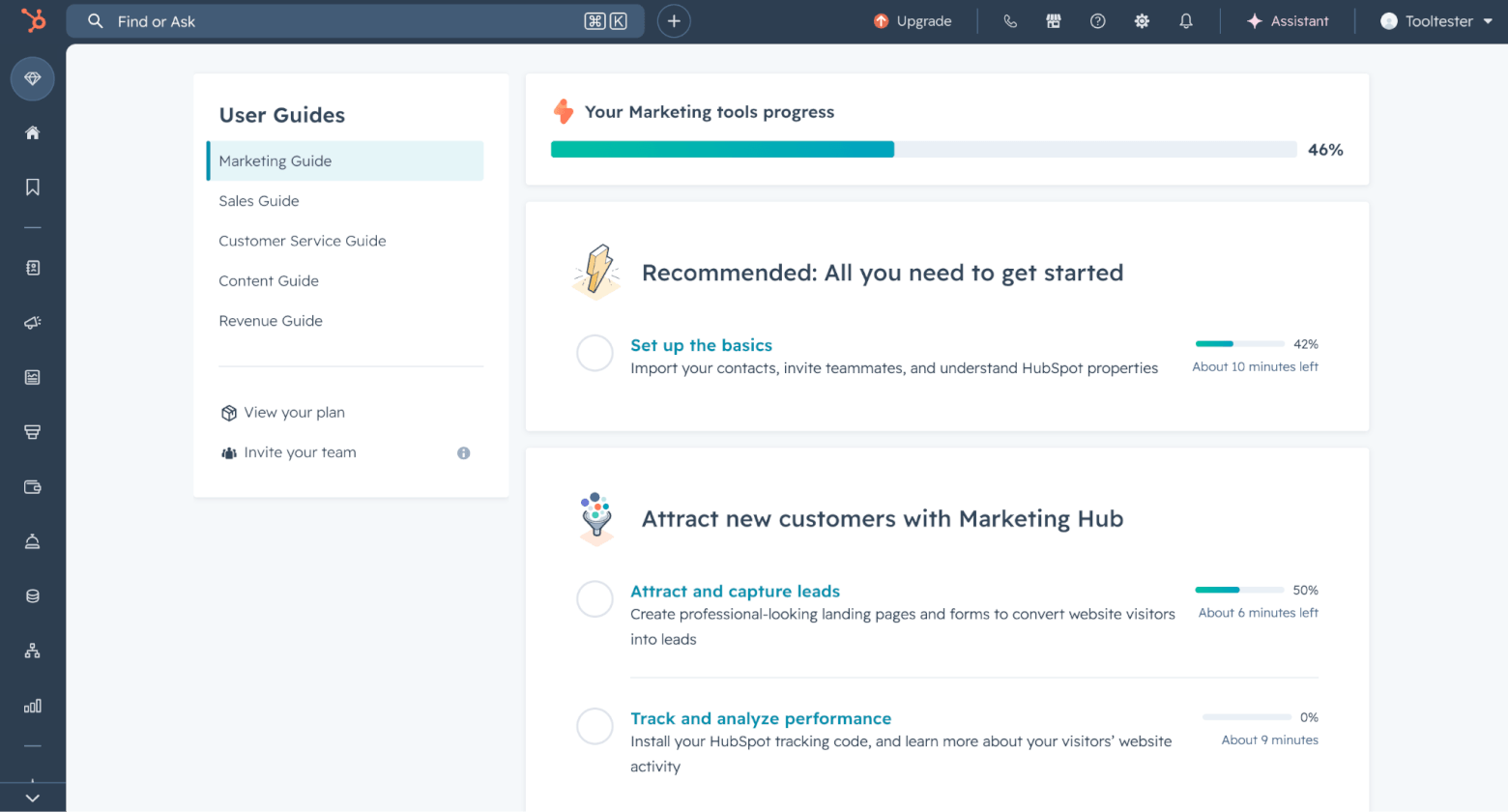
That has advantages. Depending on how you plan to use HubSpot, you can choose from different setup guides (e.g. marketing, sales, or customer service) that walk you through the most relevant first steps. These checklists are helpful, especially because HubSpot gives you access to so many tools from the start.
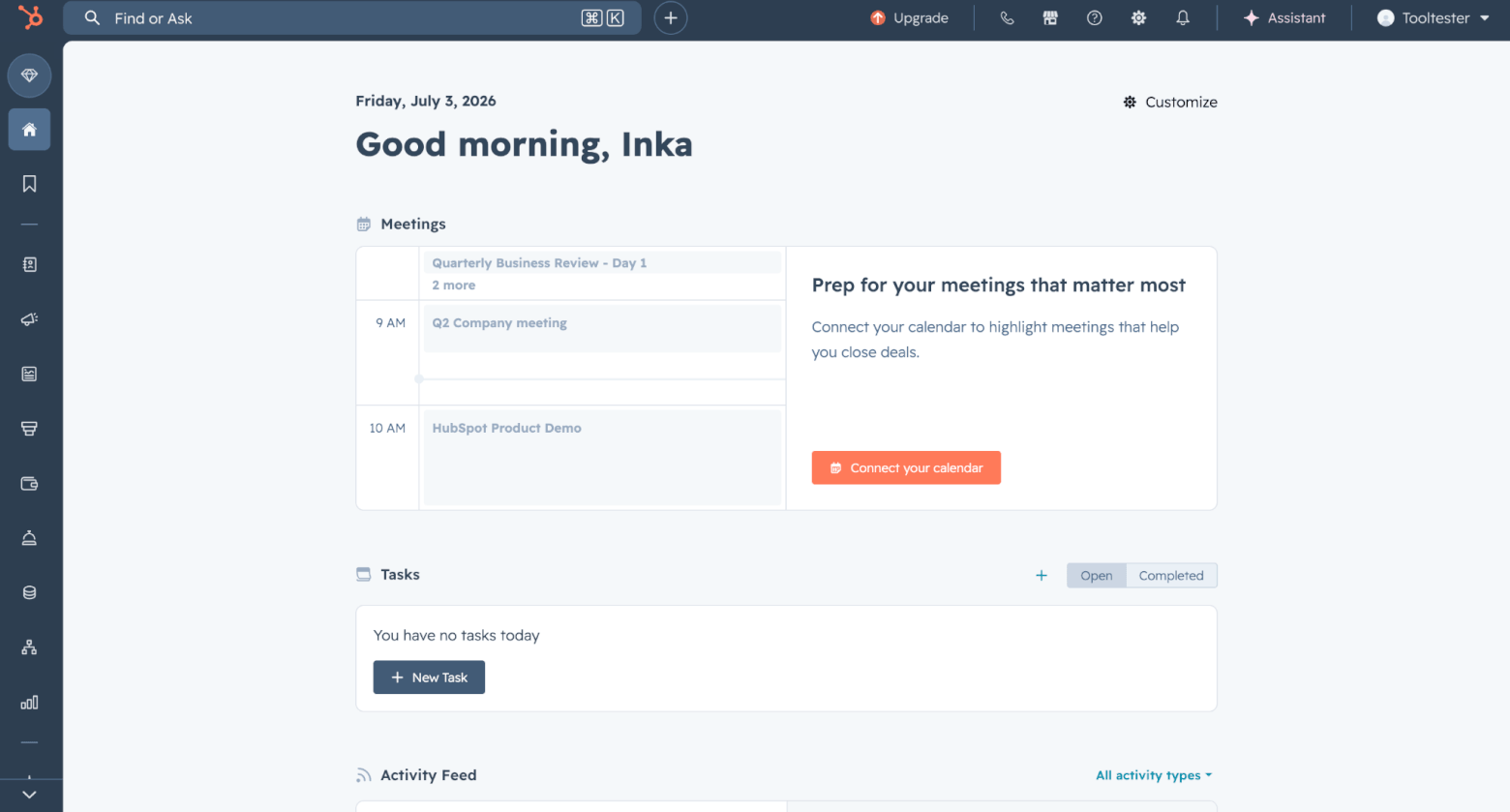
The customizable homepage also makes a good first impression. You can see meetings, tasks, items that need attention, and recent updates, and you can add bookmarks or adjust the layout to suit your workflow. This makes HubSpot feel more personal and practical, rather than just a huge menu of features.
But that huge menu also presents its own challenges. Because HubSpot includes sales, marketing, service, content, and automation tools, it’s easier to get lost. Sometimes you click into one feature, end up somewhere else, and have to work out how to get back. There are features nested inside other features, and even though the interface is generally polished, it can feel like a lot if all you want to do is send a newsletter.
Check out our video tutorial of getting started with HubSpot to learn more:
Winner: For ease of use, Constant Contact wins. HubSpot is more powerful and more customizable, and once you get used to it, it can adapt nicely to your workflow. But Constant Contact is much easier to navigate from day one, especially for users who mainly want to create campaigns without learning a full CRM system first.
Score: HubSpot: 0, Constant Contact: 1
Email editor and templates
Constant Contact offers more than 600 mobile-responsive email templates, which is a much larger built-in library than HubSpot’s. Admittedly, some designs feel a little old-school, but overall, the templates are clean, practical, and easy to adapt.
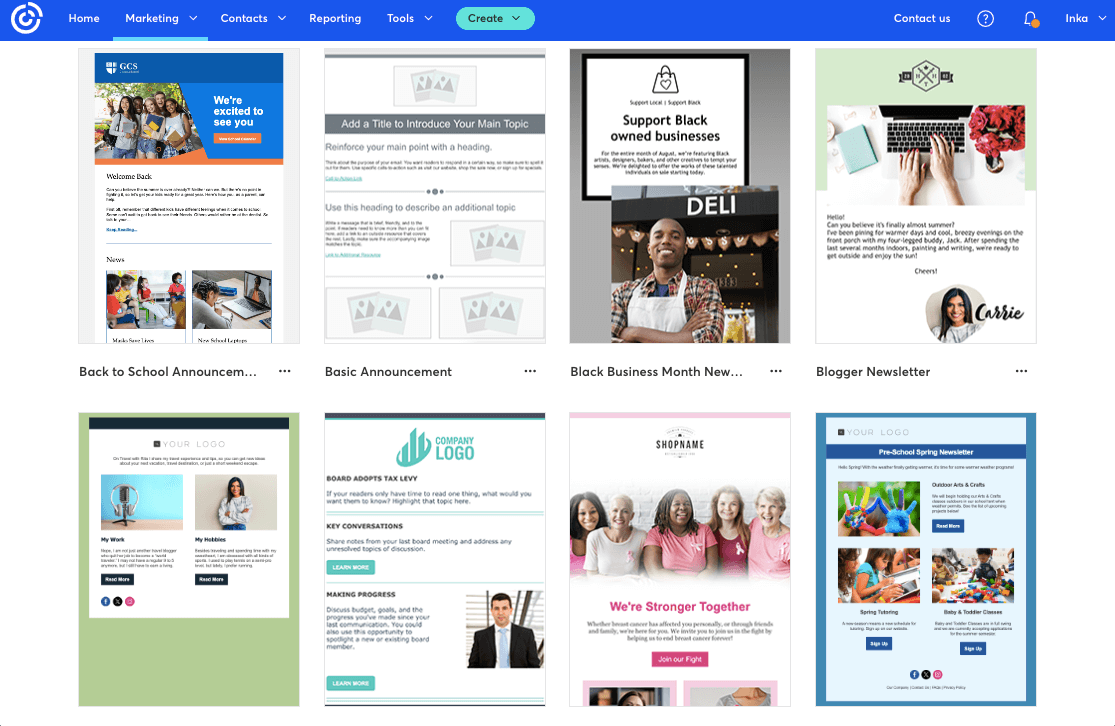
The editor itself is also very approachable. You can drag in content blocks, adjust text and images, add buttons, and quickly turn a template into a usable campaign. I have to say, it’s not the most modern editor we’ve tested, and some areas of the platform, such as the image upload experience, do still feel a little dated. But for straightforward email creation, Constant Contact does a good job of keeping things simple.
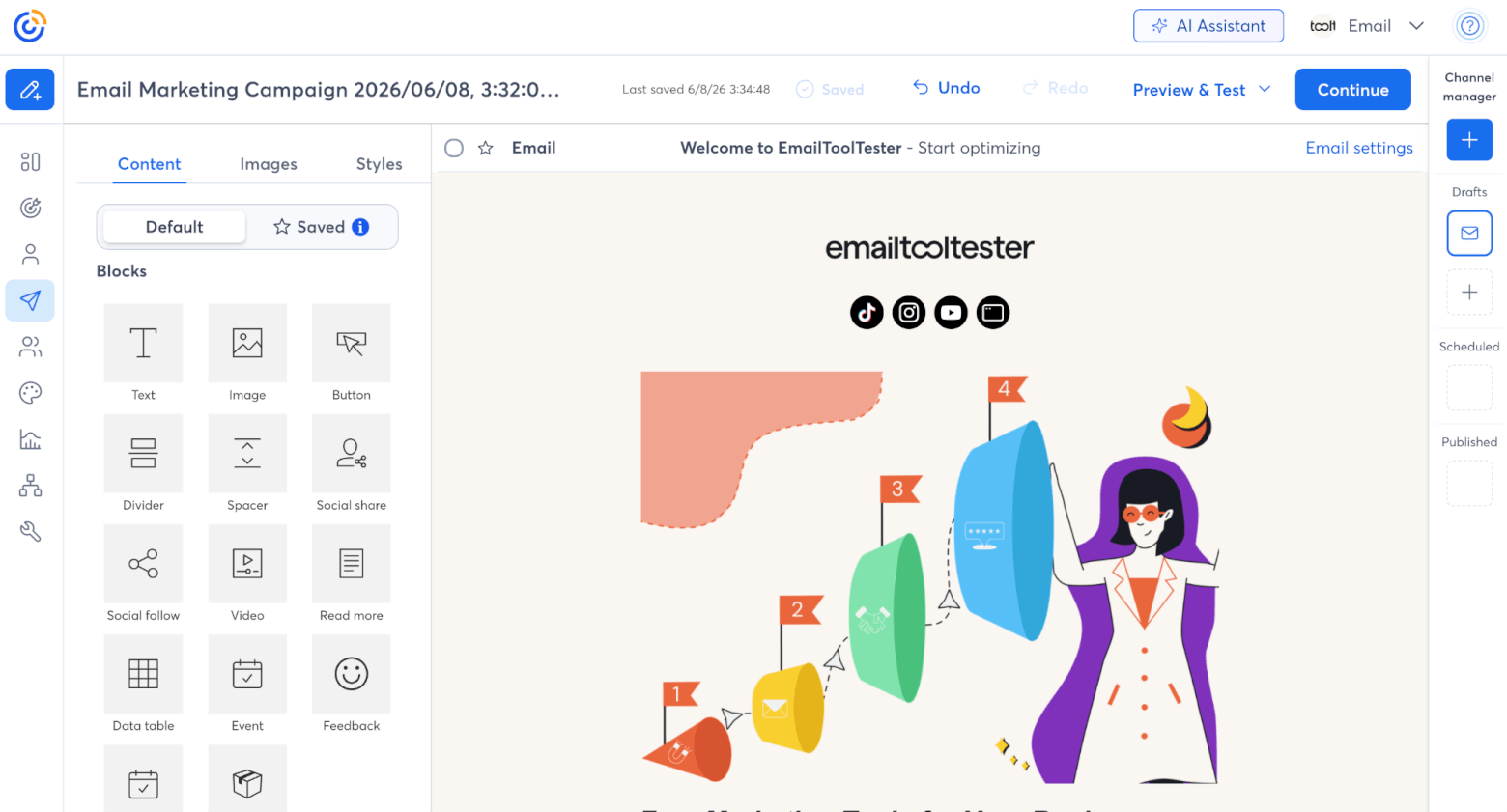
There are also some useful extras built into Constant Contact’s editor. For example, it includes event-related content blocks, such as event promotion and RSVP blocks, which fit well with its focus on event marketing.
It also integrates with Canva, allowing you to view, create, and edit Canva designs without leaving Constant Contact. This saves you from constantly switching between tabs or downloading and re-uploading files.
Another feature I liked is the integration with its social media tools. Through Constant Contact’s social media tools, you can post to Facebook, Instagram, and LinkedIn, schedule posts in advance, and view social reporting all from the same dashboard.
One thing worth noting is file storage. Constant Contact applies storage limits to image and media files depending on your plan. On the Lite plan, this can become a limitation if you upload a lot of images, graphics, or event assets over time.
HubSpot’s email editor is also strong. It offers a clean drag-and-drop builder, a selection of starter templates, and useful personalization options. Because it connects directly to HubSpot’s CRM, it’s especially good for creating emails that use contact data, list membership, lifecycle stage, or other customer information.
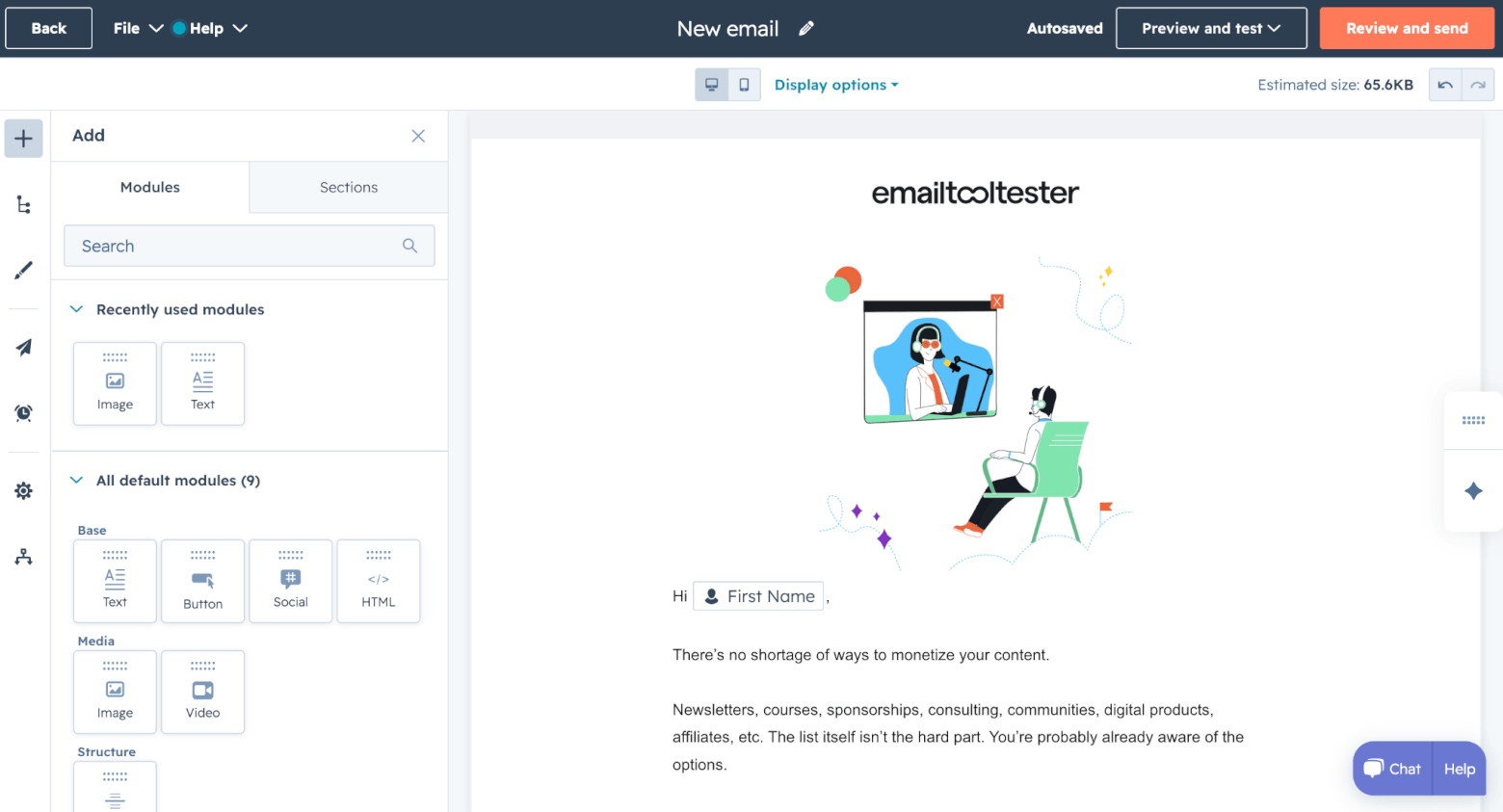
HubSpot also offers a Brand Kit, which lets you store key brand assets such as your logo, colors, fonts, and favicon, so they can be reused across emails, landing pages, forms, and other content. You can also import brand colors from a URL, and when creating an email, I like that HubSpot lets you choose whether or not to apply your brand kit. This gives you a bit more flexibility when building different types of campaigns.
AI is another area where HubSpot feels more forward-looking. On the email side, AI tools like content generation, subject line suggestions, and email copy rewriting, are woven into the content creation process.
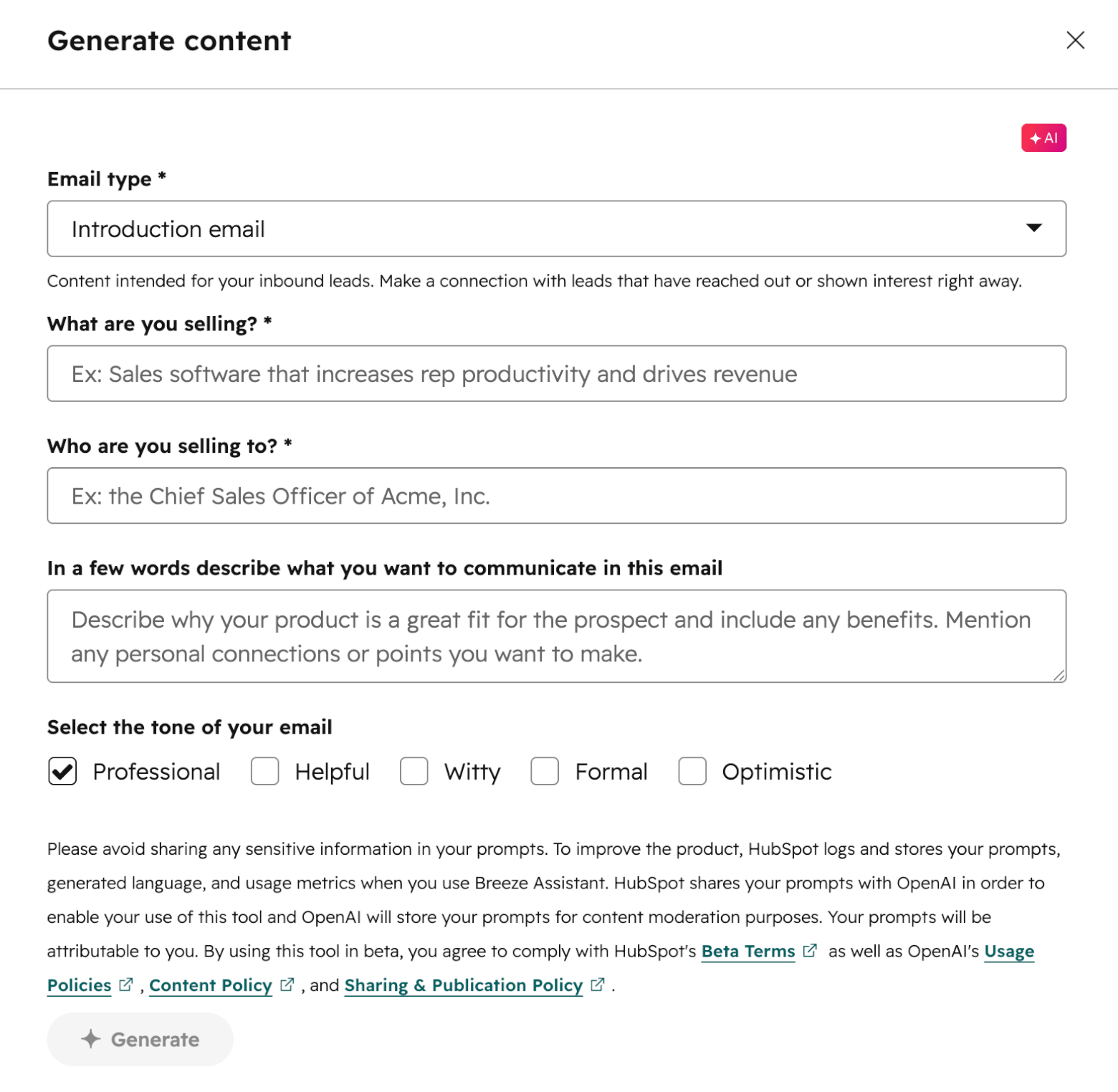
If you have the budget to upgrade to HubSpot’s Marketing Hub Professional tier, I highly recommend doing so – you’ll also be able to access some impressive extra features. One is the ability to upload the HTML of an existing email design and have HubSpot’s AI recreate it as an editable drag-and-drop template. Another is “smart content”, which can show different versions of email content based on what it knows about a contact.
Winner: This one is a tie! HubSpot’s editor is slicker and better connected to CRM data, which will matter more as your marketing gets more advanced. But Constant Contact offers the larger template library and a very beginner-friendly editing experience.
Score: HubSpot: 1, Constant Contact: 2
Marketing automation
Marketing automation is where HubSpot really starts to pull ahead.
With Constant Contact, you get around 15 automation templates to help you get started, covering common use cases such as welcome emails, birthdays, anniversaries, abandoned cart emails, and customer re-engagement.
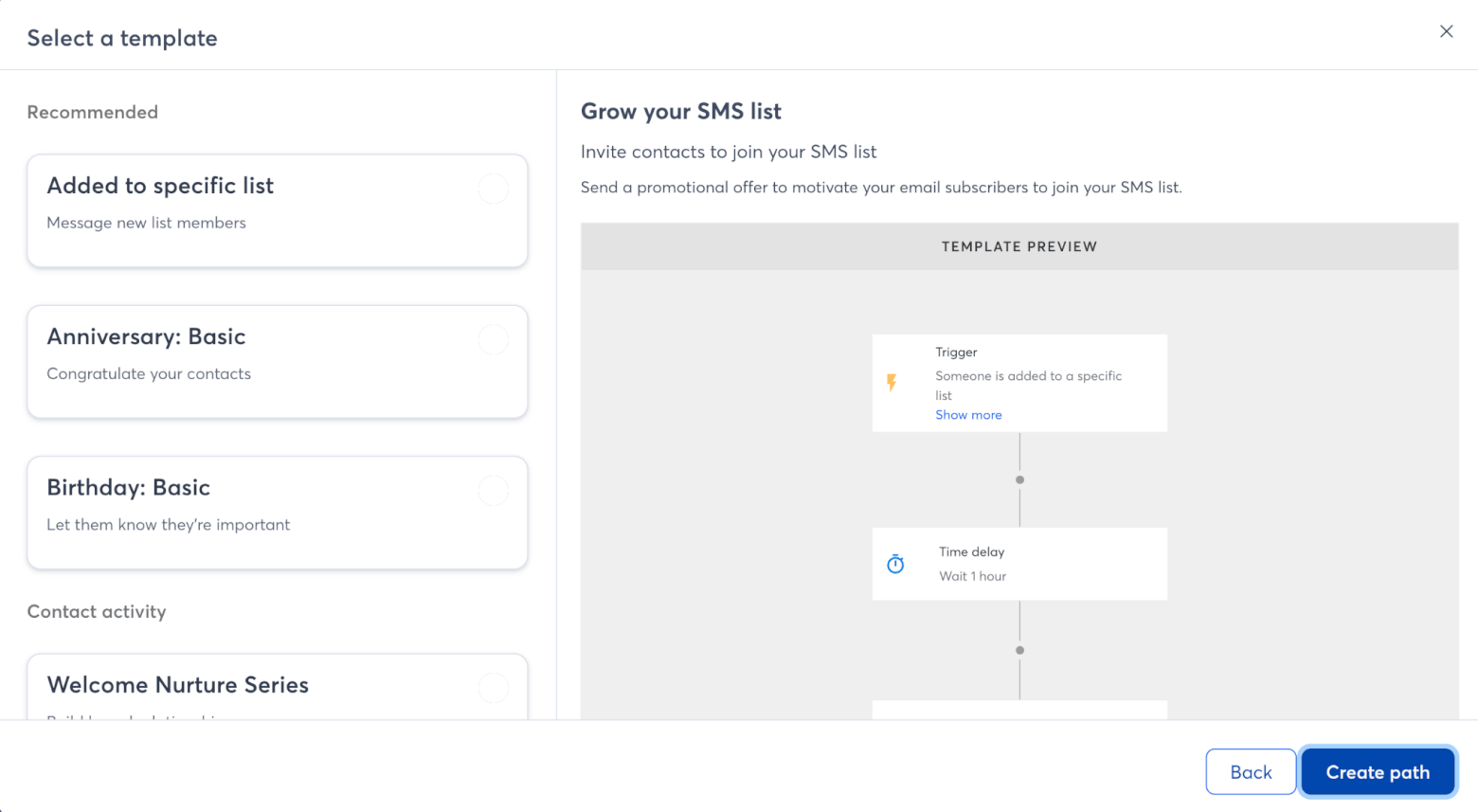
The Automation Path Builder can also trigger email and SMS messages based on dates, contact activity, invoices, and shopping activity, which gives you a decent starting point for basic customer journeys.
Constant Contact can also connect with ecommerce platforms such as Shopify, Wix, WooCommerce, and Squarespace, as well as invoice tools like Xero. That means you can set up automations for things like abandoned cart reminders, unpaid invoice follow-ups, welcome messages for new clients, or win-back campaigns for past customers.
But the automation builder still feels quite limited compared with more advanced marketing tools. Workflows can be triggered from a wide range of starting points, including contact activity and engagement level, but the actions are restricted to things like sending an email or SMS, or updating lists and tags.
You also don’t get the same level of flexibility you’d find in tools that are built around more advanced customer journeys. For example, you can’t easily combine multiple starting points in one automation, and some triggers are narrower than we’d like. If you want to trigger an automation when someone clicks a link, Constant Contact generally asks you to choose a link in a specific email, rather than letting you build broader rules around any email link click.
HubSpot’s automation is stronger because it’s connected to the CRM. For this comparison, though, there’s an important caveat: we’re mainly looking at HubSpot’s free tools and Starter plans. HubSpot’s full workflow builder, with advanced branching, scoring, and logic, is mainly a Professional and Enterprise feature.
Even so, HubSpot still gives SMBs useful automation options through its simple workflows. In Marketing Hub Starter, you can create automations from forms and marketing emails, with up to 10 actions in a workflow and one simple workflow per form. That makes it possible to automate practical tasks such as sending a follow-up after someone fills out a form, adding a contact to a segment after they engage with an email, updating contact records, or triggering basic nurture steps.
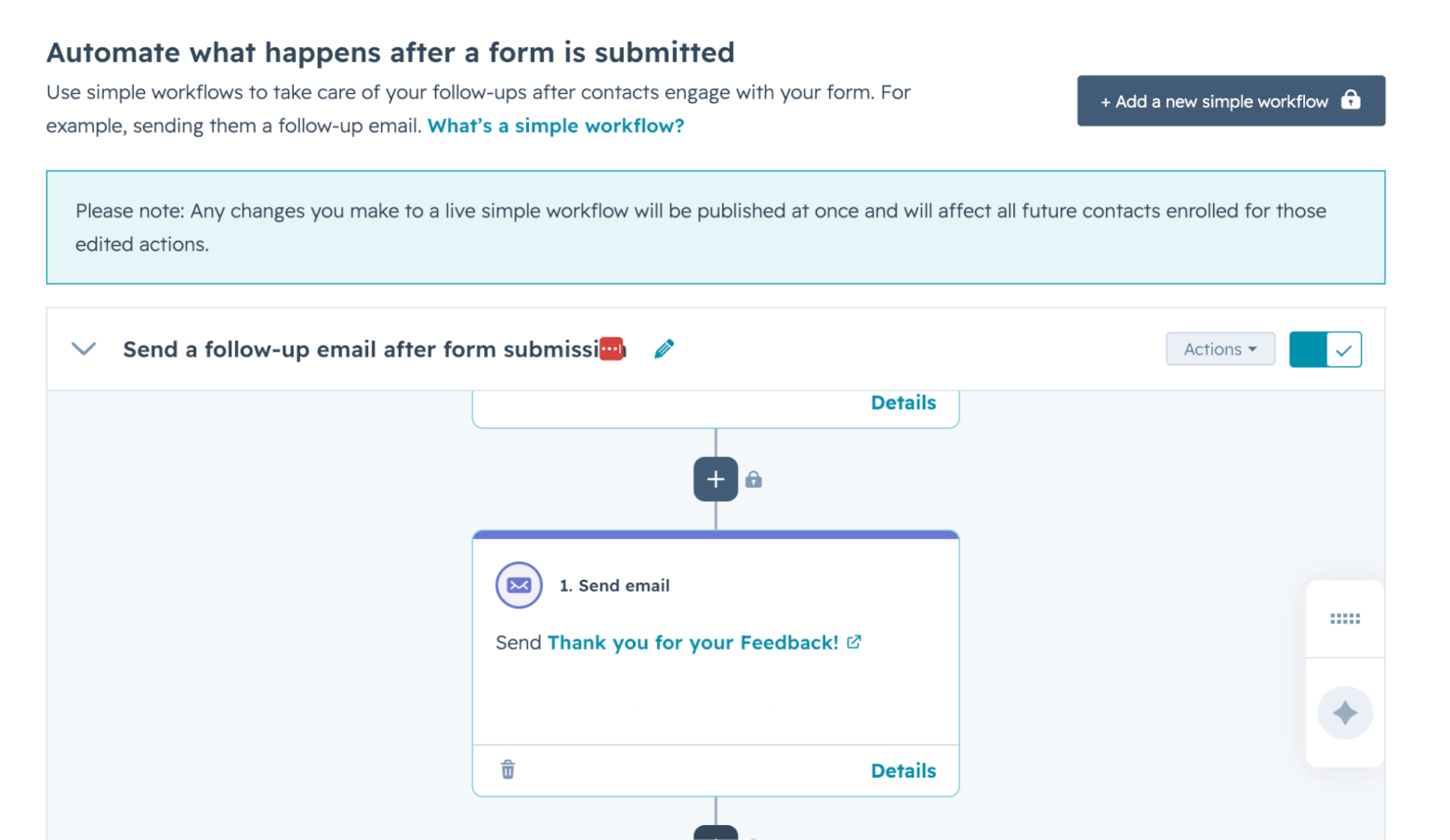
That may not sound dramatically more advanced than Constant Contact at first, but the difference is the data underneath. In HubSpot, those automations connect to a proper CRM, so a new form submission, email engagement, or contact update can become part of a broader sales and marketing process. A lead can enter your CRM, be assigned to a salesperson, receive follow-up emails, and be tracked alongside deals, tasks, and customer interactions.
Winner: HubSpot takes this round. Constant Contact is fine for basic automated campaigns, but HubSpot’s CRM-connected automations make it the better long-term choice for SMBs that want to capture leads, follow up consistently, and connect marketing activity with sales.
Score: HubSpot: 2, Constant Contact: 2
CRM and contact management
This is easily one of the biggest differences between HubSpot and Constant Contact.
Constant Contact does offer contact management tools, but they’re mostly built around email marketing rather than sales. You can import contacts, organize them into lists, apply tags, create segments, and use custom fields to store extra information.
You can also sync contacts from other tools via integrations, including Google, Squarespace, Salesforce, and others. When uploading contacts via CSV, Constant Contact can also automatically map fields, which helps make list imports a little smoother.
It also supports different opt-in statuses, such as express and implied permission, which is helpful for keeping track of how contacts joined your list.
The problem is that these features can feel a little scattered. Lists, tags, segments, custom fields, and engagement tools are spread across different areas of the platform, which can make contact management feel slightly more confusing than it needs to.
Also, while Constant Contact offers a Lead Gen & CRM product, this is a separate (and more expensive) product that’s not included in the core email marketing platform. So by default, you won’t get the built-in deal tracking or pipeline management features that you’d get in a dedicated CRM.
HubSpot, by contrast, is built around its CRM from the start. Even on HubSpot’s free and Starter plans, you’ll be able to manage contacts, companies, deals, tasks, and pipelines from one place, as we show you in this tutorial below:
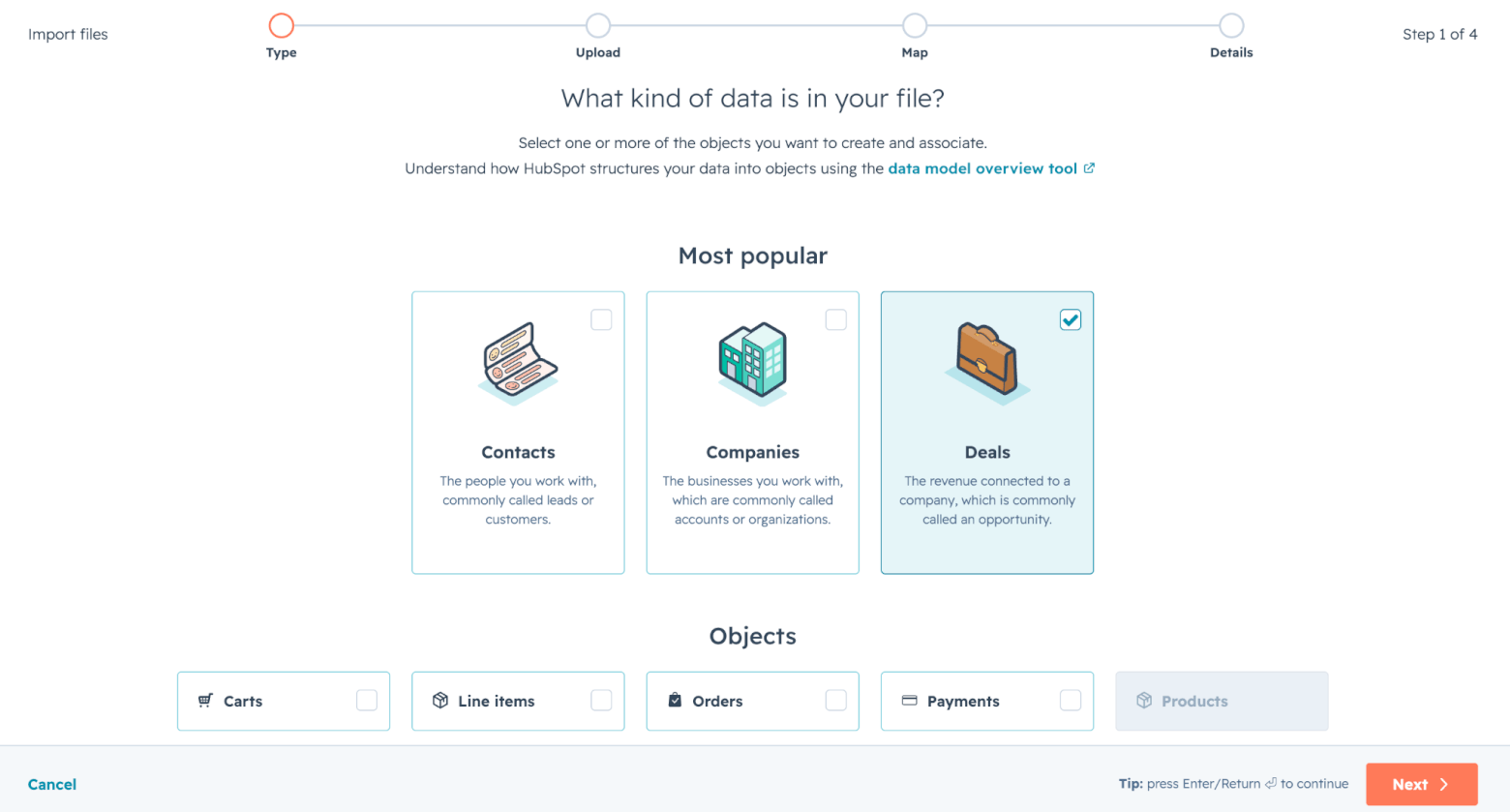
If you’re moving from another CRM, you can use HubSpot’s Smart Transfer tool to import customer, company and deal data from platforms like Pipedrive, ActiveCampaign, Mailchimp, Salesforce, and more. Otherwise, it’s also relatively simple to upload data via a CSV file.
In HubSpot, a contact record can show much more than someone’s email address and subscription status. It can include email interactions, website activity, deal information, sales conversations, and support interactions, depending on which tools you’re using. This gives your team a much clearer view of where each customer or lead stands.
We break it down in more detail in this video:

It also makes HubSpot more useful for businesses where marketing and sales need to work together. A lead can fill out a form, enter the CRM, receive a follow-up email, be assigned to a salesperson, move into a deal pipeline, and be tracked through the sales process.
HubSpot’s Breeze Assistant also adds a useful AI layer, helping sales teams with everyday tasks such as summarizing CRM records, preparing for meetings, and making CRM data more actionable.
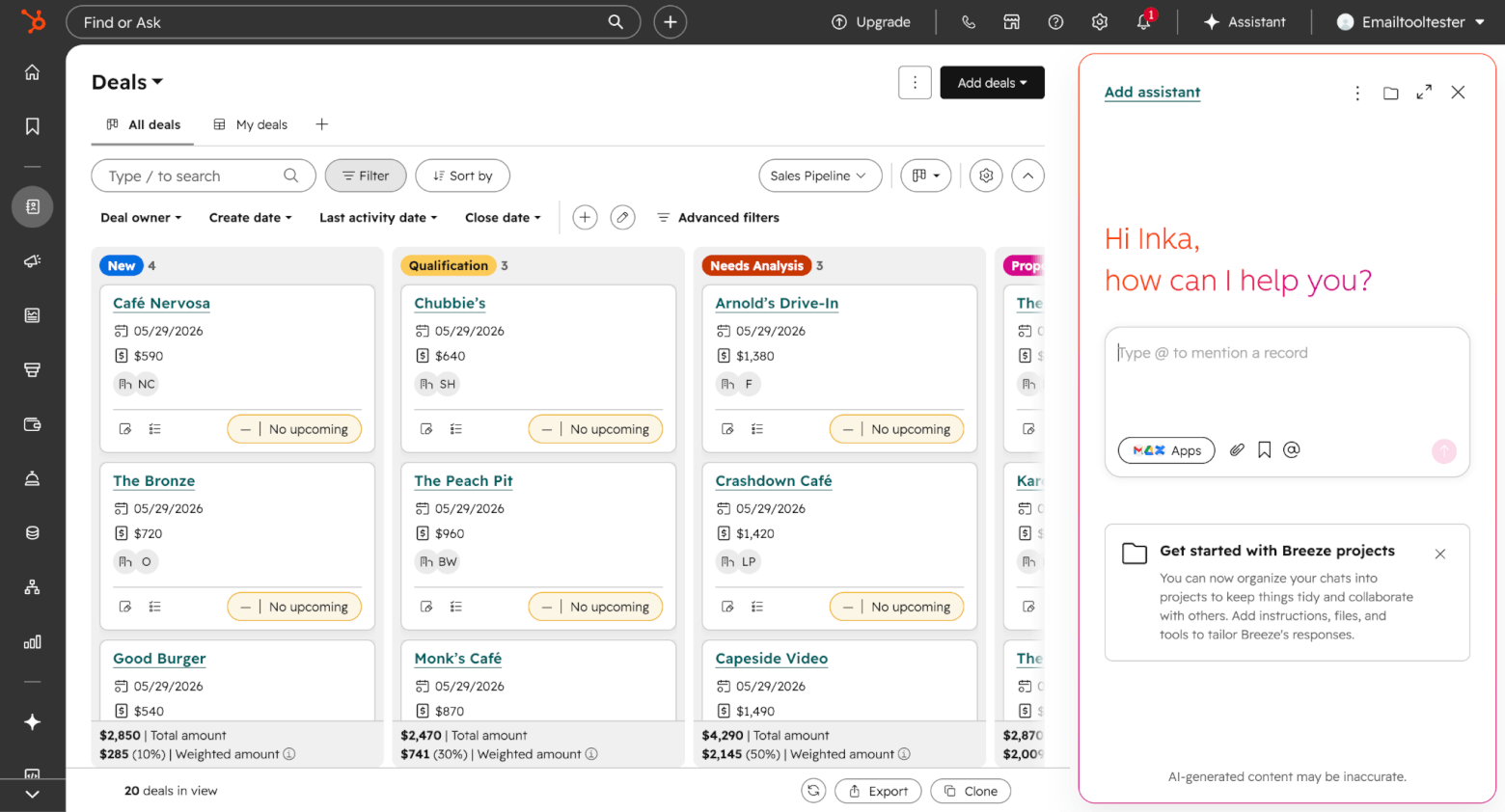
That said, HubSpot’s CRM isn’t always as intuitive as it first appears. While pipelines are customizable, it’s not always straightforward to do so. For example, editing pipeline stages isn’t something you do directly from the pipeline view. Instead, you need to go into your account settings and click through a few options before you find the right place to make changes.
However, if you’re willing to put in the work to set it up properly, HubSpot’s CRM can be powerful. Upgrading to the Professional version can also get you more advanced sales automation, lead scoring, and forecasting, which gives HubSpot plenty of room to grow with your business. Just keep in mind that this is a big jump from the Starter plan, and many SMBs won’t need those features right away.
Winner: Constant Contact is perfectly fine if you just need to store email contacts and organize them with lists, tags, segments, and custom fields. But if you want to track leads, manage deals, follow up with prospects, and connect email marketing to a broader customer journey, HubSpot is far stronger.
Score: HubSpot: 3, Constant Contact: 2
Segmentation and personalization
Constant Contact gives you a decent set of tools for organizing subscribers and sending more targeted campaigns.
You can build segments based on email activity, tags, custom fields, engagement levels, and even invoice activity. So it’s possible to send different campaigns to active subscribers, lapsed customers, event attendees, or people with unpaid invoices.
Constant Contact also offers dynamic content blocks, which let you show or hide sections of an email based on contact details (e.g. city, job title, or custom fields). It’s a useful feature, especially for small businesses that want to personalize campaigns without creating lots of separate email versions.
But, as I mentioned in the last round, Constant Contact’s segmentation tools are not always presented as one neat system, which can cause a little friction.
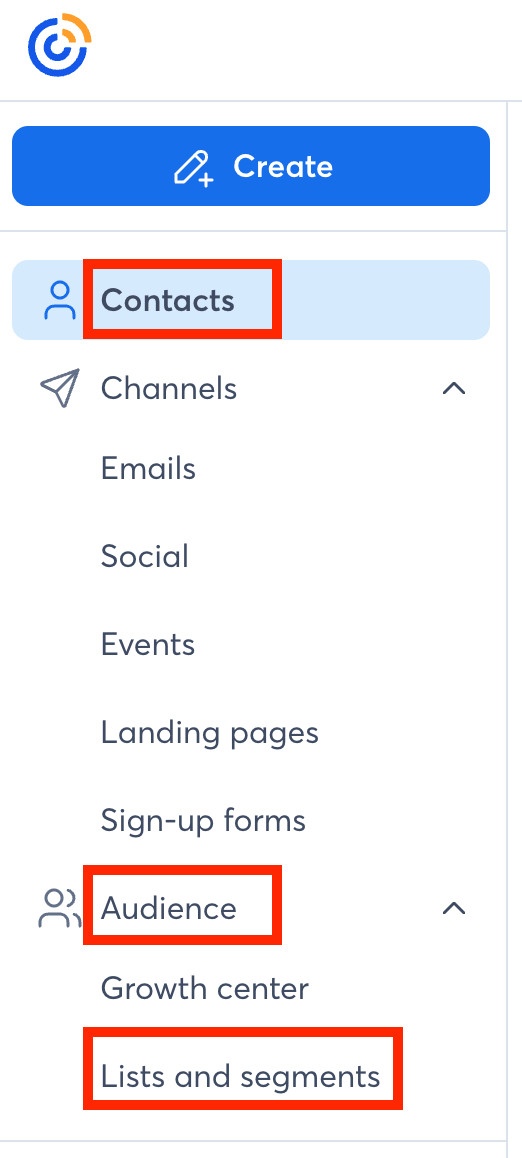
There’s also one major billing-related drawback to be aware of: deleting contacts does not automatically lower your contact tier. In other words, cleaning up your list may help your engagement and deliverability. Still, it won’t necessarily reduce your bill, as you’ll always be charged for the maximum number of contacts you’ve ever had.
HubSpot, meanwhile, gives you a much more powerful segmentation setup because it has more customer data to work with.
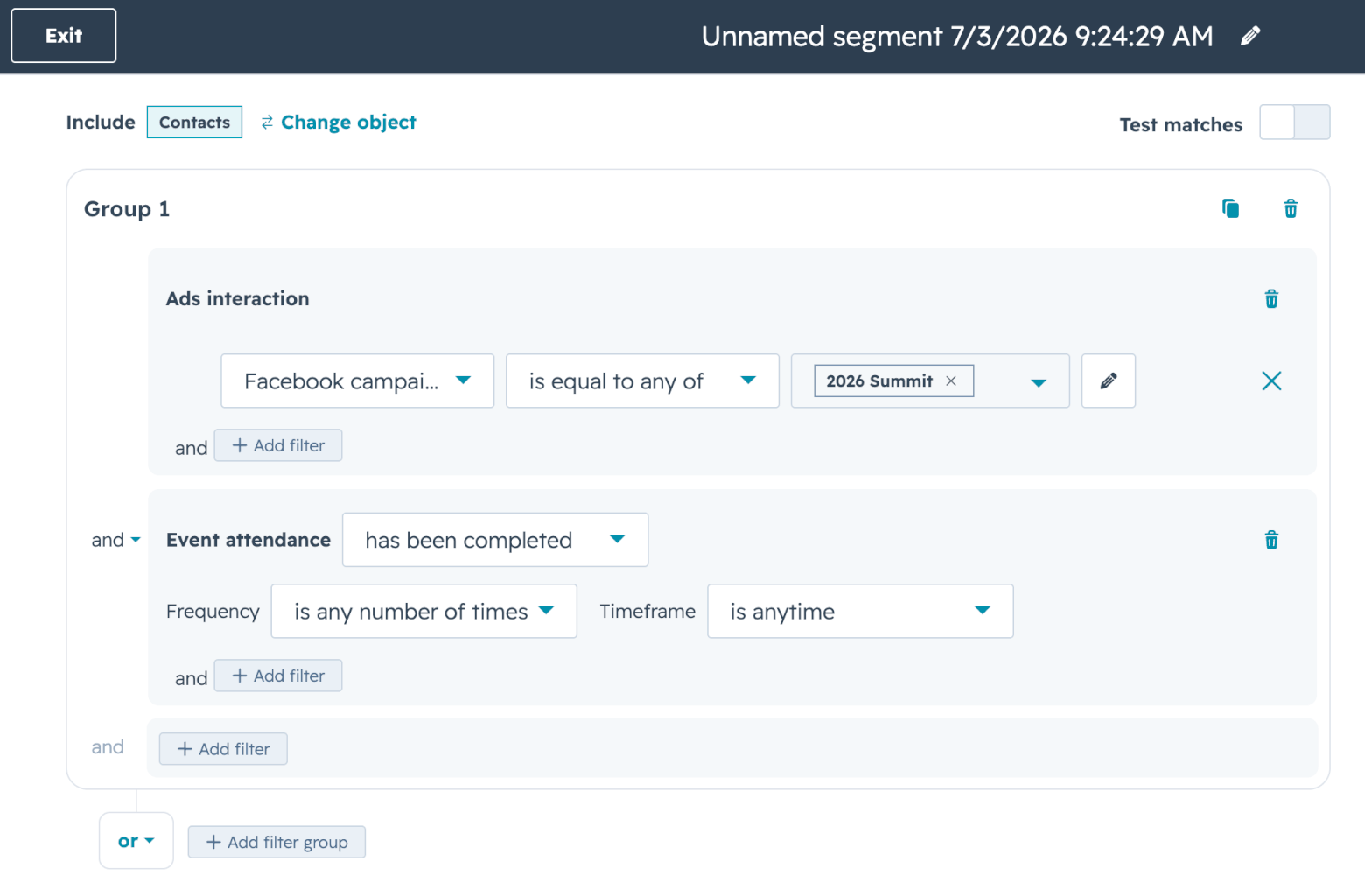
For example, you can create active or static segments. Active segments update automatically as contacts meet or stop meeting your criteria, while static segments are fixed snapshots that don’t continue updating unless you manually change them.
HubSpot’s segment builder is also much more advanced. Instead of only segmenting around email activity or basic contact data, you can build audiences using wider CRM information, including page views, lifecycle stage, deals, tickets, subscriptions, and other associated records. You can use up to 250 filters per segment, including up to 60 associated object filters, meaning you can get very granular with your targeting.
This also makes personalization more powerful. HubSpot’s personalization tokens let you pull CRM property values into emails, such as a contact’s name, company, lifecycle stage, or other stored information. So instead of simply sending different campaigns to different lists, you can make individual emails feel more relevant based on what you know about each contact.
Like Constant Contact, HubSpot also offers dynamic content through its “smart content” feature, which is potentially even more powerful because it can draw on HubSpot’s wider CRM data. However, as I mentioned earlier, this is a Professional and Enterprise feature, so it’s not accessible on the free or Starter plans.
Winner: HubSpot wins this round. Constant Contact has solid list management for straightforward campaigns and offers dynamic content on lower tiers, but HubSpot’s richer CRM data makes it the better choice for SMBs that want to send more targeted, relevant campaigns as they grow.
Score: HubSpot: 4, Constant Contact: 2
Landing pages and lead capture
HubSpot wins this round, and fairly comfortably.
Constant Contact’s landing page builder is very basic, with only a small selection of simple templates and a limited range of content blocks to add to your page.
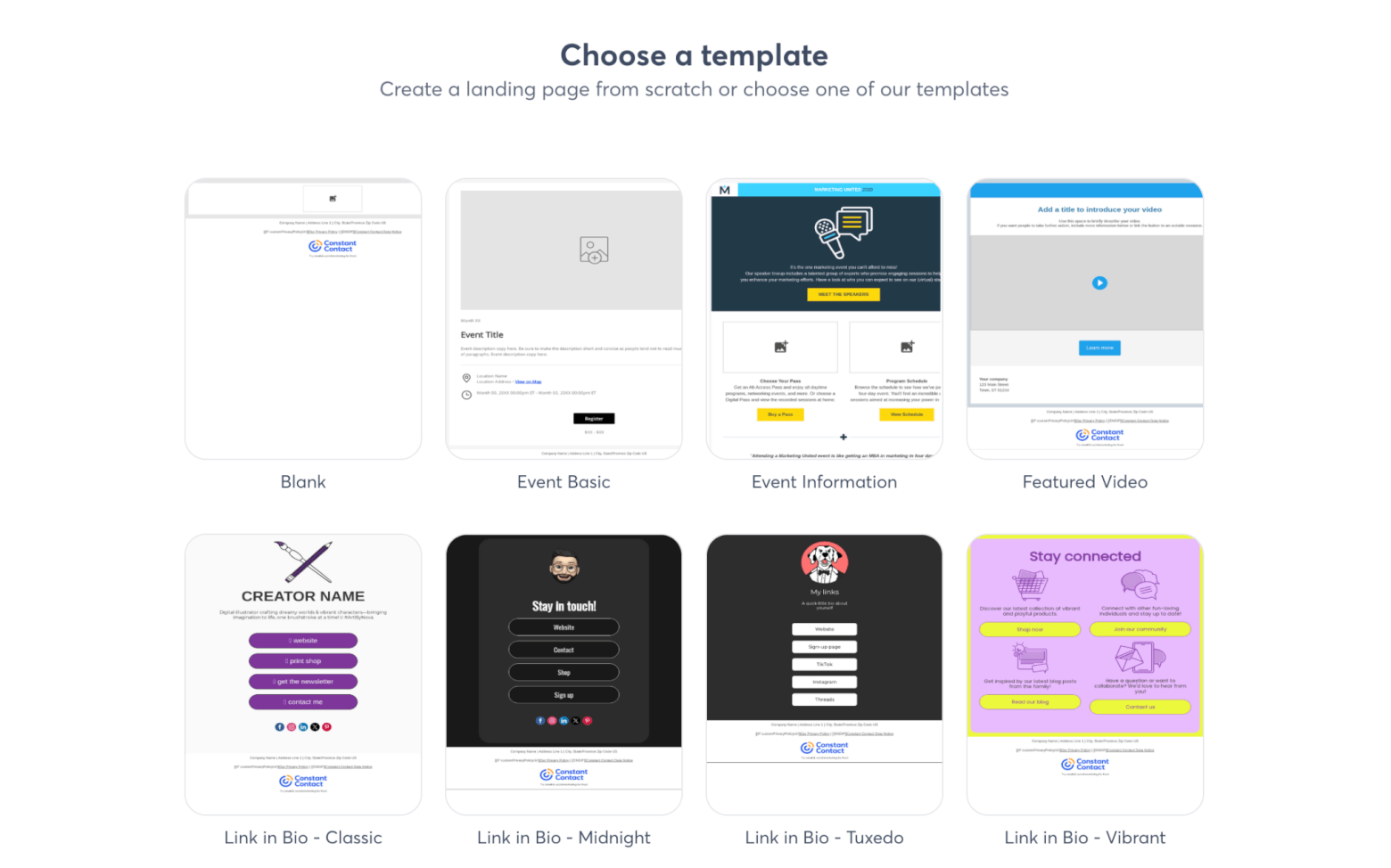
Its sign-up forms are a little more useful, with options to create pop-up, flyout, banner, and inline forms. But the form builder itself is still limited. You can add custom fields, but these are mostly text and date-based fields, so you don’t get flexibility for things like multiple-choice questions.
There are also some consent and opt-in limitations to be aware of. You can only specify double opt-in vs single opt-in at the account level, so you can’t change opt-in settings per form. The form builder also lacks GDPR consent fields.
HubSpot, meanwhile, feels much more complete for lead capture. It offers a stronger landing page builder, with modern templates, drag-and-drop editing, multi-device previews, and the ability to build pages around specific conversion goals, such as capturing a sign-up or encouraging someone to book a meeting.
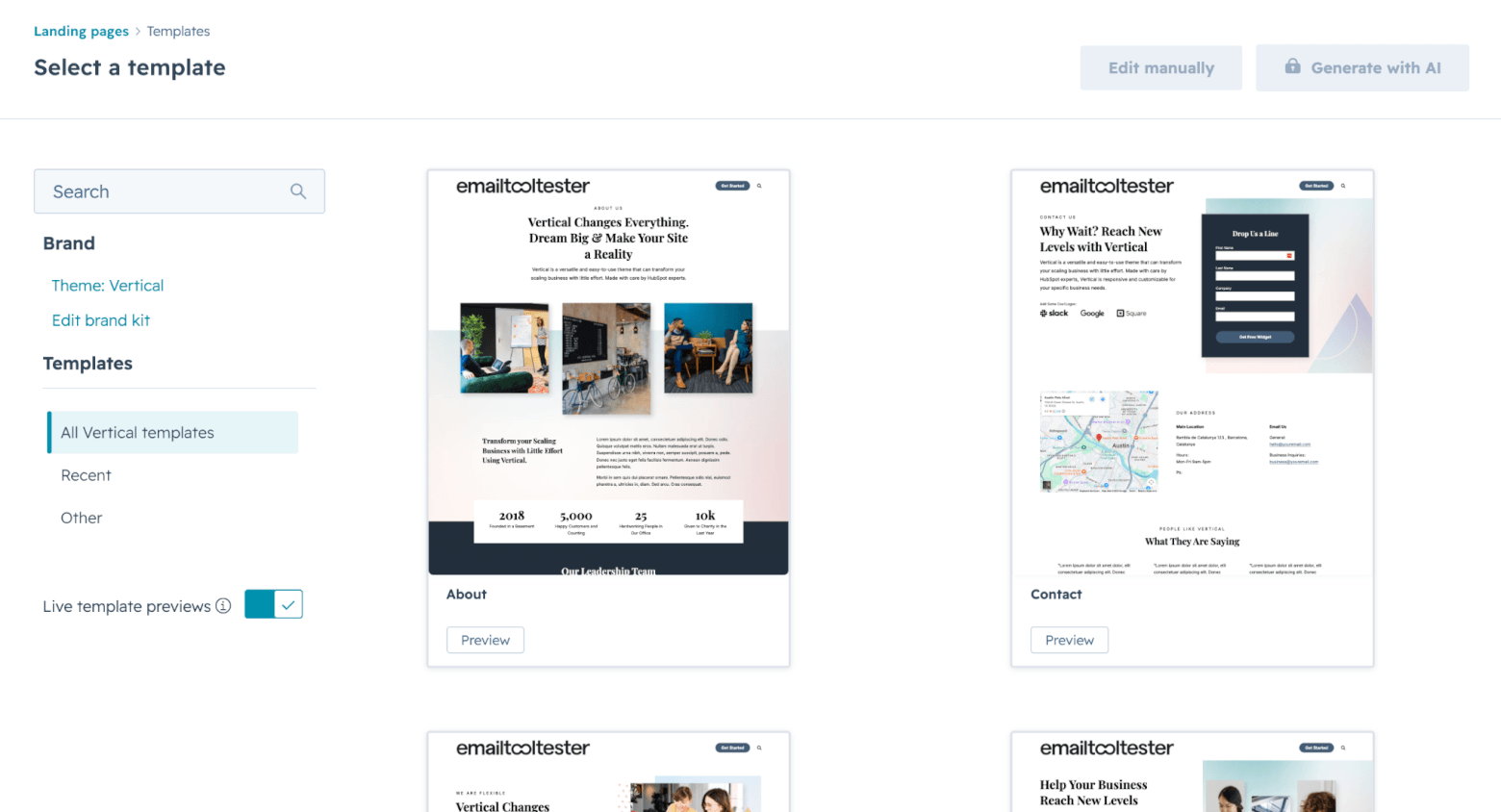
HubSpot’s page editor can also give you optimization tips, for example, around mobile friendliness or missing SEO details, which is useful if you don’t build landing pages every day.
The biggest advantage, though, is what happens after someone converts. With HubSpot, a form submission can create or update a contact in the CRM, trigger a simple follow-up automation, or help move that lead into a sales process. This is where HubSpot’s all-in-one setup really pays off: landing pages, forms, CRM records, email follow-ups, meetings, and sales activity are all connected.
There are some limitations. On the Starter plan, you don’t get HubSpot’s full advanced automation power; however, even simple form automations are useful for SMBs that want to respond quickly to new leads.
Also note: HubSpot’s free plan includes HubSpot branding, and if you want to publish landing pages on your own custom domain, you’ll need a paid plan. And while HubSpot promotes AI-powered page generation and more advanced personalization, some of these features are tied to higher-tier plans.
Winner: HubSpot is the stronger option here. Constant Contact can help you collect subscribers, but HubSpot is better at turning lead capture into a proper marketing and sales process.
Score: HubSpot: 5, Constant Contact: 2
Extra features
Both platforms offer more than just email marketing.
Constant Contact’s strongest extra feature is event management. You can create event landing pages, manage registrations, send event invitations and reminders, and accept payments through Stripe or PayPal. Constant Contact’s event tools support virtual, in-person, and hybrid events, so you can use them for anything from a simple free community session to a paid workshop or fundraiser.
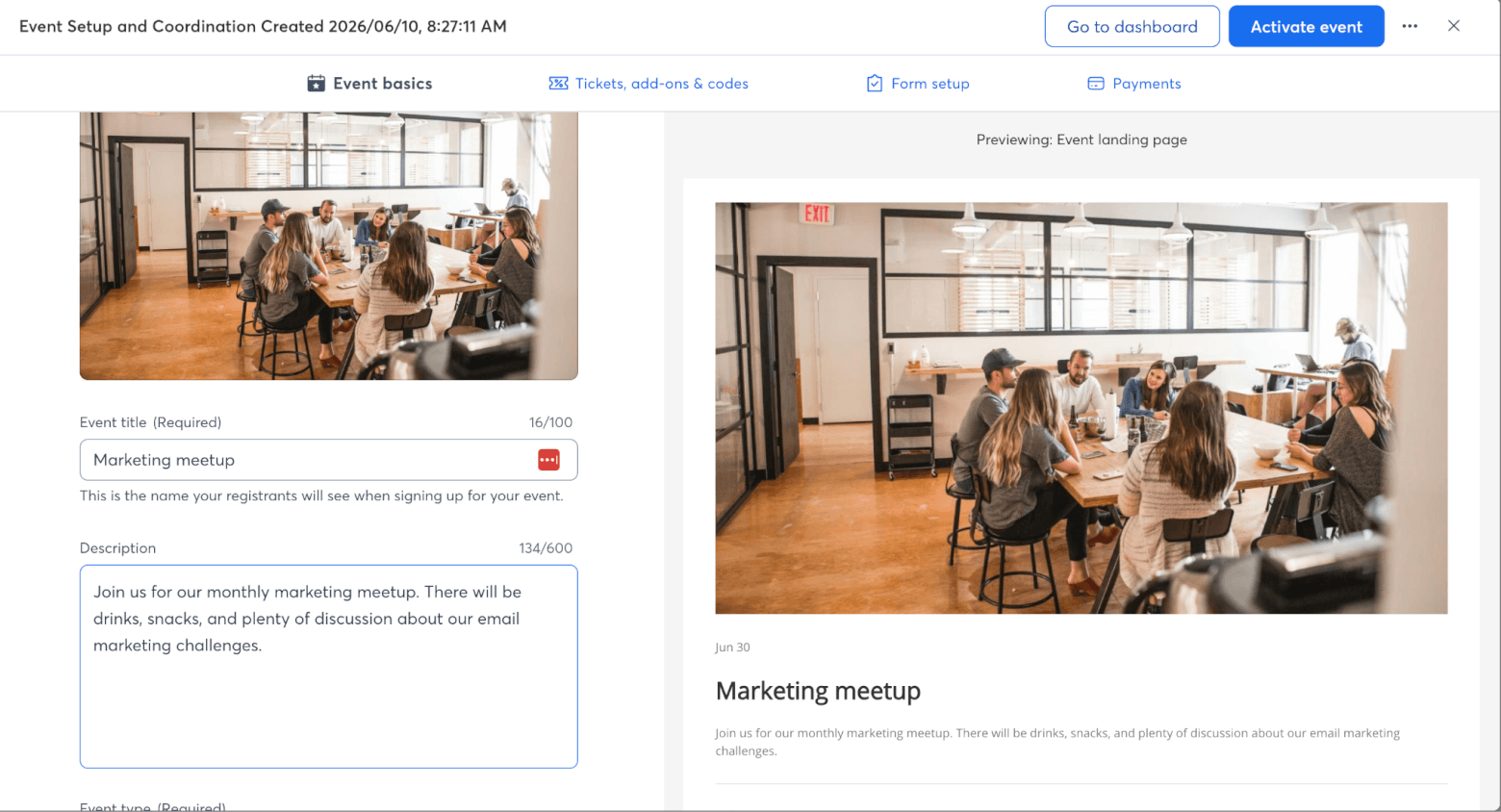
If events are central to your marketing, having these features in the same platform is genuinely useful. It’s also one of the areas where Constant Contact still feels more purpose-built than HubSpot for traditional small-business marketing.
Constant Contact also includes some useful social media tools. You can create and schedule social posts, manage social campaigns, and connect email campaigns with your wider promotional activity. SMS marketing is also available, although availability and pricing vary by location and plan.
HubSpot’s extras are broader. In fact, HubSpot is really a complete business ecosystem rather than just an email marketing tool.
Alongside the email marketing, CRM, and landing page features we’ve already explored, you can get live chat, meeting scheduling, ad management, website tools, and customer service features.
Even HubSpot’s free CRM includes useful features for organizing and tracking leads and customers, while paid Starter plans add more tools for small teams that want marketing, sales, and service in one connected system:
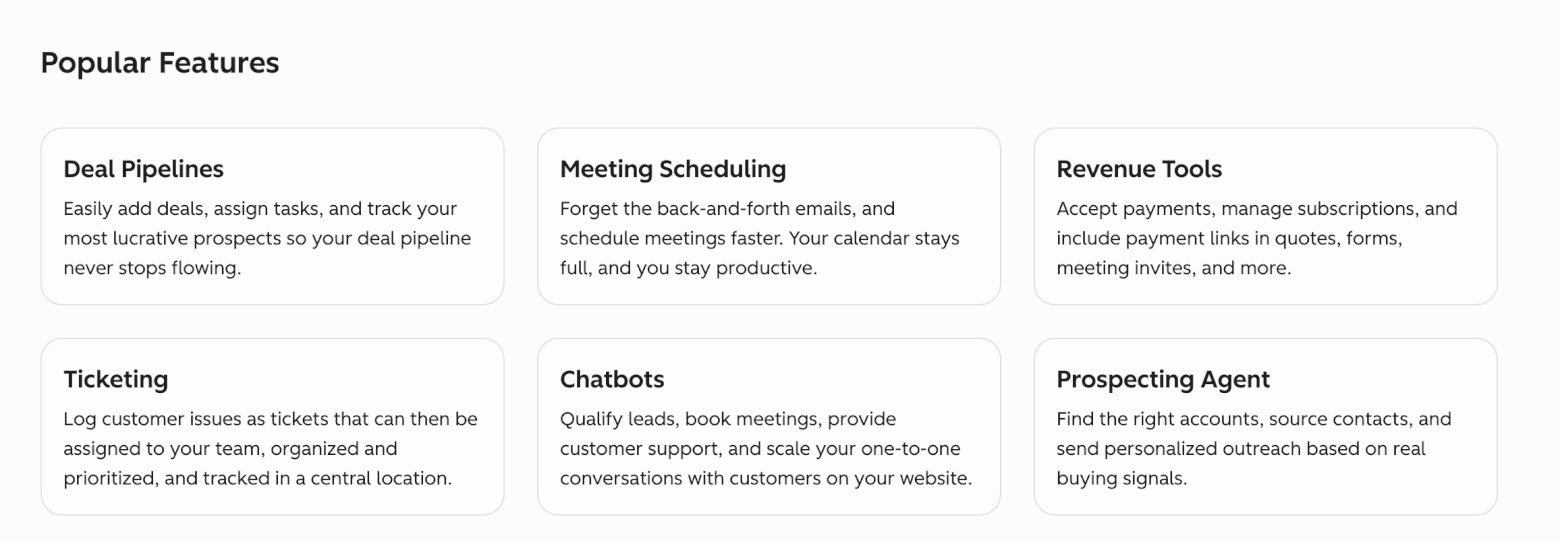
Some of the extra features included in HubSpot’s Starter Bundle for startups and small businesses
The more advanced HubSpot features are where the platform becomes much more powerful, but also much more expensive. Upgrading to Professional can unlock deeper automation, lead scoring, more advanced reporting, and more sophisticated AI and optimization tools. These features are impressive, but they are likely to be overkill for many smaller businesses.
Winner: Constant Contact deserves real credit for event management, and if events are a major part of your marketing, that could be enough to swing the decision. But HubSpot offers the broader ecosystem overall. Even at the Starter level, it gives SMBs a more connected set of tools for capturing leads, managing contacts, chatting with prospects, booking meetings, and supporting sales follow-up.
Score: HubSpot: 6, Constant Contact: 2
Pricing
Pricing is one of the trickiest parts of this comparison because HubSpot’s and Constant Contact’s pricing plans are very different.
Constant Contact doesn’t offer a free plan. You can try it for free, but once you’re paying, the lowest plan is Lite, which starts at $12/month. This includes AI copy generation, social media posting, basic reporting, event tools, live support, and one automation template. For a small business that mainly wants to send newsletters, promote events, and manage basic campaigns, that’s a pretty accessible starting point.
The next plan, Standard, starts at $35/month and is probably the more realistic choice for many growing businesses. It adds features such as email scheduling, subject line testing, more advanced reporting, contact segmentation, three automation templates, and more users.
Premium starts at $80/month and adds features such as dynamic content, unlimited automation templates, unlimited custom segments, priority support, and higher email send limits.
Note: prices rise as your contact list grows, and as I mentioned earlier, Constant Contact bills you based on the highest number of contacts you’ve added to your account. Deleting contacts does not lower your contact tier, which is a frustrating limitation if you regularly clean your list.
HubSpot looks cheaper at first because it has a free plan for up to 1,000 contacts and 2 users. It includes limited (but decent) access to HubSpot’s marketing, sales, service, content, and data tools.
HubSpot’s Starter plan is also very attractive at first glance. Marketing Hub Starter starts at $20/month for 1,000 contacts when paying monthly, and gives small businesses a low-cost way to use HubSpot for email marketing, forms, landing pages, CRM, and basic automation without jumping straight into enterprise-level pricing.
The problem is the jump from Starter to Professional. Marketing Hub Professional starts at $890/month when paid monthly, includes 2,000 marketing contacts, and also requires a one-time Professional onboarding fee of $3,000. That’s a major leap, especially for SMBs.
It unlocks more serious features, such as omni-channel campaign management, advanced automation, reporting, and higher usage limits, but for many small businesses, it may feel too expensive.
Winner: Overall, I’d give this round to Constant Contact for affordability and simpler pricing, especially for businesses that just want email marketing. But it’s a narrow win. HubSpot’s free CRM and low-cost Starter plan offer excellent value if you’re willing to stay within Starter-level limits. Just be very careful before building your strategy around Professional-only features, because that’s where HubSpot’s pricing jumps dramatically.
Score: HubSpot: 5, Constant Contact: 3
Which tool is more popular?
Based on data from our Email Detective Tracker (which has tracked over 115,000 emails sent by over 6,700 brands), HubSpot overtakes Constant Contact in terms of users – by a lot. In fact, it’s the 6th most used email marketing platform overall:

As we can see, HubSpot tends to be more popular with SaaS brands and agencies, whereas Constant Contact is more widely used by nonprofits and media brands (admittedly, the latter is a much smaller dataset!).
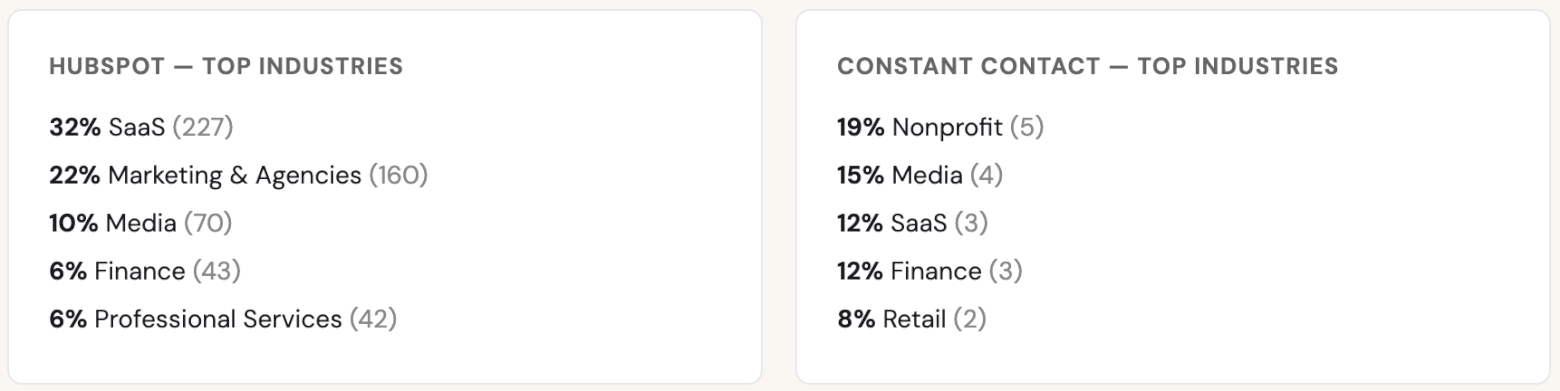
Still, it makes sense, given how differently the two platforms are built. HubSpot is a better fit for companies that need email marketing to connect with CRM, lead generation, sales follow-up, and customer data, which explains its appeal among SaaS businesses and agencies.
Constant Contact, meanwhile, has long been associated with simpler newsletters, event promotion, and community-focused campaigns, making it a natural choice for nonprofits, publishers, and organizations that want an approachable way to stay in touch with their audience.
Final verdict: HubSpot vs Constant Contact
In this HubSpot vs Constant Contact comparison, HubSpot comes out as the overall winner!
It offers a stronger long-term setup for growing businesses, with a free CRM, better contact management, stronger lead capture tools, useful automation options, and a much broader ecosystem for sales and marketing.
Even if you stick to HubSpot’s free tools or Starter plan, you get a platform that can do much more than simply send email campaigns.
Constant Contact has built its reputation on being easy, reliable, and approachable for small businesses and nonprofits. But as the market has moved toward automation and AI-assisted workflows, it can now feel more traditional than cutting-edge.
That doesn’t make it a bad choice, especially for simple newsletters, events, and straightforward campaigns. But it does explain why many users now compare it with broader platforms like HubSpot when they start thinking beyond basic email marketing.
You can try HubSpot’s free CRM and marketing tools to see how they fit your business, or compare the Starter plan against Constant Contact’s lower-tier plans to decide which setup gives you the best value:
> Try Constant Contact for free for 30 days
And if you’re still unsure, take a look at our full HubSpot review, Constant Contact review, and comparisons to see how both tools stack up against the rest of the market.
The authors
Learn more about us

Our Methodology
This article has been written and researched following our EmailTooltester methodology.
Our Methodology